Fair enough, as long as the voltages and ma were the same it was most likely not an action that would cause damage.
Technically you haven't pulled all ram. You say except for 2 sticks and I will try that again systematically - so the deal is ALL ram, right!
I'm pretty sure the battery from my Dad's system is compatible, as it is the same model (Panasonic CR 2032 3V) and his PC was also a Dell. To be safe, I went and bought a brand new 2032 battery today.
I have experimented with pulling all ram (except for 2 sticks), but I will try that again systematically.
It's important that you follow only one path and provide detailed feedback. No one (except you) can tell what you did to "get it going".
etc, etc, etc provides little information about what the machine is reporting
What do F2 and F12 do?
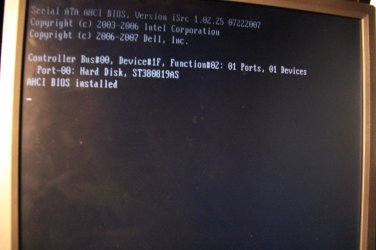
The only time you should change the clock is when the system is operating normally.However, I have a new problem. I got it going, and installed windows 7 again, but upon reboot, it now goes to a screen that says:
[Serial ATA AHCI BIOS, etc etc et]
then
Controller Bus#00, Device#1F, Funciton#02: 01 Ports, 01 Devices
and it's stuck on this black page (with the above text). I'm able to see the screen offering me F2 or F12 when I start the PC, but it always ends up on this screen.
Please take snapshots (camera or phone) of your BIOS settings and post them for someone to look through. I might not be available after tonight - I'm working out a new "ISP" plan.
Since I don't have any specific instructions and I can't gaurantee follow though, I'll bow out at this time.
Tips? Yes - follow directions given and provide detailed feedback. No one can see what you see, don't make anyone ask twice or guess. If you're not sure, ask for clarification, but don't get off track.I will note that at some point today before this, I had reset the bios settings to factory default, and did change the date later (to a newer time, when installing the new battery).
Any tips?
So post the BIOS images and someone will see if they can help straighten things out. Which BIOS screens? Start with all top level screens - you might be asked to dig a little deeper.
My Computer
At a glance
x64 (6.3.9600) Win8.1 Pro & soon dual boot x6...AMD A6-3420M APU with Radeon(tm) HD Graphics6.00 GBAMD Radeon(TM) HD 6520G
- Computer type
- Laptop
- Computer Manufacturer/Model Number
- HP Pavilion dv6-6c10us
- OS
- x64 (6.3.9600) Win8.1 Pro & soon dual boot x64 (6.1.7601) Win7_SP1 HomePrem
- CPU
- AMD A6-3420M APU with Radeon(tm) HD Graphics
- Motherboard
- Hewlett-Packard 1805
- Memory
- 6.00 GB
- Graphics Card(s)
- AMD Radeon(TM) HD 6520G
- Sound Card
- (1) AMD High Definition Audio Device (2) IDT High Definiti
- Monitor(s) Displays
- HP W2072a 20" LCD (1600 x 900) @ 60 Hz
- Screen Resolution
- 1366 x 768 x 32 bits (4294967296 colors) @ 60 Hz
- Hard Drives
- ST640LM0 00 HM641JI SATA Disk Device
- Keyboard
- Logitech k520 wireless KB
- Mouse
- Logitech m320 wireless mouse (bundled with KB)
- Internet Speed
- 15/5 | 54 MB Wireless 'n'
- Antivirus
- Realtime: Defender or Avast | On-demand: Malwarebytes, ESET
- Browser
- IE 11 on Win8, IE 10 on win 7
- Other Info
- Media: [Gimp, Audacity, VLC] || Comm: [WEmail 2012, Skype] || Productivity: [OpenOffice,| Textpad] || Utils: [Sysinternals, cCleaner, Speccy, Defraggler]