Solved Takes 2-4 times power on / off before booting (2 beeps) Mystery

Fair enough, as long as the voltages and ma were the same it was most likely not an action that would cause damage.
I'm pretty sure the battery from my Dad's system is compatible, as it is the same model (Panasonic CR 2032 3V) and his PC was also a Dell. To be safe, I went and bought a brand new 2032 battery today.
Technically you haven't pulled all ram. You say except for 2 sticks and I will try that again systematically - so the deal is ALL ram, right!
I have experimented with pulling all ram (except for 2 sticks), but I will try that again systematically.
It's important that you follow only one path and provide detailed feedback. No one (except you) can tell what you did to "get it going".

etc, etc, etc provides little information about what the machine is reporting
What do F2 and F12 do?
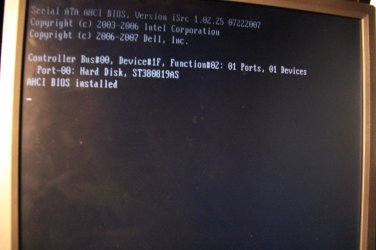
However, I have a new problem. I got it going, and installed windows 7 again, but upon reboot, it now goes to a screen that says:

[Serial ATA AHCI BIOS, etc etc et]
then
Controller Bus#00, Device#1F, Funciton#02: 01 Ports, 01 Devices

and it's stuck on this black page (with the above text). I'm able to see the screen offering me F2 or F12 when I start the PC, but it always ends up on this screen.
The only time you should change the clock is when the system is operating normally.

Please take snapshots (camera or phone) of your BIOS settings and post them for someone to look through. I might not be available after tonight - I'm working out a new "ISP" plan.

Since I don't have any specific instructions and I can't gaurantee follow though, I'll bow out at this time.
I will note that at some point today before this, I had reset the bios settings to factory default, and did change the date later (to a newer time, when installing the new battery).
Any tips?
Tips? Yes - follow directions given and provide detailed feedback. No one can see what you see, don't make anyone ask twice or guess. If you're not sure, ask for clarification, but don't get off track.

So post the BIOS images and someone will see if they can help straighten things out. Which BIOS screens? Start with all top level screens - you might be asked to dig a little deeper.
 

My Computer My Computer

At a glance

x64 (6.3.9600) Win8.1 Pro & soon dual boot x6...AMD A6-3420M APU with Radeon(tm) HD Graphics6.00 GBAMD Radeon(TM) HD 6520G
Computer type
Laptop
Computer Manufacturer/Model Number
HP Pavilion dv6-6c10us
OS
x64 (6.3.9600) Win8.1 Pro & soon dual boot x64 (6.1.7601) Win7_SP1 HomePrem
CPU
AMD A6-3420M APU with Radeon(tm) HD Graphics
Motherboard
Hewlett-Packard 1805
Memory
6.00 GB
Graphics Card(s)
AMD Radeon(TM) HD 6520G
Sound Card
(1) AMD High Definition Audio Device (2) IDT High Definiti
Monitor(s) Displays
HP W2072a 20" LCD (1600 x 900) @ 60 Hz
Screen Resolution
1366 x 768 x 32 bits (4294967296 colors) @ 60 Hz
Hard Drives
ST640LM0 00 HM641JI SATA Disk Device
Keyboard
Logitech k520 wireless KB
Mouse
Logitech m320 wireless mouse (bundled with KB)
Internet Speed
15/5 | 54 MB Wireless 'n'
Antivirus
Realtime: Defender or Avast | On-demand: Malwarebytes, ESET
Browser
IE 11 on Win8, IE 10 on win 7
Other Info
Media: [Gimp, Audacity, VLC] || Comm: [WEmail 2012, Skype] || Productivity: [OpenOffice,| Textpad] || Utils: [Sysinternals, cCleaner, Speccy, Defraggler]
Slartybart,

Let me apologize for my vagueness. I know you are trying to help me, and the more random / fiddling I do, there's a good chance I'm complicating things further. I'm so desperate for this system to work, I have been logging too many hours and have not been able to always remain intelligent and objective.

Your clarity and support is very much appreciated, and I will try my best to seek help in a more effective manor going forward.

The current install is running, so hopefully things will be A OK.. Fingers crossed.

M14
 

My Computer My Computer

At a glance

Windows 7 Ultimate x64
Computer type
PC/Desktop
Computer Manufacturer/Model Number
Dell Precision 490
OS
Windows 7 Ultimate x64
Browser
FireFox
Ok Mike,

Take your time - the more fiddling the less chance for success. If you need a break, take one.. sometimes we are in so much of a hurry that we miss something.

In the spirit of more effective manor.... what got you past the boot error?

-
 

My Computer My Computer

At a glance

x64 (6.3.9600) Win8.1 Pro & soon dual boot x6...AMD A6-3420M APU with Radeon(tm) HD Graphics6.00 GBAMD Radeon(TM) HD 6520G
Computer type
Laptop
Computer Manufacturer/Model Number
HP Pavilion dv6-6c10us
OS
x64 (6.3.9600) Win8.1 Pro & soon dual boot x64 (6.1.7601) Win7_SP1 HomePrem
CPU
AMD A6-3420M APU with Radeon(tm) HD Graphics
Motherboard
Hewlett-Packard 1805
Memory
6.00 GB
Graphics Card(s)
AMD Radeon(TM) HD 6520G
Sound Card
(1) AMD High Definition Audio Device (2) IDT High Definiti
Monitor(s) Displays
HP W2072a 20" LCD (1600 x 900) @ 60 Hz
Screen Resolution
1366 x 768 x 32 bits (4294967296 colors) @ 60 Hz
Hard Drives
ST640LM0 00 HM641JI SATA Disk Device
Keyboard
Logitech k520 wireless KB
Mouse
Logitech m320 wireless mouse (bundled with KB)
Internet Speed
15/5 | 54 MB Wireless 'n'
Antivirus
Realtime: Defender or Avast | On-demand: Malwarebytes, ESET
Browser
IE 11 on Win8, IE 10 on win 7
Other Info
Media: [Gimp, Audacity, VLC] || Comm: [WEmail 2012, Skype] || Productivity: [OpenOffice,| Textpad] || Utils: [Sysinternals, cCleaner, Speccy, Defraggler]
Patience is a virtue! Slow & methodical often does so much more than fast and energetic, but it's hard under pressure to remember that after 5 hours of troubleshooting.

So, getting around that boot error was a matter of

1. disconnecting the drives and ram.
2. turning on pc, then turning off pc
3. connecting ram, turning on pc, and having now access to bios.
4. changing hard drive setting to ata from achi

Then I was able to boot to my W7 Usb.
I installed W7 in the ata setting, then reinstalled the bios (went with newest version, which seemed same as old A08), then rebooted, changed ata to achi in bios, then rebooted and installed W7 again.

All seemed OK.

However, as I write this, I've just rebooted the second system, and it's doing the same thing again :(

I'm now wondering if it's a video card issue, as soon before the problems started, I started using a program that decompresses video on the GPU rather than CPU, so it might have gotten it's first hard usage in years.

In any case, back to the drawing board, and thanks again.

M14
 

My Computer My Computer

At a glance

Windows 7 Ultimate x64
Computer type
PC/Desktop
Computer Manufacturer/Model Number
Dell Precision 490
OS
Windows 7 Ultimate x64
Browser
FireFox
Yeah, so after over 20 hours of trouble shooting and pulling my hair out, I have finally come to the conclusion that it is 99% the video card.

I don't know how / why I didn't test this earlier, but after my new install (with the old, simpler card), I went to put back in my Nvidia Quadro 3700, and it started doing the exact same thing.

Swapped back my consumer card, and it boots every time consistently.

So all that powering on / off, caused the hard drive trouble that made me reformat, but had I just originally tried the other video card, I would have avoided all those hours (most likely) and all the costs.

Not that I think about it, it really makes sense as a software I started using around the same time "does all the playback on the videocard's GPU it's faster than any other codec"..

My old card just probably couldn't keep up, and kicked the bucket. :(Anyway, again, 1000 thanks for all the support.

M14
 

My Computer My Computer

At a glance

Windows 7 Ultimate x64
Computer type
PC/Desktop
Computer Manufacturer/Model Number
Dell Precision 490
OS
Windows 7 Ultimate x64
Browser
FireFox
Only 20 hours? I've spent weeks tracking down an issue :)

Good work figuring it out. Troubleshooting 101
back off most recent changes until the issue goes away

Now we know 2 beeps on a Dell is hardware :p

Bill
 

My Computer My Computer

At a glance

x64 (6.3.9600) Win8.1 Pro & soon dual boot x6...AMD A6-3420M APU with Radeon(tm) HD Graphics6.00 GBAMD Radeon(TM) HD 6520G
Computer type
Laptop
Computer Manufacturer/Model Number
HP Pavilion dv6-6c10us
OS
x64 (6.3.9600) Win8.1 Pro & soon dual boot x64 (6.1.7601) Win7_SP1 HomePrem
CPU
AMD A6-3420M APU with Radeon(tm) HD Graphics
Motherboard
Hewlett-Packard 1805
Memory
6.00 GB
Graphics Card(s)
AMD Radeon(TM) HD 6520G
Sound Card
(1) AMD High Definition Audio Device (2) IDT High Definiti
Monitor(s) Displays
HP W2072a 20" LCD (1600 x 900) @ 60 Hz
Screen Resolution
1366 x 768 x 32 bits (4294967296 colors) @ 60 Hz
Hard Drives
ST640LM0 00 HM641JI SATA Disk Device
Keyboard
Logitech k520 wireless KB
Mouse
Logitech m320 wireless mouse (bundled with KB)
Internet Speed
15/5 | 54 MB Wireless 'n'
Antivirus
Realtime: Defender or Avast | On-demand: Malwarebytes, ESET
Browser
IE 11 on Win8, IE 10 on win 7
Other Info
Media: [Gimp, Audacity, VLC] || Comm: [WEmail 2012, Skype] || Productivity: [OpenOffice,| Textpad] || Utils: [Sysinternals, cCleaner, Speccy, Defraggler]
Thanks so much! Weeks, YIKES!!

Now to track down a new video card :)
 

My Computer My Computer

At a glance

Windows 7 Ultimate x64
Computer type
PC/Desktop
Computer Manufacturer/Model Number
Dell Precision 490
OS
Windows 7 Ultimate x64
Browser
FireFox
Oh Maaaaaan. So this is the thread that never ends. I figured I'd try and match your 'weeks of troubleshooting' : )

So, all was going well. I specifically would shut down the machine, and restart to see if there were any hiccups. It would restart every time, flawlessly. I did this about 3 or 4 times.

After that, I did two things.

1. I plugged in an ethernet cable (to connect to start downloading drivers etc, although I didn't start installing).

2. I then went into the bios, and made usb later than the sata drive, so that I would not always boot into the windows install any time the usb was left plugged in on a reboot.

Low and behold, on the next reboot, I am cycling through problems again.

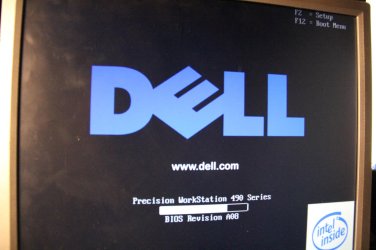
All I can get is a constant alternation between these two screens (see pictures attached).

Lol What's so strange to me is things work, then don't work. Work, then don't work.

I guess I will start trying your ram suggestion next, one at a time.

Any other thoughts of what might be causing this? There is no beeping now, so maybe that was the bad video card, but what is making it cycle like this is beyond me.

M14
 

Attachments

  • IMG_0548.jpg
    IMG_0548.jpg
    366.7 KB · Views: 0
  • IMG_0549.jpg
    IMG_0549.jpg
    379.9 KB · Views: 1

My Computer My Computer

At a glance

Windows 7 Ultimate x64
Computer type
PC/Desktop
Computer Manufacturer/Model Number
Dell Precision 490
OS
Windows 7 Ultimate x64
Browser
FireFox
Gentlemen,

eventually got everything running, and it is indeed the video card.

A happy ending for me, as better the video card then the mother board.

Thanks again for all help.

M14
 

Attachments

  • IMG_0934.jpg
    IMG_0934.jpg
    436.3 KB · Views: 1
  • IMG_0935.JPG
    IMG_0935.JPG
    408.5 KB · Views: 0

My Computer My Computer

At a glance

Windows 7 Ultimate x64
Computer type
PC/Desktop
Computer Manufacturer/Model Number
Dell Precision 490
OS
Windows 7 Ultimate x64
Browser
FireFox
Hey Mike,

Great news. Now quit mucking around with things or you will break my record ;)

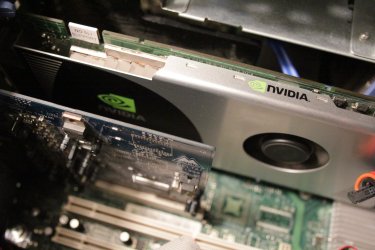
That's a pretty powerful looking video card you have there.

Bill
 

My Computer My Computer

At a glance

x64 (6.3.9600) Win8.1 Pro & soon dual boot x6...AMD A6-3420M APU with Radeon(tm) HD Graphics6.00 GBAMD Radeon(TM) HD 6520G
Computer type
Laptop
Computer Manufacturer/Model Number
HP Pavilion dv6-6c10us
OS
x64 (6.3.9600) Win8.1 Pro & soon dual boot x64 (6.1.7601) Win7_SP1 HomePrem
CPU
AMD A6-3420M APU with Radeon(tm) HD Graphics
Motherboard
Hewlett-Packard 1805
Memory
6.00 GB
Graphics Card(s)
AMD Radeon(TM) HD 6520G
Sound Card
(1) AMD High Definition Audio Device (2) IDT High Definiti
Monitor(s) Displays
HP W2072a 20" LCD (1600 x 900) @ 60 Hz
Screen Resolution
1366 x 768 x 32 bits (4294967296 colors) @ 60 Hz
Hard Drives
ST640LM0 00 HM641JI SATA Disk Device
Keyboard
Logitech k520 wireless KB
Mouse
Logitech m320 wireless mouse (bundled with KB)
Internet Speed
15/5 | 54 MB Wireless 'n'
Antivirus
Realtime: Defender or Avast | On-demand: Malwarebytes, ESET
Browser
IE 11 on Win8, IE 10 on win 7
Other Info
Media: [Gimp, Audacity, VLC] || Comm: [WEmail 2012, Skype] || Productivity: [OpenOffice,| Textpad] || Utils: [Sysinternals, cCleaner, Speccy, Defraggler]
Bill,

You said you'd trouble shot systems for weeks, so I figured I had to break mine again to catch up to you ;)

The video card is only 512 megs.. Not a bad card, but a shame it's not working.

Earlier I took the back off, and when I reattached it, low and behold it worked (for a while).

Then dead again. I'm going to try and put new thermal paste on it this week, and after that, put it in the over for 10 minutes

(hear of that trick?!!#@)

Fingers crossed!

M14

p.s. one good thing about troubleshooting is you learn A LOT in the process, about other things you think it might be :)
 

My Computer My Computer

At a glance

Windows 7 Ultimate x64
Computer type
PC/Desktop
Computer Manufacturer/Model Number
Dell Precision 490
OS
Windows 7 Ultimate x64
Browser
FireFox
It wasn't a challenge Mike.... :p.
You said you'd trouble shot systems for weeks, so I figured I had to break mine again to catch up to you ;)
I'd skip the oven.... I've heard of it, but I've heard horror stories too (apripos for Halloween)
Flame On!

Human_Torch_animated_4.gif
Then dead again. I'm going to try and put new thermal paste on it this week, and after that, put it in the over for 10 minutes
(hear of that trick?!!#@)
It can be an expensive education! As long as you maintain a healthy attitude, it can be fun.
p.s. one good thing about troubleshooting is you learn A LOT in the process, about other things you think it might be :)
 

My Computer My Computer

At a glance

x64 (6.3.9600) Win8.1 Pro & soon dual boot x6...AMD A6-3420M APU with Radeon(tm) HD Graphics6.00 GBAMD Radeon(TM) HD 6520G
Computer type
Laptop
Computer Manufacturer/Model Number
HP Pavilion dv6-6c10us
OS
x64 (6.3.9600) Win8.1 Pro & soon dual boot x64 (6.1.7601) Win7_SP1 HomePrem
CPU
AMD A6-3420M APU with Radeon(tm) HD Graphics
Motherboard
Hewlett-Packard 1805
Memory
6.00 GB
Graphics Card(s)
AMD Radeon(TM) HD 6520G
Sound Card
(1) AMD High Definition Audio Device (2) IDT High Definiti
Monitor(s) Displays
HP W2072a 20" LCD (1600 x 900) @ 60 Hz
Screen Resolution
1366 x 768 x 32 bits (4294967296 colors) @ 60 Hz
Hard Drives
ST640LM0 00 HM641JI SATA Disk Device
Keyboard
Logitech k520 wireless KB
Mouse
Logitech m320 wireless mouse (bundled with KB)
Internet Speed
15/5 | 54 MB Wireless 'n'
Antivirus
Realtime: Defender or Avast | On-demand: Malwarebytes, ESET
Browser
IE 11 on Win8, IE 10 on win 7
Other Info
Media: [Gimp, Audacity, VLC] || Comm: [WEmail 2012, Skype] || Productivity: [OpenOffice,| Textpad] || Utils: [Sysinternals, cCleaner, Speccy, Defraggler]
Back
Top