Task manager question

MRValiant

New member
Power User
VIP
Local time
1:06 AM
Messages
201
Location
Cleveland
Hi guys

First post here.

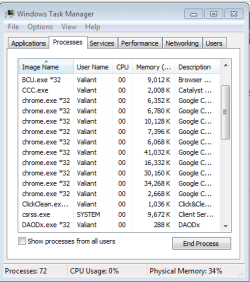
Can someone explain all of the chrome.exe to me. What do they mean? And all that memory its useing thanks.
 

Attachments

  • CHROME.PNG
    CHROME.PNG
    11.2 KB · Views: 4

My Computer

OS
Windows 8 Pro
CPU
AMD 1090 T Black 6 CORES 4.0+ overclocked
Motherboard
Asus Crosshair IV Formula
Memory
8gigs
Graphics Card(s)
HisHDx2
Monitor(s) Displays
42 inch vizio
Screen Resolution
HD
Hard Drives
4x1000mb
PSU
Corsair
Case
Coolermaster
Cooling
Corsair
Keyboard
logitech
Mouse
logitech
Internet Speed
Wideband
Hi MRValiant

Each instance of chrome.exe will be linked to each tab you have open in google chrome.Simple as that.

Danny
 

My Computer

Computer Manufacturer/Model Number
acer aspire 5935g
OS
Windows 7 Home Premium x64 SP1
CPU
intel(R)core(TM)2 duo CPU T6600 @ 2.20GHz
Motherboard
intel gm45/gm47 revision 07
Memory
3 gb ddr3
Graphics Card(s)
ati radeon hd4570/512mb
Monitor(s) Displays
lop156wh2-tle1 15.3 flat
Screen Resolution
1366x768
Hard Drives
OCZ-Agility3 60gig ssd
320gig external hdd
500gig external hdd
Mouse
Optical
Internet Speed
30Mbps Down/30Mbps Up
not to forget: each and every extension/app you run in Chrome has its own instance ;)

Welcome to SF
-DG
 

My Computer

Computer Manufacturer/Model Number
HP m8000n
OS
Windows 7 Ultimate x86
CPU
DualCore AMD Athlon 64 X2, 2600 MHz 5200+
Motherboard
Asus M2N68-LA (Narra)
Memory
Samsung 2GB DDR2
Graphics Card(s)
Onboard NVIDIA GeForce 6150SE nForce 430
Sound Card
Onboard nVIDIA nForce 6100-430 (MCP61P)
Monitor(s) Displays
Westinghouse 19" LED
Screen Resolution
1280x1024
Hard Drives
SATA II Seagate Barracuda 500GB
USB II WD Elements 500GB
USB II WD My Book 1TB
USB II WD My Book 2TB
PSU
Stock (HP)
Case
Stock (HP)
Cooling
Stock
Keyboard
Logitech Classic KB 200
Mouse
Standard HP opticle USB mouse
I'm not using Chrome,my brother use it. But when I start Chrome automaticly are started 3 processes,not one.
 

My Computer

Computer type
PC/Desktop
Computer Manufacturer/Model Number
Custom Build
OS
Windows 10 Pro x64
CPU
Intel Core i5 4440 @Stock
Motherboard
Gigabyte Z97 D3H
Memory
4 x 4GB HyperX Fury DDR3
Graphics Card(s)
Gigabyte GTX 1050Ti O4G
Sound Card
Integrated
Monitor(s) Displays
Dell P2417H
Screen Resolution
1920 x 1080
Hard Drives
Samsung EVO 850 120GB / Toshiba DT01ACA050 1TB 7200prm 32MB
PSU
Riotoro Onyx 750W
Case
NZXT H500 Black-Red
Cooling
Stock CPU + NZXT 120mm + 2x120mm red fans
Keyboard
Modecom Volcano Lanparty
Mouse
Asus ROG Gladius / DeepCool E-Pad Plus
Internet Speed
DOCSIS 50/3 Mbit
Browser
Google Chrome
Other Info
Asus K55VJ(i5 3210M, GT635M / 2GB, 8GB DDR3, 500GB HDD)
Thank you sirs for your replys.
 

My Computer

OS
Windows 8 Pro
CPU
AMD 1090 T Black 6 CORES 4.0+ overclocked
Motherboard
Asus Crosshair IV Formula
Memory
8gigs
Graphics Card(s)
HisHDx2
Monitor(s) Displays
42 inch vizio
Screen Resolution
HD
Hard Drives
4x1000mb
PSU
Corsair
Case
Coolermaster
Cooling
Corsair
Keyboard
logitech
Mouse
logitech
Internet Speed
Wideband
I'm not using Chrome,my brother use it. But when I start Chrome automaticly are started 3 processes,not one.

What do you mean?
 

My Computer

OS
Windows 8 Pro
CPU
AMD 1090 T Black 6 CORES 4.0+ overclocked
Motherboard
Asus Crosshair IV Formula
Memory
8gigs
Graphics Card(s)
HisHDx2
Monitor(s) Displays
42 inch vizio
Screen Resolution
HD
Hard Drives
4x1000mb
PSU
Corsair
Case
Coolermaster
Cooling
Corsair
Keyboard
logitech
Mouse
logitech
Internet Speed
Wideband
That chrome automaticly creates 3 processes when he' starting. Without opened tab just that blank start screen I have 3 chrome.exe
 

My Computer

Computer type
PC/Desktop
Computer Manufacturer/Model Number
Custom Build
OS
Windows 10 Pro x64
CPU
Intel Core i5 4440 @Stock
Motherboard
Gigabyte Z97 D3H
Memory
4 x 4GB HyperX Fury DDR3
Graphics Card(s)
Gigabyte GTX 1050Ti O4G
Sound Card
Integrated
Monitor(s) Displays
Dell P2417H
Screen Resolution
1920 x 1080
Hard Drives
Samsung EVO 850 120GB / Toshiba DT01ACA050 1TB 7200prm 32MB
PSU
Riotoro Onyx 750W
Case
NZXT H500 Black-Red
Cooling
Stock CPU + NZXT 120mm + 2x120mm red fans
Keyboard
Modecom Volcano Lanparty
Mouse
Asus ROG Gladius / DeepCool E-Pad Plus
Internet Speed
DOCSIS 50/3 Mbit
Browser
Google Chrome
Other Info
Asus K55VJ(i5 3210M, GT635M / 2GB, 8GB DDR3, 500GB HDD)
Right now im showing 10 chrome.exe. 3 tabs open and 6 extensions. So thats 9 one not accounted for and one extension that is showing up? clicknclean extension? So that would be 11?
 

My Computer

OS
Windows 8 Pro
CPU
AMD 1090 T Black 6 CORES 4.0+ overclocked
Motherboard
Asus Crosshair IV Formula
Memory
8gigs
Graphics Card(s)
HisHDx2
Monitor(s) Displays
42 inch vizio
Screen Resolution
HD
Hard Drives
4x1000mb
PSU
Corsair
Case
Coolermaster
Cooling
Corsair
Keyboard
logitech
Mouse
logitech
Internet Speed
Wideband
Right-click in Chrome at the top where there are no tabs, and you should be given the option to open Chrome's task manager from the right-click menu. That should give you an idea of which chrome.exe is which - remember that Chrome is a frame and tab browser (like Internet Explorer), meaning the container that hosts the tabs themselves (i.e. the "frame") is a process, and each tab is also a process. Also note that with Chrome's design, any interop or loaded extensions are likely also opening sandboxed in their own chrome.exe process (I know Adobe flash is one of these), so yes, it is normal to have one tab open with at least 3 processes by default.

 

My Computer

Computer type
PC/Desktop
Computer Manufacturer/Model Number
Custom
OS
Windows 10 Pro x64
CPU
Intel Core i7 4790K @ 4.5GHz
Motherboard
Asus Maximus Hero VII
Memory
32GB DDR3
Graphics Card(s)
Nvidia GeForce GTX970
Sound Card
Realtek HD Audio
Screen Resolution
1920x1200
Hard Drives
1x Samsung 250GB SSD
4x WD RE 2TB (RAIDZ)
PSU
Corsair AX760i
Case
Fractal Design Define R4
Cooling
Noctua NH-D15
Back
Top