Task Scheduler - Create New Task

How to Create Automated Task that Runs at Set Time in Windows 7


   Information
A very handy feature within Vista, Windows Server 2008 & now Windows 7 is the Task Scheduler. This app will allow the automated running of files and programs at a user designated time.


Here's How:
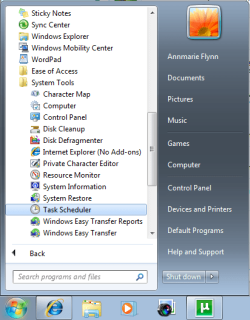
1. Open up Task Scheduler by either typing "task" into the Start Menu search bar, or by opening All Programs - Accesories - System Tools.​
Task Scheduler (Step 1 - Start).png
2. Select 'Create Basic Task' from the right hand pane and the 'Create Basic Task Wizard will open.
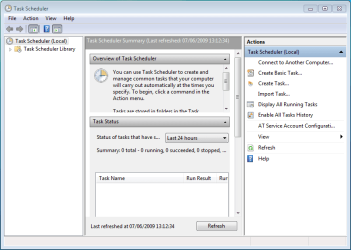
Task Scheduler (Step 2 - Opened).png


3. With the Wizard open, type a 'Name' and 'Description' for your new task and click Next.
NOTE: The Next button will only be accessible once a 'Name' has been entered.

Task Scheduler (Step 3a - Create basic task).png


4. Select when you would like the event/task to run and click Next.
NOTE: For this tutorial i've selected 'Daily'.
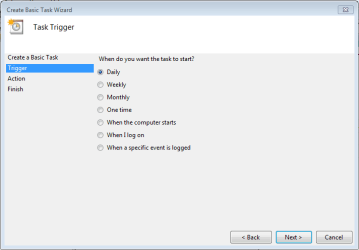
Task Scheduler (Step 3b - Create basic task - trigger).png


5. Select the exact time and date at which you wish the first task to start (each task afterward will run based on your selection in step 4) then click Next.
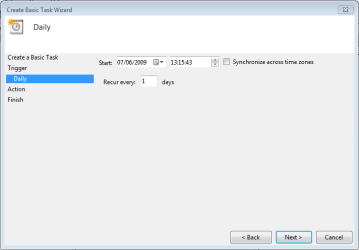
Task Scheduler (Step 3c - Create basic task - time & date).png


6. Choose the action you with the task to execute from the list then click Next.
NOTE: For this tutorial i've selected 'Start a program'.
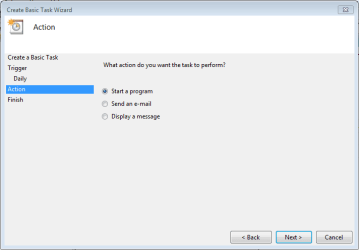
Task Scheduler (Step 3d - Create basic task - action).png


7. Click 'Browse' and navigate to the executable (exe) file of the program you wish to run then click Next.
NOTE: I've chosen to ignore 'Add arguments' and 'Start in'.
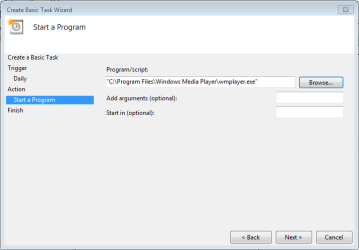
Task Scheduler (Step 3e - Create basic task - select program).png


8. Review the task and make sure that you've set all your required information correctly. If satisfied click Finish.
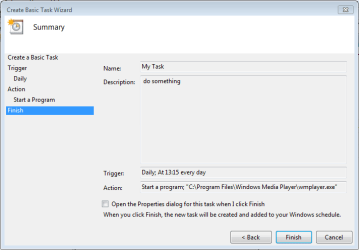
Task Scheduler (Step 3f - Create basic task - review task).png


9. Your new task has been created and will run at the user specified time. Click 'Refresh' and scroll the list to see your new task (in this case 'My Task'.
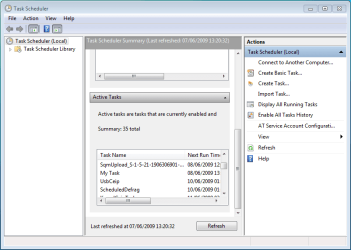
Task Scheduler (Step 4 - check task).png


   Note
You can create a new task with the 'Create Task' option in the right hand pane, this will just open the 'Create New Task' windows without the Wizard

Task Scheduler (Create task step 1).png


10. If you Created a Task to Wake Up the Computer and Run
A) You would need to change how long Windows 7 will wait to go back to sleep mode automatically after waking up unattended (no activity made by the actual user) and idle. The default time is only 120 seconds (2 minutes), so you would need to set this for how long it may take for the program or task to run instead. The tutorial below can help show you how to. It will be the same in Windows 7. For how, see:

Sleep Return Timeout for Unattended Wake Up - Vista Forums

Edit/Change Task:

1. You can change you task settings at any time, just double-click the new task.
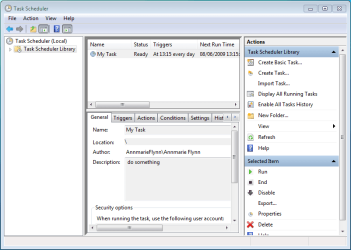
Task Scheduler (Step 5 - edit run disable delete).png


OR

2. If you wish to delete the task you can just click the 'Delete' button in the right hand pane. You will get the confimation dialog upon clicking 'delete'
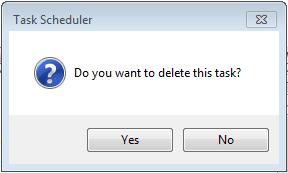
Task Scheduler Confirmation dialog.png


Last edited by a moderator:
I'm away from my machine at the moment but will endevour to get back to my own machine to see what I can do :)

P.S sorry for the late reply, i've been up to my neck with a 1 year old to manage...lol
 

My Computer

Computer Manufacturer/Model Number
Compaq Desktop
OS
Windows 7 Ultimate x64
CPU
AMD Sempron Dual Core
Memory
3GB
Graphics Card(s)
NVIDIA GeForce 6150SE nForce 430
Screen Resolution
1024x768
Hard Drives
150GB Sata
I'm away from my machine at the moment but will endevour to get back to my own machine to see what I can do :)

P.S sorry for the late reply, i've been up to my neck with a 1 year old to manage...lol

I remember those days! :D
 

My Computer

Computer Manufacturer/Model Number
Home built
OS
Windows 7 Ultimate 32 bit
CPU
Intel(R) Pentium(R) 4 CPU 3.00GHz
Motherboard
ASUS P4P800-VM Motherboard Chipset: Intel 865G + ICH5
Memory
2.50 GB RAM
Graphics Card(s)
NVIDIA GeForce 7600 GS
Sound Card
SoundMax Integrated Digital Audio (Chip)
Monitor(s) Displays
ViewSonic VX 1962 wm
Screen Resolution
1680 X 1050
Hard Drives
Seagate Barracuda 7200.10 80 GB
ST380215A ATA Device 18.6 GB
Western Digital "My Book" external hard drive 750 GB
Cooling
Fan based
Keyboard
Microsoft Comfort Curve Keyboard 2000 v10 USB
Mouse
Logitec optic USB
Internet Speed
3.01 Mb/s download 0.64 Mb/s upload
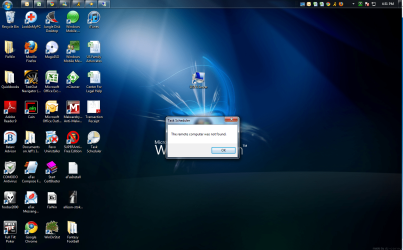
everytime i try to open task scheduler i get the error:

"The remote computer was not found."

After that on the right hand side I see where is says "Task Scheduler (Local)" but it still wont let me run any actions to create a basic task.

Anyone know why?
 

Attachments

  • taskschedulererror.png
    taskschedulererror.png
    962.8 KB · Views: 583

My Computer

OS
7 Home Premium
Hi,

That's a strange 1 :p

Have you tried typing 'task' into the start menu then right clicking 'task scheduler' and running as administrator? Also, try opening the start menu and right clicking 'Computer' and selecting 'Manage' as this uses a similar (remote) principle for accessing certain processes.


OS
 

My Computer

Computer Manufacturer/Model Number
Compaq Desktop
OS
Windows 7 Ultimate x64
CPU
AMD Sempron Dual Core
Memory
3GB
Graphics Card(s)
NVIDIA GeForce 6150SE nForce 430
Screen Resolution
1024x768
Hard Drives
150GB Sata
Good tutorial and just what I was looking for! Thank you.
 
Last edited:

My Computer

Computer type
PC/Desktop
Computer Manufacturer/Model Number
Dell Studio XPS 8100, Dell XPS 15 laptop
OS
Windows 10 Home, 64 bit
CPU
Intel Core i7 860 @ 2.8 GHz
Motherboard
Dell 0T568R (CPU1)
Memory
8.0 GB Dual Channel DDR3 @ 664 MHz (9-9-9-24)
Graphics Card(s)
nVidia GeForce GTS 240
Sound Card
M-Audio Delta Audiophile 2496
Monitor(s) Displays
Dell 2407WFP
Screen Resolution
1920x1200
Hard Drives
977 GB Western Digital WDC WD1001FAES-75W7A0 (SCSI)
Antivirus
Windows Defender, MalwareBytes Anti-Malware, AdwCleaner
Browser
Firefox, occasionally IE and Edge
Other Info
Mozilla Firefox, Mozilla Thunderbird. Western Digital Passport 250 GB external HD, two Mushkin Enhanced Mulholland 32GB USB flash drives, AKG K240 Studio headphones, Asus AC-1900 dual band wireless router.

My Computer

Computer Manufacturer/Model Number
Compaq Desktop
OS
Windows 7 Ultimate x64
CPU
AMD Sempron Dual Core
Memory
3GB
Graphics Card(s)
NVIDIA GeForce 6150SE nForce 430
Screen Resolution
1024x768
Hard Drives
150GB Sata
Welcome!
 

My Computer

Computer type
PC/Desktop
Computer Manufacturer/Model Number
Dell Studio XPS 8100, Dell XPS 15 laptop
OS
Windows 10 Home, 64 bit
CPU
Intel Core i7 860 @ 2.8 GHz
Motherboard
Dell 0T568R (CPU1)
Memory
8.0 GB Dual Channel DDR3 @ 664 MHz (9-9-9-24)
Graphics Card(s)
nVidia GeForce GTS 240
Sound Card
M-Audio Delta Audiophile 2496
Monitor(s) Displays
Dell 2407WFP
Screen Resolution
1920x1200
Hard Drives
977 GB Western Digital WDC WD1001FAES-75W7A0 (SCSI)
Antivirus
Windows Defender, MalwareBytes Anti-Malware, AdwCleaner
Browser
Firefox, occasionally IE and Edge
Other Info
Mozilla Firefox, Mozilla Thunderbird. Western Digital Passport 250 GB external HD, two Mushkin Enhanced Mulholland 32GB USB flash drives, AKG K240 Studio headphones, Asus AC-1900 dual band wireless router.
How can I get a scheduled program to do specific tasks within?

I'd like to be able to schedule one of my programs to do a scan for malware at a certain time of day. Is this possible within Task Scheduler or do I really need to know the scripting of the program in order for this to happen? What are "arguments" and would they have any impact upon the needed solution I'm looking for?
 

My Computer

OS
Windows 7 Home Premium 64Bit
Most AV/Malware programs will allow you to set a schedule from within the program.

Let us know which one you are running and we can help with scheduling.
 

My Computer

Computer type
PC/Desktop
Computer Manufacturer/Model Number
76~2.0
OS
Windows 7 Ult x64 - SP1/ Windows 8 Pro x64
CPU
Intel Core i5-3570K 4.6GHz
Motherboard
Gigabyte GA-Z77X UD3H, f18
Memory
8GB (2X4GB) DDR3 1600 Corsair Vengeance CL8 1.5v
Graphics Card(s)
Sapphire HD 7770 Vapor-X OC 1GB DDR5
Sound Card
Onboard VIA VT2021
Monitor(s) Displays
22" LCD Dell
Screen Resolution
1680x1050
Hard Drives
Samsung 840Pro 128GB SSD,
Seagate Barracuda 500GB SATA2 7200rpm 32MB cache, Seagate Barracuda 1TB SATA2 7200rpm 32MB cache,
PSU
Corsair HX650W
Case
Cooler Master Storm Scout
Cooling
Corsair H80 2x12cm Noctua NF P12 , 2x14cm case fans
Keyboard
Logitech Wave
Mouse
CM Sentinel
Internet Speed
Dismal
Antivirus
Avast
Browser
Opera Next
Other Info
Haswell laptop: HP Envy 17t-j, i7-4700MQ, GeForce 740M 2GB DDR3, 17.3" Full HD 1920x1080, 16GB RAM, Samsung 840 Pro 128GB, 1TB Hitachi 7200 HDD,
Desktop: eSATA ports,
External eSATA Seagate 500GB SATA2 7200rpm,
External WD USB 500GB
visualization problem

when i cancel artist picture showing in windows media player and give a visualization. the visualization automatically changed and show artist picture. so how i can solve this problem?
 

My Computer

Computer Manufacturer/Model Number
hp pavilion dv6-3201tx
OS
windows 7 genuine 64
CPU
intel corei3
Motherboard
intel
Memory
500GB
Graphics Card(s)
370
Sound Card
yes
Monitor(s) Displays
15.6
Hard Drives
500
Case
yes
Cooling
yes
Task in Windows Enterprise which works even after log off

Hello All,

I wanted to create a task which will work even after I logoff.

I am able to create a task does it say that I have rights to create a task which will run even I logoff from account.

I wanted to make it a task which will run even if someone else logs in with their credentials.. kinda system task.

Kindly guide me through this.

Thanks!

Regards,
Ranganath
 

My Computer

OS
Windows 7 Ultimate, 64 Bit
How do you run it under SYSTEM?
 

My Computer

OS
Windows 7 Pro x64
CPU
Q6600 3.2 Ghz
Memory
4 GB DDR2
Graphics Card(s)
GTX 275
Monitor(s) Displays
SyncMaster 2443
Screen Resolution
1920x1200
Hard Drives
500 GB 7200 RPM Seagate Barracuda
2 TB WD Green
2 TB WD Green
Internet Speed
50 Mbps down/3 Mbps up
I am trying to schedule a command (batch) file because I need to include the date in the results (file name). But the scheduler will not execute the batch code and run the progeam with the arguments I provide -- the command and arguments work fine when I do it and the batch part also works -- just not together as a scheduled task.

Running on W7 HP

The lines of the command file are:

@echo off
For /f "tokens=2-4 delims=/ " %%a in ('date /t') do (set mydate=%%c-%%a-%%b)
mysqldump -h sql3.hostdepot.com -e -c --single-transaction --user=XXXXXXX --password=YYYYYY charscore > c:\dbbackup\charscore%mydate%.sql

Ant help would be greatly appreciated.

Mike Harris
 

My Computer

OS
w7hp64
Schedule a Service

ITunes will not recognize my devices until I stop and start "Apple mobile device" in the services. It is running automatically. So I have created a shortcut to Services which helps a bit so I can manually stop and start, but I would like to set up stopping and starting the service through the scheduler.

However, I don't know where the "exe" would be, if there is one. I've tried creating a "bat" file but that also, if it was working, didn't allow iTunes to see devices.

Added information - I have uninstalled and reinstalled iTunes more than once.

May have found it, C:\Program Files (x86)\Common Files\Apple\Mobile Device Support but still don't know how to stop and start it.

Still no joy but I think just starting Apple...won't do it because I have to stop it and then restart it when I do it manually.
 
Last edited:

My Computer

Computer Manufacturer/Model Number
Dell Inspiron 1525
OS
Windows 7
CPU
Intel Core(TM)2 Duo T5750 2.00 GHz
Memory
3GB
Hard Drives
232 GB
In the tab "Actions", there is a field labeled "start in" located under arguments. I am clear on everything else but this interests me. If somebody could clearify its use I would appreciate it. Thank you.
 

My Computer

Computer Manufacturer/Model Number
HP 2000 Notebook
OS
Windows 7 Home Premium (64-bit)
CPU
AMD E-350 [1.60 Ghz]
Memory
3G DDR3
Graphics Card(s)
AMD Radeon HD [1.42G]
Monitor(s) Displays
15,6" HD LED [HP]
Screen Resolution
1366 x 768
Hard Drives
320G - SATA [Internal]
2T - Western Digital "My Book Essential"
Other Info
New Desktop "In-Progress"
I know this should be easy, all I want to do is start SpeedFan 4.49 when my user logs in. I think I have lost most of my hair! I can get it to run in admin login but it is in the user log in I need it , my kids wont start it manually and are burning up the video card because speed fan will up the gpu fan speed, that or fiqure how to get ati hd5700 to run at higher fan speed. HELP ME keep what hair I have left! Using windows 7 Professional.
 

My Computer

Computer type
PC/Desktop
Computer Manufacturer/Model Number
custom
OS
Windows 7 Professional
CPU
intel dual 1.8 GHz
Motherboard
intel 975x
Memory
2 gb
Graphics Card(s)
AMD Radeon HD 5700
Hard Drives
wd 500 gb
Seagate 250 gb
Antivirus
microsoft security essentials
Browser
IE 11
Hello All,

I want get a reminder/pop up message after unlocking the system everytime. Request you to help me on this.
 

My Computer

Computer type
PC/Desktop
OS
WIN 7
Hello All,

I want get a reminder/pop up message after unlocking the system everytime. Request you to help me on this.
Welcome to SevenForums,

It depends what kind of alert you want, you can specify when workstation unlock under 'Triggers' (i've never actually tested this trigger before though)

2014-07-10 14_00_15-jdsvr03 - Remote Desktop Connection.png

What do you want to happen at that point?
 

My Computer

Computer type
PC/Desktop
Computer Manufacturer/Model Number
Self Built
OS
Windows 8.1 Pro x64
CPU
Intel Core i5-2500K @ 3.30GHz - S1155
Motherboard
Asus P8P67 LE Rev3, Intel P67, S115
Memory
8GB Corsair DDR3 XMS3, PC3-12800
Graphics Card(s)
NVIDIA GeForce GTX 650
Sound Card
On-Board
Monitor(s) Displays
3 x 24" {Extended Display}
Screen Resolution
1920 x 1080
Hard Drives
300GB Seagate Barracuda 7200
PSU
550W Coolermaster GX550
Case
Silverstone Precision PS04B
Cooling
Stock
Keyboard
Logitech K120
Mouse
World of Warcraft Cataclysm MMO Gaming Mouse
Internet Speed
80 MB
Antivirus
MSE / Windows Defender
Browser
Chrome
It is asking me to enter password for user account, I have given my system login password but it is not accepting
 

My Computer

Computer type
PC/Desktop
OS
WIN 7

My Computer

Computer type
PC/Desktop
Computer Manufacturer/Model Number
Self Built
OS
Windows 8.1 Pro x64
CPU
Intel Core i5-2500K @ 3.30GHz - S1155
Motherboard
Asus P8P67 LE Rev3, Intel P67, S115
Memory
8GB Corsair DDR3 XMS3, PC3-12800
Graphics Card(s)
NVIDIA GeForce GTX 650
Sound Card
On-Board
Monitor(s) Displays
3 x 24" {Extended Display}
Screen Resolution
1920 x 1080
Hard Drives
300GB Seagate Barracuda 7200
PSU
550W Coolermaster GX550
Case
Silverstone Precision PS04B
Cooling
Stock
Keyboard
Logitech K120
Mouse
World of Warcraft Cataclysm MMO Gaming Mouse
Internet Speed
80 MB
Antivirus
MSE / Windows Defender
Browser
Chrome
Back
Top