
Task Scheduler: Error, custom handlers uneditable and reported corrupt

elster

New member
Local time
11:20 PM
Messages
2
This scheduled task starts the Microsoft Transient Multi-Monitor Manager when a user logs on to a Windows user account

Task TMM: The Task image is corrupt or has been tampered with
---Located this one in [Microsoft][windows][mobilPC]
---The actions tab: Custom Handler
--- Attempt to use/view via EDIT: This type of action cannot be edited in this tool.
---so I cannot edit and repair it. I can delete it, but how would I be able to recreate it
---if I do not know where the program file is located and its name, and what switches to
---set on it.
Task GatherWiredInfo: The task image is corrupt or has been tampered with.
Task GatherWierlessInfo: The task image is corrupt or has been tampered with.

I read a thread from about a year ago on just about the same issue and the responders
kept insisting that user was using the taskschd.msc tool wrong. So I also do not want to
be asked "why do I want to do this", there is a problem and I am trying to find a fix.
 

My Computer

Computer type
PC/Desktop
Computer Manufacturer/Model Number
Dell, Studio XPS 1640
OS
Windows 7 Ultimate x64
CPU
Intel Centrino
Memory
8 g
Antivirus
Symantec
Welcome to the Seven Forums.

Can you export the task(s) in question?
 

My Computer

Computer type
Laptop
Computer Manufacturer/Model Number
Employer provided Dell Latitude
OS
W7 Pro SP1 64bit
CPU
i7
Memory
8GB
Graphics Card(s)
Intel HD Graphics
Hard Drives
crappy SSD
Antivirus
Employer mandated Symantec Endpoint Protection
Browser
Pale Moon 64bit, IE11 64bit & Chrome 64bit
yes, from a second machine, these should be un-corrupted copies.

From the machine in question, the answer is no. They no longer are displayed, but
Task scheduler still think they are there; when I attempted to import a copy from
the unaffected machine the system balked. Also every time I open the appropriate
folder in Taskschd.msc it pops up a error message that the task is corrupt or tampered.

After looking at the tasks from computer #2 after export, I found at the bottom in the
action section a Class ID. Using regedit on computer#1 I found that Class ID does not
exist. So it appears that this entry in the registry maybe different in each computer. If
this is the case then it is not very useful.


<?xml version="1.0" encoding="UTF-16"?>
<Task version="1.2" xmlns="http://schemas.microsoft.com/windows/2004/02/mit/task">
<RegistrationInfo>
<Source>MobilePC Display Handling</Source>
<Author>Microsoft Corporation</Author>
<Description>Microsoft Transient Multi-Monitor Manager</Description>
<URI>Microsoft\Windows\MobilePC\TMM</URI>
<SecurityDescriptor>D:(A;;FA;;;BA)(A;;FA;;;SY)(A;;FR;;;AU)</SecurityDescriptor>
</RegistrationInfo>
<Triggers>
<LogonTrigger>
<Enabled>true</Enabled>
<Delay>PT00M02S</Delay>
</LogonTrigger>
</Triggers>
<Principals>
<Principal id="Users">
<GroupId>Authenticated Users</GroupId>
<RunLevel>LeastPrivilege</RunLevel>
</Principal>
</Principals>
<Settings>
<IdleSettings>
<Duration>PT10M</Duration>
<WaitTimeout>PT1H</WaitTimeout>
<StopOnIdleEnd>false</StopOnIdleEnd>
<RestartOnIdle>false</RestartOnIdle>
</IdleSettings>
<MultipleInstancesPolicy>Parallel</MultipleInstancesPolicy>
<DisallowStartIfOnBatteries>false</DisallowStartIfOnBatteries>
<StopIfGoingOnBatteries>false</StopIfGoingOnBatteries>
<AllowHardTerminate>true</AllowHardTerminate>
<StartWhenAvailable>true</StartWhenAvailable>
<RunOnlyIfNetworkAvailable>false</RunOnlyIfNetworkAvailable>
<AllowStartOnDemand>true</AllowStartOnDemand>
<Enabled>true</Enabled>
<Hidden>false</Hidden>
<RunOnlyIfIdle>false</RunOnlyIfIdle>
<WakeToRun>true</WakeToRun>
<ExecutionTimeLimit>PT0S</ExecutionTimeLimit>
<Priority>7</Priority>
</Settings>
<Actions Context="Users">
<ComHandler>
<ClassId>{35EF4182-F900-4632-B072-8639E4478A61}</ClassId>
</ComHandler>
</Actions>
</Task>
 

My Computer

Computer type
PC/Desktop
Computer Manufacturer/Model Number
Dell, Studio XPS 1640
OS
Windows 7 Ultimate x64
CPU
Intel Centrino
Memory
8 g
Antivirus
Symantec
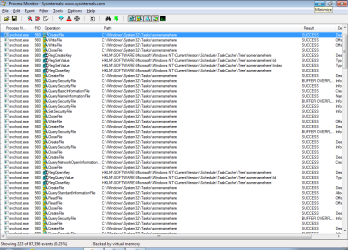
Using Process Monitor to see where all task info is stored - shows this:

PM.png

Perhaps you can dig around in those folder and registry areas to see if you can remove all traces of the scheduled task from the problematic computer. I'm not sure how you can restore the task if the ClassID info is not in all of the places that it needs to be in the registry. Such info is normally placed there by the Trusted Installer. Maybe you can import a reg file - or maybe take the computer back in time via system restore.
 

My Computer

Computer type
Laptop
Computer Manufacturer/Model Number
Employer provided Dell Latitude
OS
W7 Pro SP1 64bit
CPU
i7
Memory
8GB
Graphics Card(s)
Intel HD Graphics
Hard Drives
crappy SSD
Antivirus
Employer mandated Symantec Endpoint Protection
Browser
Pale Moon 64bit, IE11 64bit & Chrome 64bit
Back
Top