Solved Win 7 Task Scheduler Error

tjg79

New member
Power User
VIP
Local time
4:45 PM
Messages
512
I receive the following error when I open Task Scheduler:

Task Scheduler pop-up error box:

Task
User_Feed_Synchronization-{C5AF528F-CA57-4EF7-8439-15FF5967DE62}
: The task image is corrupt or has been tampered with.

I don't see the User Feed Synchronization task in the Task Scheduler.

I did a search in the regedit program for the ID in "{ }," but didn't find it.

From what I understand, if I can delete the task, the issue should be resolved.

Does anyone have any suggestions?

Thanks in advance for your assistance.

Regards
 

My Computer

Computer type
PC/Desktop
Computer Manufacturer/Model Number
Custom Build
OS
Windows 7 Professional x64 SP1
CPU
Intel i7-980x @ 3.6GHz
Motherboard
Intel DX58SO
Memory
Corsair 12GB DDR3 RAM (3x4GB)
Graphics Card(s)
EVGA NVIDIA GeForce GTX 760 SC
Sound Card
Intel High Definition 7.1 Audio Subsystem - Realtek ALC889
Monitor(s) Displays
Dual Display - LG Electronics Flatron L227WTG
Screen Resolution
1680 x 1050 60Hz 32-bit
Hard Drives
2 Seagate Constellation ST1000NM0033 1TB SATA 6Gb/s HDDs configured as Intel SATA Array 0, RST RAID 1, Vol. 0 (C:\) & Vol. 1 (D:\), & 2 Seagate Barracuda ST500DM002 500GB SATA 6Gb/s HDDs configured as Intel SATA Array 1 RST RAID 1, Vol. 0 (E:\)
PSU
Corsair HX850W
Case
Antec P182
Cooling
Stock Intel i7-980x Cooling Solution + 4 120mm Case Fans
Keyboard
Microsoft Wireless Multimedia Keyboard 1.1
Mouse
Microsoft Standard Wireless Optical Mouse
Internet Speed
DSL - 3.0 Mb/s download 768 Kb/s upload
Antivirus
ESET Smart Security 12, Defender & SuperAntiSpyware Pro
Browser
Firefox Quantum 64-bit
Other Info
Optical Drives: Pioneer DVR-216R & TSSTcorp SH-S223Q, Anker USB 3.0 PCI-E Card, Hauppauge WinTV-HVR 2250 Dual TV Tuner Board for Windows Media Center, Bose Companion 3 Series II multimedia speaker system, APC Smart-UPS SMT1500
You can delete the file corresponding to the name by navigating:
Either via RUN or by the Start menu.
Code:
%SystemRoot%\Tasks
 

My Computer

Computer type
PC/Desktop
OS
Windows 10
CPU
Intel Core i5 3570K
Motherboard
Asus P8Z77V-PRO
Memory
16GB 1600Mhz G.Skill
Graphics Card(s)
Gigabyte GTX 970 G1-Gaming
PSU
Seasonic 1000W Platinum
Case
Fractal Design Define R4
Cooling
Noctua NH-D14
Thanks,

I ran the code from the Start menu and RUN, but both times, the window that popped up didn't list the task file.

In fact, only five task files were displayed which is a portion of the fourteen tasks that appear in Task Scheduler.

Is there another solution?

Regards
 

My Computer

Computer type
PC/Desktop
Computer Manufacturer/Model Number
Custom Build
OS
Windows 7 Professional x64 SP1
CPU
Intel i7-980x @ 3.6GHz
Motherboard
Intel DX58SO
Memory
Corsair 12GB DDR3 RAM (3x4GB)
Graphics Card(s)
EVGA NVIDIA GeForce GTX 760 SC
Sound Card
Intel High Definition 7.1 Audio Subsystem - Realtek ALC889
Monitor(s) Displays
Dual Display - LG Electronics Flatron L227WTG
Screen Resolution
1680 x 1050 60Hz 32-bit
Hard Drives
2 Seagate Constellation ST1000NM0033 1TB SATA 6Gb/s HDDs configured as Intel SATA Array 0, RST RAID 1, Vol. 0 (C:\) & Vol. 1 (D:\), & 2 Seagate Barracuda ST500DM002 500GB SATA 6Gb/s HDDs configured as Intel SATA Array 1 RST RAID 1, Vol. 0 (E:\)
PSU
Corsair HX850W
Case
Antec P182
Cooling
Stock Intel i7-980x Cooling Solution + 4 120mm Case Fans
Keyboard
Microsoft Wireless Multimedia Keyboard 1.1
Mouse
Microsoft Standard Wireless Optical Mouse
Internet Speed
DSL - 3.0 Mb/s download 768 Kb/s upload
Antivirus
ESET Smart Security 12, Defender & SuperAntiSpyware Pro
Browser
Firefox Quantum 64-bit
Other Info
Optical Drives: Pioneer DVR-216R & TSSTcorp SH-S223Q, Anker USB 3.0 PCI-E Card, Hauppauge WinTV-HVR 2250 Dual TV Tuner Board for Windows Media Center, Bose Companion 3 Series II multimedia speaker system, APC Smart-UPS SMT1500
Download Autoruns, word of caution be VERY careful with this tool!!!.

Run as Administrator.runasadmin.jpg


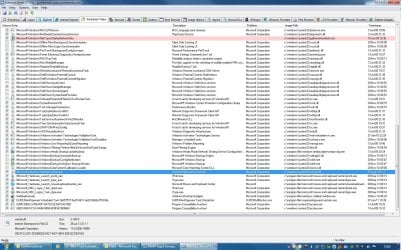
Select the Scheduled Tasks tab, at first it will look like this:
atfirst.jpg

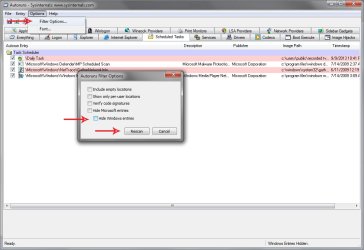
Go to Options> Filter Options> uncheck the box to hide Windows entries.
then.jpg

Right-Click the task you want to remove and delete it:
dekete.jpg


Restart the PC than visit the Task Scheduler the Error should be gone now.
Next open an http://www.sevenforums.com/tutorials/783-elevated-command-prompt.html and enter this command to restore the task.
Code:
[I]msfeedssync enable[/I]
and press enter.
 

My Computer

Computer type
PC/Desktop
OS
Windows 10
CPU
Intel Core i5 3570K
Motherboard
Asus P8Z77V-PRO
Memory
16GB 1600Mhz G.Skill
Graphics Card(s)
Gigabyte GTX 970 G1-Gaming
PSU
Seasonic 1000W Platinum
Case
Fractal Design Define R4
Cooling
Noctua NH-D14
Thanks YoYo,

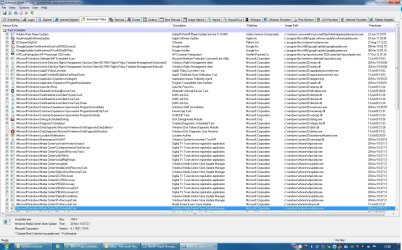
I followed your instructions, but I don't see anything under the columns Task Scheduler or Description that indicates "User Feed Synchronization."

I did find the following instructions on the Microsoft Support Community and I have the same questions as the OP in following the posted instructions.

Based on the information, when trying to start Task Scheduler, you are receiving error message: “The task image is corrupt or has been tampered with”.
This could have happen due to some corruption in the Task scheduler.
Let’s try the following steps to fix the issue:
Method 1:
Recreate the task by deleting the corrupted task.
a. Click Start, type task scheduler and hit enter.
b. In the left pane, click on "Task scheduler library" and select the backup task in the middle pane and delete it.
If you’ve trouble finding the corrupted task, follow the steps mentioned below.
i. Click on Start; in the start search type cmd. In the programs list, right click on cmd and run as administrator.
ii. Now execute the following command.
schtasks /query | findstr /i

Method 2:
Follow the steps to recreate the Task scheduler.
a. Click on Start.
b. In the Search bar type “regedit.exe” and press Enter.
c. Navigate to the following location HKLM\SOFTWARE\Microsoft\Windows NT\Current Version\Schedule key.
d. Select and delete all sub keys.
e. Save the changes and then exit the registry editor.
Important: The above mentioned link contains steps to modify the registry. However, serious problems might occur if you modify the registry incorrectly. Therefore, make sure that you follow these steps carefully. For added protection, back up the registry before you modify it. Then, you can restore the registry if a problem occurs.
For more information, you may refer to the article:
Back up the registry
For further information, refer to the article:
MS10-092: Vulnerability in Task Scheduler could allow for elevation of privilege

Method 3:
If the issue persists, try performing a SFC scan on the computer which would scan for corrupt system files on the computer and replace them.
Use the System File Checker tool to troubleshoot missing or corrupted system files on Windows Vista or on Windows 7

Hope the information helps.

Let us know if you need further assistance with Windows related issues. We will be happy to help.


Thank you for your reply. I ran into some problems.....

1. Started the Task Scheduler and performed Method 1. I could not find a "backup" task in the middle pane.

2. Then I tried schtasks /query | findstr /i . It kept telling me that the "Findstr" command line was invalid.

Was that the right syntax? Just asking. I tried several different ways to perform this task - changing spaces, etc. But always the same result.

3. In Method 2 - I found the location of the Schedule Key. What I am confused about is - do you want me to just delete the entries when I click on that key? There are several 'folders' inside of the Schedule Key. Do you want me to delete all of those as well? I did perform a registry export just in case I mess up, but I have used Regedit for many years. I am just not clear on what you EXACTLY want me to do. As you mentioned, use regedit with caution and I want to clarify this before I proceed.

4. I ran sfc /scannow and it found no integrity violations.

I had the exact same indications and questions as the OP in the second quote above.

Can you clarify the questions?

Regards
 

My Computer

Computer type
PC/Desktop
Computer Manufacturer/Model Number
Custom Build
OS
Windows 7 Professional x64 SP1
CPU
Intel i7-980x @ 3.6GHz
Motherboard
Intel DX58SO
Memory
Corsair 12GB DDR3 RAM (3x4GB)
Graphics Card(s)
EVGA NVIDIA GeForce GTX 760 SC
Sound Card
Intel High Definition 7.1 Audio Subsystem - Realtek ALC889
Monitor(s) Displays
Dual Display - LG Electronics Flatron L227WTG
Screen Resolution
1680 x 1050 60Hz 32-bit
Hard Drives
2 Seagate Constellation ST1000NM0033 1TB SATA 6Gb/s HDDs configured as Intel SATA Array 0, RST RAID 1, Vol. 0 (C:\) & Vol. 1 (D:\), & 2 Seagate Barracuda ST500DM002 500GB SATA 6Gb/s HDDs configured as Intel SATA Array 1 RST RAID 1, Vol. 0 (E:\)
PSU
Corsair HX850W
Case
Antec P182
Cooling
Stock Intel i7-980x Cooling Solution + 4 120mm Case Fans
Keyboard
Microsoft Wireless Multimedia Keyboard 1.1
Mouse
Microsoft Standard Wireless Optical Mouse
Internet Speed
DSL - 3.0 Mb/s download 768 Kb/s upload
Antivirus
ESET Smart Security 12, Defender & SuperAntiSpyware Pro
Browser
Firefox Quantum 64-bit
Other Info
Optical Drives: Pioneer DVR-216R & TSSTcorp SH-S223Q, Anker USB 3.0 PCI-E Card, Hauppauge WinTV-HVR 2250 Dual TV Tuner Board for Windows Media Center, Bose Companion 3 Series II multimedia speaker system, APC Smart-UPS SMT1500
I will do my best.

If I understood you correctly you can not open the task scheduler, so method one is irrelevant.
Method two describes deleting registry keys which I advise messing with as a last resort.
The OP of that thread states that running SFC /scannow yielded no change so I don't think it will help us either.

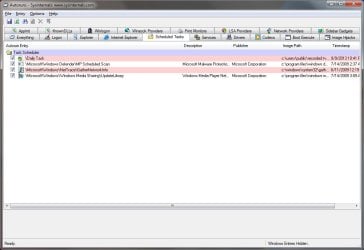
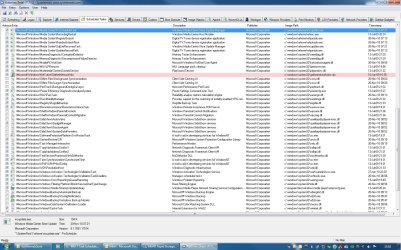
Can you post a screenshot of the Scheduled Tasks in Autoruns, where you can't find the task in question?
 

My Computer

Computer type
PC/Desktop
OS
Windows 10
CPU
Intel Core i5 3570K
Motherboard
Asus P8Z77V-PRO
Memory
16GB 1600Mhz G.Skill
Graphics Card(s)
Gigabyte GTX 970 G1-Gaming
PSU
Seasonic 1000W Platinum
Case
Fractal Design Define R4
Cooling
Noctua NH-D14
I can open Task Scheduler, but I don't see anything in the middle pane as the MS Support Community guy suggests. I have the exact same indications and questions about deleting registry keys as the guy seeking assistance.

Below are the screen shots.

Thanks again for your help.

Regards

Autoruns Screen Shot 1.jpg

Autoruns Screen Shot 2.jpg

Autoruns Screen Shot 3.jpg
 

My Computer

Computer type
PC/Desktop
Computer Manufacturer/Model Number
Custom Build
OS
Windows 7 Professional x64 SP1
CPU
Intel i7-980x @ 3.6GHz
Motherboard
Intel DX58SO
Memory
Corsair 12GB DDR3 RAM (3x4GB)
Graphics Card(s)
EVGA NVIDIA GeForce GTX 760 SC
Sound Card
Intel High Definition 7.1 Audio Subsystem - Realtek ALC889
Monitor(s) Displays
Dual Display - LG Electronics Flatron L227WTG
Screen Resolution
1680 x 1050 60Hz 32-bit
Hard Drives
2 Seagate Constellation ST1000NM0033 1TB SATA 6Gb/s HDDs configured as Intel SATA Array 0, RST RAID 1, Vol. 0 (C:\) & Vol. 1 (D:\), & 2 Seagate Barracuda ST500DM002 500GB SATA 6Gb/s HDDs configured as Intel SATA Array 1 RST RAID 1, Vol. 0 (E:\)
PSU
Corsair HX850W
Case
Antec P182
Cooling
Stock Intel i7-980x Cooling Solution + 4 120mm Case Fans
Keyboard
Microsoft Wireless Multimedia Keyboard 1.1
Mouse
Microsoft Standard Wireless Optical Mouse
Internet Speed
DSL - 3.0 Mb/s download 768 Kb/s upload
Antivirus
ESET Smart Security 12, Defender & SuperAntiSpyware Pro
Browser
Firefox Quantum 64-bit
Other Info
Optical Drives: Pioneer DVR-216R & TSSTcorp SH-S223Q, Anker USB 3.0 PCI-E Card, Hauppauge WinTV-HVR 2250 Dual TV Tuner Board for Windows Media Center, Bose Companion 3 Series II multimedia speaker system, APC Smart-UPS SMT1500
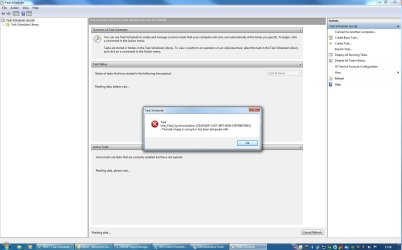
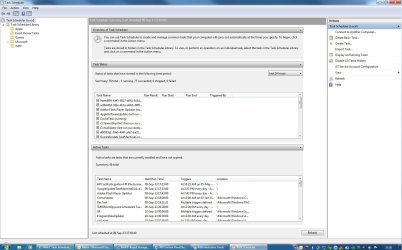
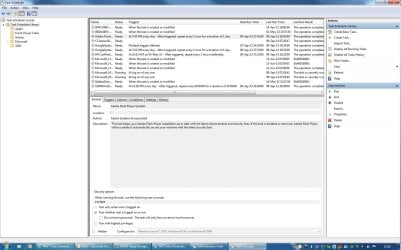
Just so you can see what I see when I open Task Scheduler, below are four screen shots. The first is when I start Task Scheduler and get the error. The second is when I clear the error box by clicking "OK." The Third is when I click on "Task Scheduler Library" in the left pane and get the error again. The fourth is when I clear the error box again by clicking "OK." The attached pics in this and the previous post are easier to read the details if you download the pic to your computer.

Thanks again.

Regards

Task Scheduler Screen Shot 1.jpg

Task Scheduler Screen Shot 2.jpg

Task Scheduler Screen Shot 3.jpg

Task Scheduler Screen Shot 4.jpg
 

My Computer

Computer type
PC/Desktop
Computer Manufacturer/Model Number
Custom Build
OS
Windows 7 Professional x64 SP1
CPU
Intel i7-980x @ 3.6GHz
Motherboard
Intel DX58SO
Memory
Corsair 12GB DDR3 RAM (3x4GB)
Graphics Card(s)
EVGA NVIDIA GeForce GTX 760 SC
Sound Card
Intel High Definition 7.1 Audio Subsystem - Realtek ALC889
Monitor(s) Displays
Dual Display - LG Electronics Flatron L227WTG
Screen Resolution
1680 x 1050 60Hz 32-bit
Hard Drives
2 Seagate Constellation ST1000NM0033 1TB SATA 6Gb/s HDDs configured as Intel SATA Array 0, RST RAID 1, Vol. 0 (C:\) & Vol. 1 (D:\), & 2 Seagate Barracuda ST500DM002 500GB SATA 6Gb/s HDDs configured as Intel SATA Array 1 RST RAID 1, Vol. 0 (E:\)
PSU
Corsair HX850W
Case
Antec P182
Cooling
Stock Intel i7-980x Cooling Solution + 4 120mm Case Fans
Keyboard
Microsoft Wireless Multimedia Keyboard 1.1
Mouse
Microsoft Standard Wireless Optical Mouse
Internet Speed
DSL - 3.0 Mb/s download 768 Kb/s upload
Antivirus
ESET Smart Security 12, Defender & SuperAntiSpyware Pro
Browser
Firefox Quantum 64-bit
Other Info
Optical Drives: Pioneer DVR-216R & TSSTcorp SH-S223Q, Anker USB 3.0 PCI-E Card, Hauppauge WinTV-HVR 2250 Dual TV Tuner Board for Windows Media Center, Bose Companion 3 Series II multimedia speaker system, APC Smart-UPS SMT1500
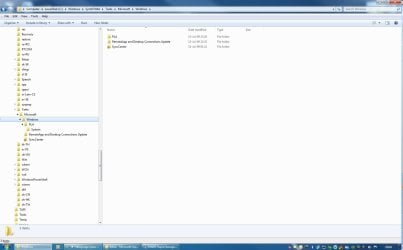
Try looking for it in this folder:
Code:
C:\Windows\SysWOW64\Tasks\Microsoft\Windows
 

My Computer

Computer type
PC/Desktop
OS
Windows 10
CPU
Intel Core i5 3570K
Motherboard
Asus P8Z77V-PRO
Memory
16GB 1600Mhz G.Skill
Graphics Card(s)
Gigabyte GTX 970 G1-Gaming
PSU
Seasonic 1000W Platinum
Case
Fractal Design Define R4
Cooling
Noctua NH-D14
There are no files in that folder or any of the subfolders you see in the attached screen shot.

SysWOW64 Screen Shot.jpg
 

My Computer

Computer type
PC/Desktop
Computer Manufacturer/Model Number
Custom Build
OS
Windows 7 Professional x64 SP1
CPU
Intel i7-980x @ 3.6GHz
Motherboard
Intel DX58SO
Memory
Corsair 12GB DDR3 RAM (3x4GB)
Graphics Card(s)
EVGA NVIDIA GeForce GTX 760 SC
Sound Card
Intel High Definition 7.1 Audio Subsystem - Realtek ALC889
Monitor(s) Displays
Dual Display - LG Electronics Flatron L227WTG
Screen Resolution
1680 x 1050 60Hz 32-bit
Hard Drives
2 Seagate Constellation ST1000NM0033 1TB SATA 6Gb/s HDDs configured as Intel SATA Array 0, RST RAID 1, Vol. 0 (C:\) & Vol. 1 (D:\), & 2 Seagate Barracuda ST500DM002 500GB SATA 6Gb/s HDDs configured as Intel SATA Array 1 RST RAID 1, Vol. 0 (E:\)
PSU
Corsair HX850W
Case
Antec P182
Cooling
Stock Intel i7-980x Cooling Solution + 4 120mm Case Fans
Keyboard
Microsoft Wireless Multimedia Keyboard 1.1
Mouse
Microsoft Standard Wireless Optical Mouse
Internet Speed
DSL - 3.0 Mb/s download 768 Kb/s upload
Antivirus
ESET Smart Security 12, Defender & SuperAntiSpyware Pro
Browser
Firefox Quantum 64-bit
Other Info
Optical Drives: Pioneer DVR-216R & TSSTcorp SH-S223Q, Anker USB 3.0 PCI-E Card, Hauppauge WinTV-HVR 2250 Dual TV Tuner Board for Windows Media Center, Bose Companion 3 Series II multimedia speaker system, APC Smart-UPS SMT1500
That was the fix. Every thing is back to normal. The Task Scheduler functions as intended.

I think that solution is far better than deleting all the subkeys under "Schedule" as suggested in the Microsoft Community Support forum post extract that I posted.

I think I need to get my lens prescription updated. I checked that registry tree several times and didn't see that user feed synchronization key. After looking at the link you posted and then going back to the registry, it stood out like a beacon.

Thanks again for all your help.

Regards
 

My Computer

Computer type
PC/Desktop
Computer Manufacturer/Model Number
Custom Build
OS
Windows 7 Professional x64 SP1
CPU
Intel i7-980x @ 3.6GHz
Motherboard
Intel DX58SO
Memory
Corsair 12GB DDR3 RAM (3x4GB)
Graphics Card(s)
EVGA NVIDIA GeForce GTX 760 SC
Sound Card
Intel High Definition 7.1 Audio Subsystem - Realtek ALC889
Monitor(s) Displays
Dual Display - LG Electronics Flatron L227WTG
Screen Resolution
1680 x 1050 60Hz 32-bit
Hard Drives
2 Seagate Constellation ST1000NM0033 1TB SATA 6Gb/s HDDs configured as Intel SATA Array 0, RST RAID 1, Vol. 0 (C:\) & Vol. 1 (D:\), & 2 Seagate Barracuda ST500DM002 500GB SATA 6Gb/s HDDs configured as Intel SATA Array 1 RST RAID 1, Vol. 0 (E:\)
PSU
Corsair HX850W
Case
Antec P182
Cooling
Stock Intel i7-980x Cooling Solution + 4 120mm Case Fans
Keyboard
Microsoft Wireless Multimedia Keyboard 1.1
Mouse
Microsoft Standard Wireless Optical Mouse
Internet Speed
DSL - 3.0 Mb/s download 768 Kb/s upload
Antivirus
ESET Smart Security 12, Defender & SuperAntiSpyware Pro
Browser
Firefox Quantum 64-bit
Other Info
Optical Drives: Pioneer DVR-216R & TSSTcorp SH-S223Q, Anker USB 3.0 PCI-E Card, Hauppauge WinTV-HVR 2250 Dual TV Tuner Board for Windows Media Center, Bose Companion 3 Series II multimedia speaker system, APC Smart-UPS SMT1500
Great news!
I'm glad it's fixed :) .
 

My Computer

Computer type
PC/Desktop
OS
Windows 10
CPU
Intel Core i5 3570K
Motherboard
Asus P8Z77V-PRO
Memory
16GB 1600Mhz G.Skill
Graphics Card(s)
Gigabyte GTX 970 G1-Gaming
PSU
Seasonic 1000W Platinum
Case
Fractal Design Define R4
Cooling
Noctua NH-D14
I have run into probs like this many times & tho I don't understand User_Task_Sync..., I usually get clues as many may based on other errors. In this case the error ID corresponded w/one user post but no others. Intermittently in trying to open Task Manager intermittently I got a msg that an app I had loaded and deleted a very long time back didn't exist and then everything associated with the task manager load and the popup error were frozen. I ran an SFC /scannow: no negative results. But when I scanned the Registry, which I have done many times when other arcane issues like this come up, I found several entries for the defunct app and deleted all of them (Keys and values) entirely: There usually are multiple entries that define the defunct app. After doing the Registry scan/deletions, I then got the Task Manager to come up without error: It showed 2 tasks related to the defunct app which I have also deleted. Problem now solved. I hope this information gives some a clue as to what to look for. As someone said here, it is not a good idea play with the Registry but over the years I have had a lot of experience doing just that and found that quite often that is the only option as it often contains keys/data which as in this case are erroneous, conflict with std MS pgms and cause havoc with others (often also std MS pgms). Yes, it is the last resort but often the only one if you have owned a machine for say almost 5 yrs or more and downloaded various apps, many of which do not uninstall themselves properly. BTW, I usually have UAC turned off. Regards, sfwizard
 

My Computer

Computer Manufacturer/Model Number
Dell
OS
Win 7 Ultimate
CPU
Intel X5482
Memory
12 Gig
Graphics Card(s)
Nvidia Quadro FX3700
Sound Card
Iteg
Monitor(s) Displays
Dell 2408WFP (digital)
Hard Drives
2 1Tera in RAID 1 config w/ integ SATA controller
I get a similar problem. Except I get a lot of errors. Can some one please help me :( I get these errors:

An error has occured for task Weebly Start. Error message: The specified account name is not valid.

Task UpdateRecord Path: The task image is corrupt or has been tampered with.

Task SqlLiteRecoveryTask: The task image is corrupt or has been tampered with.

Task ReindexSearchRoot: The task image is corrupt or has been tampered with.

Task RegisterSearch: The task image is corrupt or has been tampered with.

Task RecordingRestart: The task image is corrupt or has been tampered with.

Task PvrScheduleTask: The task image is corrupt or has been tampered with.

Task PvrRecovery Task: The task image is corrupt or has been tamepred with.

Task PBDADiscoveryW2: The Task image is corrupt or has been tampered with.

Task PBDADiscoveryW1: The task image s corrupt or has been tampered with.

Task PBDADiscovery: The task image is corrupt or has been tampered with.

Task OCURDiscovery: The image is corrupt or has been tampered with.

Task OCURActive: The task image is corrupt or has been tampered with.

Task ObjectStoreRecoveryTask: The task image is corrupt or has been tampered with.

Task MediaCenterRecoveryTask: The task image is corrupt or has been tampered with.

Task mcupdate_scheduled: The task image is corrupt or has been tampered with.

Task mcupdate: The task image is corrupt or has been tampered with.

Task InstallPlayReady: The task image is corrupt or has been tampered with.

Task ehDRMInit: The task image is corrupt or has been tampered with.

Task DispatchRecoveryTasks: The task image is corrupt or has been tampered with.

Task ConfigureInternetTimeService: The task image is corrupt or has been tampered with.

Task ActivateWindowsSearch: The task image s corrupt or has been tampered with.

Task HotStart: The task image is cprrupt or has been tampered with.

Task BackgroundConfigSurveyor: The task image is corrupt or has been tampered with.

Task RacTask: The task image is corrupt or has been tampered with.

Task WindowsParentalControls: The task is corrupt or has been tampered with.

Task SystemDataProviders: The task image is corrupt or has been tampered with.

Task SessionAgent: The task image is corrupt or has been tampered with.

Task GadgetManager: The task image is corrupt or has been tampered with.

Task AutoWake: The task image is corrupt or has been tampered with.

Task IpAddressConflict2: The task image s corrupt or has been tampered with.

Task IpAddressConflict1: The task image s corrupt or has been tampered with.

Task Windwos Backup Monitor: The task image s corrupt or has been tampered with.

Task AutomaticBackup: The task image s corrupt or has been tampered with.
 

My Computer

Computer type
PC/Desktop
Computer Manufacturer/Model Number
Dell
OS
Windows 7 Home Premium 64Bit
CPU
AMD Athlon(tm) II X4 620 Processor 2.60GHz
Motherboard
Unknown
Memory
Installed Memory(RAM) 4.00 GB (3.65 GB Usable)
Graphics Card(s)
ATI Radeon
Hard Drives
Manufacture: Unknown...
Amount: 1
Space: 259 GB free of 687 GB
Antivirus
Avast
Browser
Internet Explorer, Firefox, And Google Chrome
Last edited:

My Computer

Computer type
Laptop
Computer Manufacturer/Model Number
Dell, Inc.
OS
Windows 7 Ultimate x64 SP1, updated to latest Java and .NET
CPU
Mobile Intel Core i7-4800MQ, 8x 3500 MHz (35 x 100)
Motherboard
Dell Precision M4800
Memory
32 GB ie 4x 8GB SODIMM
Graphics Card(s)
AMD FirePro M5100 and Intel(R) HD Graphics 4600
Sound Card
Realtek Audio and AMD High Definition Audio Device
Monitor(s) Displays
Built-in 1080p, ext 2x 27" 1080p, ext 1x 55" 1080p
Screen Resolution
4x 1920 x 1080 x 32 bits
Hard Drives
2x 1 TB SSD
multiple external drives
PSU
210W for docking station & laptop
Case
Metal
Cooling
2 Fans
Keyboard
US QWERTY
Mouse
touchpad, pointstick, ext mouse
Internet Speed
1Gbps Eth, 512Mbps cable
Antivirus
Avast latest
Browser
various
Hi,

I try to set some new test in Task Scheduler in Win 7 Pro 64bit.
The Task Scheduler is working and I don't find any problems, but when I set to same task to run, only one is running and the second not.
I try to run A Net Use command to map some drives under the system, but doesn't know why the first command will not be finished as it should be, even I don't have by any of these commands any errors.
When I run this command directly in CMD, both will be done without any problems.

Please can you help me, where can be the problem?

Thanks.
 

My Computer

Computer type
PC/Desktop
OS
Win 7 64bit
Back
Top