
Task scheduler issue

nate42nd

Learning every day
Guru
Gold Member
VIP
Local time
9:37 PM
Messages
2,036
Location
The Wild West
I have seen this problem before, but the solution found will not work for me. I have looked around the net but though someone here might know what is going on here.

http://www.sevenforums.com/general-discussion/21646-task-scheduler-bug-w7.html

I am having the saem thing, but on a new laptop I have not messed with. I have not turned off any services, i have not run CCLeaner, or many programs at all yet. I have just used it for "normal" things....yet I have this error. Anyone know what it is and how to fix it?
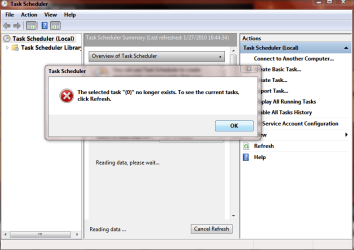
task.PNG

This happens every time I open task scheduler, Yet I think all tasks are running. I enabled the history two days ago and the tasks scheduled to run have a history.
 

My Computer

Computer Manufacturer/Model Number
Keeps changing - (Custom)
OS
Windows 7 Professional x64
CPU
Intel Core i7 860
Motherboard
Gigabyte GA-P55-UD4P
Memory
4GB DDR3 Mushkin 1600Mhz @ 7-8-7-20
Graphics Card(s)
MSI GTS250 1GB DDR3 Twin Frozr
Sound Card
Onboard realtek
Monitor(s) Displays
Samsung SyncMaster 24" P2450 + Samsung 20" 2033
Screen Resolution
1920 X 1080 and 1600 X 900 (#2 system 1440 X 900)
Hard Drives
Patriot Inferno 120GB SSD + 3 WD Blue 640GB drives
PSU
Corsair 750 HX Modular
Case
Lancool PC-K62
Cooling
Cooler Master TX3 CPU cooler and 4-140mm and 1-120mm case
Keyboard
Gigabyte USB keyboard
Mouse
Microsoft wireless laser mouse 5000
Internet Speed
7 Mb down 1.5 up
Other Info
System #2: AMD Phenom II X6 1055T (Freezer 7 Pro cooler) - Gigabyte 880GMA-UD2H - WD 500GB Black - 9500GT (1GB) 500W OCZ modular PSU - Antec 200 case. System #3 (LapTop) Core 2 Duo T6670 - 320GB 7200RPM HD - 4GB DDR3 RAM.
I had the same problem. On a system a few months old, all of a suddent the bug appears. I just bit the bullet and did a system restore, it worked. Do you have restore points on the new computer?
 

My Computer

Computer type
PC/Desktop
Computer Manufacturer/Model Number
Dell XPS 420
OS
Windows 10, Home Clean Install
CPU
Intel Core2 processsor Q8200(2.33Ghz 1333FSB) Quad Core Tech
Motherboard
Dell
Memory
6 gb
Graphics Card(s)
ATI Radeon 256MB HD3650
Sound Card
Intergrated 7.1 Channel Audio
Monitor(s) Displays
Dell SP2009W 20"
Hard Drives
640 GB Serial ATA Hard drive
Cooling
Fan
Keyboard
Dell USB Keyboard
Mouse
Dell Premium Optical USB
Internet Speed
DSL 2.85
I had the same problem. On a system a few months old, all of a suddent the bug appears. I just bit the bullet and did a system restore, it worked. Do you have restore points on the new computer?

Yes I do have restore points, I just don't know when it happened.

I will keep looking and try that if I can't find the answer.

Thanks rich

EDIT: I tried two restore points. They didn't work. Still the same deal. It's not happening on my two desktops and I have done all kinds of stuff to them....they run SSDs and I have disabled services and tweaked the heck out of them with no problems I couldn't fix....
 

My Computer

Computer Manufacturer/Model Number
Keeps changing - (Custom)
OS
Windows 7 Professional x64
CPU
Intel Core i7 860
Motherboard
Gigabyte GA-P55-UD4P
Memory
4GB DDR3 Mushkin 1600Mhz @ 7-8-7-20
Graphics Card(s)
MSI GTS250 1GB DDR3 Twin Frozr
Sound Card
Onboard realtek
Monitor(s) Displays
Samsung SyncMaster 24" P2450 + Samsung 20" 2033
Screen Resolution
1920 X 1080 and 1600 X 900 (#2 system 1440 X 900)
Hard Drives
Patriot Inferno 120GB SSD + 3 WD Blue 640GB drives
PSU
Corsair 750 HX Modular
Case
Lancool PC-K62
Cooling
Cooler Master TX3 CPU cooler and 4-140mm and 1-120mm case
Keyboard
Gigabyte USB keyboard
Mouse
Microsoft wireless laser mouse 5000
Internet Speed
7 Mb down 1.5 up
Other Info
System #2: AMD Phenom II X6 1055T (Freezer 7 Pro cooler) - Gigabyte 880GMA-UD2H - WD 500GB Black - 9500GT (1GB) 500W OCZ modular PSU - Antec 200 case. System #3 (LapTop) Core 2 Duo T6670 - 320GB 7200RPM HD - 4GB DDR3 RAM.
Do you think that an SFC /scannow or a repair install may be the answer. I think that the repair install would do the trick.

Just so you know, if you go back far enough the SR will work. As I said I did it. So this is not just hearsay, from what I read.

I wish you luck.
 

My Computer

Computer type
PC/Desktop
Computer Manufacturer/Model Number
Dell XPS 420
OS
Windows 10, Home Clean Install
CPU
Intel Core2 processsor Q8200(2.33Ghz 1333FSB) Quad Core Tech
Motherboard
Dell
Memory
6 gb
Graphics Card(s)
ATI Radeon 256MB HD3650
Sound Card
Intergrated 7.1 Channel Audio
Monitor(s) Displays
Dell SP2009W 20"
Hard Drives
640 GB Serial ATA Hard drive
Cooling
Fan
Keyboard
Dell USB Keyboard
Mouse
Dell Premium Optical USB
Internet Speed
DSL 2.85

My Computer

Computer type
PC/Desktop
Computer Manufacturer/Model Number
Dell XPS 420
OS
Windows 10, Home Clean Install
CPU
Intel Core2 processsor Q8200(2.33Ghz 1333FSB) Quad Core Tech
Motherboard
Dell
Memory
6 gb
Graphics Card(s)
ATI Radeon 256MB HD3650
Sound Card
Intergrated 7.1 Channel Audio
Monitor(s) Displays
Dell SP2009W 20"
Hard Drives
640 GB Serial ATA Hard drive
Cooling
Fan
Keyboard
Dell USB Keyboard
Mouse
Dell Premium Optical USB
Internet Speed
DSL 2.85
I have seen this problem before, but the solution found will not work for me. I have looked around the net but though someone here might know what is going on here.

http://www.sevenforums.com/general-discussion/21646-task-scheduler-bug-w7.html

I am having the saem thing, but on a new laptop I have not messed with. I have not turned off any services, i have not run CCLeaner, or many programs at all yet. I have just used it for "normal" things....yet I have this error. Anyone know what it is and how to fix it?

View attachment 50658

This happens every time I open task scheduler, Yet I think all tasks are running. I enabled the history two days ago and the tasks scheduled to run have a history.

Hi Nate,

Autoruns can display scheduled tasks and some properties, Give it a try and see if you get any errors while viewing sceduled tasks: (http://technet.microsoft.com/en-us/sysinternals/bb963902.aspx)

that error your seeing is from something firing the listview selectedindexchanged event when theres nothing selected, I have no idea why :confused:

btw, Is that desktop from the screenshot using a high DPI or something, whats with the bold large text? :huh:

Steven
 
Do you think that an SFC /scannow or a repair install may be the answer. I think that the repair install would do the trick.

Just so you know, if you go back far enough the SR will work. As I said I did it. So this is not just hearsay, from what I read.

I wish you luck.

Thanks a lot for looking into this rich. I will try a repair if need be.

I didn't have "system protection" set for one partition so I went back as far as I could without getting into trouble....but I may try something further back and have to reinstall some programs. It would make things difficult the way I have things set up now.

I have seen this problem before, but the solution found will not work for me. I have looked around the net but though someone here might know what is going on here.

http://www.sevenforums.com/general-discussion/21646-task-scheduler-bug-w7.html

I am having the saem thing, but on a new laptop I have not messed with. I have not turned off any services, i have not run CCLeaner, or many programs at all yet. I have just used it for "normal" things....yet I have this error. Anyone know what it is and how to fix it?

View attachment 50658

This happens every time I open task scheduler, Yet I think all tasks are running. I enabled the history two days ago and the tasks scheduled to run have a history.

Hi Nate,

Autoruns can display scheduled tasks and some properties, Give it a try and see if you get any errors while viewing sceduled tasks: (http://technet.microsoft.com/en-us/sysinternals/bb963902.aspx)

that error your seeing is from something firing the listview selectedindexchanged event when theres nothing selected, I have no idea why :confused:

btw, Is that desktop from the screenshot using a high DPI or something, whats with the bold large text? :huh:

Steven

Thanks to you dmex. I will look into this too. I have run out of time today. I have to leave. I will do this tomorrow. Please monitor this and I will let you know if I can fix it with your suggestions. Then we will both know...if it happens to someone else.

About the text.....I set all text in BOLD in window color / advanced appearance settings on every Windows 7 install I do for myself. I LOVE the way it looks. I make "icon" and "menu" one size bigger and set anything else I can "bold" I love the look of it.
 

My Computer

Computer Manufacturer/Model Number
Keeps changing - (Custom)
OS
Windows 7 Professional x64
CPU
Intel Core i7 860
Motherboard
Gigabyte GA-P55-UD4P
Memory
4GB DDR3 Mushkin 1600Mhz @ 7-8-7-20
Graphics Card(s)
MSI GTS250 1GB DDR3 Twin Frozr
Sound Card
Onboard realtek
Monitor(s) Displays
Samsung SyncMaster 24" P2450 + Samsung 20" 2033
Screen Resolution
1920 X 1080 and 1600 X 900 (#2 system 1440 X 900)
Hard Drives
Patriot Inferno 120GB SSD + 3 WD Blue 640GB drives
PSU
Corsair 750 HX Modular
Case
Lancool PC-K62
Cooling
Cooler Master TX3 CPU cooler and 4-140mm and 1-120mm case
Keyboard
Gigabyte USB keyboard
Mouse
Microsoft wireless laser mouse 5000
Internet Speed
7 Mb down 1.5 up
Other Info
System #2: AMD Phenom II X6 1055T (Freezer 7 Pro cooler) - Gigabyte 880GMA-UD2H - WD 500GB Black - 9500GT (1GB) 500W OCZ modular PSU - Antec 200 case. System #3 (LapTop) Core 2 Duo T6670 - 320GB 7200RPM HD - 4GB DDR3 RAM.

My Computer

Computer Manufacturer/Model Number
Keeps changing - (Custom)
OS
Windows 7 Professional x64
CPU
Intel Core i7 860
Motherboard
Gigabyte GA-P55-UD4P
Memory
4GB DDR3 Mushkin 1600Mhz @ 7-8-7-20
Graphics Card(s)
MSI GTS250 1GB DDR3 Twin Frozr
Sound Card
Onboard realtek
Monitor(s) Displays
Samsung SyncMaster 24" P2450 + Samsung 20" 2033
Screen Resolution
1920 X 1080 and 1600 X 900 (#2 system 1440 X 900)
Hard Drives
Patriot Inferno 120GB SSD + 3 WD Blue 640GB drives
PSU
Corsair 750 HX Modular
Case
Lancool PC-K62
Cooling
Cooler Master TX3 CPU cooler and 4-140mm and 1-120mm case
Keyboard
Gigabyte USB keyboard
Mouse
Microsoft wireless laser mouse 5000
Internet Speed
7 Mb down 1.5 up
Other Info
System #2: AMD Phenom II X6 1055T (Freezer 7 Pro cooler) - Gigabyte 880GMA-UD2H - WD 500GB Black - 9500GT (1GB) 500W OCZ modular PSU - Antec 200 case. System #3 (LapTop) Core 2 Duo T6670 - 320GB 7200RPM HD - 4GB DDR3 RAM.
Back
Top