Task scheduler to detect time zone change or set to run when app run

Louiscar

New member
Local time
9:31 AM
Messages
70
Location
Brighton
Hi,

I want to know if it's possible to get the task scheduler to run when an app runs. So far I haven't found a way to do it.

Although I'd like to know how to do this anyway the pressing concern is that one of my apps is changing the time zone everytime I run it.

I have a powershell script which checks that my time zone is correct and if not resets it. But the trigger is the problem. I don't know how to get the trigger to recognise this change and would like some advise as to how I can detect the change (what event am I looking for?)

Alternatively as mentioned above how can I detect the application running and change it. The event 'application' doesn't seem to do it and has only a select bunch of choices non of which seem appropriate.

Maybe what I am trying to do is not possible?
 

My Computer My Computer

At a glance

Windows 7 ultimate 64biti7 92012GBMSI R7
Computer type
PC/Desktop
Computer Manufacturer/Model Number
Home Brew
OS
Windows 7 ultimate 64bit
CPU
i7 920
Motherboard
Asus P6 Deluxe
Memory
12GB
Graphics Card(s)
MSI R7
Hard Drives
Crucial M550 512GB SSD
WD 2TB Black
WD 1TB Black
WD 1TB Blue
Toshiba 2TB
Hitachi 1TB
Case
HAF 960
Cooling
Corsair H80 Water
Browser
Firefox
By app, do you mean program or app like in Win 8 or 10?

If program, why not look for another that doesn't change the time zone, or maybe there is an option or parameter for the program that can help?

Alternatively you could launch the app via a batch file and as soon as it launched then launch your powershell script. Set the script to loop until the app terminates then fix the time zone and exit.
 

My Computer My Computer

At a glance

Windows 10 Pro X64Intel Quad Core i7-4770 @ 3.4Ghz16.0GB PC3-12800 DDR3 SDRAM 1600 MHzIntel Integrated HD Graphics
Computer type
PC/Desktop
Computer Manufacturer/Model Number
Lenovo IdeaCenter 450
OS
Windows 10 Pro X64
CPU
Intel Quad Core i7-4770 @ 3.4Ghz
Memory
16.0GB PC3-12800 DDR3 SDRAM 1600 MHz
Graphics Card(s)
Intel Integrated HD Graphics
Sound Card
Realtek HD Audio
Monitor(s) Displays
HP 22" LCD
Screen Resolution
1680 x 1050
Hard Drives
250GB Samsung EVO SATA-3 SSD
2TB Seagate ST2000DM001 SATA-2
1.5TB Seagate ST3150041AS SATA
Keyboard
Dell USB
Mouse
Lenovo USB
Internet Speed
Cable via Road Runner 3MB Upload, 30MB Download
Antivirus
Windows Defender, MBAM Pro, MBAE
Browser
Seamonkey
Other Info
UEFI/GPT
PLDS DVD-RW DH16AERSH
Sorry I meant program not app.

Thanks for the suggestions. I like the batch file idea although I'm a little wary of the script looping taking up resources. Not really that adept with powershell but I'll figure it out.
 

My Computer My Computer

At a glance

Windows 7 ultimate 64biti7 92012GBMSI R7
Computer type
PC/Desktop
Computer Manufacturer/Model Number
Home Brew
OS
Windows 7 ultimate 64bit
CPU
i7 920
Motherboard
Asus P6 Deluxe
Memory
12GB
Graphics Card(s)
MSI R7
Hard Drives
Crucial M550 512GB SSD
WD 2TB Black
WD 1TB Black
WD 1TB Blue
Toshiba 2TB
Hitachi 1TB
Case
HAF 960
Cooling
Corsair H80 Water
Browser
Firefox
You only need a loop if the program changes the Time Zone over and over while it runs.

If your program only changes the Time Zone once, then your batch file could look like:

program
timeout 10
powershell script
 

My Computer My Computer

At a glance

W7 Pro SP1 64biti78GBIntel HD Graphics
Computer type
Laptop
Computer Manufacturer/Model Number
Employer provided Dell Latitude
OS
W7 Pro SP1 64bit
CPU
i7
Memory
8GB
Graphics Card(s)
Intel HD Graphics
Hard Drives
crappy SSD
Antivirus
Employer mandated Symantec Endpoint Protection
Browser
Pale Moon 64bit, IE11 64bit & Chrome 64bit
It does so it needs a way to detect when the program terminates then set it back.
Is there a way to get that info when it stops running?
 

My Computer My Computer

At a glance

Windows 7 ultimate 64biti7 92012GBMSI R7
Computer type
PC/Desktop
Computer Manufacturer/Model Number
Home Brew
OS
Windows 7 ultimate 64bit
CPU
i7 920
Motherboard
Asus P6 Deluxe
Memory
12GB
Graphics Card(s)
MSI R7
Hard Drives
Crucial M550 512GB SSD
WD 2TB Black
WD 1TB Black
WD 1TB Blue
Toshiba 2TB
Hitachi 1TB
Case
HAF 960
Cooling
Corsair H80 Water
Browser
Firefox
task scheduler

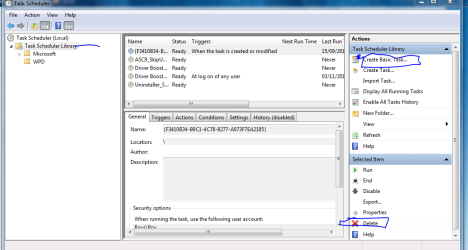
Has the program, (it would be handy to know what it is), created its own task.
You can check via
Controlpanel>admintools>taskScheduler>taskscheduler library,
this lists all non MS tasks.
If its there highlight it and delete.

Alternately create a basic task to run the Windows time service after the program has started.
Same route as above.

Roy
 

Attachments

  • task sched.PNG
    task sched.PNG
    33.4 KB · Views: 1

My Computer My Computer

At a glance

W7 home premium 32bit/W7HP 64bit/w10 tp insid...E5300 dual core3gbNvidia Geforce 7100 Nforce 630i
Computer type
PC/Desktop
Computer Manufacturer/Model Number
medionl/Aspire 6930G/acer x55a
OS
W7 home premium 32bit/W7HP 64bit/w10 tp insider ring
CPU
E5300 dual core
Motherboard
medion MS7366
Memory
3gb
Graphics Card(s)
Nvidia Geforce 7100 Nforce 630i
Monitor(s) Displays
avixc
Internet Speed
n (isp resticted to 72)
Antivirus
mse/pands
Browser
palemoon
Other Info
Belkin Fd7050 n USB using Railink RT2870 drivers, more upto date
I'm sure Powershell has a way to query a task. How often it has to wake up to query the task then reset the time depends on your usage of the program.

What program by the way?
 

My Computer My Computer

At a glance

Windows 10 Pro X64Intel Quad Core i7-4770 @ 3.4Ghz16.0GB PC3-12800 DDR3 SDRAM 1600 MHzIntel Integrated HD Graphics
Computer type
PC/Desktop
Computer Manufacturer/Model Number
Lenovo IdeaCenter 450
OS
Windows 10 Pro X64
CPU
Intel Quad Core i7-4770 @ 3.4Ghz
Memory
16.0GB PC3-12800 DDR3 SDRAM 1600 MHz
Graphics Card(s)
Intel Integrated HD Graphics
Sound Card
Realtek HD Audio
Monitor(s) Displays
HP 22" LCD
Screen Resolution
1680 x 1050
Hard Drives
250GB Samsung EVO SATA-3 SSD
2TB Seagate ST2000DM001 SATA-2
1.5TB Seagate ST3150041AS SATA
Keyboard
Dell USB
Mouse
Lenovo USB
Internet Speed
Cable via Road Runner 3MB Upload, 30MB Download
Antivirus
Windows Defender, MBAM Pro, MBAE
Browser
Seamonkey
Other Info
UEFI/GPT
PLDS DVD-RW DH16AERSH
The program is Metal Gear. I have no idea why it does this.
 

My Computer My Computer

At a glance

Windows 7 ultimate 64biti7 92012GBMSI R7
Computer type
PC/Desktop
Computer Manufacturer/Model Number
Home Brew
OS
Windows 7 ultimate 64bit
CPU
i7 920
Motherboard
Asus P6 Deluxe
Memory
12GB
Graphics Card(s)
MSI R7
Hard Drives
Crucial M550 512GB SSD
WD 2TB Black
WD 1TB Black
WD 1TB Blue
Toshiba 2TB
Hitachi 1TB
Case
HAF 960
Cooling
Corsair H80 Water
Browser
Firefox
Nothing returned on a search for metal gear changes data on system
 

My Computer My Computer

At a glance

Windows 10 Pro X64Intel Quad Core i7-4770 @ 3.4Ghz16.0GB PC3-12800 DDR3 SDRAM 1600 MHzIntel Integrated HD Graphics
Computer type
PC/Desktop
Computer Manufacturer/Model Number
Lenovo IdeaCenter 450
OS
Windows 10 Pro X64
CPU
Intel Quad Core i7-4770 @ 3.4Ghz
Memory
16.0GB PC3-12800 DDR3 SDRAM 1600 MHz
Graphics Card(s)
Intel Integrated HD Graphics
Sound Card
Realtek HD Audio
Monitor(s) Displays
HP 22" LCD
Screen Resolution
1680 x 1050
Hard Drives
250GB Samsung EVO SATA-3 SSD
2TB Seagate ST2000DM001 SATA-2
1.5TB Seagate ST3150041AS SATA
Keyboard
Dell USB
Mouse
Lenovo USB
Internet Speed
Cable via Road Runner 3MB Upload, 30MB Download
Antivirus
Windows Defender, MBAM Pro, MBAE
Browser
Seamonkey
Other Info
UEFI/GPT
PLDS DVD-RW DH16AERSH
Back
Top