
Time Zone - Change

How to Change the Time Zone in Windows 7

   Information
This will show you how to change the Time Zone and turn Daylight Saving Time on or off in Windows 7.


Here's How:
1. Right click on the clock, at the far right of the taskbar, and click on Adjust Date/Time. (See screenshot below)
Right_Click.jpg
A) Go to step 3.
OR

2. Left click on the clock, at the far right of the taskbar, and click on Change date and time settings. (See screenshot below)
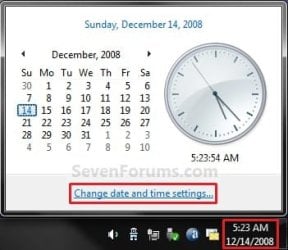
Left_Click.jpg
3. Click on the Change time zone button. (See screenshot below)
NOTE: If you would like to be notified with a notification balloon when the clock changes, then check the Notify me when the clock changes box.
Time_Zone-1.jpg
4. Click on the Time Zone drop down menu and select your time zone. (See screenshot below step 6)
NOTE: If your country or region is not in the Windows time zone list, then you can use the equivalent time zone according to the table here: How to select time zone for countries or regions that are not listed in Windows time zone list

5. Check the Automatically adjust clock for Daylight Saving Time box. (See screenshot below step 6)
NOTE: It is recommended to have this check to keep you system clock accurate for Daylight Saving Time.

6. Click on OK. (See screenshot below)
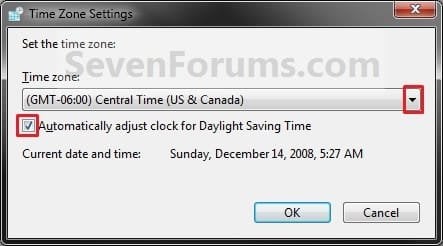
Time_Zone-2.jpg
7. Click on OK. (See screenshot below step 3)
That's it,
Shawn


Last edited:
HI Shawn,
In my window it is showing - Daylight saving is not observed by this time zone.
What does that means?
:confused:

Hello Ali Khan, and welcome to Seven Forums.

It just means that your time zone doesn't use Daylight Saving. That's all. :)
 
Last edited:

My Computer

Computer type
PC/Desktop
Computer Manufacturer/Model Number
Self built custom
OS
64-bit Windows 11 Pro for Workstations
CPU
Intel i7-8700K OC'd to 5 GHz
Motherboard
ASUS ROG Maximus XI Formula Z390
Memory
64 GB (4x16GB) G.SKILL TridentZ RGB DDR4 3600 MHz
Graphics Card(s)
ASUS ROG-STRIX-GTX1080TI-O11G-GAMING
Sound Card
Integrated
Monitor(s) Displays
2 x Samsung Odyssey G7 27"
Screen Resolution
2560x1440
Hard Drives
1TB Samsung 990 PRO M.2,
4TB Samsung 990 PRO PRO M.2,
TerraMaster F8 SSD Plus NAS
PSU
Seasonic Prime Titanium 850W
Case
Thermaltake Core P3
Cooling
Corsair Hydro H115i
Keyboard
Logitech wireless K800
Mouse
Logitech MX Master 4
Internet Speed
2 Gb/s Download and 100 Mb/s Upload
Antivirus
Malwarebyte Anti-Malware Premium
Browser
Google Chrome
Other Info
Logitech Z625 speaker system,
Logitech BRIO 4K Pro webcam,
HP Color LaserJet Pro MFP M477fdn,
APC SMART-UPS RT 1000 XL - SURT1000XLI,
Galaxy S23 Plus phone
i'm trying to do a repair inside of the timezone list, because it has disappeared all countries and its timezone since weeks, only i can seing the central time canada" youve some help for me, please my buddies.

the list can be fixed throught regedit for example:
HKEY_LOCAL_MACHINE\SYSTEM\CurrentControlSet\Control\TimeZoneInformation
Bias REG_DWORD 0x1e0
StandardName REG_SZ Pacific Standard Time
StandardBias REG_DWORD 0x0
StandardStart REG_BINARY 00000B00010002000000000000000000
DaylightName REG_SZ Pacific Daylight Time
DaylightBias REG_DWORD 0xffffffc4
DaylightStart REG_BINARY 00000300020002000000000000000000
ActiveTimeBias REG_DWORD 0x1e0

but i need this complete .REG from someone friendly who can cooperatively upload this list

Pd: I found what I was looking for using the internal search engine. many thanks.

Time Zones - Restore Missing Default Time Zones - Windows 7 Help Forums

my respects for all of you.
 

My Computer

Computer type
PC/Desktop
Computer Manufacturer/Model Number
custom build
OS
Windows 7 Ultimate x64
CPU
intel core i7 2600
Motherboard
abit
Memory
32gb
Graphics Card(s)
3 sli x16
Hard Drives
12 hdd
Antivirus
norton
Browser
internet explorer
I'm glad it could help Jonathan. :)
 

My Computer

Computer type
PC/Desktop
Computer Manufacturer/Model Number
Self built custom
OS
64-bit Windows 11 Pro for Workstations
CPU
Intel i7-8700K OC'd to 5 GHz
Motherboard
ASUS ROG Maximus XI Formula Z390
Memory
64 GB (4x16GB) G.SKILL TridentZ RGB DDR4 3600 MHz
Graphics Card(s)
ASUS ROG-STRIX-GTX1080TI-O11G-GAMING
Sound Card
Integrated
Monitor(s) Displays
2 x Samsung Odyssey G7 27"
Screen Resolution
2560x1440
Hard Drives
1TB Samsung 990 PRO M.2,
4TB Samsung 990 PRO PRO M.2,
TerraMaster F8 SSD Plus NAS
PSU
Seasonic Prime Titanium 850W
Case
Thermaltake Core P3
Cooling
Corsair Hydro H115i
Keyboard
Logitech wireless K800
Mouse
Logitech MX Master 4
Internet Speed
2 Gb/s Download and 100 Mb/s Upload
Antivirus
Malwarebyte Anti-Malware Premium
Browser
Google Chrome
Other Info
Logitech Z625 speaker system,
Logitech BRIO 4K Pro webcam,
HP Color LaserJet Pro MFP M477fdn,
APC SMART-UPS RT 1000 XL - SURT1000XLI,
Galaxy S23 Plus phone

My Computer

Computer type
PC/Desktop
Computer Manufacturer/Model Number
custom build
OS
Windows 7 Ultimate x64
CPU
intel core i7 2600
Motherboard
abit
Memory
32gb
Graphics Card(s)
3 sli x16
Hard Drives
12 hdd
Antivirus
norton
Browser
internet explorer
Back
Top