Task Se7en

I'm interested in testing this too
 

My Computer

Computer Manufacturer/Model Number
My Build
OS
Windows 7
CPU
Intel i7 920 DO
Motherboard
Asus p6t Deluxe
Memory
Corsair Dominator GT 1866MHz, 7-8-7-20
Graphics Card(s)
ATI Radeon HD 4850
Monitor(s) Displays
Acer P223w x2
Screen Resolution
3360 x 1050
Cooling
Water
Pre-beta Released!

I've created an installer for the Task Se7en pre-beta release.

Since I don't yet have a web site for Task Se7en I've uploaded the installer to MediaFire. (This will change in the not too distant future :D)

Here is the download link:
Free File Hosting Made Simple - MediaFire

Please take the time to read the Read Me in the installer..
 

My Computer

OS
Windows 7 Build 7600
It will not run for me installed ok but when I restart the pc it comes up with Task Se7en has stopped working :sarc:
 

My Computer

Computer Manufacturer/Model Number
My Build
OS
Windows 7
CPU
Intel i7 920 DO
Motherboard
Asus p6t Deluxe
Memory
Corsair Dominator GT 1866MHz, 7-8-7-20
Graphics Card(s)
ATI Radeon HD 4850
Monitor(s) Displays
Acer P223w x2
Screen Resolution
3360 x 1050
Cooling
Water
I should quickly mention this...

Task Se7en is written and compiled on an x86 - 32bit machine. I've done absolutely no testing on 64 bit systems as I don't have one to test on.
Use Task Se7en on a 64 bit machine at your own risk.. I'm not saying it's going to erase your files and knock up your daughter, just that I don't know if it will even run on 64 bit systems.
 

My Computer

OS
Windows 7 Build 7600
I am running the 32 bit
 

My Computer

Computer Manufacturer/Model Number
My Build
OS
Windows 7
CPU
Intel i7 920 DO
Motherboard
Asus p6t Deluxe
Memory
Corsair Dominator GT 1866MHz, 7-8-7-20
Graphics Card(s)
ATI Radeon HD 4850
Monitor(s) Displays
Acer P223w x2
Screen Resolution
3360 x 1050
Cooling
Water
I'm in the process of adding error logging to the pre-beta and will repost the installer when complete. As for now, please direct all bug reports to: [email protected] and I'll do whatever I can to find and fix them.
 

My Computer

OS
Windows 7 Build 7600
"TaskSe7en cannot be installed on Windows XP/Vista x64. Im on 7100 64-bit.
 

My Computer

Computer Manufacturer/Model Number
self built
OS
Windows 7 Professional 64-bit
CPU
Intel E8400 3GHz
Motherboard
Intel DX48BT2
Memory
Kingston PC3-10700H 4Gb
Graphics Card(s)
XFX Radeon HD 5850 BlackEd.
Sound Card
Asus Xonar DG
Monitor(s) Displays
2x Samsung SM-T220HD 22"
Screen Resolution
1680x1050 on two monitors
Hard Drives
OCZ Vertex 2 120gb 3.5" (OS)
Seagate Momentus XT 500gb
Samsung F3 1Tb (games)
2x Samsung F1 1Tb
PSU
Thermaltake ToughPower 850w
Case
Thermaltake Armor
Cooling
Scythe Mugen II
Keyboard
Microsoft Comfort Curve USB
Mouse
Razer Diamondback 3G
Internet Speed
8128/443
Ok just tried it. I did not read the Readme just to see what would happen. It was a good idea because I found a problem with the solution.

After you install the program the first time, it asks you the settings. These settings will be saved in C:\Windows\Task7ven.db.

If you let "Show only images", it will crashes when you start it. If you choose "Show image and text", it will not crash but it will be showing the images without text.

If anybody here have this problem, delete C:\Windows\Task7ven.db and choose "Show image and text"
 

My Computer

OS
Win7 64 bits FR
CPU
2500K @ 4.5 GHz
Motherboard
Asrock Z68 Gen3 Extreme3
Memory
4x4GB 1600MHz GSkill CL9.
Graphics Card(s)
HD6850 Powercolor stock
Sound Card
Integrated
Monitor(s) Displays
Samsung 2343 + Dell 20in 4/3
Screen Resolution
2048x1152, 1600x1200
Hard Drives
OCZ Vertex LE SSD, 50GB
OCZ Solid 3 120GB
OCZ Vertex 2 240GB
Western Digital Scorpio 320GB 5400 rpm
PSU
KingWin Lazer Platinum (90+) 550Watts
Case
HAF912
Cooling
CPU: OCZ Vendetta 2
Keyboard
MX5500 revolution bluetooth
Mouse
MX5500 revolution bluetooth
Internet Speed
Cable 7 Mbps
"TaskSe7en cannot be installed on Windows XP/Vista x64. Im on 7100 64-bit.

Can you provide full version number string for this 64 bit build? (Ya, I'm too lazy to look it up myself :p)

I'll add the build string into the OS check.. who knows, you might get it working on 64 bit once it passes the OS check.
 

My Computer

OS
Windows 7 Build 7600
After you install the program the first time, it asks you the settings. These settings will be saved in C:\Windows\Task7ven.db.

If you let "Show only images", it will crashes when you start it. If you choose "Show image and text", it will not crash but it will be showing the images without text.

If anybody here have this problem, delete C:\Windows\Task7ven.db and choose "Show image and text"

I found the issue to be related to Xenocode Postbuild 2009 and am working on a solution right now.
 

My Computer

OS
Windows 7 Build 7600
Doesnt start..
 

My Computer

Computer Manufacturer/Model Number
HP DV2000 (Service tag 2613tu)
OS
Windozer 7 - 7068
CPU
1.5ghz C2D.
Motherboard
Unkown.
Memory
2x2gb Corsair 667 DDR2
Graphics Card(s)
Intel integrated X3100 (yeah, laugh)
Sound Card
Conexant High definition Audio.
Monitor(s) Displays
14.1 inch laptop display with 17inch CRT as secondary.
Screen Resolution
1280x800 both screens.
Hard Drives
160gb toshiba drive. (chills at around 65 degrees C on a cool day.)
PSU
Battery.
Case
Laptop.
Cooling
Whats that? I own a HP.
Keyboard
Laptop standard.
Mouse
Logitech cordless.
Internet Speed
Depends on the weather. (no, literally.) 5mbs-7mbs line.
Other Info
Build 7068.
Task 7 has stopped working.. Image and text etc changed, no difference..

Build 7068 090321-1322
 

My Computer

Computer Manufacturer/Model Number
HP DV2000 (Service tag 2613tu)
OS
Windozer 7 - 7068
CPU
1.5ghz C2D.
Motherboard
Unkown.
Memory
2x2gb Corsair 667 DDR2
Graphics Card(s)
Intel integrated X3100 (yeah, laugh)
Sound Card
Conexant High definition Audio.
Monitor(s) Displays
14.1 inch laptop display with 17inch CRT as secondary.
Screen Resolution
1280x800 both screens.
Hard Drives
160gb toshiba drive. (chills at around 65 degrees C on a cool day.)
PSU
Battery.
Case
Laptop.
Cooling
Whats that? I own a HP.
Keyboard
Laptop standard.
Mouse
Logitech cordless.
Internet Speed
Depends on the weather. (no, literally.) 5mbs-7mbs line.
Other Info
Build 7068.
Task Se7en failing...

This issue is stemming from the use of Xenocode Postbuild 2009 beta.
I have found a workaround for this and will post a new installer very shortly.
 

My Computer

OS
Windows 7 Build 7600
New Installer..

I've tested this installer several times and everything seems to be working fine on my machine (doesn't it always work that way?)... I have experienced the same start up issues, as most of you, when using the old installer - I hope this one solves those problems.

The new installer can be gotten here:
http://www.mediafire.com/file/jznmzgny4yo/Task7Setup.exe

I'll have a web site setup sometime this week and will host the installer there. Once the site is setup I'll be deleting it from Mediafire.

This build has application logging enabled so, if you run into any kind of problems please email a copy of the log to: [email protected]
 
Last edited:

My Computer

OS
Windows 7 Build 7600
We have a winner!
 

My Computer

Computer Manufacturer/Model Number
HP DV2000 (Service tag 2613tu)
OS
Windozer 7 - 7068
CPU
1.5ghz C2D.
Motherboard
Unkown.
Memory
2x2gb Corsair 667 DDR2
Graphics Card(s)
Intel integrated X3100 (yeah, laugh)
Sound Card
Conexant High definition Audio.
Monitor(s) Displays
14.1 inch laptop display with 17inch CRT as secondary.
Screen Resolution
1280x800 both screens.
Hard Drives
160gb toshiba drive. (chills at around 65 degrees C on a cool day.)
PSU
Battery.
Case
Laptop.
Cooling
Whats that? I own a HP.
Keyboard
Laptop standard.
Mouse
Logitech cordless.
Internet Speed
Depends on the weather. (no, literally.) 5mbs-7mbs line.
Other Info
Build 7068.
Out of respect for users wanting to test, would you mind updating the *first* post so users don't have to wade through a sea of posts to find the latest release?

Also, on Build 7077 x64, I got this the first time I ran the installer:
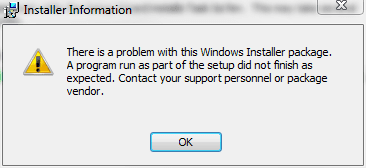
Task7 Install Error.PNG

but then my system asked me if the app had installed correctly, and I allowed it to use the recommended settings and the installer worked just fine.

However, ran into a bevy of issues:

On first run I get the following:
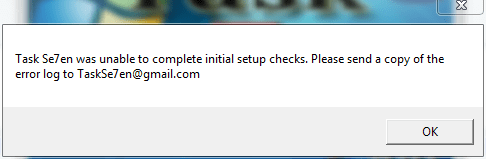
Task7 firstrun error.PNG

If I allow it an then set my settings (including the image and text option according to the poster above) it creates a blank taskbar on my main window on the left....and I have to use Process Explorer to kill it.

Of course, I figured it was trying to save the config to a folder that is inaccessible - so I ran it as admin, and got this instead:
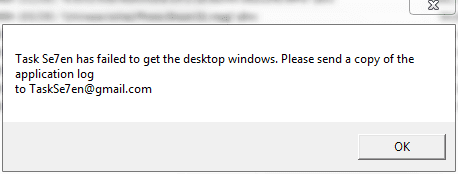
Task7 secondrun error.PNG

So here is the log.....

View attachment Task7 ApplicationLog.zip

Also, if I select Image and text, Task7 dies - without fail, 100% of the time. If I leave the setting at image it now works - with an image.

Also, I have DisplayFusion running but the extra taskbar disabled. I'll try it with DF not running and see if anything changes.

 

My Computers

System One System Two

  • Computer type
    PC/Desktop
    Computer Manufacturer/Model Number
    The Beast Model A (homebrew)
    OS
    Windows 11 21H2 Current build
    CPU
    AMD Ryzen 9 3950X
    Motherboard
    MSI MEG X570 GODLIKE
    Memory
    4 * 32 GB - Corsair Vengeance 3600 MHz
    Graphics Card(s)
    EVGA GeForce RTX 3080 Ti XC3 ULTRA GAMING (12G-P5-3955-KR)
    Sound Card
    Realtek® ALC1220 Codec
    Monitor(s) Displays
    2x Eve Spectrum ES07D03 4K Gaming Monitor (Matte) | Eve Spec
    Screen Resolution
    3x 3840 x 2160
    Hard Drives
    3x Samsung 980 Pro NVMe PCIe 4 M.2 2 TB SSD (MZ-V8P2T0B/AM) } 3x Sabrent Rocket NVMe 4.0 1 TB SSD
    PSU
    PC Power & Cooling’s Silencer Series 1050 Watt, 80 Plus Plat
    Case
    Fractal Design Define 7 XL Dark ATX Full Tower Case
    Cooling
    SteelSeries Apex Pro Wired Gaming Keyboard
    Keyboard
    SteelSeries Apex Pro
    Mouse
    Logitech MX Master 3S | MX Master 3 for business
    Internet Speed
    AT&T LightSpeed Gigabit Duplex Ftth
    Antivirus
    Windows Defender + MB 3
    Browser
    Nightly (default) + Firefox (stable),Chrome, Edge
  • Computer type
    PC/Desktop
    System Manufacturer/Model Number
    Dell Latitude E5470
    OS
    ChromeOS Flex Dev Channel (current)
    CPU
    Intel(R) Core(TM) i5-6300U CPU @ 2.40GHz, 2501 Mhz, 2 Core(s), 4 Logical Processor(s)
    Motherboard
    Dell
    Memory
    16 GB
    Graphics Card(s)
    Intel(R) HD Graphics 520
    Sound Card
    Intel(R) HD Graphics 520 + RealTek Audio
    Monitor(s) Displays
    Dell laptop display 15"
    Screen Resolution
    1920 * 1080
    Hard Drives
    Toshiba 128GB M.2 22300 drive
    INTEL Cherryville 520 Series SSDSC2CW180A 180 GB SATA III SSD
    PSU
    Dell
    Case
    Dell
    Cooling
    Dell
    Keyboard
    Dell
    Mouse
    Logitech MX Master 3S (shared w. Sys 1) | Dell TouchPad
    Internet Speed
    AT&T LightSpeed Gigabit Duplex Ftth
johngalt it dose say 32bit only that might be why you got problems
 

My Computer

Computer Manufacturer/Model Number
My Build
OS
Windows 7
CPU
Intel i7 920 DO
Motherboard
Asus p6t Deluxe
Memory
Corsair Dominator GT 1866MHz, 7-8-7-20
Graphics Card(s)
ATI Radeon HD 4850
Monitor(s) Displays
Acer P223w x2
Screen Resolution
3360 x 1050
Cooling
Water
can you provide full version number string for this 64 bit build? (ya, i'm too lazy to look it up myself :p)

i'll add the build string into the os check.. Who knows, you might get it working on 64 bit once it passes the os check.

6.1.7100.
 

My Computer

Computer Manufacturer/Model Number
self built
OS
Windows 7 Professional 64-bit
CPU
Intel E8400 3GHz
Motherboard
Intel DX48BT2
Memory
Kingston PC3-10700H 4Gb
Graphics Card(s)
XFX Radeon HD 5850 BlackEd.
Sound Card
Asus Xonar DG
Monitor(s) Displays
2x Samsung SM-T220HD 22"
Screen Resolution
1680x1050 on two monitors
Hard Drives
OCZ Vertex 2 120gb 3.5" (OS)
Seagate Momentus XT 500gb
Samsung F3 1Tb (games)
2x Samsung F1 1Tb
PSU
Thermaltake ToughPower 850w
Case
Thermaltake Armor
Cooling
Scythe Mugen II
Keyboard
Microsoft Comfort Curve USB
Mouse
Razer Diamondback 3G
Internet Speed
8128/443
Back
Top