Taskbar Button Grouping - Enable or Disable

How to Enable or Disable Taskbar Button Grouping in Windows 7

   Information
A taskbar button represents an open window on the desktop. These buttons appear on the taskbar as a horizontal bar or icon button.

This tutorial will show you how to have similar open window buttons to group to one button or separate buttons in Windows 7.

   Note
When you have more than one similar window open, say Notepad windows, you could set the taskbar to group the same Notepad taskbar buttons to just one button instead of multiple buttons. This can help organize the taskbar and save space when you have multiple windows open.

   Tip
Microsoft has made available a hotfix that will resolve a problem where the taskbar customizations are lost and reset to defaults when automatic logon is enabled in Windows 7 and Windows Server 2008 R2.

More details are available at FIX: The Taskbar is reset to the default settings when you use the "Automatically Log On" feature in Windows 7 and in Windows Server 2008 R2.


EXAMPLE: Taskbar Buttons Grouped
544d1226605261-taskbar-button-grouping-enable-disable-always_grouped.jpg


545d1226605261-taskbar-button-grouping-enable-disable-grouped_expanded.jpg

EXAMPLE: Taskbar Buttons Not Grouped
546d1226605261-taskbar-button-grouping-enable-disable-not_always_grouped.jpg


OPTION ONE

Enable or Disable Taskbar Button Grouping in Taskbar and Start Menu Properties


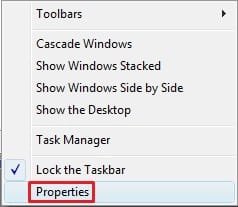
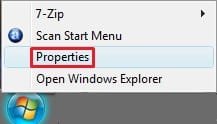
1. Right click on an empty area of the taskbar, and click/tap on Properties. (See screenshot below)
547d1226605261-taskbar-button-grouping-enable-disable-taskbar.jpg

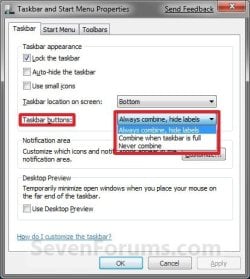
2. Click on the drop down arrow menu to the right of Taskbar buttons, and do step 3, 4, or 5 below for what you would like to do. (See screenshot below)
NOTE: If this option is grayed out, then see this tutorial to "Allow" it: http://www.sevenforums.com/tutorials/118986-taskbar-button-grouping-allow-prevent.html
Properties-6956.jpg Windows-8.jpg
3. To Always Group Taskbar Buttons
NOTE: Taskbar buttons for the same opened program or window will always be grouped to one icon button.
A) Click/tap on Always combine, hide labels to select it, and go to step 6 below. (See screenshot below step 3)
4. To Only Group Taskbar Buttons when the Taskbar is Full
NOTE: Taskbar bar buttons for the same opened program or window will be grouped to one icon button when the taskbar runs out space for the buttons.
A) Click/tap on Combine when taskbar is full to select it, and go to step 6 below. (See screenshot below step 3)
5. To Never Group Taskbar Buttons
NOTE: Open windows will remain as separate bar buttons on the taskbar and not be grouped together.
A) Click/tap on Never combine to select it, and go to step 6 below. (See screenshot below step 3)
6. Click/tap on OK. (See screenshot below step 3)


OPTION TWO

Enable or Disable Taskbar Button Grouping using a BAT File


1. Do step 2, 3, or 4 below for how you would like your taskbar buttons set to do.

2. To Always Group Taskbar Buttons
NOTE: Taskbar buttons for the same opened program or window will always be grouped to one icon button.
A) Click/tap on the download button below to download the file below, and go to step 5 below.
Always_combine_hide_labels.bat


Download


3. To Only Group Taskbar Buttons when the Taskbar is Full
NOTE: Taskbar bar buttons for the same opened program or window will be grouped to one icon button when the taskbar runs out space for the buttons.
A) Click/tap on the download button below to download the file below, and go to step 5 below.
Combine_when_taskbar_is_full.bat

Download


4. To Never Group Taskbar Buttons
NOTE: Open windows will remain as separate bar buttons on the taskbar and not be grouped together.
A) Click/tap on the download button below to download the file below, and go to step 5 below.
Never_combine.bat


Download


5. Save the .bat file to your Desktop.

6. Double click/tap on the downloaded .bat file to run it.

7. If prompted, click/tap on Run.
NOTE: If you like, you can stop getting the Run prompt by unblocking the downloaded .bat file.

8. You will now notice your screen quckly flash as explorer is restarted.

That's it,
Shawn


Attachments

  • Always_Grouped.jpg
    Always_Grouped.jpg
    4.2 KB · Views: 253,012
  • Grouped_Expanded.jpg
    Grouped_Expanded.jpg
    13.3 KB · Views: 252,935
  • Not_Always_Grouped.jpg
    Not_Always_Grouped.jpg
    16 KB · Views: 254,670
  • taskbar.jpg
    taskbar.jpg
    8.3 KB · Views: 253,589
  • Start_Menu.jpg
    Start_Menu.jpg
    5.1 KB · Views: 112,734
  • Combine_when_taskbar_is_full.bat
    Combine_when_taskbar_is_full.bat
    336 bytes · Views: 2,118
  • Never_combine.bat
    Never_combine.bat
    336 bytes · Views: 4,423
  • Always_combine_hide_labels.bat
    Always_combine_hide_labels.bat
    336 bytes · Views: 4,917
Last edited:
just what i was looking for, thanks again Shawn........Great work!!

:)SK
 

My Computer

Computer Manufacturer/Model Number
myself
OS
SEVEN x64
CPU
Q9450 @ 3.6GHZ 1.34v
Motherboard
ASUS P5K PREMIUM P35
Memory
8GB 1066 buffalo firestix @ 1152mhz CL5
Graphics Card(s)
Sapphire HD 5970 + GTX260 (physX)
Sound Card
Creative X-FI Xtreme Gamer
Monitor(s) Displays
SAMSUNG 20'' & SAMSUNG 23'' (dual screens)
Screen Resolution
2048x1152 & 1680x1050
Hard Drives
1x seagate 160gb IDE & 1x seagate 160gb SATA
PSU
XCILIO 850w (78A)
Case
CM590 1x 120x38mm & 2x92x38mm / 4x 120x25mm
Cooling
AC7 PRO @ 92x38mm blower, Lamptron military bus bay controll
Keyboard
LOGITECH E110
Mouse
logitech NX5
Internet Speed
2MB
Other Info
its a continual ''work in progress''....
Nice. Thanks Shawn.

Gary
 

My Computer

Computer Manufacturer/Model Number
Dell XPS420
OS
Vista Ult 64 bit Seven Ult RTM x64
CPU
Intel Core2 Quad Q6600 2.40 gigahertz
Memory
Crucial Ballistix 4x2GB PC2 6400
Graphics Card(s)
NVIDIA GeForce 8600 GTS 256 MB
Sound Card
Creative SB X-Fi audio
Monitor(s) Displays
HP w2207 + HPvs15
Screen Resolution
1680x1050 + 1024x768
Hard Drives
2-WD5000AAKS-500 GB
WD5000AAV-500 GB external
Keyboard
Microsoft Comfort Curve
Mouse
MX Revolution
Other Info
Wacom Intuos 2 Graphics Tablet
Experience Index=5.5
You're welcome Mitch and Gary.
 

My Computer

Computer type
PC/Desktop
Computer Manufacturer/Model Number
Self built custom
OS
64-bit Windows 11 Pro for Workstations
CPU
Intel i7-8700K OC'd to 5 GHz
Motherboard
ASUS ROG Maximus XI Formula Z390
Memory
64 GB (4x16GB) G.SKILL TridentZ RGB DDR4 3600 MHz
Graphics Card(s)
ASUS ROG-STRIX-GTX1080TI-O11G-GAMING
Sound Card
Integrated
Monitor(s) Displays
2 x Samsung Odyssey G7 27"
Screen Resolution
2560x1440
Hard Drives
1TB Samsung 990 PRO M.2,
4TB Samsung 990 PRO PRO M.2,
TerraMaster F8 SSD Plus NAS
PSU
Seasonic Prime Titanium 850W
Case
Thermaltake Core P3
Cooling
Corsair Hydro H115i
Keyboard
Logitech wireless K800
Mouse
Logitech MX Master 4
Internet Speed
2 Gb/s Download and 100 Mb/s Upload
Antivirus
Malwarebyte Anti-Malware Premium
Browser
Google Chrome
Other Info
Logitech Z625 speaker system,
Logitech BRIO 4K Pro webcam,
HP Color LaserJet Pro MFP M477fdn,
APC SMART-UPS RT 1000 XL - SURT1000XLI,
Galaxy S23 Plus phone
Nice one thanks
 

My Computer

Computer Manufacturer/Model Number
Sony-Vaio VGC-RA828G
OS
Windows 7
CPU
Pentium 4 3.6 GHZ
Memory
2 GB
Graphics Card(s)
Ati Radeon X600
Monitor(s) Displays
Sony 19"
Screen Resolution
1280x1024
Hard Drives
400GB
Mouse
Logitech MX Revolution
Internet Speed
ADSL 6MB/Sec
You're welcome Igorstaro. :)
 

My Computer

Computer type
PC/Desktop
Computer Manufacturer/Model Number
Self built custom
OS
64-bit Windows 11 Pro for Workstations
CPU
Intel i7-8700K OC'd to 5 GHz
Motherboard
ASUS ROG Maximus XI Formula Z390
Memory
64 GB (4x16GB) G.SKILL TridentZ RGB DDR4 3600 MHz
Graphics Card(s)
ASUS ROG-STRIX-GTX1080TI-O11G-GAMING
Sound Card
Integrated
Monitor(s) Displays
2 x Samsung Odyssey G7 27"
Screen Resolution
2560x1440
Hard Drives
1TB Samsung 990 PRO M.2,
4TB Samsung 990 PRO PRO M.2,
TerraMaster F8 SSD Plus NAS
PSU
Seasonic Prime Titanium 850W
Case
Thermaltake Core P3
Cooling
Corsair Hydro H115i
Keyboard
Logitech wireless K800
Mouse
Logitech MX Master 4
Internet Speed
2 Gb/s Download and 100 Mb/s Upload
Antivirus
Malwarebyte Anti-Malware Premium
Browser
Google Chrome
Other Info
Logitech Z625 speaker system,
Logitech BRIO 4K Pro webcam,
HP Color LaserJet Pro MFP M477fdn,
APC SMART-UPS RT 1000 XL - SURT1000XLI,
Galaxy S23 Plus phone
How do I keep Windows 7 from positioning all the Firefox buttons together? When I open a new Firefox window, I would like to button to appear at the right end of the taskbar. However, Win7 positions it with the other Firefox buttons and will not let me move an individual button; they all move as a group. Under Vista and XP I used a utility called Taskbar Shuffle that let me put each button where I wanted it. Win7 is almost there, but not quite. (Note: this doesn't just apply to Firefox, it will occur with all applications that allow multiple instances).
 

My Computer

OS
Windows XP
Hello Fquist, and welcome to Seven Forums.

I'm afraid that the individual buttons will move together when not grouped, or as one when group by default and cannot be changed. :(

Sorry,
Shawn
 

My Computer

Computer type
PC/Desktop
Computer Manufacturer/Model Number
Self built custom
OS
64-bit Windows 11 Pro for Workstations
CPU
Intel i7-8700K OC'd to 5 GHz
Motherboard
ASUS ROG Maximus XI Formula Z390
Memory
64 GB (4x16GB) G.SKILL TridentZ RGB DDR4 3600 MHz
Graphics Card(s)
ASUS ROG-STRIX-GTX1080TI-O11G-GAMING
Sound Card
Integrated
Monitor(s) Displays
2 x Samsung Odyssey G7 27"
Screen Resolution
2560x1440
Hard Drives
1TB Samsung 990 PRO M.2,
4TB Samsung 990 PRO PRO M.2,
TerraMaster F8 SSD Plus NAS
PSU
Seasonic Prime Titanium 850W
Case
Thermaltake Core P3
Cooling
Corsair Hydro H115i
Keyboard
Logitech wireless K800
Mouse
Logitech MX Master 4
Internet Speed
2 Gb/s Download and 100 Mb/s Upload
Antivirus
Malwarebyte Anti-Malware Premium
Browser
Google Chrome
Other Info
Logitech Z625 speaker system,
Logitech BRIO 4K Pro webcam,
HP Color LaserJet Pro MFP M477fdn,
APC SMART-UPS RT 1000 XL - SURT1000XLI,
Galaxy S23 Plus phone
Thanks for the tip Brink!!
Now if you could just tell me how to change the taksbar to that nice dark grey I'd be set!!
 

My Computer

Computer type
PC/Desktop
Computer Manufacturer/Model Number
LENOVO K450 @3.0GHZ
OS
64-bit Windows 8.1 Pro
CPU
Core(TM) i5 CPU 4330 Haswell @ 3.20GHz
Motherboard
LENOVO
Memory
12.00 GB
Graphics Card(s)
Intel(R) HD Graphics
Sound Card
Intel HD integtrated
Monitor(s) Displays
HP 25' ISP Monitor
Screen Resolution
1900/1020
Hard Drives
(1) ST1000DM003-1CH162 (2) Generic STORAGE DEVICE USB Device (3) Generic STORAGE DEVICE USB Device
Internet Speed
100mb down/10mb up
You're welcome Tews,

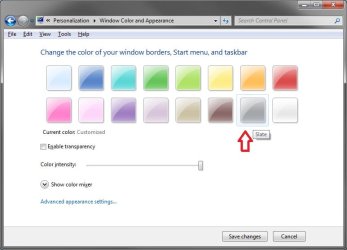
These are the color settings that I used for the taskbar. :)

Personalize_Windows_Color.jpg
 

My Computer

Computer type
PC/Desktop
Computer Manufacturer/Model Number
Self built custom
OS
64-bit Windows 11 Pro for Workstations
CPU
Intel i7-8700K OC'd to 5 GHz
Motherboard
ASUS ROG Maximus XI Formula Z390
Memory
64 GB (4x16GB) G.SKILL TridentZ RGB DDR4 3600 MHz
Graphics Card(s)
ASUS ROG-STRIX-GTX1080TI-O11G-GAMING
Sound Card
Integrated
Monitor(s) Displays
2 x Samsung Odyssey G7 27"
Screen Resolution
2560x1440
Hard Drives
1TB Samsung 990 PRO M.2,
4TB Samsung 990 PRO PRO M.2,
TerraMaster F8 SSD Plus NAS
PSU
Seasonic Prime Titanium 850W
Case
Thermaltake Core P3
Cooling
Corsair Hydro H115i
Keyboard
Logitech wireless K800
Mouse
Logitech MX Master 4
Internet Speed
2 Gb/s Download and 100 Mb/s Upload
Antivirus
Malwarebyte Anti-Malware Premium
Browser
Google Chrome
Other Info
Logitech Z625 speaker system,
Logitech BRIO 4K Pro webcam,
HP Color LaserJet Pro MFP M477fdn,
APC SMART-UPS RT 1000 XL - SURT1000XLI,
Galaxy S23 Plus phone
I'm not seeing what the tutorial is for, isn't this the default settings for the taskbar?
 

My Computer

OS
7264x64/7260x86
I'm not seeing what the tutorial is for, isn't this the default settings for the taskbar?

I may be wrong but i believe the 'Buttons' have text & the 'Icons' don't, making them more condensed.
 

My Computer

Computer Manufacturer/Model Number
Compaq Desktop
OS
Windows 7 Ultimate x64
CPU
AMD Sempron Dual Core
Memory
3GB
Graphics Card(s)
NVIDIA GeForce 6150SE nForce 430
Screen Resolution
1024x768
Hard Drives
150GB Sata
So it's for people using the "xp style" taskbar then.
 

My Computer

OS
7264x64/7260x86
I'm not seeing what the tutorial is for, isn't this the default settings for the taskbar?

Hello Copernicus,

The buttons is to have the old Vista style taskbar with the open window Title text, and the icons is for the new default Windows 7 style taskbar that onle have the icons. You can see the example screenshots at the top of the tutorial to help get a better idea if each though. :)

Hope this helps,
Shaw
 

My Computer

Computer type
PC/Desktop
Computer Manufacturer/Model Number
Self built custom
OS
64-bit Windows 11 Pro for Workstations
CPU
Intel i7-8700K OC'd to 5 GHz
Motherboard
ASUS ROG Maximus XI Formula Z390
Memory
64 GB (4x16GB) G.SKILL TridentZ RGB DDR4 3600 MHz
Graphics Card(s)
ASUS ROG-STRIX-GTX1080TI-O11G-GAMING
Sound Card
Integrated
Monitor(s) Displays
2 x Samsung Odyssey G7 27"
Screen Resolution
2560x1440
Hard Drives
1TB Samsung 990 PRO M.2,
4TB Samsung 990 PRO PRO M.2,
TerraMaster F8 SSD Plus NAS
PSU
Seasonic Prime Titanium 850W
Case
Thermaltake Core P3
Cooling
Corsair Hydro H115i
Keyboard
Logitech wireless K800
Mouse
Logitech MX Master 4
Internet Speed
2 Gb/s Download and 100 Mb/s Upload
Antivirus
Malwarebyte Anti-Malware Premium
Browser
Google Chrome
Other Info
Logitech Z625 speaker system,
Logitech BRIO 4K Pro webcam,
HP Color LaserJet Pro MFP M477fdn,
APC SMART-UPS RT 1000 XL - SURT1000XLI,
Galaxy S23 Plus phone
i cant see the pin to taskbar option when i right click the shortcut icon.... i cant move the shortcut icon to taskbar......the taskbar wont allow it.... i tried the download .zip file.... extracted it without error... still i cant find the pin to taskbar option.... theres no unblock in the properties/gen tab also.... so its already unblocked.... BTW.... i alread enabled the recent items on the start menu... :cry:
 

My Computer

Computer Manufacturer/Model Number
ASUSTeK Computer INC.
OS
Windows 7 Ultimate 64bit
CPU
Intel Core i5 750
Motherboard
Maximus III Formula
Memory
2 x 4GB Corsair Dominator ddr3 1600mhz dual channel
Graphics Card(s)
XFX 5850
Sound Card
SupremeFX X-Fi
Monitor(s) Displays
Acer G235H
Screen Resolution
1920x1080
Hard Drives
60GB OCZ Vertex SSD
160GB WD Cav Blue
PSU
Silverstone DA650
Case
Bitfenix Shinobi
Cooling
Swiftech Apogee XT
Keyboard
Microsoft X6
Mouse
Razer Salmosa Korean Tournament Ed.
Internet Speed
3 MBPs
Hello Nomadgamer13,

What shortcut or tutorial is this for? :huh:
 

My Computer

Computer type
PC/Desktop
Computer Manufacturer/Model Number
Self built custom
OS
64-bit Windows 11 Pro for Workstations
CPU
Intel i7-8700K OC'd to 5 GHz
Motherboard
ASUS ROG Maximus XI Formula Z390
Memory
64 GB (4x16GB) G.SKILL TridentZ RGB DDR4 3600 MHz
Graphics Card(s)
ASUS ROG-STRIX-GTX1080TI-O11G-GAMING
Sound Card
Integrated
Monitor(s) Displays
2 x Samsung Odyssey G7 27"
Screen Resolution
2560x1440
Hard Drives
1TB Samsung 990 PRO M.2,
4TB Samsung 990 PRO PRO M.2,
TerraMaster F8 SSD Plus NAS
PSU
Seasonic Prime Titanium 850W
Case
Thermaltake Core P3
Cooling
Corsair Hydro H115i
Keyboard
Logitech wireless K800
Mouse
Logitech MX Master 4
Internet Speed
2 Gb/s Download and 100 Mb/s Upload
Antivirus
Malwarebyte Anti-Malware Premium
Browser
Google Chrome
Other Info
Logitech Z625 speaker system,
Logitech BRIO 4K Pro webcam,
HP Color LaserJet Pro MFP M477fdn,
APC SMART-UPS RT 1000 XL - SURT1000XLI,
Galaxy S23 Plus phone
How do I keep Windows 7 from positioning all the Firefox buttons together? When I open a new Firefox window, I would like to button to appear at the right end of the taskbar. However, Win7 positions it with the other Firefox buttons and will not let me move an individual button; they all move as a group. Under Vista and XP I used a utility called Taskbar Shuffle that let me put each button where I wanted it. Win7 is almost there, but not quite. (Note: this doesn't just apply to Firefox, it will occur with all applications that allow multiple instances).
Google for "7 Taskbar Tweaker".
 
Number of programs grouped

Hi,

I'm tired of looking for this answer everywhere (maybe i'm not looking well)... Is there any way to change the taskbar so it shows the number of windows opened of an application (when programs are grouped) like on Windows Vista and XP taskbar?

thanks
 

My Computer

OS
Windows 7
Hello Ritzpkr, and welcome to Seven Forums.

Sorry, but not that I'm aware of. :(

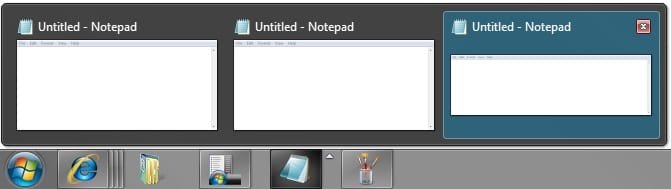
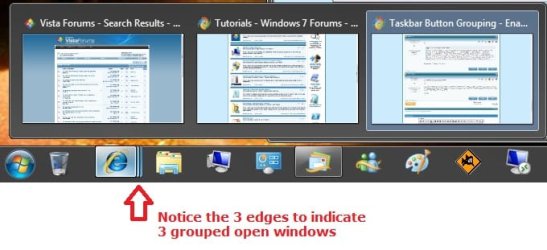
You will have a extra edge on the pinned icon for each opened window you have for it. Plus, you can hover the mouse of the icon to see a thumbnail preview of the opened windows. You can see in the example below with 3 opened tabs (windows) of IE8.
 

Attachments

  • grouped.jpg
    grouped.jpg
    35.6 KB · Views: 2,197

My Computer

Computer type
PC/Desktop
Computer Manufacturer/Model Number
Self built custom
OS
64-bit Windows 11 Pro for Workstations
CPU
Intel i7-8700K OC'd to 5 GHz
Motherboard
ASUS ROG Maximus XI Formula Z390
Memory
64 GB (4x16GB) G.SKILL TridentZ RGB DDR4 3600 MHz
Graphics Card(s)
ASUS ROG-STRIX-GTX1080TI-O11G-GAMING
Sound Card
Integrated
Monitor(s) Displays
2 x Samsung Odyssey G7 27"
Screen Resolution
2560x1440
Hard Drives
1TB Samsung 990 PRO M.2,
4TB Samsung 990 PRO PRO M.2,
TerraMaster F8 SSD Plus NAS
PSU
Seasonic Prime Titanium 850W
Case
Thermaltake Core P3
Cooling
Corsair Hydro H115i
Keyboard
Logitech wireless K800
Mouse
Logitech MX Master 4
Internet Speed
2 Gb/s Download and 100 Mb/s Upload
Antivirus
Malwarebyte Anti-Malware Premium
Browser
Google Chrome
Other Info
Logitech Z625 speaker system,
Logitech BRIO 4K Pro webcam,
HP Color LaserJet Pro MFP M477fdn,
APC SMART-UPS RT 1000 XL - SURT1000XLI,
Galaxy S23 Plus phone
I was wondering if there was a way to group unopened applications on the task bar?
to turn this:
Task%20bar%20unsorted.PNG

Into this:
Task%20bar%20sorted.PNG
 

My Computer

Computer Manufacturer/Model Number
Lenovo Ideapad Y430
OS
Windows 7 professional 64 bit
CPU
Intel cor 2 duo T6400
Back
Top