Taskbar Button Grouping - Enable or Disable

How to Enable or Disable Taskbar Button Grouping in Windows 7

   Information
A taskbar button represents an open window on the desktop. These buttons appear on the taskbar as a horizontal bar or icon button.

This tutorial will show you how to have similar open window buttons to group to one button or separate buttons in Windows 7.

   Note
When you have more than one similar window open, say Notepad windows, you could set the taskbar to group the same Notepad taskbar buttons to just one button instead of multiple buttons. This can help organize the taskbar and save space when you have multiple windows open.

   Tip
Microsoft has made available a hotfix that will resolve a problem where the taskbar customizations are lost and reset to defaults when automatic logon is enabled in Windows 7 and Windows Server 2008 R2.

More details are available at FIX: The Taskbar is reset to the default settings when you use the "Automatically Log On" feature in Windows 7 and in Windows Server 2008 R2.


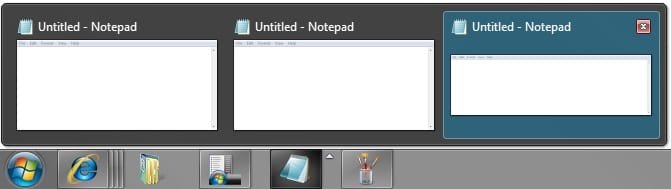
EXAMPLE: Taskbar Buttons Grouped
544d1226605261-taskbar-button-grouping-enable-disable-always_grouped.jpg


545d1226605261-taskbar-button-grouping-enable-disable-grouped_expanded.jpg

EXAMPLE: Taskbar Buttons Not Grouped
546d1226605261-taskbar-button-grouping-enable-disable-not_always_grouped.jpg


OPTION ONE

Enable or Disable Taskbar Button Grouping in Taskbar and Start Menu Properties


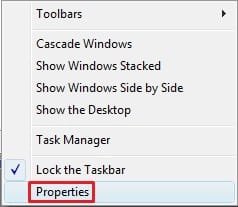
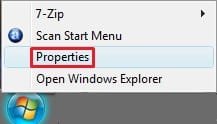
1. Right click on an empty area of the taskbar, and click/tap on Properties. (See screenshot below)
547d1226605261-taskbar-button-grouping-enable-disable-taskbar.jpg

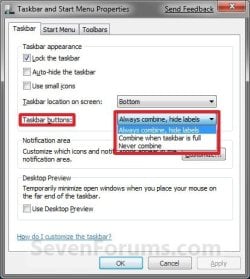
2. Click on the drop down arrow menu to the right of Taskbar buttons, and do step 3, 4, or 5 below for what you would like to do. (See screenshot below)
NOTE: If this option is grayed out, then see this tutorial to "Allow" it: http://www.sevenforums.com/tutorials/118986-taskbar-button-grouping-allow-prevent.html
Properties-6956.jpg Windows-8.jpg
3. To Always Group Taskbar Buttons
NOTE: Taskbar buttons for the same opened program or window will always be grouped to one icon button.
A) Click/tap on Always combine, hide labels to select it, and go to step 6 below. (See screenshot below step 3)
4. To Only Group Taskbar Buttons when the Taskbar is Full
NOTE: Taskbar bar buttons for the same opened program or window will be grouped to one icon button when the taskbar runs out space for the buttons.
A) Click/tap on Combine when taskbar is full to select it, and go to step 6 below. (See screenshot below step 3)
5. To Never Group Taskbar Buttons
NOTE: Open windows will remain as separate bar buttons on the taskbar and not be grouped together.
A) Click/tap on Never combine to select it, and go to step 6 below. (See screenshot below step 3)
6. Click/tap on OK. (See screenshot below step 3)


OPTION TWO

Enable or Disable Taskbar Button Grouping using a BAT File


1. Do step 2, 3, or 4 below for how you would like your taskbar buttons set to do.

2. To Always Group Taskbar Buttons
NOTE: Taskbar buttons for the same opened program or window will always be grouped to one icon button.
A) Click/tap on the download button below to download the file below, and go to step 5 below.
Always_combine_hide_labels.bat


Download


3. To Only Group Taskbar Buttons when the Taskbar is Full
NOTE: Taskbar bar buttons for the same opened program or window will be grouped to one icon button when the taskbar runs out space for the buttons.
A) Click/tap on the download button below to download the file below, and go to step 5 below.
Combine_when_taskbar_is_full.bat

Download


4. To Never Group Taskbar Buttons
NOTE: Open windows will remain as separate bar buttons on the taskbar and not be grouped together.
A) Click/tap on the download button below to download the file below, and go to step 5 below.
Never_combine.bat


Download


5. Save the .bat file to your Desktop.

6. Double click/tap on the downloaded .bat file to run it.

7. If prompted, click/tap on Run.
NOTE: If you like, you can stop getting the Run prompt by unblocking the downloaded .bat file.

8. You will now notice your screen quckly flash as explorer is restarted.

That's it,
Shawn


Attachments

  • Always_Grouped.jpg
    Always_Grouped.jpg
    4.2 KB · Views: 253,012
  • Grouped_Expanded.jpg
    Grouped_Expanded.jpg
    13.3 KB · Views: 252,935
  • Not_Always_Grouped.jpg
    Not_Always_Grouped.jpg
    16 KB · Views: 254,670
  • taskbar.jpg
    taskbar.jpg
    8.3 KB · Views: 253,589
  • Start_Menu.jpg
    Start_Menu.jpg
    5.1 KB · Views: 112,734
  • Combine_when_taskbar_is_full.bat
    Combine_when_taskbar_is_full.bat
    336 bytes · Views: 2,118
  • Never_combine.bat
    Never_combine.bat
    336 bytes · Views: 4,423
  • Always_combine_hide_labels.bat
    Always_combine_hide_labels.bat
    336 bytes · Views: 4,917
Last edited:
:( i search for this but none of the program or change in register made that i wont.
thx anyway.
 

My Computer

OS
windows xp
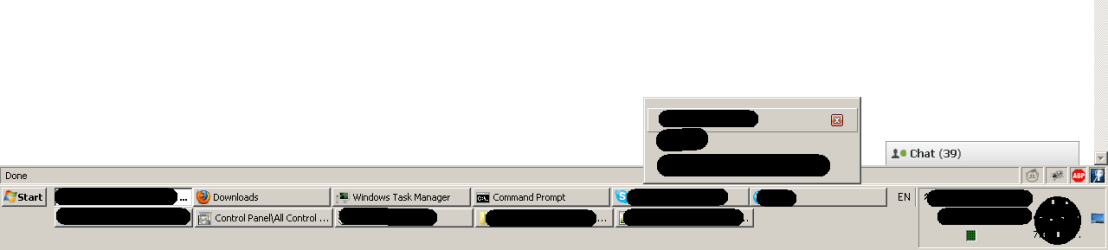
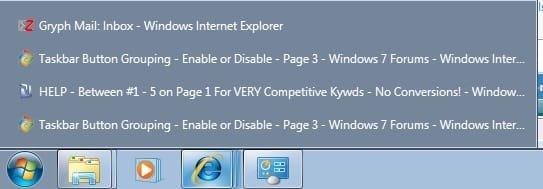
I have a similar but different problem. Unlike the initial tutorial on page one of this thread, I need to know how to achieve the attached result. I use 2 computers running windows 7, one displays like the attachement when I mouse over the IE button, and the other dispalys the open IE pages side by side like the initial examples. How do you change between those modes?

Thanks,

Jordan
 

Attachments

  • windows 7 taskbar.jpg
    windows 7 taskbar.jpg
    14.3 KB · Views: 339

My Computer

OS
Windows 7 64bit

My Computer

Computer type
PC/Desktop
Computer Manufacturer/Model Number
Self built custom
OS
64-bit Windows 11 Pro for Workstations
CPU
Intel i7-8700K OC'd to 5 GHz
Motherboard
ASUS ROG Maximus XI Formula Z390
Memory
64 GB (4x16GB) G.SKILL TridentZ RGB DDR4 3600 MHz
Graphics Card(s)
ASUS ROG-STRIX-GTX1080TI-O11G-GAMING
Sound Card
Integrated
Monitor(s) Displays
2 x Samsung Odyssey G7 27"
Screen Resolution
2560x1440
Hard Drives
1TB Samsung 990 PRO M.2,
4TB Samsung 990 PRO PRO M.2,
TerraMaster F8 SSD Plus NAS
PSU
Seasonic Prime Titanium 850W
Case
Thermaltake Core P3
Cooling
Corsair Hydro H115i
Keyboard
Logitech wireless K800
Mouse
Logitech MX Master 4
Internet Speed
2 Gb/s Download and 100 Mb/s Upload
Antivirus
Malwarebyte Anti-Malware Premium
Browser
Google Chrome
Other Info
Logitech Z625 speaker system,
Logitech BRIO 4K Pro webcam,
HP Color LaserJet Pro MFP M477fdn,
APC SMART-UPS RT 1000 XL - SURT1000XLI,
Galaxy S23 Plus phone
Thanks. I will try that. I tend to like the method I attached better...but I use the 2 machines differently. So, I will apply that on the other machine, and see how that works for the work I do on that machine. I always have a ton of things going on, hence the ability to stack and keep it neater. Thanks again for the quick response. You would think it was be a simple toggle somewhere within Windows, I guess I was wrong.
 

My Computer

OS
Windows 7 64bit
You're most welcome Jordan.

In addition, if you like, you can use step 3 in OPTION TWO to set how many thumbnail previews to display before it automatically displays list mode instead.
 

My Computer

Computer type
PC/Desktop
Computer Manufacturer/Model Number
Self built custom
OS
64-bit Windows 11 Pro for Workstations
CPU
Intel i7-8700K OC'd to 5 GHz
Motherboard
ASUS ROG Maximus XI Formula Z390
Memory
64 GB (4x16GB) G.SKILL TridentZ RGB DDR4 3600 MHz
Graphics Card(s)
ASUS ROG-STRIX-GTX1080TI-O11G-GAMING
Sound Card
Integrated
Monitor(s) Displays
2 x Samsung Odyssey G7 27"
Screen Resolution
2560x1440
Hard Drives
1TB Samsung 990 PRO M.2,
4TB Samsung 990 PRO PRO M.2,
TerraMaster F8 SSD Plus NAS
PSU
Seasonic Prime Titanium 850W
Case
Thermaltake Core P3
Cooling
Corsair Hydro H115i
Keyboard
Logitech wireless K800
Mouse
Logitech MX Master 4
Internet Speed
2 Gb/s Download and 100 Mb/s Upload
Antivirus
Malwarebyte Anti-Malware Premium
Browser
Google Chrome
Other Info
Logitech Z625 speaker system,
Logitech BRIO 4K Pro webcam,
HP Color LaserJet Pro MFP M477fdn,
APC SMART-UPS RT 1000 XL - SURT1000XLI,
Galaxy S23 Plus phone
If you like seeing a list of open program names (titles), I would also suggest trying the taskbar at the left or right edge of the screen. Set the width of the taskbar to accomodate enough text of each title to satisfy you. Assuming that your taskbar is in Auto-Hide mode, just popping up the taskbar will show you your list of programs.

I launch most of my programs from the "Desktop" toolbar on the taskbar (right-click on the taskbar, then select Toolbars->Desktop), keeping the taskbar wide enough for three columns of icons (they can be arranged on the toolbar).

Bottom line, I've never used the taskbar at the bottom, and given the features removed in Windows 7 I purchased a copy of ClassicStartMenu (SevenClassicStart is another one).

The neat thing about ClassicStartMenu (not a perfect program, but hey, if Microsoft hadn't removed features I wouldn't have needed it) is that I can choose to click on either the ClassicStartMenu button and get my pre-Windows 7 look and feel, or I can click next to it and get the Windows 7 start menu, which is okay when you know the exact word to search for.
 

My Computer

OS
Windows XP / Vista / 7
Nice post, but I like them grouped. Keeps them organized when I have a lot of windows open. All I have to do is just click on the tab and scroll up to which ever window I want. Better than minimizing this and that.
 

My Computer

Computer Manufacturer/Model Number
Toshiba
OS
Windows 7 Home Premium 64Bit
Hard Drives
320 GB
My problem is that I can't use option of taskbar buttons grouping because I haven't got active posibility to change options like on (3) of taskbar icons when I try do that by making like (1)

WHY????


attachment.php


Can you help, that is nice new way in 7 that I can't use :(
 
Last edited by a moderator:

My Computer

OS
7 hp 32

My Computer

Computer type
PC/Desktop
Computer Manufacturer/Model Number
Self built custom
OS
64-bit Windows 11 Pro for Workstations
CPU
Intel i7-8700K OC'd to 5 GHz
Motherboard
ASUS ROG Maximus XI Formula Z390
Memory
64 GB (4x16GB) G.SKILL TridentZ RGB DDR4 3600 MHz
Graphics Card(s)
ASUS ROG-STRIX-GTX1080TI-O11G-GAMING
Sound Card
Integrated
Monitor(s) Displays
2 x Samsung Odyssey G7 27"
Screen Resolution
2560x1440
Hard Drives
1TB Samsung 990 PRO M.2,
4TB Samsung 990 PRO PRO M.2,
TerraMaster F8 SSD Plus NAS
PSU
Seasonic Prime Titanium 850W
Case
Thermaltake Core P3
Cooling
Corsair Hydro H115i
Keyboard
Logitech wireless K800
Mouse
Logitech MX Master 4
Internet Speed
2 Gb/s Download and 100 Mb/s Upload
Antivirus
Malwarebyte Anti-Malware Premium
Browser
Google Chrome
Other Info
Logitech Z625 speaker system,
Logitech BRIO 4K Pro webcam,
HP Color LaserJet Pro MFP M477fdn,
APC SMART-UPS RT 1000 XL - SURT1000XLI,
Galaxy S23 Plus phone
You're most welcome Modrzew. :)
 

My Computer

Computer type
PC/Desktop
Computer Manufacturer/Model Number
Self built custom
OS
64-bit Windows 11 Pro for Workstations
CPU
Intel i7-8700K OC'd to 5 GHz
Motherboard
ASUS ROG Maximus XI Formula Z390
Memory
64 GB (4x16GB) G.SKILL TridentZ RGB DDR4 3600 MHz
Graphics Card(s)
ASUS ROG-STRIX-GTX1080TI-O11G-GAMING
Sound Card
Integrated
Monitor(s) Displays
2 x Samsung Odyssey G7 27"
Screen Resolution
2560x1440
Hard Drives
1TB Samsung 990 PRO M.2,
4TB Samsung 990 PRO PRO M.2,
TerraMaster F8 SSD Plus NAS
PSU
Seasonic Prime Titanium 850W
Case
Thermaltake Core P3
Cooling
Corsair Hydro H115i
Keyboard
Logitech wireless K800
Mouse
Logitech MX Master 4
Internet Speed
2 Gb/s Download and 100 Mb/s Upload
Antivirus
Malwarebyte Anti-Malware Premium
Browser
Google Chrome
Other Info
Logitech Z625 speaker system,
Logitech BRIO 4K Pro webcam,
HP Color LaserJet Pro MFP M477fdn,
APC SMART-UPS RT 1000 XL - SURT1000XLI,
Galaxy S23 Plus phone
disabling grouping

Hey guys,

I am using win98 theme for my win7, regrettably when I open several sub windows (skype for example) when I hover over any of them, a list of all sub windows appears.

I am pretty sure this was intended behavior on standard settings, but come on...
 

My Computer

OS
Windows 7 Ultimate 32
Hello Lazy, and welcome to Seven Forums.

Could you post back a screenshot of this just so that we can see it and be sure of what to suggest. :)
 

My Computer

Computer type
PC/Desktop
Computer Manufacturer/Model Number
Self built custom
OS
64-bit Windows 11 Pro for Workstations
CPU
Intel i7-8700K OC'd to 5 GHz
Motherboard
ASUS ROG Maximus XI Formula Z390
Memory
64 GB (4x16GB) G.SKILL TridentZ RGB DDR4 3600 MHz
Graphics Card(s)
ASUS ROG-STRIX-GTX1080TI-O11G-GAMING
Sound Card
Integrated
Monitor(s) Displays
2 x Samsung Odyssey G7 27"
Screen Resolution
2560x1440
Hard Drives
1TB Samsung 990 PRO M.2,
4TB Samsung 990 PRO PRO M.2,
TerraMaster F8 SSD Plus NAS
PSU
Seasonic Prime Titanium 850W
Case
Thermaltake Core P3
Cooling
Corsair Hydro H115i
Keyboard
Logitech wireless K800
Mouse
Logitech MX Master 4
Internet Speed
2 Gb/s Download and 100 Mb/s Upload
Antivirus
Malwarebyte Anti-Malware Premium
Browser
Google Chrome
Other Info
Logitech Z625 speaker system,
Logitech BRIO 4K Pro webcam,
HP Color LaserJet Pro MFP M477fdn,
APC SMART-UPS RT 1000 XL - SURT1000XLI,
Galaxy S23 Plus phone
Here is the shot...
This popup is quite annoying. I have increased the time for it's appearing, but sometimes it just ignore this value...
 

Attachments

  • annoy1.png
    annoy1.png
    5.4 KB · Views: 364

My Computer

OS
Windows 7 Ultimate 32

My Computer

Computer type
PC/Desktop
Computer Manufacturer/Model Number
Self built custom
OS
64-bit Windows 11 Pro for Workstations
CPU
Intel i7-8700K OC'd to 5 GHz
Motherboard
ASUS ROG Maximus XI Formula Z390
Memory
64 GB (4x16GB) G.SKILL TridentZ RGB DDR4 3600 MHz
Graphics Card(s)
ASUS ROG-STRIX-GTX1080TI-O11G-GAMING
Sound Card
Integrated
Monitor(s) Displays
2 x Samsung Odyssey G7 27"
Screen Resolution
2560x1440
Hard Drives
1TB Samsung 990 PRO M.2,
4TB Samsung 990 PRO PRO M.2,
TerraMaster F8 SSD Plus NAS
PSU
Seasonic Prime Titanium 850W
Case
Thermaltake Core P3
Cooling
Corsair Hydro H115i
Keyboard
Logitech wireless K800
Mouse
Logitech MX Master 4
Internet Speed
2 Gb/s Download and 100 Mb/s Upload
Antivirus
Malwarebyte Anti-Malware Premium
Browser
Google Chrome
Other Info
Logitech Z625 speaker system,
Logitech BRIO 4K Pro webcam,
HP Color LaserJet Pro MFP M477fdn,
APC SMART-UPS RT 1000 XL - SURT1000XLI,
Galaxy S23 Plus phone
Thank you. I will test it for few days and update (although I am pretty sure, it will work) :D
 

My Computer

OS
Windows 7 Ultimate 32
You're most welcome. :)
 

My Computer

Computer type
PC/Desktop
Computer Manufacturer/Model Number
Self built custom
OS
64-bit Windows 11 Pro for Workstations
CPU
Intel i7-8700K OC'd to 5 GHz
Motherboard
ASUS ROG Maximus XI Formula Z390
Memory
64 GB (4x16GB) G.SKILL TridentZ RGB DDR4 3600 MHz
Graphics Card(s)
ASUS ROG-STRIX-GTX1080TI-O11G-GAMING
Sound Card
Integrated
Monitor(s) Displays
2 x Samsung Odyssey G7 27"
Screen Resolution
2560x1440
Hard Drives
1TB Samsung 990 PRO M.2,
4TB Samsung 990 PRO PRO M.2,
TerraMaster F8 SSD Plus NAS
PSU
Seasonic Prime Titanium 850W
Case
Thermaltake Core P3
Cooling
Corsair Hydro H115i
Keyboard
Logitech wireless K800
Mouse
Logitech MX Master 4
Internet Speed
2 Gb/s Download and 100 Mb/s Upload
Antivirus
Malwarebyte Anti-Malware Premium
Browser
Google Chrome
Other Info
Logitech Z625 speaker system,
Logitech BRIO 4K Pro webcam,
HP Color LaserJet Pro MFP M477fdn,
APC SMART-UPS RT 1000 XL - SURT1000XLI,
Galaxy S23 Plus phone
Still no problem. Thank you again.

Respect.
 

My Computer

OS
Windows 7 Ultimate 32
That's great news Lazy. Thank you for posting back with your results. :)
 

My Computer

Computer type
PC/Desktop
Computer Manufacturer/Model Number
Self built custom
OS
64-bit Windows 11 Pro for Workstations
CPU
Intel i7-8700K OC'd to 5 GHz
Motherboard
ASUS ROG Maximus XI Formula Z390
Memory
64 GB (4x16GB) G.SKILL TridentZ RGB DDR4 3600 MHz
Graphics Card(s)
ASUS ROG-STRIX-GTX1080TI-O11G-GAMING
Sound Card
Integrated
Monitor(s) Displays
2 x Samsung Odyssey G7 27"
Screen Resolution
2560x1440
Hard Drives
1TB Samsung 990 PRO M.2,
4TB Samsung 990 PRO PRO M.2,
TerraMaster F8 SSD Plus NAS
PSU
Seasonic Prime Titanium 850W
Case
Thermaltake Core P3
Cooling
Corsair Hydro H115i
Keyboard
Logitech wireless K800
Mouse
Logitech MX Master 4
Internet Speed
2 Gb/s Download and 100 Mb/s Upload
Antivirus
Malwarebyte Anti-Malware Premium
Browser
Google Chrome
Other Info
Logitech Z625 speaker system,
Logitech BRIO 4K Pro webcam,
HP Color LaserJet Pro MFP M477fdn,
APC SMART-UPS RT 1000 XL - SURT1000XLI,
Galaxy S23 Plus phone
The second registry file links to an image instead of reg file. Please correct this!!!
 
Last edited by a moderator:

My Computer

Computer Manufacturer/Model Number
Sony Vaio
OS
Windows 7 Home premium x64
CPU
Intel i5 520m at 2.4GHz(plus turbo mode at 2.9GHz)
Memory
4GB ddr3 1067
Graphics Card(s)
Nvidia 330m
Back
Top