Taskbar buttons - auto order

Mr Bear

New member
Local time
1:24 PM
Messages
5
I'm going nuts trying to find a solution for this.
How can I have my taskbar buttons to open in the order they were opened and stay that way? (FYI buttons are un-grouped)

It's mainly my internet buttons/tabs at the bottom. Before W7, they opened in the order I open them. Example: the last thing I opened be it IE, explorer, or an app should be the last button next to the clock. Right now I have 4 windows open and all the buttons/tabs at the bottom say the same thing. W7 keeps arranging them then I have to look for the new order ...:cry:

I hope I have explained my situation enough ... Please help while I still have some hair not pulled out.
 

My Computer

OS
Windows 7 Ultimate x64 / XP Pro x32
CPU
Modified Q6600 2.4 to 3.0
Motherboard
Dell
Memory
Dell / 4GB
Graphics Card(s)
ATI 2600
Hey Mr Bear Welcome to Seven Forums,
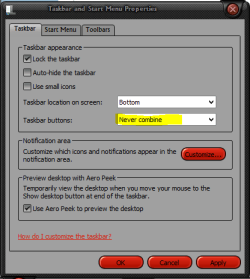
Do you have your taskbar properties set to "NEVER COMBINE" Like this,
 

Attachments

  • Capture.PNG
    Capture.PNG
    31.6 KB · Views: 48

My Computer

Computer type
PC/Desktop
Computer Manufacturer/Model Number
Self Built
OS
Win 10 Pro x64
CPU
Intel I5-2500K @3.3GHz
Motherboard
Asrock P67 Extreme4
Memory
16GB G.Skill Ripjaws X (4x4GB)
Graphics Card(s)
EVGA GeForce 750 Ti SC 2GB
Sound Card
ASUS Xonar DG 5.1 Channels 24-bit 96KHz PCI Interface Sound
Monitor(s) Displays
auria eq2367
Screen Resolution
1920 x 1080
Hard Drives
250GB Samsung 850 EVO SSD
1TB WD Blue
1TB Hitachi
PSU
SeaSonic X 650W 80 Plus Gold
Case
Corsair Obsidian 750D
Cooling
Corsair H60, Three 140mm case fans
Keyboard
Logitech Wireless Keyboard K520
Mouse
Logitech Wireless Mouse M310
Internet Speed
Wave Broadband ~ 100 dn 5 up
Antivirus
Windows Defender, Malwarebytes Premium
Browser
Edge, IE11, Chrome
Other Info
Laptop specs: HP g7-1365dx /
CPU: AMD A6-3420M APU with Radeon(tm) HD Graphics /
RAM: Crucial 8Gb (2x4Gb) /
SSD: Crucial M4-CT128M4SSD2 ATA Device/ FW 000F /
GFX: AMD Radeon HD 6520G /
OS: Windows 10 Pro x64
Yes, taskbar properties are set to "NEVER COMBINE".

Often I have many pages open at a time. W7 will decide to give the buttons a new order as I open new windows then I will have to find the page I wanted to go back to. (they auto arrange so to speak) I'm old school. I believe in quick launch, classic start menu and no auto order/arrange...
 

My Computer

OS
Windows 7 Ultimate x64 / XP Pro x32
CPU
Modified Q6600 2.4 to 3.0
Motherboard
Dell
Memory
Dell / 4GB
Graphics Card(s)
ATI 2600
Here's one case.
1) open IE
2) open second HD (in explorer)
3) open IE

The tab order should be 1-2-3 (XP/Vista style) but its 1-3-2 (W7 style).

Seeing as I use multiple firefox profiles at the same time, at times it get confusing. It appears it might be some sort of "grouping" process.
 

My Computer

OS
Windows 7 Ultimate x64 / XP Pro x32
CPU
Modified Q6600 2.4 to 3.0
Motherboard
Dell
Memory
Dell / 4GB
Graphics Card(s)
ATI 2600
I've been scouring the internet for a solution to this too. I joined these forums just to ask, has anyone heard of a solution to this? It's driving me nuts.

Thanks!
 

My Computer

OS
Windows 7
:(
This problem is driving me nuts, too. I already set IE to not use tabs and disabled the taskbar's groupings, but whenever a new IE window is opened it pops into the taskbar in a random position. (At least there seems to be no logic to it to me. It isn't chronological nor alphabetical by window title.)

I'd be very eager to learn any way to get Windows 7 to stop messing with the order of my IE windows in the Win7 taskbar.

Another odd thing is that I've read that items in the taskbar can be reordered, but I can't reorder any of my IE instances that appear in the taskbar.

Craig in NJ
 

My Computer

OS
Win 7 64-bit
Found a Solution!

A guy named Ram Michael created the 7 Taskbar Tweaker that really works!

The project url http://board.rammichael.com/index.php?showtopic=29

[x]´s, Rafael Mussi @ Brazil

Overview:
"This programs enables you to tweak your Windows 7 taskbar.
Features:
- Show standard window menu on right click instead of jump list.
- Close or focus a window on middle click instead of running a new instance.
- Disable grouping of windows by file path or application id.
- Cycle through windows of a grouped button on left click instead of showing a thumbnails preview.
- Open with while dropping a file on a taskbar button instead of pinning.
- Disable thumbnail previews.

Tested on Windows 7 RTM 7600 Ultimate only.
Available for x86 and x64 systems."
 

My Computer

OS
Seven 7600 Ultimate | Vista 6200 Ultimate SP2
It works !!

Just the tweak I was looking for .. Thanks ! :D
 

My Computer

OS
Windows 7 Ultimate x64 / XP Pro x32
CPU
Modified Q6600 2.4 to 3.0
Motherboard
Dell
Memory
Dell / 4GB
Graphics Card(s)
ATI 2600
Back
Top