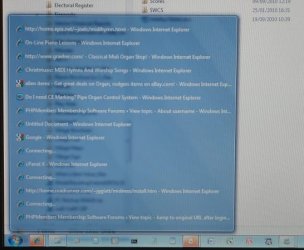
Taskbar Highlighting

rowanbradley

New member
W7 has a feature where icons for running programs in the taskbar are highlighted in an orange/yellow colour when the window requires attention. However, if, as in the attached example, I have multiple windows open in that application (IE in this case), how am I supposed to know which window it is that needs attention?

Thanks - Rowan
 

Attachments

  • IMG_6612sm.jpg
    IMG_6612sm.jpg
    92.9 KB · Views: 9

My Computer

OS
Windows 7 Pro
I thought it told you in the list?
 

My Computer

Computer Manufacturer/Model Number
Advent
OS
Dual-boot: Windows 7 HP 32-bit SP1 & Windows XP Pro 32-bit SP2.
CPU
AMD Phenom X4 9550 2.8Ghz
Motherboard
FOXCONN A6VMX (Socket 940)
Memory
4.0GB RAM
Graphics Card(s)
256MB On-board ATI Radeon X1200 Series
Sound Card
UnKnown
Monitor(s) Displays
19" TFT Mointor
Screen Resolution
1400 by 900
Hard Drives
500GB Western Digital WDC
Keyboard
HP Keyboard
Internet Speed
Dial-up via Mobile phone (Three)
Other Info
80GB External Hard-drive.

Also I have an old Windows XP Laptop for backup/occasional use etc.
Do you mean the list which pops up when you hover your mouse over the icon? If so, I can't see how. The image I attached showed this list - where does it identify the window that requires attention?

If you mean something else by "the list", what exactly?

Thanks - Rowan
 

My Computer

OS
Windows 7 Pro
Back
Top