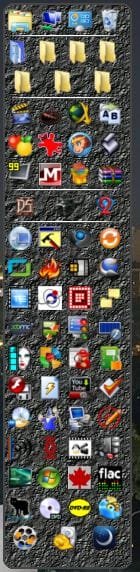
taskbar icons

madgirl

New member
Local time
1:20 AM
Messages
14
Hi

Is there a way of placing the icons the way we used to do in win xp. I mean, i used to place icons in groups in a folder so that it was much easier and faster to select them without having to go to Start>All programs.

I work as a designer, mainly 3d models and i use many softwares. Quite often i have to work with three or four and sometimes 6 softwares at the same time. This way i have to keep them at sight in order not to go crazy.

My problem is that i´ve changed my OS recently and i´ve had a hard time trying to find things out, but i wasn´t able to config the taskbar the way i want it.

Can you give me a helping hand?

Thanks
madgirl
 

My Computer

OS
Windows Ultimate 32
CPU
Intel Core2 Duo E7500 2.93GHz
Motherboard
ASUS p/ Intel P5G41-M LX 775
Memory
3 gb
Graphics Card(s)
vga XFX 1024MB (1GB) GeForce 9500 GT DDR2
Monitor(s) Displays
samsung syncmaster 931c
Hard Drives
500 gb - SeaGate and Samsumg 500 gb
Can't you just drag and drop it into the taskbar?

Or right click it and pin to taskbar.

Edit: Just checked again. If you right click on your icon the menu will give you a selection and
one of them is pin to task bar...
 

My Computer

Computer Manufacturer/Model Number
HP M9077c
OS
Windows 7 Home Premium 64bit
CPU
Intel(R)Core(TM)2 quad [email protected] 2.39GHz
Motherboard
ASUSeK
Memory
6GB DDR2 6400
Graphics Card(s)
GeForce 8500/512MB
Sound Card
Realtek High Def Audio
Monitor(s) Displays
HP w2408 LCD 24" widescreen
Screen Resolution
1920x1200
Cooling
6 pack of Bud
Keyboard
MS wireless Inteli
Mouse
MS wireless Inteli
Hi

Is there a way of placing the icons the way we used to do in win xp. I mean, i used to place icons in groups in a folder so that it was much easier and faster to select them without having to go to Start>All programs.

I work as a designer, mainly 3d models and i use many softwares. Quite often i have to work with three or four and sometimes 6 softwares at the same time. This way i have to keep them at sight in order not to go crazy.

My problem is that i´ve changed my OS recently and i´ve had a hard time trying to find things out, but i wasn´t able to config the taskbar the way i want it.

Can you give me a helping hand?

Thanks
madgirl

Welcome to the forum,

In addition to The Howling Wolves' great advice,

Maybe something like one of these tutorials will help you also,

http://www.sevenforums.com/tutorials/72092-toolbars-how-use-windows-7-vista.html

http://www.sevenforums.com/tutorials/9305-taskbar-pin-unpin-folder.html
 

My Computer

Computer type
PC/Desktop
Computer Manufacturer/Model Number
Self Built
OS
Win 10 Pro x64
CPU
Intel I5-2500K @3.3GHz
Motherboard
Asrock P67 Extreme4
Memory
16GB G.Skill Ripjaws X (4x4GB)
Graphics Card(s)
EVGA GeForce 750 Ti SC 2GB
Sound Card
ASUS Xonar DG 5.1 Channels 24-bit 96KHz PCI Interface Sound
Monitor(s) Displays
auria eq2367
Screen Resolution
1920 x 1080
Hard Drives
250GB Samsung 850 EVO SSD
1TB WD Blue
1TB Hitachi
PSU
SeaSonic X 650W 80 Plus Gold
Case
Corsair Obsidian 750D
Cooling
Corsair H60, Three 140mm case fans
Keyboard
Logitech Wireless Keyboard K520
Mouse
Logitech Wireless Mouse M310
Internet Speed
Wave Broadband ~ 100 dn 5 up
Antivirus
Windows Defender, Malwarebytes Premium
Browser
Edge, IE11, Chrome
Other Info
Laptop specs: HP g7-1365dx /
CPU: AMD A6-3420M APU with Radeon(tm) HD Graphics /
RAM: Crucial 8Gb (2x4Gb) /
SSD: Crucial M4-CT128M4SSD2 ATA Device/ FW 000F /
GFX: AMD Radeon HD 6520G /
OS: Windows 10 Pro x64
Sorry, I think I´ve not been very clear. The problem is not to pin them to the taskbar. My problem is that there are so many of them on the taskebar that i´ve no been able deal with them properly. First, there are the icons(shortcuts) and i also have icons of opened windows.

This way, it´s become a real mess when searching for one of them. When i used win xp all of them used to be separated, but in win 7 all them stay together at the same place (taskbar) and i ve not been able to sort them out so that shortcuts and icons of opened windows can be in separated places.

Thanks again
madgirl
 

My Computer

OS
Windows Ultimate 32
CPU
Intel Core2 Duo E7500 2.93GHz
Motherboard
ASUS p/ Intel P5G41-M LX 775
Memory
3 gb
Graphics Card(s)
vga XFX 1024MB (1GB) GeForce 9500 GT DDR2
Monitor(s) Displays
samsung syncmaster 931c
Hard Drives
500 gb - SeaGate and Samsumg 500 gb

My Computer

Computer type
PC/Desktop
Computer Manufacturer/Model Number
Self Built
OS
Win 10 Pro x64
CPU
Intel I5-2500K @3.3GHz
Motherboard
Asrock P67 Extreme4
Memory
16GB G.Skill Ripjaws X (4x4GB)
Graphics Card(s)
EVGA GeForce 750 Ti SC 2GB
Sound Card
ASUS Xonar DG 5.1 Channels 24-bit 96KHz PCI Interface Sound
Monitor(s) Displays
auria eq2367
Screen Resolution
1920 x 1080
Hard Drives
250GB Samsung 850 EVO SSD
1TB WD Blue
1TB Hitachi
PSU
SeaSonic X 650W 80 Plus Gold
Case
Corsair Obsidian 750D
Cooling
Corsair H60, Three 140mm case fans
Keyboard
Logitech Wireless Keyboard K520
Mouse
Logitech Wireless Mouse M310
Internet Speed
Wave Broadband ~ 100 dn 5 up
Antivirus
Windows Defender, Malwarebytes Premium
Browser
Edge, IE11, Chrome
Other Info
Laptop specs: HP g7-1365dx /
CPU: AMD A6-3420M APU with Radeon(tm) HD Graphics /
RAM: Crucial 8Gb (2x4Gb) /
SSD: Crucial M4-CT128M4SSD2 ATA Device/ FW 000F /
GFX: AMD Radeon HD 6520G /
OS: Windows 10 Pro x64
I feel your pain...my solution, I have a few:
A Desktop Gadget: AppLauncher v3.x Windows Live Gallery
Where you could either drop folders or just single programs to avoid the search through all programs.
It offers dividers so you could group your stuff.
Capture.JPG

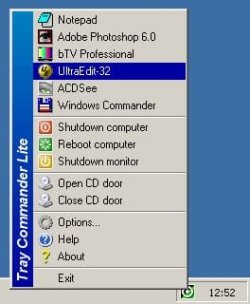
Alternatively you could try this application for the Tray
Download Tray Commander Lite - Freeware Software - Tucows
traycommandrlite.jpg
again you can group your stuff by several means just try it out.

or look here for some alternatives to Tray Commander like
Launchy
Pstart
Type and Go
etc.

-DG
 

My Computer

Computer Manufacturer/Model Number
HP m8000n
OS
Windows 7 Ultimate x86
CPU
DualCore AMD Athlon 64 X2, 2600 MHz 5200+
Motherboard
Asus M2N68-LA (Narra)
Memory
Samsung 2GB DDR2
Graphics Card(s)
Onboard NVIDIA GeForce 6150SE nForce 430
Sound Card
Onboard nVIDIA nForce 6100-430 (MCP61P)
Monitor(s) Displays
Westinghouse 19" LED
Screen Resolution
1280x1024
Hard Drives
SATA II Seagate Barracuda 500GB
USB II WD Elements 500GB
USB II WD My Book 1TB
USB II WD My Book 2TB
PSU
Stock (HP)
Case
Stock (HP)
Cooling
Stock
Keyboard
Logitech Classic KB 200
Mouse
Standard HP opticle USB mouse
Hi there!

Thanks all of you guys for the help. I think i got it! The derekimo tutorial worked all right! All my folders with the shortcuts are back!! uf!

thanks a lot
madgirl
 

My Computer

OS
Windows Ultimate 32
CPU
Intel Core2 Duo E7500 2.93GHz
Motherboard
ASUS p/ Intel P5G41-M LX 775
Memory
3 gb
Graphics Card(s)
vga XFX 1024MB (1GB) GeForce 9500 GT DDR2
Monitor(s) Displays
samsung syncmaster 931c
Hard Drives
500 gb - SeaGate and Samsumg 500 gb
Hi there!

Thanks all of you guys for the help. I think i got it! The derekimo tutorial worked all right! All my folders with the shortcuts are back!! uf!

thanks a lot
madgirl

You're welcome, glad you got it sorted out. Thanks for posting back too.
 

My Computer

Computer type
PC/Desktop
Computer Manufacturer/Model Number
Self Built
OS
Win 10 Pro x64
CPU
Intel I5-2500K @3.3GHz
Motherboard
Asrock P67 Extreme4
Memory
16GB G.Skill Ripjaws X (4x4GB)
Graphics Card(s)
EVGA GeForce 750 Ti SC 2GB
Sound Card
ASUS Xonar DG 5.1 Channels 24-bit 96KHz PCI Interface Sound
Monitor(s) Displays
auria eq2367
Screen Resolution
1920 x 1080
Hard Drives
250GB Samsung 850 EVO SSD
1TB WD Blue
1TB Hitachi
PSU
SeaSonic X 650W 80 Plus Gold
Case
Corsair Obsidian 750D
Cooling
Corsair H60, Three 140mm case fans
Keyboard
Logitech Wireless Keyboard K520
Mouse
Logitech Wireless Mouse M310
Internet Speed
Wave Broadband ~ 100 dn 5 up
Antivirus
Windows Defender, Malwarebytes Premium
Browser
Edge, IE11, Chrome
Other Info
Laptop specs: HP g7-1365dx /
CPU: AMD A6-3420M APU with Radeon(tm) HD Graphics /
RAM: Crucial 8Gb (2x4Gb) /
SSD: Crucial M4-CT128M4SSD2 ATA Device/ FW 000F /
GFX: AMD Radeon HD 6520G /
OS: Windows 10 Pro x64
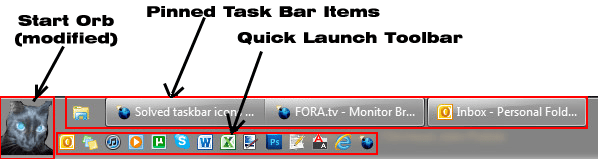
I just arranged mine like it was on Xp
No pinned stuff just simple 3 quick launch.
One is just blank space.
 

Attachments

  • Taskbar.jpg
    Taskbar.jpg
    143.9 KB · Views: 13

My Computer

Computer type
PC/Desktop
Computer Manufacturer/Model Number
696
OS
7 Ultimate x64 sp1
CPU
Intel i5-4690K
Motherboard
GA Z97X Gaming 5
Memory
16Gb HyperX fury
Graphics Card(s)
R9-270x 2Gb
Sound Card
On Board
Monitor(s) Displays
2443NW
Screen Resolution
1920x1200
Hard Drives
WD5000 -
WD5001 -
WD1002
PSU
Cft-650-14cs
Case
Very Big Case
Cooling
stock
Keyboard
G11
Mouse
Logitech
Internet Speed
Adsl
Browser
FF
Other Info
RWD
Last edited:

My Computer

Computer Manufacturer/Model Number
HP M9077c
OS
Windows 7 Home Premium 64bit
CPU
Intel(R)Core(TM)2 quad [email protected] 2.39GHz
Motherboard
ASUSeK
Memory
6GB DDR2 6400
Graphics Card(s)
GeForce 8500/512MB
Sound Card
Realtek High Def Audio
Monitor(s) Displays
HP w2408 LCD 24" widescreen
Screen Resolution
1920x1200
Cooling
6 pack of Bud
Keyboard
MS wireless Inteli
Mouse
MS wireless Inteli

My Computer

Computer type
PC/Desktop
Computer Manufacturer/Model Number
Self Built
OS
Win 10 Pro x64
CPU
Intel I5-2500K @3.3GHz
Motherboard
Asrock P67 Extreme4
Memory
16GB G.Skill Ripjaws X (4x4GB)
Graphics Card(s)
EVGA GeForce 750 Ti SC 2GB
Sound Card
ASUS Xonar DG 5.1 Channels 24-bit 96KHz PCI Interface Sound
Monitor(s) Displays
auria eq2367
Screen Resolution
1920 x 1080
Hard Drives
250GB Samsung 850 EVO SSD
1TB WD Blue
1TB Hitachi
PSU
SeaSonic X 650W 80 Plus Gold
Case
Corsair Obsidian 750D
Cooling
Corsair H60, Three 140mm case fans
Keyboard
Logitech Wireless Keyboard K520
Mouse
Logitech Wireless Mouse M310
Internet Speed
Wave Broadband ~ 100 dn 5 up
Antivirus
Windows Defender, Malwarebytes Premium
Browser
Edge, IE11, Chrome
Other Info
Laptop specs: HP g7-1365dx /
CPU: AMD A6-3420M APU with Radeon(tm) HD Graphics /
RAM: Crucial 8Gb (2x4Gb) /
SSD: Crucial M4-CT128M4SSD2 ATA Device/ FW 000F /
GFX: AMD Radeon HD 6520G /
OS: Windows 10 Pro x64
The simplest solution I can think of is to use the "links" tool bar. Just right click on the task bar, select "tool bars" and then "links". This will place a links folder in the notification tray. Drag all your programs there and you'll have instant access to them without cluttering up your task bar.

Taskbar Toolbars - Vista Forums
 

My Computer

Computer Manufacturer/Model Number
Custom Build
OS
Windows 7 Pro/32 Academic. Build 7600
CPU
Intel 2.3 Duo core
Motherboard
EliteGroup G31T-M
Memory
4 GB DDR
Graphics Card(s)
Nvidia GeForce 9500 GT
Sound Card
Built in
Monitor(s) Displays
Viewsonic 15" 4:3
Screen Resolution
1280 x 1024
Hard Drives
WD Caviar Black 750 GB
WD 250 GB External
PSU
Antec 450w
Keyboard
Standard windows
Mouse
Logitech USB
Internet Speed
Bellsouth DSL 6.0
The simplest solution I can think of is to use the "links" tool bar. Just right click on the task bar, select "tool bars" and then "links". This will place a links folder in the notification tray. Drag all your programs there and you'll have instant access to them without cluttering up your task bar.

Taskbar Toolbars - Vista Forums
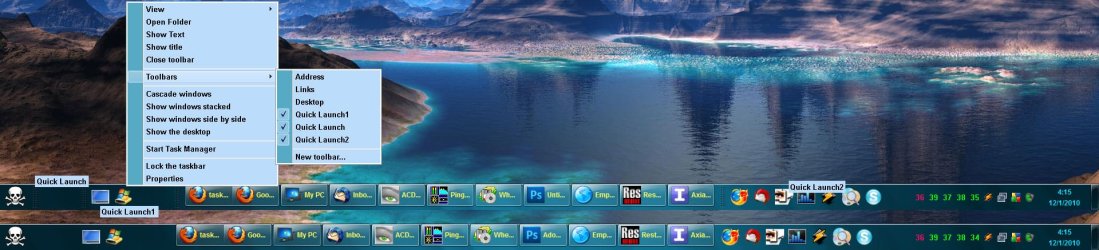
Agreed, mborner. I use the "Quick Launch" Toolbar instead of the "Links" Toolbar but the results would be the same. I also set my Task Bar to two rows high and Auto-hide it:

ScreenShot00173.png
 

My Computer

Computer Manufacturer/Model Number
Toshiba L355D
OS
Windows 7 Ultimate x64 SP1
CPU
Core2 Duo
Motherboard
Intel
Memory
4 GB
Graphics Card(s)
GM965 on-board
Sound Card
RealTek on-board
Monitor(s) Displays
19"+17"(laptop)
Screen Resolution
1440x900 (x 2)
Hard Drives
500GB Ext. 200GB Internal
PSU
N/A
Case
N/A
Cooling
N/A
Back
Top