Solved taskbar items

spinksy

New member
Member
Local time
5:48 AM
Messages
70
is it possible to combine items on the taskbar that are not 'the same', the same way it does it automatically for like items. i want to create a 'folder/group' on the taskbar for games and again for other items, is this possible?
 

My Computer

Computer Manufacturer/Model Number
Toshiba Qosmio x500 02g - PQX33A 02g00J
OS
Windows 7 Professional x64
CPU
Intel Core i7 Q720 1.60GHz
Motherboard
TOSHIBA Qosmio X500
Memory
4GB DDR3 (2GB + 2GB) (1066MHz)
Graphics Card(s)
NVIDIA GeForce GTS 250M
Sound Card
(1) NVIDIA High Definition Audio (2) Conexant Pebble High
Monitor(s) Displays
18.4” Widescreen Full HD TruBrite® Display (1920 x 1080)
Screen Resolution
1920x1080
Hard Drives
(1) TOSHIBA MK5055GSX (2) TOSHIBA MK5055GSX

My Computer

OS
Win7U 64 RTM
CPU
Q9550
Motherboard
GA-EP45-UD3R
Memory
8GB Gskill
Graphics Card(s)
ASUS|EAH4850/HTDI/1GD3/A
Sound Card
xfi Plat
Monitor(s) Displays
Dell 2405fpw
Screen Resolution
1920x1200
Hard Drives
Seagate & WD sata Drives
PSU
Antec
Case
Antec
Keyboard
MS Natural Ergonomic 4000
Mouse
Logitech MX610 USB Cordless
thanks, thats not really what im after.
i want to be able to access these items without needing to go into the folder/tab that i create. for example when there are multiple chrome windows open i can click and drag upwards showing all the windows that are open (and recent pages etc.) this is what i want to be able to do with these programs.
it is just a convenience thing, so i dont have to go to the desktop or crowd the taskbar.
 

My Computer

Computer Manufacturer/Model Number
Toshiba Qosmio x500 02g - PQX33A 02g00J
OS
Windows 7 Professional x64
CPU
Intel Core i7 Q720 1.60GHz
Motherboard
TOSHIBA Qosmio X500
Memory
4GB DDR3 (2GB + 2GB) (1066MHz)
Graphics Card(s)
NVIDIA GeForce GTS 250M
Sound Card
(1) NVIDIA High Definition Audio (2) Conexant Pebble High
Monitor(s) Displays
18.4” Widescreen Full HD TruBrite® Display (1920 x 1080)
Screen Resolution
1920x1080
Hard Drives
(1) TOSHIBA MK5055GSX (2) TOSHIBA MK5055GSX

My Computer

Computer Manufacturer/Model Number
HP Pavillion dv5t (generation 1)
OS
Vista 64 bit and 32 bit (SP2)
CPU
Intel(R) Core(TM)2 Duo Processor T9400 (2.53 GHz
Memory
4GB DDR2 System Memory (2 Dimm)
Graphics Card(s)
512 MB NVIDIA GeForce 9600M GT
Monitor(s) Displays
15.4" diagonal WSXGA+ High-Definition HP BrightView Widescre
Screen Resolution
1680 x 1050
Hard Drives
320GB 5400RPM SATA Hard Drive with HP ProtectSmart Hard Drive Protection
Keyboard
Built-in HP
Mouse
Built in - Synaptics TouchPad V6.5 on PS/2 Port
Internet Speed
Max
Other Info
~ Intel Next-Gen Wireless-N Mini-card w/Bluetooth ~ Blu-Ray ROM DVD+/-R/RW ~ Integ. HDTV Hybrid Tuner ~ 12 Cell Battery ~ MS Office (Home Premium) 2007 ~
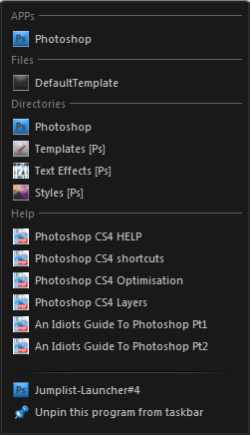
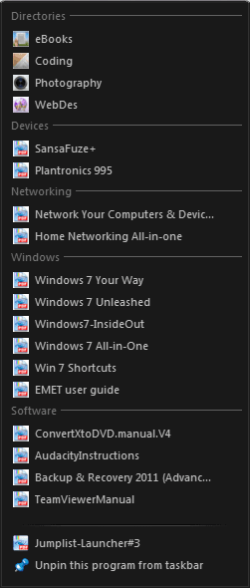
If you want to create workgroup Jumplists comprising of individual files/executables, folders, and directories, the best solution I've come across is the freeware Jumplist-Launcher (standalone executable).

For example;

JL#3.png JL#4.png

You will need to use multiples of the original executable to have more than one custom JumpList. This is easily done by repeatedly extracting from the zip file, and renaming the new folder as well as the executable/s within. If you look at the bottom of the images above you will see where I have done this. The original icon for the executable is uncompressed, so it's easy to customize icons for each launcher with most resource editors- I use the inbuilt editor in the freeware IcoFX.

Although it may take up to a couple of hours to set up and customize, nothing is run in the background, and it works very well. I've been using 11x (mini taskbar) JumpLists for over a year now without any issues or instability, and its quick. While the majority of the interface is in English, some parts are in German, though it is very easy to see whats-what.

If this is for you I'll be happy to provide some step by step help if you need it?
 

My Computer

Computer type
PC/Desktop
OS
Windows 7
thank you OakenG, that is perfect. it only took a couple of mins to set up,
great app and great answer.
 

My Computer

Computer Manufacturer/Model Number
Toshiba Qosmio x500 02g - PQX33A 02g00J
OS
Windows 7 Professional x64
CPU
Intel Core i7 Q720 1.60GHz
Motherboard
TOSHIBA Qosmio X500
Memory
4GB DDR3 (2GB + 2GB) (1066MHz)
Graphics Card(s)
NVIDIA GeForce GTS 250M
Sound Card
(1) NVIDIA High Definition Audio (2) Conexant Pebble High
Monitor(s) Displays
18.4” Widescreen Full HD TruBrite® Display (1920 x 1080)
Screen Resolution
1920x1080
Hard Drives
(1) TOSHIBA MK5055GSX (2) TOSHIBA MK5055GSX
Glad it's what you wanted Spinksy. :)
 

My Computer

Computer type
PC/Desktop
OS
Windows 7
Back
Top