Taskbar Problems

Leisha

New member
Local time
5:41 PM
Messages
3
Good morning,

My taskbar demonstrates the following problems:
- when my mouse hovers over a taskbar icon, the open documents are not those of that application, but of one next to it or often, a running application which isn't listed.
- not all of my open applications are on the taskbar, and there is no ability to
- after a short while, the clock and the entire right block disappears and is a white box
- even after i close an application, the duplicate icon (for the open files) remains

It's driving me crazy! The only thing that fixes it is a reboot, and that's only a temporary fix. Any ideas? Any help is greatly appreciated...Leisha
 

My Computer

Computer type
Laptop
Computer Manufacturer/Model Number
DELL
OS
Windows 7 64
The first thing I notice is you have 124 processes running. That is a huge amount.
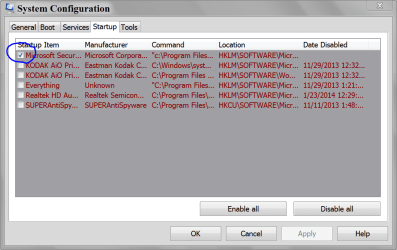
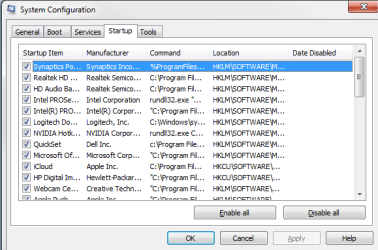
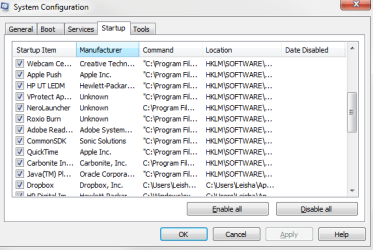
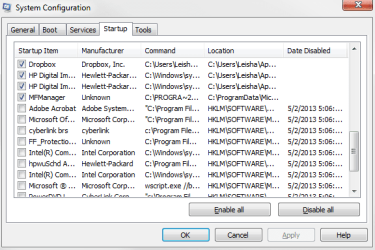
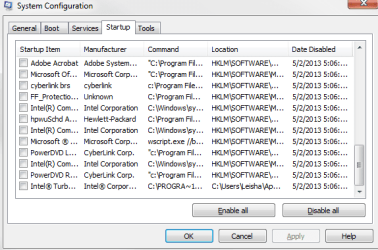
Could you post a picture of all your Start Up programs using msconfig/Start Up.

Example:

MSCONFIG STARTUP.PNG

You could have so many things going on that their is no room on the Taskbar or the Taskbar is doubling up.
 

My Computer

Computer type
PC/Desktop
Computer Manufacturer/Model Number
Home made Desktop
OS
Windows 10 Pro. 64/ version 1709 Windows 7 Pro/64
CPU
Intel i7-6800K @ 4.3
Motherboard
ASUS X-99 Deluxe II
Memory
Corsair Platinum 16 gig @2400
Graphics Card(s)
EVGA GTX 1070 OC
Monitor(s) Displays
Asus 27" LED LCD/VE278Q
Screen Resolution
1920-1080 or 1280-720 HDMI
Hard Drives
INTEL SSD 730-240 Gb Sata 3.0/
PSU
EVGA Platium 1200W
Case
Phanteks Luxe Tempered Glass 8 fans/ one radiator
Cooling
XSPC/ Water Cooled CPU
Keyboard
Das 4 Professional
Mouse
Logitech M705/MX Anywhere 2-S
Internet Speed
100 mbits
Antivirus
Microsoft Security Essentials/ Malwarebytes Premium 3.0/ SAS
Browser
I.E. 11 default/Firefox/ ISP Time Warner Cable/Spectrum
Other Info
LG BluRay Burner/
Sound system-KLipsch-THX/
Icy Dock ssd Hot Swap bays.
Thank you Layback Bear. I just uploaded 4 files which are screen shots of all the processes.
 

Attachments

  • msconfig Start Up -1.png
    msconfig Start Up -1.png
    13.9 KB · Views: 11
  • msconfig Start Up -2.png
    msconfig Start Up -2.png
    13.1 KB · Views: 10
  • msconfig Start Up -3.png
    msconfig Start Up -3.png
    14 KB · Views: 10
  • msconfig Start Up -4.png
    msconfig Start Up -4.png
    13 KB · Views: 10

My Computer

Computer type
Laptop
Computer Manufacturer/Model Number
DELL
OS
Windows 7 64

My Computer

Computer type
PC/Desktop
Computer Manufacturer/Model Number
Home made Desktop
OS
Windows 10 Pro. 64/ version 1709 Windows 7 Pro/64
CPU
Intel i7-6800K @ 4.3
Motherboard
ASUS X-99 Deluxe II
Memory
Corsair Platinum 16 gig @2400
Graphics Card(s)
EVGA GTX 1070 OC
Monitor(s) Displays
Asus 27" LED LCD/VE278Q
Screen Resolution
1920-1080 or 1280-720 HDMI
Hard Drives
INTEL SSD 730-240 Gb Sata 3.0/
PSU
EVGA Platium 1200W
Case
Phanteks Luxe Tempered Glass 8 fans/ one radiator
Cooling
XSPC/ Water Cooled CPU
Keyboard
Das 4 Professional
Mouse
Logitech M705/MX Anywhere 2-S
Internet Speed
100 mbits
Antivirus
Microsoft Security Essentials/ Malwarebytes Premium 3.0/ SAS
Browser
I.E. 11 default/Firefox/ ISP Time Warner Cable/Spectrum
Other Info
LG BluRay Burner/
Sound system-KLipsch-THX/
Icy Dock ssd Hot Swap bays.
Back
Top