
Taskbar questions

Darkfoxx

New member
Local time
9:52 AM
Messages
5
I have a few questions regarding the taskbar.

1. How do I get rid of this list that appears when I hover over a program in my taskbar?
attachment.php


2. I'm using the Windows 7 Basic theme. How do I change that god-awful blue colored taskbar? I've read that it's impossible to change without editing a theme file. Does anyone know of a Vista-esque theme for Win7 (the black gradient taskbar)?

Thanks.
 

Attachments
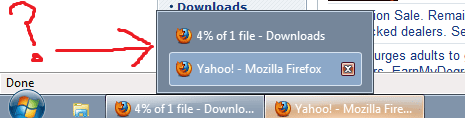
  • wtfisthisshitandhowdoikillit.png
    wtfisthisshitandhowdoikillit.png
    6.8 KB · Views: 289

My Computer

Computer Manufacturer/Model Number
me, myself, and I
OS
Windows 7 Pro x64
CPU
2.4 GHz Core 2 Quad Q6600 Kentsfield 2 x 4MB L2 Cache
Motherboard
Asus P5Q Pro
Memory
2x2GB Mushkin 996557, 2x2GB Corsair CM2X2048-6400C5
Graphics Card(s)
896 MB EVGA Geforce GTX260 GDDR3 PCI-E 2.0
Monitor(s) Displays
LG 19" LCD
Hard Drives
OCZ Vertex SSD 120GB SATA 2 HD (boot)
Western Digital 200 GB 7200 RPM SATA 2 HD
Western Digital 80 GB 7200 RPM SATA HD
Seagate 200 GB 7200 RPM IDE HD
PSU
600w OCZ GameXStream
Case
Antec 900
Cooling
AC 7 Freezer (HSF), tons of fans
You can mess around with the themes and colors in the personalization center.

As far as removing the hover box, if you right click on, My Computer -- Properties -- Advanced System Settings -- Performance Settings, you should get a box that you can use to check or uncheck options that you like or don't.
 

My Computer

Computer Manufacturer/Model Number
Zen Productions
OS
Windows 7 Ultimate x64
CPU
Intel i7-860
Motherboard
Gigabyte GA-P55A-UD4P
Memory
Corsair Dominator 1600Mhz, 8-8-8-24 1.65v 2x2GB
Graphics Card(s)
ATI Radeon 5770 HD
Sound Card
Intel High Definition Sound
Monitor(s) Displays
Samsung P2570HD
Screen Resolution
1920x1080
Hard Drives
Western Digital Caviar Black 500gb
PSU
Corsair CMPSU-750HX 750W
Case
Antec p183
Cooling
Corsair H50 Water Cooler
Keyboard
Logitech G110
Mouse
Logitech MX Revolution
Internet Speed
768 mb/s
You can mess around with the themes and colors in the personalization center.
I'm not using Aero, so that doesn't work.

As far as removing the hover box, if you right click on, My Computer -- Properties -- Advanced System Settings -- Performance Settings, you should get a box that you can use to check or uncheck options that you like or don't.
I only have the last 4 boxes checked, and none of the boxes have any effect on the hover box.
 

My Computer

Computer Manufacturer/Model Number
me, myself, and I
OS
Windows 7 Pro x64
CPU
2.4 GHz Core 2 Quad Q6600 Kentsfield 2 x 4MB L2 Cache
Motherboard
Asus P5Q Pro
Memory
2x2GB Mushkin 996557, 2x2GB Corsair CM2X2048-6400C5
Graphics Card(s)
896 MB EVGA Geforce GTX260 GDDR3 PCI-E 2.0
Monitor(s) Displays
LG 19" LCD
Hard Drives
OCZ Vertex SSD 120GB SATA 2 HD (boot)
Western Digital 200 GB 7200 RPM SATA 2 HD
Western Digital 80 GB 7200 RPM SATA HD
Seagate 200 GB 7200 RPM IDE HD
PSU
600w OCZ GameXStream
Case
Antec 900
Cooling
AC 7 Freezer (HSF), tons of fans
Turn Aero back on, then right-click on your desktop, select Personalization and click on "Window colour" at the bottom. Untick "Enable transparency". Now you can still change the Window colour to something more agreeable.
 

My Computer

OS
XP/7
Alright so I changed back to Aero and I'm now pretty happy with the color.

Any way to disable the preview when I mouse over the open programs on the taskbar?
 

My Computer

Computer Manufacturer/Model Number
me, myself, and I
OS
Windows 7 Pro x64
CPU
2.4 GHz Core 2 Quad Q6600 Kentsfield 2 x 4MB L2 Cache
Motherboard
Asus P5Q Pro
Memory
2x2GB Mushkin 996557, 2x2GB Corsair CM2X2048-6400C5
Graphics Card(s)
896 MB EVGA Geforce GTX260 GDDR3 PCI-E 2.0
Monitor(s) Displays
LG 19" LCD
Hard Drives
OCZ Vertex SSD 120GB SATA 2 HD (boot)
Western Digital 200 GB 7200 RPM SATA 2 HD
Western Digital 80 GB 7200 RPM SATA HD
Seagate 200 GB 7200 RPM IDE HD
PSU
600w OCZ GameXStream
Case
Antec 900
Cooling
AC 7 Freezer (HSF), tons of fans
Any way to disable the preview when I mouse over the open programs on the taskbar?
Why would you want to? It's one of the useful features to find something if you have multiple windows open.

Does it not show a thumbnail now you have your aero theme turned on?
 

My Computer

Computer Manufacturer/Model Number
Custom Built by me
OS
Windows 7 Ultimate x86
CPU
Intel E6700 Core2Duo 2.67GHz
Motherboard
Asus P5B Deluxe WIFI
Memory
OCZ 4GB (2x2GB) DDR2 800MHz/PC2-6400 Titanium CL4(4-4-4-15)
Graphics Card(s)
XFX 7900GS 256MB Dual DVI TV Out PCI-E
Sound Card
Onboard
Monitor(s) Displays
Samsung Syncmaster SM206BW 20" Widescreen LCD Flat Panel
Screen Resolution
1680x1050
Hard Drives
1 x 1TB Samsung SpinPoint F1 HD103UJ
2 x 500G Samsung SATA2 HD501LJ
PSU
650W Seasonic S12-650 80% Effic
Case
Antec P180 Silver Aluminium Super Miditower Case
Cooling
Arctic Cool. Freezer7Pro s775
Keyboard
Microsoft Natural Ergonomic 4000
Mouse
Logitech MX510
Internet Speed
Up to 8Mb
Yes, it shows a preview...but I'd like it to not show anything when I mouse over.
 

My Computer

Computer Manufacturer/Model Number
me, myself, and I
OS
Windows 7 Pro x64
CPU
2.4 GHz Core 2 Quad Q6600 Kentsfield 2 x 4MB L2 Cache
Motherboard
Asus P5Q Pro
Memory
2x2GB Mushkin 996557, 2x2GB Corsair CM2X2048-6400C5
Graphics Card(s)
896 MB EVGA Geforce GTX260 GDDR3 PCI-E 2.0
Monitor(s) Displays
LG 19" LCD
Hard Drives
OCZ Vertex SSD 120GB SATA 2 HD (boot)
Western Digital 200 GB 7200 RPM SATA 2 HD
Western Digital 80 GB 7200 RPM SATA HD
Seagate 200 GB 7200 RPM IDE HD
PSU
600w OCZ GameXStream
Case
Antec 900
Cooling
AC 7 Freezer (HSF), tons of fans

My Computer

Computer Manufacturer/Model Number
Custom Built by me
OS
Windows 7 Ultimate x86
CPU
Intel E6700 Core2Duo 2.67GHz
Motherboard
Asus P5B Deluxe WIFI
Memory
OCZ 4GB (2x2GB) DDR2 800MHz/PC2-6400 Titanium CL4(4-4-4-15)
Graphics Card(s)
XFX 7900GS 256MB Dual DVI TV Out PCI-E
Sound Card
Onboard
Monitor(s) Displays
Samsung Syncmaster SM206BW 20" Widescreen LCD Flat Panel
Screen Resolution
1680x1050
Hard Drives
1 x 1TB Samsung SpinPoint F1 HD103UJ
2 x 500G Samsung SATA2 HD501LJ
PSU
650W Seasonic S12-650 80% Effic
Case
Antec P180 Silver Aluminium Super Miditower Case
Cooling
Arctic Cool. Freezer7Pro s775
Keyboard
Microsoft Natural Ergonomic 4000
Mouse
Logitech MX510
Internet Speed
Up to 8Mb
Thanks Andy!
 

My Computer

Computer Manufacturer/Model Number
me, myself, and I
OS
Windows 7 Pro x64
CPU
2.4 GHz Core 2 Quad Q6600 Kentsfield 2 x 4MB L2 Cache
Motherboard
Asus P5Q Pro
Memory
2x2GB Mushkin 996557, 2x2GB Corsair CM2X2048-6400C5
Graphics Card(s)
896 MB EVGA Geforce GTX260 GDDR3 PCI-E 2.0
Monitor(s) Displays
LG 19" LCD
Hard Drives
OCZ Vertex SSD 120GB SATA 2 HD (boot)
Western Digital 200 GB 7200 RPM SATA 2 HD
Western Digital 80 GB 7200 RPM SATA HD
Seagate 200 GB 7200 RPM IDE HD
PSU
600w OCZ GameXStream
Case
Antec 900
Cooling
AC 7 Freezer (HSF), tons of fans
Glad I could help :)
 

My Computer

Computer Manufacturer/Model Number
Custom Built by me
OS
Windows 7 Ultimate x86
CPU
Intel E6700 Core2Duo 2.67GHz
Motherboard
Asus P5B Deluxe WIFI
Memory
OCZ 4GB (2x2GB) DDR2 800MHz/PC2-6400 Titanium CL4(4-4-4-15)
Graphics Card(s)
XFX 7900GS 256MB Dual DVI TV Out PCI-E
Sound Card
Onboard
Monitor(s) Displays
Samsung Syncmaster SM206BW 20" Widescreen LCD Flat Panel
Screen Resolution
1680x1050
Hard Drives
1 x 1TB Samsung SpinPoint F1 HD103UJ
2 x 500G Samsung SATA2 HD501LJ
PSU
650W Seasonic S12-650 80% Effic
Case
Antec P180 Silver Aluminium Super Miditower Case
Cooling
Arctic Cool. Freezer7Pro s775
Keyboard
Microsoft Natural Ergonomic 4000
Mouse
Logitech MX510
Internet Speed
Up to 8Mb
Back
Top