InceptSean
New member
- Local time
- 2:57 PM
- Messages
- 6
Look, I have looked all over the internet and everywhere tells me the same thing.
Click the arrow on task bar>>customize>>customize notification icons>>change behavior of icon to only show notifications/hide icon and notifications.
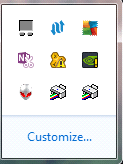
Guess what...it doesn't work. I hide both of these stupid printer icons, they still remain there. I restart my computer still there. I switch to a different option...restart etc, still there. I have other random icons where I try the same as the above and the same thing happens--nothing.
I have severe OCD, please help me!!
Click the arrow on task bar>>customize>>customize notification icons>>change behavior of icon to only show notifications/hide icon and notifications.
Guess what...it doesn't work. I hide both of these stupid printer icons, they still remain there. I restart my computer still there. I switch to a different option...restart etc, still there. I have other random icons where I try the same as the above and the same thing happens--nothing.
I have severe OCD, please help me!!
My Computer
- Computer type
- Laptop
- Computer Manufacturer/Model Number
- Alienware M14x R2/6NGWFV1
- OS
- Windows 7 Home Premium 64bit
- CPU
- Processor Intel(R) Core(TM) i7-3720QM CPU @ 2.60GHz/3.7Ghz
- Memory
- 455.52gb
- Internet Speed
- Ping: 16 ms, Download Speed: 34.84Mbps, Upload Speed: 6.54 M
- Antivirus
- AVG AntiVirus Free Edition 2014
- Browser
- Google Chrome