

- Local time
- 8:43 AM
- Messages
- 173
I am looking to put a toolbar on my Taskbar that allows me to run my video games from it thus eliminating desktop shortcuts.
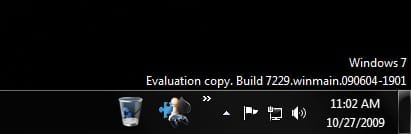
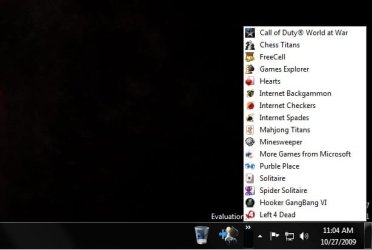
I have created a Toolbar on my taskbar using the Microsoft Start menu Games directory. It looks like such. Nice little icon for the games and when I click on the Expanding arrow it opens up a list.
If I wanted an Icon to show instead of the word "Games", it just used the icon for the first game on the list. So I put a shortcut to the games menu IN the games directory. That way if I click on the icon itself, it opens up the games directory which is just Windows Explorer folder with all the shortcuts in it instead of running first of the 20 games on the list.
Now my question to you is this. I want to find a way to move the jumplist of the games shown to open when I click on the Games Icon itself, not the tiny arrows. In fact I'd like to get rid of those arrows altogether. Which also means that I DON'T want the shortcut's directory to open when I click on the icon.
Currently : If I click the arrow, the list appears. If I click the icon, the directory in windows explorer opens.
Desired : Remove the arrows altogether. When I click on the icon, the directory does NOT open, and instead the nice little jumplist opens and I pick a game.
Instead of the games list opening when I click the arrow here -

I want it to open when I click the Icon here -
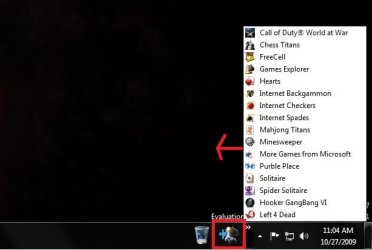
So I want my Taskbar to look like this (picture photoshopped)-
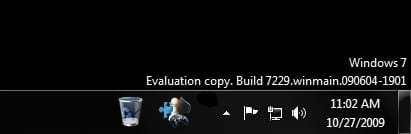
And I want this games menu/list to open when I click on the icon like this (picture photoshopped) -

Does anyone know if it is possible? If so is it a toolbar or a jumplist type thing I should edit?
All help is appreciated. Thanks!
I have created a Toolbar on my taskbar using the Microsoft Start menu Games directory. It looks like such. Nice little icon for the games and when I click on the Expanding arrow it opens up a list.
If I wanted an Icon to show instead of the word "Games", it just used the icon for the first game on the list. So I put a shortcut to the games menu IN the games directory. That way if I click on the icon itself, it opens up the games directory which is just Windows Explorer folder with all the shortcuts in it instead of running first of the 20 games on the list.
Now my question to you is this. I want to find a way to move the jumplist of the games shown to open when I click on the Games Icon itself, not the tiny arrows. In fact I'd like to get rid of those arrows altogether. Which also means that I DON'T want the shortcut's directory to open when I click on the icon.
Currently : If I click the arrow, the list appears. If I click the icon, the directory in windows explorer opens.
Desired : Remove the arrows altogether. When I click on the icon, the directory does NOT open, and instead the nice little jumplist opens and I pick a game.
Instead of the games list opening when I click the arrow here -
I want it to open when I click the Icon here -
So I want my Taskbar to look like this (picture photoshopped)-
And I want this games menu/list to open when I click on the icon like this (picture photoshopped) -
Does anyone know if it is possible? If so is it a toolbar or a jumplist type thing I should edit?
All help is appreciated. Thanks!
My Computer
- OS
- Windows 7 RC - 7100 64bit
- CPU
- AMD Athlon(tm) 64 x2 4800+ 2.50Ghz Dual Core
- Motherboard
- Hewlett Packard
- Memory
- 4 gig Kingston DDR2
- Graphics Card(s)
- XFX Nvidia GeForce GTS 250
- Sound Card
- na
- Monitor(s) Displays
- 22" Samsung LCD Syncmaster
- Screen Resolution
- 1680x1050
- Hard Drives
- 300gig Western Digital
- PSU
- BFG Tech 550watt
- Case
- Crap stock Dell
- Cooling
- Side panel open on case, and a box fan blowing in.
- Keyboard
- G15
- Mouse
- G9
- Internet Speed
- Bike Messenger


