
taskbar

jamieresearch

New member
Local time
7:41 PM
Messages
47
On every version of Windows I've ever used, open programs appear on the taskbar in the order in which they were opened.

For instance, if I opened a Firefox browser, and then an MS Word doc, and then another FF browser, they'd appear in that order.

Now, it seems they are being grouped together by program. Not in groups, like you click on the taskbar and get the popup menu for the six open browsers you may have in FF, for example, but now I have 4 FF browsers right in a row, and then 3 Word docs right in a row, instead of in the order in which they were opened.

Hope that makes sense. I know what I'm trying to say but not sure if I'm saying it correctly.

Anyway, if this DOES make sense and someone knows how to make it go back the old way, I'd be grateful. I liked it better that way because it made it easier for me find programs to go between.

I've already turned off grouping in the taskbar prefs, but is there something else I can do?

Thanx,
Jamie
 

My Computer

Computer Manufacturer/Model Number
HP / dv7-1451nr
OS
windows 7
CPU
2.20 GHz AMD Turion X2 Ultra ZM-82 Dual-Core Mobile Processo
Memory
4096MB
Graphics Card(s)
ATI Radeon HD 3200 Graphics RS780M
Sound Card
Altec Lansing with SRS Premium Sound
Monitor(s) Displays
17.0�? Diagonal WXGA+ High-Definition HP BrightView W
Hard Drives
500GB (5400RPM)
Keyboard
101-key compatible
Mouse
Touch Pad with On/Off button and dedicated vertical scroll U
Other Info
I THINK I filled in the info in the correct places. If not, here is the link to the specs from HP. It probably tells you more of what you need to know.

http://h20000.www2.hp.com/bizsupport/TechSupport/Document.jsp?lang=en&cc=us&objectID=c01753033&jumpid=reg_R1002_USEN
Right -click on the Start Burton,. choose properties,. click the Taskbar tab and choose Combine when taskbar is full.
 

My Computer

Computer Manufacturer/Model Number
Cheap $399.00 E-Machine
OS
Windows 7 Pro & Vista Home Premium
CPU
Athlon 64 3800+ (Orleans) 2.40GHz
Motherboard
Winfast
Memory
2GB DDR2 RAM DIMM
Graphics Card(s)
NVIDIA GeForce 8500 GT 512 MB memory HDMI out
Sound Card
creative X-Fi Exteme 7..1 channel
Monitor(s) Displays
Acer V223W 22" widescreen DVI
Screen Resolution
1680x1050
Hard Drives
WDC WD5 500GB
WDC WD25 250GB
PSU
OCZ 550 watt
Case
Gateway
Cooling
2 fans
Keyboard
Dell
Mouse
Sony Vaio
Internet Speed
18MB/s down - .72MB /s up
No, that's precisely what I DON'T want it to do.

In other words, if I open a FF browser, then a Word doc and then a FF browser, in the old days, they would appear in my taskbar in that order. Now I see a FF, FF and then the Word doc.

I want it the way it used to be.
 

My Computer

Computer Manufacturer/Model Number
HP / dv7-1451nr
OS
windows 7
CPU
2.20 GHz AMD Turion X2 Ultra ZM-82 Dual-Core Mobile Processo
Memory
4096MB
Graphics Card(s)
ATI Radeon HD 3200 Graphics RS780M
Sound Card
Altec Lansing with SRS Premium Sound
Monitor(s) Displays
17.0�? Diagonal WXGA+ High-Definition HP BrightView W
Hard Drives
500GB (5400RPM)
Keyboard
101-key compatible
Mouse
Touch Pad with On/Off button and dedicated vertical scroll U
Other Info
I THINK I filled in the info in the correct places. If not, here is the link to the specs from HP. It probably tells you more of what you need to know.

http://h20000.www2.hp.com/bizsupport/TechSupport/Document.jsp?lang=en&cc=us&objectID=c01753033&jumpid=reg_R1002_USEN
No, that's precisely what I DON'T want it to do.

In other words, if I open a FF browser, then a Word doc and then a FF browser, in the old days, they would appear in my taskbar in that order. Now I see a FF, FF and then the Word doc.

I want it the way it used to be.

Why open so many instances of FF? Why not open tabs instead?
 

My Computer

OS
Win7
I hate tabs. They irritate me. I like having the open windows at the bottom of the screen so I can see them at a glance if I'm not in the browser.
 

My Computer

Computer Manufacturer/Model Number
HP / dv7-1451nr
OS
windows 7
CPU
2.20 GHz AMD Turion X2 Ultra ZM-82 Dual-Core Mobile Processo
Memory
4096MB
Graphics Card(s)
ATI Radeon HD 3200 Graphics RS780M
Sound Card
Altec Lansing with SRS Premium Sound
Monitor(s) Displays
17.0�? Diagonal WXGA+ High-Definition HP BrightView W
Hard Drives
500GB (5400RPM)
Keyboard
101-key compatible
Mouse
Touch Pad with On/Off button and dedicated vertical scroll U
Other Info
I THINK I filled in the info in the correct places. If not, here is the link to the specs from HP. It probably tells you more of what you need to know.

http://h20000.www2.hp.com/bizsupport/TechSupport/Document.jsp?lang=en&cc=us&objectID=c01753033&jumpid=reg_R1002_USEN
The simple answer is Windows 7 has changed dramatically from Previous operating systems
 

My Computer

Computer Manufacturer/Model Number
Cheap $399.00 E-Machine
OS
Windows 7 Pro & Vista Home Premium
CPU
Athlon 64 3800+ (Orleans) 2.40GHz
Motherboard
Winfast
Memory
2GB DDR2 RAM DIMM
Graphics Card(s)
NVIDIA GeForce 8500 GT 512 MB memory HDMI out
Sound Card
creative X-Fi Exteme 7..1 channel
Monitor(s) Displays
Acer V223W 22" widescreen DVI
Screen Resolution
1680x1050
Hard Drives
WDC WD5 500GB
WDC WD25 250GB
PSU
OCZ 550 watt
Case
Gateway
Cooling
2 fans
Keyboard
Dell
Mouse
Sony Vaio
Internet Speed
18MB/s down - .72MB /s up
Hello Jamie,

I'm sure that you may have seen this already, but when you have a group of opened say Internet explorer windows or tabs, you will notice a edge per opened window or tab on the right of grouped taskbar icon. When you hover the mouse pointer over the icon, you will then see all if the open windows for that icon to make it easy to see them all at a glance as well. As an example, here's a screenshot of Internet Explorer with 3 tabs open in it.

thumbmails.jpg
 

My Computer

Computer type
PC/Desktop
Computer Manufacturer/Model Number
Self built custom
OS
64-bit Windows 11 Pro for Workstations
CPU
Intel i7-8700K OC'd to 5 GHz
Motherboard
ASUS ROG Maximus XI Formula Z390
Memory
64 GB (4x16GB) G.SKILL TridentZ RGB DDR4 3600 MHz
Graphics Card(s)
ASUS ROG-STRIX-GTX1080TI-O11G-GAMING
Sound Card
Integrated
Monitor(s) Displays
2 x Samsung Odyssey G7 27"
Screen Resolution
2560x1440
Hard Drives
1TB Samsung 990 PRO M.2,
4TB Samsung 990 PRO PRO M.2,
TerraMaster F8 SSD Plus NAS
PSU
Seasonic Prime Titanium 850W
Case
Thermaltake Core P3
Cooling
Corsair Hydro H115i
Keyboard
Logitech wireless K800
Mouse
Logitech MX Master 4
Internet Speed
2 Gb/s Download and 100 Mb/s Upload
Antivirus
Malwarebyte Anti-Malware Premium
Browser
Google Chrome
Other Info
Logitech Z625 speaker system,
Logitech BRIO 4K Pro webcam,
HP Color LaserJet Pro MFP M477fdn,
APC SMART-UPS RT 1000 XL - SURT1000XLI,
Galaxy S23 Plus phone
Thanx, Brink, but that's not really what I'm looking to do.
 

My Computer

Computer Manufacturer/Model Number
HP / dv7-1451nr
OS
windows 7
CPU
2.20 GHz AMD Turion X2 Ultra ZM-82 Dual-Core Mobile Processo
Memory
4096MB
Graphics Card(s)
ATI Radeon HD 3200 Graphics RS780M
Sound Card
Altec Lansing with SRS Premium Sound
Monitor(s) Displays
17.0�? Diagonal WXGA+ High-Definition HP BrightView W
Hard Drives
500GB (5400RPM)
Keyboard
101-key compatible
Mouse
Touch Pad with On/Off button and dedicated vertical scroll U
Other Info
I THINK I filled in the info in the correct places. If not, here is the link to the specs from HP. It probably tells you more of what you need to know.

http://h20000.www2.hp.com/bizsupport/TechSupport/Document.jsp?lang=en&cc=us&objectID=c01753033&jumpid=reg_R1002_USEN
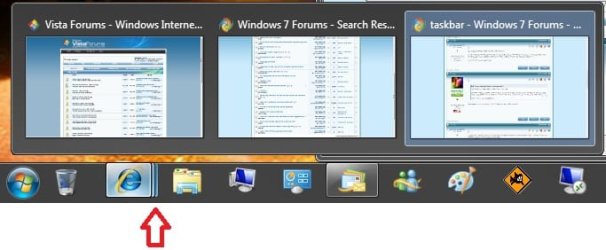
What is inconvenient with having a dozen windows open and being able to hover the mouse over the browser button to see all 12, clean your desktop by clicking the red X in the thumbnails themselves, or instantly open the window you want by clicking it's image by sight?

BTW when you pin a program to the taskbar (like Word) you get it's entire history by right clicking.
 
Last edited by a moderator:

My Computer

Computer Manufacturer/Model Number
Cheap $399.00 E-Machine
OS
Windows 7 Pro & Vista Home Premium
CPU
Athlon 64 3800+ (Orleans) 2.40GHz
Motherboard
Winfast
Memory
2GB DDR2 RAM DIMM
Graphics Card(s)
NVIDIA GeForce 8500 GT 512 MB memory HDMI out
Sound Card
creative X-Fi Exteme 7..1 channel
Monitor(s) Displays
Acer V223W 22" widescreen DVI
Screen Resolution
1680x1050
Hard Drives
WDC WD5 500GB
WDC WD25 250GB
PSU
OCZ 550 watt
Case
Gateway
Cooling
2 fans
Keyboard
Dell
Mouse
Sony Vaio
Internet Speed
18MB/s down - .72MB /s up
The thumbnails Brink refers to are useless as far as I can see. I tend to open as many as 30 windows to pages I want to go back to and read in reverse-chronological order. Win 7 instead randomly reorders them. Seeing the thumbnails is useless because they are too small to be able to see what they are each about and how they're different, and even if they were legible when I'm checking through dozens of pages like that I don't want to waste time visually hunting through thumbnails to pick which one to read -- I just want to go back to read them in the exact order I opened them or exact reverse order, with all of them a single click away (not a hover+click) in the original order I had opened them.

I'm eager for a hack to undo this Win7 random scrambled order of my windows, esp. my IE windows. No tabs, no groupings.
 

My Computer

OS
Win 7 64-bit
This might help you...

zzz2496
 

My Computer

Computer Manufacturer/Model Number
Self Built
OS
Windows7 Ultimate 64bit
CPU
Intel Core 2 Quad Q6600
Motherboard
Abit IN9-32X-MMAX
Memory
DDR2 Adata 4GB
Graphics Card(s)
Nvidia GeForce GTX 285 1024 and Nvidia GeForce 8800GT 512
Sound Card
Asus Xonar HDAV 1.3
Monitor(s) Displays
Dell 2407WFP and BenQ 2400v and Philips 150v3
Screen Resolution
3840x1200 and 1024x768
Hard Drives
2 WDC 1TB
1 WDC 1.5TB
1 WDC 640GB
1 WDC 320GB
1 Seagate 200GB
PSU
Corsair TX 850W
Case
Cooler Master HAF932
Cooling
Arctic Cooling Freezer Extreme and plenty of fans...
Keyboard
MicrosoftNaturalKeyboard 4000/Apple Alu keyboard/Dinovo mini
Mouse
Logitech G5/MarbleMouseTrackball/PerformanceMX/SpacePilotPRO
Internet Speed
1.5Mbps down/384Kbps up
Other Info
APC SURT 1000XL
Logitech Z-560
Wiimote
Mikrotik Router
Linksys (now Cisco) SD2008 8 port Gigabit switch
Linksys WRT54G (acting as AP)
Apple wireless Aluminium keyboard
Apple Magic Mouse
Xbox360 wired controller
The thumbnails Brink refers to are useless as far as I can see. I tend to open as many as 30 windows to pages I want to go back to and read in reverse-chronological order. Win 7 instead randomly reorders them. Seeing the thumbnails is useless because they are too small to be able to see what they are each about and how they're different, and even if they were legible when I'm checking through dozens of pages like that I don't want to waste time visually hunting through thumbnails to pick which one to read -- I just want to go back to read them in the exact order I opened them or exact reverse order, with all of them a single click away (not a hover+click) in the original order I had opened them.

I'm eager for a hack to undo this Win7 random scrambled order of my windows, esp. my IE windows. No tabs, no groupings.


I don't guess everone likes change. I tend to lean that way but Win 7 is a change that is for the good.
 

My Computer

Computer type
PC/Desktop
Computer Manufacturer/Model Number
Custom Build
OS
Windows 7 Home Premium 32-Bit - Build 7600 SP1
CPU
Intel Core i3-2120 3.30Ghz
Motherboard
Asus P8Z68-V LX Intel Z68 Socket H2 ATX
Memory
Kingston 4 GB DDR3 1333 mhz
Graphics Card(s)
AMD Radeon HD6670
Sound Card
Sound Blaster Audigy SE 24-Bit
Monitor(s) Displays
Asus VE228
Screen Resolution
1440 X 900
Hard Drives
OCZ Vertex 3 120 GB Sata 3 SSD ==
Kingston SH103/S3 120 G Hyper X 120 GB SSD ==
Western Digital 500 GB Caviar Green 7200 RPM ==
PSU
Corsair CX600M == 600 Watt
Case
NZXT Apollo - Silver with Clear Side Panel
Cooling
Three 120 mm Fans
Keyboard
Microsoft Natural 4000
Mouse
Microsoft Custom Optical 3000
Internet Speed
AT&T Fiber Optic Wireless Network
Antivirus
Microsoft Security Essentials
Browser
Chrome
Other Info
120 mm Blue LED Fan -- Three Blue LED Lazer Light Sticks
I don't guess everone likes change. I tend to lean that way but Win 7 is a change that is for the good.
I love change when it improves my efficiency and effectiveness.

My guess is that the changes I see to Win 7's taskbar seem designed to attract back Apple Mac users who, at least stereotypically, like things as simple as possible regardless of the limitations that might create. There are probably a lot more people like that in the world than there are Windows users who have spent years optimizing their Windows and their procedures for fastest productivity.

My other guess is that MS' market research probably didn't consider realistic examples for a customer like me. If they saw what I see, they might have decided to keep an option for turning off the way their new paradigm plays "Three Card Monte" with a person's windows.

zzz: Thanks for suggesting 7 Taskbar Tweeker. That might help.

Craig
 

My Computer

OS
Win 7 64-bit
Report back if that doesn't do what you want... I'll look for another alternative...

zzz2496
 

My Computer

Computer Manufacturer/Model Number
Self Built
OS
Windows7 Ultimate 64bit
CPU
Intel Core 2 Quad Q6600
Motherboard
Abit IN9-32X-MMAX
Memory
DDR2 Adata 4GB
Graphics Card(s)
Nvidia GeForce GTX 285 1024 and Nvidia GeForce 8800GT 512
Sound Card
Asus Xonar HDAV 1.3
Monitor(s) Displays
Dell 2407WFP and BenQ 2400v and Philips 150v3
Screen Resolution
3840x1200 and 1024x768
Hard Drives
2 WDC 1TB
1 WDC 1.5TB
1 WDC 640GB
1 WDC 320GB
1 Seagate 200GB
PSU
Corsair TX 850W
Case
Cooler Master HAF932
Cooling
Arctic Cooling Freezer Extreme and plenty of fans...
Keyboard
MicrosoftNaturalKeyboard 4000/Apple Alu keyboard/Dinovo mini
Mouse
Logitech G5/MarbleMouseTrackball/PerformanceMX/SpacePilotPRO
Internet Speed
1.5Mbps down/384Kbps up
Other Info
APC SURT 1000XL
Logitech Z-560
Wiimote
Mikrotik Router
Linksys (now Cisco) SD2008 8 port Gigabit switch
Linksys WRT54G (acting as AP)
Apple wireless Aluminium keyboard
Apple Magic Mouse
Xbox360 wired controller

My Computer

Computer type
PC/Desktop
Computer Manufacturer/Model Number
Dell OP7010
OS
Windows 7 Enterprise (x64); Windows Server 2008 R2 (x64)
Memory
16GB
Monitor(s) Displays
4 Dell 24" LCD
Screen Resolution
1280x1024
Keyboard
Dell
Mouse
Dell Optical
Internet Speed
40meg
Back
Top