
TaskEng.exe Window Appears on Startup - Restore? Repair? Malware?

LaurieD227

New member
Power User
VIP
Local time
11:08 AM
Messages
133
Location
Central Colorado
I am trying to repurpose my old Dell D630, and I have encountered a problem.

I made several changes to my machine, and during the reboots there were a couple of times when the system appeared to "hang" - black screen, white bar that I guess is a cursor was motionless in the upper left corner with no apparent activity (steadily lit). This appeared to happen after it got past the initial boot up stage, since I saw the Dell logo page/progress bar go by before it got stuck.

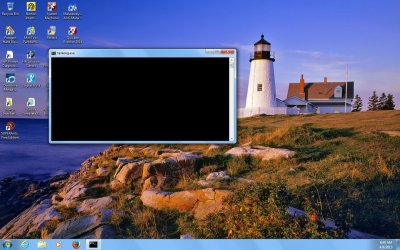
It stayed in that state for so long that I finally forced a reboot. This happened twice in a row; the third time it booted all the way into Windows, but I now see a "TaskEng.exe" command window show up whenever I start up, during the "populate the desktop" part of starting up. I have attached a screen shot in case I am not describing it well.

When I watched the Command window closely, I saw a brief flash of text that said something about "not found" - but this text appears and vanishes so fast that I cannot read it nor can I capture a screen shot of it even though the window itself lingers while before it closes.

The changes I made include the following:
-resized my partitions
-added a user account
-moved some data files
-uninstalled MS Office

The only web sites I visited immediately before this began were Google, this forum, and Microsoft Answers. Therefore, I think my problem is probably damaged or missing Windows files rather than a virus or malware, but I don't want to assume that so I came here for help.
 

Attachments
  • TaskEng on Startup.jpg
    TaskEng on Startup.jpg
    209.8 KB · Views: 0

My Computer My Computer

Computer type
Laptop
Computer Manufacturer/Model Number
ProStar Model P157SM-A
OS
Windows 7 Professional 64 bit SP 1
CPU
Intel Core i7-4710 MQ
Motherboard
No info
Memory
16 GB
Graphics Card(s)
NVIDIA GeForce GTX 870M
Hard Drives
256 GB Samsung SSD
1TB 7200 RPM Hard Drive
Antivirus
Norton Internet Security
Browser
Internet Explorer and Mozilla Firefox
I ran "SFC /scannow" as an Administrator and it said it found no integrity violations
I ran CHKDSK and it showed that Windows had fixed a couple of things. Here are the results:

Checking file system on C:
The type of the file system is NTFS.
A disk check has been scheduled.
Windows will now check the disk.
CHKDSK is verifying files (stage 1 of 5)...
189184 file records processed. File verification completed.
1646 large file records processed. 0 bad file records processed. 4 EA records processed. 76 reparse records processed. CHKDSK is verifying indexes (stage 2 of 5)...
232702 index entries processed. Index verification completed.
0 unindexed files scanned. 0 unindexed files recovered. CHKDSK is verifying security descriptors (stage 3 of 5)...
189184 file SDs/SIDs processed. Cleaning up 126 unused index entries from index $SII of file 0x9.
Cleaning up 126 unused index entries from index $SDH of file 0x9.
Cleaning up 126 unused security descriptors.
CHKDSK is compacting the security descriptor stream
21760 data files processed. CHKDSK is verifying Usn Journal...
36575128 USN bytes processed. Usn Journal verification completed.
CHKDSK is verifying file data (stage 4 of 5)...
189168 files processed. File data verification completed.
CHKDSK is verifying free space (stage 5 of 5)...
12351009 free clusters processed. Free space verification is complete.
Correcting errors in the Volume Bitmap.
Windows has made corrections to the file system.
115684351 KB total disk space.
65882164 KB in 145990 files.
100920 KB in 21763 indexes.
0 KB in bad sectors.
297231 KB in use by the system.
65536 KB occupied by the log file.
49404036 KB available on disk.
4096 bytes in each allocation unit.
28921087 total allocation units on disk.
12351009 allocation units available on disk.
 
Last edited:

My Computer My Computer

Computer type
Laptop
Computer Manufacturer/Model Number
ProStar Model P157SM-A
OS
Windows 7 Professional 64 bit SP 1
CPU
Intel Core i7-4710 MQ
Motherboard
No info
Memory
16 GB
Graphics Card(s)
NVIDIA GeForce GTX 870M
Hard Drives
256 GB Samsung SSD
1TB 7200 RPM Hard Drive
Antivirus
Norton Internet Security
Browser
Internet Explorer and Mozilla Firefox
I'll just add that before making any of these changes, I did a Macrium backup using the using the "Create an image that can be used to backup and restore Windows" function (which imaged my C partition and my System 100MB partition, but did not do a full backup of my entire 320GB disk).

What I need to know about the Macrium backup is this: because I deleted one of my data partitions and resized the others - as well as resizing my C partition - after I ran it, can I still use it to restore my Windows files, or will that fail because of the nature of the changes I made?

I checked, and I don't have a usable Windows Restore Point for my C partition although System Protection is turned on for it (I have one from yesterday that is after the problem began, and a previous one from March 23 which I'd hate to have to go back to). I do have my Win7 disks, so if I have to do a Repair Install I have the media available.

I also have a Macrium Rescue Disk available, which I made when I saved the Macrium backup described above.
 
Last edited:

My Computer My Computer

Computer type
Laptop
Computer Manufacturer/Model Number
ProStar Model P157SM-A
OS
Windows 7 Professional 64 bit SP 1
CPU
Intel Core i7-4710 MQ
Motherboard
No info
Memory
16 GB
Graphics Card(s)
NVIDIA GeForce GTX 870M
Hard Drives
256 GB Samsung SSD
1TB 7200 RPM Hard Drive
Antivirus
Norton Internet Security
Browser
Internet Explorer and Mozilla Firefox
I tried checking for malware and viruses since I read somewhere on the Internet that this might be malware or virus related.
-I ran Norton and Malwarebytes - they found and fixed some tracking cookies.
-I downloaded and installed SuperAntiSpyware. It found something called "Malware Trace" but that did not affect the TaskEng.exe problem.
-I downloaded AdwareCleaner, but when I went to install it, Norton reacted by finding a threat named SONARheuristic120 that made it decide that Adware Cleaner was malicious. As a result, it prevented the install and removed all the associated files so I never did run it. (I can post a screen shot if needed, but this did not affect the problem either so I don't want to divert attention from my current issue)

I found some other information on the Internet that said this could indicate a registry problem, sometimes caused when a program is installed or uninstalled - hence the CHKDSK and SFC runs. From here, I can pursue a restore or a repair if that is the best option.

Right now, I need guidance - what additional data and images or print outs do I need to provide to help diagnose this, and what do I need to do now?

In case it would help, I've posted a screen shot of the summary level of Event Viewer. It shows some errors and some warnings. Since I don't know if anyof this data might be useful, I figured I'd share it in case there's something there I need to copy and post.
 

Attachments

  • Event Viewer Summary.jpg
    Event Viewer Summary.jpg
    131.4 KB · Views: 2

My Computer My Computer

Computer type
Laptop
Computer Manufacturer/Model Number
ProStar Model P157SM-A
OS
Windows 7 Professional 64 bit SP 1
CPU
Intel Core i7-4710 MQ
Motherboard
No info
Memory
16 GB
Graphics Card(s)
NVIDIA GeForce GTX 870M
Hard Drives
256 GB Samsung SSD
1TB 7200 RPM Hard Drive
Antivirus
Norton Internet Security
Browser
Internet Explorer and Mozilla Firefox
I think you can restore that image of C and the 100MB partition despite the changes you made. You may encounter some missing references for the data that was in the data partition that you deleted.

Going back to the March restore point is another option. It will not effect your data just the system and the installed programs and settings which will be set back to March.
 

My Computer My Computer

Computer Manufacturer/Model Number
HP, Dell, Gateway, Toshiba - 4 laptops and 2 desktops
OS
Vista, Windows7, Mint Mate, Zorin, Windows 8
CPU
from 1.6GHz Duo to i7
Monitor(s) Displays
2x HP w2207
Hard Drives
5x HDD, 7x SSD, 12x Externals
Keyboard
with trackball - no mices
Mouse
Trackball mice
Internet Speed
DSL 6000
I think you can restore that image of C and the 100MB partition despite the changes you made. You may encounter some missing references for the data that was in the data partition that you deleted.

Going back to the March restore point is another option. It will not effect your data just the system and the installed programs and settings which will be set back to March.

Wolfgang, thanks for the quick reply!

I'd rather not go back to the March date if I can avoid it, as that was before I discovered and installed all the tools this forum recommends :)

The good news is that I moved all data out of the data partition before I deleted it, so I can deal with the missing references. The other good news is I took your earlier advice and did a Macrium Restore test on a small partition with a few files in it, so I have at least done this once before (although never with files that matter).

I have reused the allocated space that was freed up when I deleted the partition, as I expanded my C partition to use some of it, and moved a different data partition to reuse the remaining space.


Will the fact that my C partition is now bigger be a problem in this restore? It sounds like probably not, but I figured best to double-check.

PS - I also changed the name of my machine from LAURIE-LAPTOP to LAURIE-D630. If this will create an issue in the Restore, I can change it back before I do it.

Please let me know if you think either of these will be a problem. Thanks in advance for your help.
 

My Computer My Computer

Computer type
Laptop
Computer Manufacturer/Model Number
ProStar Model P157SM-A
OS
Windows 7 Professional 64 bit SP 1
CPU
Intel Core i7-4710 MQ
Motherboard
No info
Memory
16 GB
Graphics Card(s)
NVIDIA GeForce GTX 870M
Hard Drives
256 GB Samsung SSD
1TB 7200 RPM Hard Drive
Antivirus
Norton Internet Security
Browser
Internet Explorer and Mozilla Firefox
Will the fact that my C partition is now bigger be a problem in this restore?
That is no problem. You will, however, have unallocated space on the C partition after the restore. Just extend the C partition in disk management then to make use of that unallocated space.

Regarding the machine name - I would think you will get the old name back.
 

My Computer My Computer

Computer Manufacturer/Model Number
HP, Dell, Gateway, Toshiba - 4 laptops and 2 desktops
OS
Vista, Windows7, Mint Mate, Zorin, Windows 8
CPU
from 1.6GHz Duo to i7
Monitor(s) Displays
2x HP w2207
Hard Drives
5x HDD, 7x SSD, 12x Externals
Keyboard
with trackball - no mices
Mouse
Trackball mice
Internet Speed
DSL 6000
Will the fact that my C partition is now bigger be a problem in this restore?
That is no problem. You will, however, have unallocated space on the C partition after the restore. Just extend the C partition in disk management then to make use of that unallocated space.

Regarding the machine name - I would think you will get the old name back.

Cool - those are easy to deal with!

I will post back after I have performed the Restore
 

My Computer My Computer

Computer type
Laptop
Computer Manufacturer/Model Number
ProStar Model P157SM-A
OS
Windows 7 Professional 64 bit SP 1
CPU
Intel Core i7-4710 MQ
Motherboard
No info
Memory
16 GB
Graphics Card(s)
NVIDIA GeForce GTX 870M
Hard Drives
256 GB Samsung SSD
1TB 7200 RPM Hard Drive
Antivirus
Norton Internet Security
Browser
Internet Explorer and Mozilla Firefox
I did the Macrium Restore, and as far as I can tell it completed successfully. My machine is in the same state as it was before I resized my C partition, added a User account, and uninstalled MS Office. Thanks, Wolfgang, your information was right on as usual!

The bad news is the TaskEng.exe command window still shows up on Start Up, while my desktop icons are loading, just like it did before. However, I took it a step further and tried booting up in Safe Mode - and I did NOT get a TaskEng.exe command window.

As I have said repeatedly, I'm no expert, but what this seems to mean to me is that there is a problem for one of the items I have in my start up routine. Maybe if I can isolate which one is the problem, I can do a reinstall or something for that item.

I will start trying to figure out how to isolate my start up items in order to identify the problem in case that turns out to be the cause of this, but I could really use some more guidance from people who know what they're doing since I clearly don't. :rolleyes:
 

My Computer My Computer

Computer type
Laptop
Computer Manufacturer/Model Number
ProStar Model P157SM-A
OS
Windows 7 Professional 64 bit SP 1
CPU
Intel Core i7-4710 MQ
Motherboard
No info
Memory
16 GB
Graphics Card(s)
NVIDIA GeForce GTX 870M
Hard Drives
256 GB Samsung SSD
1TB 7200 RPM Hard Drive
Antivirus
Norton Internet Security
Browser
Internet Explorer and Mozilla Firefox
You should disable ALL startups except the AV program and those that you have set yourself. They are completely useless. They will start when needed.
 

My Computer My Computer

Computer Manufacturer/Model Number
HP, Dell, Gateway, Toshiba - 4 laptops and 2 desktops
OS
Vista, Windows7, Mint Mate, Zorin, Windows 8
CPU
from 1.6GHz Duo to i7
Monitor(s) Displays
2x HP w2207
Hard Drives
5x HDD, 7x SSD, 12x Externals
Keyboard
with trackball - no mices
Mouse
Trackball mice
Internet Speed
DSL 6000
Wolfgang, thanks. I guess I could disable all, and then only add an item back when it becomes a nuisance not to have it.

I have done a bit more experimenting - I had an admin account and a standard account, and I added a second standard account for a family member. When I tried restarting, and logging into each account, the only one where the TaskEng.exe window appears is my Admin account.

Then I created a second Admin account (didn't add any startup items yet), and I discovered that when I log into this account the TaskEng.exe window does not appear. I can use this account to experiment with adding startup items, such as my calendar or whatever, and see if any of them will recreate the problem.


Hmmmm ... the mystery continues
 

My Computer My Computer

Computer type
Laptop
Computer Manufacturer/Model Number
ProStar Model P157SM-A
OS
Windows 7 Professional 64 bit SP 1
CPU
Intel Core i7-4710 MQ
Motherboard
No info
Memory
16 GB
Graphics Card(s)
NVIDIA GeForce GTX 870M
Hard Drives
256 GB Samsung SSD
1TB 7200 RPM Hard Drive
Antivirus
Norton Internet Security
Browser
Internet Explorer and Mozilla Firefox
You should definitely have the startups that you set yourself like the Calendar or a dock. But all those 'automatic' startups that crept in by themselves are really not required. I suspect that the funny message comes from one of those.
 

My Computer My Computer

Computer Manufacturer/Model Number
HP, Dell, Gateway, Toshiba - 4 laptops and 2 desktops
OS
Vista, Windows7, Mint Mate, Zorin, Windows 8
CPU
from 1.6GHz Duo to i7
Monitor(s) Displays
2x HP w2207
Hard Drives
5x HDD, 7x SSD, 12x Externals
Keyboard
with trackball - no mices
Mouse
Trackball mice
Internet Speed
DSL 6000
Yep

Worst case, I guess I could start using my new Admin acct and just delete the one with the issue after I retrieve any data files I want to keep.

What fun ...


The good news of course for this whole thing is I got to practice my Macrium skills again - thanks, Teach! - and I learned some more new tools
 

My Computer My Computer

Computer type
Laptop
Computer Manufacturer/Model Number
ProStar Model P157SM-A
OS
Windows 7 Professional 64 bit SP 1
CPU
Intel Core i7-4710 MQ
Motherboard
No info
Memory
16 GB
Graphics Card(s)
NVIDIA GeForce GTX 870M
Hard Drives
256 GB Samsung SSD
1TB 7200 RPM Hard Drive
Antivirus
Norton Internet Security
Browser
Internet Explorer and Mozilla Firefox
I've been observing my D630's behavior, and I have a revised theory. When I was getting ready to rearrange and resize my partitions, I moved some User folders and files to my external hard drive instead of copying them over.

I think I may have accidentally moved a file or folder that one of my applications or start up items needs in order to run. I still have to figure out which one is having the problem, but in the meantime I'm trying to move those files back into their original position on my internal drive to see if that helps. Next I'll tackle the start up items and any apps I've installed recently.


PS the behavior I observed is that when my external drive is attached, that's when my start up process seems to hang - the underscore keeps blinking against a blank screen, and I see the data transmission light on my external drive flashing as though active interaction is taking place (not just a heartbeat type regular flash). In addition, when I go to safely remove the drive, it says I can't because a program is using it.
 

My Computer My Computer

Computer type
Laptop
Computer Manufacturer/Model Number
ProStar Model P157SM-A
OS
Windows 7 Professional 64 bit SP 1
CPU
Intel Core i7-4710 MQ
Motherboard
No info
Memory
16 GB
Graphics Card(s)
NVIDIA GeForce GTX 870M
Hard Drives
256 GB Samsung SSD
1TB 7200 RPM Hard Drive
Antivirus
Norton Internet Security
Browser
Internet Explorer and Mozilla Firefox
For all files that I moved, I've moved them back to my C partition but that didn't solve the problem.

I've taken my "Startup Items" (as listed in that tab of my System Configuration window) down to almost nothing and that didn't solve the problem either. I've also uninstalled a couple of programs I recently installed and that made no difference.

I even tried taking a video of the process to see if I could capture the text that so briefly appears before the tasking.exe window closes, but I don't have good enough resolution in my little camera to capture it clearly - and it only lasts for about a frame or at most two frames. When I tried to read it as it went by, I think I saw "not found" and I might have seen "dll" but that is a guess at best.

The good news is it only shows up for the one Admin account - the new Admin account I built and the two standard accounts I built do not appear to be experiencing the same issue.

When I was looking at applications to uninstall, I also found some old stuff that I no longer need, so I was able to do some housekeeping - so I guess that's good news also.

It's possible that the problem is associated with a Service rather than a Startup item, but I don't know enough to know which ones I can safely disable. I did confirm that this doesn't happen when I start up in Safe mode; I may also try starting up in diagnostic mode to see what happens.

At this point, I plan to use my new Admin account long enough to make sure I can do everything I need, and then I'll delete the Admin account that has the problem. If the problem doesn't show up on another account at that point, I will mark this thread as solved.
 

My Computer My Computer

Computer type
Laptop
Computer Manufacturer/Model Number
ProStar Model P157SM-A
OS
Windows 7 Professional 64 bit SP 1
CPU
Intel Core i7-4710 MQ
Motherboard
No info
Memory
16 GB
Graphics Card(s)
NVIDIA GeForce GTX 870M
Hard Drives
256 GB Samsung SSD
1TB 7200 RPM Hard Drive
Antivirus
Norton Internet Security
Browser
Internet Explorer and Mozilla Firefox
Back
Top