
Temp. Internet Files in IE9

grits

New member
Power User
VIP
Local time
11:28 PM
Messages
582
I have 2 that are there every day & would appreciate an explanation in 'simple terms' please.

I realize that the 'Compatible' one deals with easier reading in old site or something to that affect but is it automatic or did I cause it by clicking that icon up in address bar?

The google one dumfounds me 'cuz I followed advice from a post somewhere here in forum that was supposed to block 3rd party snopes. Did I do it wrong?

Thanks
 

Attachments

  • 2012-09-19_134433 _ these are constantly in TIF.png
    2012-09-19_134433 _ these are constantly in TIF.png
    3.8 KB · Views: 19

My Computer My Computer

At a glance

Microsoft Windows 7 Home Premium 64-bit 7601 ...AMD Athlon(tm) II X2 220 Processor3.00 GBNVIDIA GeForce 6150SE nForce 430
Computer type
PC/Desktop
Computer Manufacturer/Model Number
emachines
OS
Microsoft Windows 7 Home Premium 64-bit 7601 Multiprocessor Free Service Pack 1
CPU
AMD Athlon(tm) II X2 220 Processor
Motherboard
eMachines EL1358G
Memory
3.00 GB
Graphics Card(s)
NVIDIA GeForce 6150SE nForce 430
Sound Card
Realtek High Definition Audio
Screen Resolution
1280 x 1024 x 32 bits (4294967296 colors) @ 60 Hz
Hard Drives
(1) WDC WD10 EADX-22TDHB0 SCSI Disk Device (2) Generic- Multi-Card USB Device
Keyboard
came with PC
Mouse
came with PC
Antivirus
Avast
Browser
IE 9
Other Info
don't know how to get info for the other 5 areas
I have a somewhat different question but it does concern TIF's. I meant to ask this last week 'cuz it had been happening for quite some time: back in May I had asked at a different forum "why did I have so many cookies,etc.items in my TIF after visit there but only a couple from other forum" ( I was referring to sevenforum) but lately I've had oodles from here too. Now, Murphy's Law, when I logged out of here approx. 1/2 hr.ago & checked TIF's there were 259 items but only 2 cookies & both were sevenforum, not those others. Go figure!:confused::huh:
 

Attachments

  • 2012-09-13_154713 _ cookies from 7 forum.png
    2012-09-13_154713 _ cookies from 7 forum.png
    3.3 KB · Views: 12

My Computer My Computer

At a glance

Microsoft Windows 7 Home Premium 64-bit 7601 ...AMD Athlon(tm) II X2 220 Processor3.00 GBNVIDIA GeForce 6150SE nForce 430
Computer type
PC/Desktop
Computer Manufacturer/Model Number
emachines
OS
Microsoft Windows 7 Home Premium 64-bit 7601 Multiprocessor Free Service Pack 1
CPU
AMD Athlon(tm) II X2 220 Processor
Motherboard
eMachines EL1358G
Memory
3.00 GB
Graphics Card(s)
NVIDIA GeForce 6150SE nForce 430
Sound Card
Realtek High Definition Audio
Screen Resolution
1280 x 1024 x 32 bits (4294967296 colors) @ 60 Hz
Hard Drives
(1) WDC WD10 EADX-22TDHB0 SCSI Disk Device (2) Generic- Multi-Card USB Device
Keyboard
came with PC
Mouse
came with PC
Antivirus
Avast
Browser
IE 9
Other Info
don't know how to get info for the other 5 areas
http://ie.microsoft.com/testdrive/browser/p3p/google.txt will show you this:

Code:
msFilterList
: Expires=1
# Blocks 3rd-party Google tracking
# Last Modified: 2/19/2012
#
-d news.google.com
-d youtube.com
-d blogger.com
- apis.google.com/*plusone*
-d plus.google.com
-d googleadservices.com
-d googletagservices.com
-d googlesyndication.com
-d googleadservices.com
-d google-analytics.com
-d doubleclick.net
-d doubleclick.com
- http://google.*/api/sclk?
- http://google.*/client_204?
- http://google.*/gen204?
- google.com*/lh/ajaxlog?
- google.com*/uds/stats?
- google.com*/bin/stats?
- google.com*/log?
- google.com*/buzz

http://blogs.msdn.com/b/ie/archive/2012/02/20/google-bypassing-user-privacy-settings.aspx

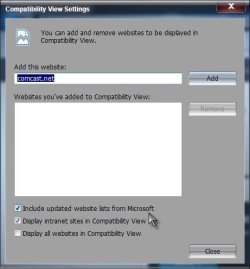
The Compatibility View List http://ie9cvlist.ie.microsoft.com/IE9CompatViewList.xml Is loaded automatically unless you disable it in Compatibility View settings.

You can disable this (I wouldn't, since it is useful, and I assume you just wanted to know what it was ;)) by clicking Tools in the upper left menu. Select Compatibility view settings, and uncheck Include updated website list from Microsoft
Compat.jpg

Understanding the Compatibility View List (Internet Explorer)

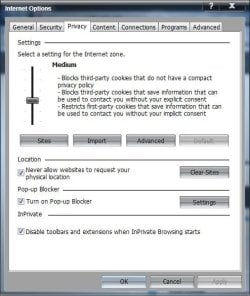
As far as cookies go, accepting cookies from sites you visit is usually acceptable. It is 3rd party cookies from sites you are not visiting that would probably be unacceptable to most. You can see what your settings are.

Open IE> Click on "Gear" (Tools) icon in upper right> Choose Internet options> Click on the Privacy tab

See what your Internet zone setting is currently set to. I would recommend Medium (Medium high is default, and also an acceptable choice which blocks rather then restricts certain cookies).

Privacy.jpg

Cookies stored in this mode would generally fall in the acceptable area.

A Guy
 

My Computer My Computer

At a glance

Windows 10 Home x64INTEL Core i5-750 Quad-Core 3.37GHzHyperX Fury Black Series 8GB (2 x 4GB) 1866MhzEVGA GeForce GTX 750 Superclocked 1GB 128-Bit...
Computer type
PC/Desktop
OS
Windows 10 Home x64
CPU
INTEL Core i5-750 Quad-Core 3.37GHz
Motherboard
ASUS P7P55D
Memory
HyperX Fury Black Series 8GB (2 x 4GB) 1866Mhz
Graphics Card(s)
EVGA GeForce GTX 750 Superclocked 1GB 128-Bit GDDR5
Monitor(s) Displays
LG 32MA68HY 32" IPS
Screen Resolution
1920 x 1080
Hard Drives
Samsung 840 Evo 120GB, SEAGATE 500GB Barracuda® 7200.12, SATA 3 Gb/s, 7200 RPM, 16MB cache
PSU
ANTEC TruePower New TP-550, 80 PLUS, 550W
Case
ANTEC Three Hundred Illusion
Cooling
COOLER MASTER Hyper 212 Plus, 4 x 120mm 1 x 140mm Noctua's
Internet Speed
85 + Mbps
Antivirus
Avast
Browser
Vivaldi
Back
Top
