
Temporary file in storage

swiftie

Old git Member
Member
VIP
Local time
8:45 PM
Messages
149
Location
Hampshire, England
Yesterday, while investigating RAMdisks, and files in storage for temporary files I came across a couple of options on the file open call that could be used. One was "DeleteOnClose".

I can't recall the other option, but the explanation stated "the effect of this is that the file is kept only in RAM". I seem to recall that it had something to do with temporary files.

Can anyone help me locate this other option?

I've looked at every page in my browser history, but for some reason I haven't found the page...
 
Last edited:

My Computer

Computer type
PC/Desktop
Computer Manufacturer/Model Number
Arbico/Quiet i7377
OS
Windows 7 Ultimate x64
CPU
3.40 gigahertz Intel Core i7-3770 Multi-core (4 total)
Motherboard
ASUSTeK COMPUTER INC. P8Z77-V LX Rev X.0x
Memory
16Gb
Graphics Card(s)
AMD Radeon HD 7700
Sound Card
AMD High Definition Audio Device
Monitor(s) Displays
Samsung 2443BW/Lenovo L2240pwD
Screen Resolution
1920x1200 1050x1680
Hard Drives
OCZ-VERTEX450 (256 GB)
ST31000524AS (1000.20 GB)
Drobo 5D 5-disk enclosure
Seagate USB 1Tb
ST1500DL 003-9VT16L 1500.30 GB
Case
Special noise-reducing case
Cooling
Quiet fans
Keyboard
Lenovo SK-8815 Multimedia keyboard
Mouse
Logitech MX
Internet Speed
~7mbps
Antivirus
Microsoft Security Essentials (and caution)
Browser
Chrome/Opera/Firefox/IE/Off-by-One
Other Info
Acoustic Energy AEGO-M Speakers - incredible sound, given their size.
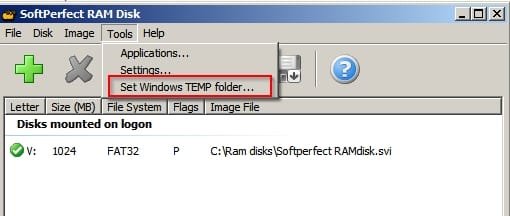
Windows Temp Folder?

Sounds like the option to move Windows Temp Folder onto the disk. If you're going to mess about with RAMdisks I suggest having a system image backup and restore option in place before going ahead.

RAM Disk.jpg
 

My Computer

Computer type
Laptop
Computer Manufacturer/Model Number
ASUS
OS
Microsoft Windows 7 Home Premium 64-bit 7601 Multiprocessor Free Service Pack 1
CPU
AMD C-60 APU with Radeon(tm) HD Graphics
Motherboard
ASUSTeK COMPUTER INC. X501U
Memory
4.00 GB
Graphics Card(s)
AMD Radeon HD 6290 Graphics
Sound Card
(1) AMD High Definition Audio Device (2) Realtek High Defi
Screen Resolution
1366 x 768 x 32 bits (4294967296 colors) @ 60 Hz
Hard Drives
Hitachi HTS545050A7E380 SATA Disk Device
Antivirus
Comodo CIS & FW, SecureAplus App Whitelisting, Threatfire
Browser
Cyberfox 64bit, Opera 64bit, Airfox
Other Info
Spy-The-Spy, HitmanPro.Alert, Norton Connect Safe, MJRegWatcher, BitDefender TrafficLight, Voodoo Shield, Zemana AntiMalware
What I saw was an option on the File Open call (or maybe the File Create). "DeleteOnClose" is obviously a File I/O option.

The reason that I'm interested in these options is because I'm hoping to get the capability of temporary files in RAM implemented in my programming language of choice. Doing the research on what it involves is half of the battle.

I'm happy enough with my Temp folder as it is, though I'm tempted to move it from C: (SSD boot drive) to D: (Internal Data drive).
 

My Computer

Computer type
PC/Desktop
Computer Manufacturer/Model Number
Arbico/Quiet i7377
OS
Windows 7 Ultimate x64
CPU
3.40 gigahertz Intel Core i7-3770 Multi-core (4 total)
Motherboard
ASUSTeK COMPUTER INC. P8Z77-V LX Rev X.0x
Memory
16Gb
Graphics Card(s)
AMD Radeon HD 7700
Sound Card
AMD High Definition Audio Device
Monitor(s) Displays
Samsung 2443BW/Lenovo L2240pwD
Screen Resolution
1920x1200 1050x1680
Hard Drives
OCZ-VERTEX450 (256 GB)
ST31000524AS (1000.20 GB)
Drobo 5D 5-disk enclosure
Seagate USB 1Tb
ST1500DL 003-9VT16L 1500.30 GB
Case
Special noise-reducing case
Cooling
Quiet fans
Keyboard
Lenovo SK-8815 Multimedia keyboard
Mouse
Logitech MX
Internet Speed
~7mbps
Antivirus
Microsoft Security Essentials (and caution)
Browser
Chrome/Opera/Firefox/IE/Off-by-One
Other Info
Acoustic Energy AEGO-M Speakers - incredible sound, given their size.
Okay I think that's probably beyond my understanding but thanks for making it clear!
 

My Computer

Computer type
Laptop
Computer Manufacturer/Model Number
ASUS
OS
Microsoft Windows 7 Home Premium 64-bit 7601 Multiprocessor Free Service Pack 1
CPU
AMD C-60 APU with Radeon(tm) HD Graphics
Motherboard
ASUSTeK COMPUTER INC. X501U
Memory
4.00 GB
Graphics Card(s)
AMD Radeon HD 6290 Graphics
Sound Card
(1) AMD High Definition Audio Device (2) Realtek High Defi
Screen Resolution
1366 x 768 x 32 bits (4294967296 colors) @ 60 Hz
Hard Drives
Hitachi HTS545050A7E380 SATA Disk Device
Antivirus
Comodo CIS & FW, SecureAplus App Whitelisting, Threatfire
Browser
Cyberfox 64bit, Opera 64bit, Airfox
Other Info
Spy-The-Spy, HitmanPro.Alert, Norton Connect Safe, MJRegWatcher, BitDefender TrafficLight, Voodoo Shield, Zemana AntiMalware
Yesterday, while investigating RAMdisks, and files in storage for temporary files I came across a couple of options on the file open call that could be used. One was "DeleteOnClose".

I can't recall the other option, but the explanation stated "the effect of this is that the file is kept only in RAM". I seem to recall that it had something to do with temporary files.

Can anyone help me locate this other option?

I've looked at every page in my browser history, but for some reason I haven't found the page...

Since I am somewhat familiar with the CreateFile API function, I read your inquiry with interest. Although I may have missed it (as frequently I do), I didn't see a "delete on close" flag, although such a flag sounds familiar to me, too. Nevertheless, i found another flag that may come closer to meeting your requirements, and it is one of which I long ago made a mental note to investigate further. According to the official CreateFile documentation at https://msdn.microsoft.com/en-us/library/windows/desktop/aa363858(v=vs.85).aspx, I read the following paragraph.

Specifying the FILE_ATTRIBUTE_TEMPORARY attribute causes file systems to avoid writing data back to mass storage if sufficient cache memory is available, because an application deletes a temporary file after a handle is closed. In that case, the system can entirely avoid writing the data. Although it does not directly control data caching in the same way as the previously mentioned flags, the FILE_ATTRIBUTE_TEMPORARY attribute does tell the system to hold as much as possible in the system cache without writing and therefore may be of concern for certain applications.

I suspect this this flag comes closer to meeting your requirements.
 

My Computer

Computer type
PC/Desktop
Computer Manufacturer/Model Number
Gateway
OS
Windows 7 SP Professional 1, 64 bit
CPU
Intel Pentium G630 @ 2.7 GHz
Motherboard
Gateway
Memory
4.0 GB
Graphics Card(s)
Intel HD Graphics
Hard Drives
1 TB SATA
Antivirus
Microsoft Antimalware
Browser
Google Chrome, Windows Internet Explorer 11
Txwizard: file_attribute_temporary is exactly what I was trying to recall. Thank you!

The description is exactly as I remember it. I have 16GB RAM, so most of my temporary files would fit.

I'm looking for a neat solution to capturing the file output from utilities like wget, and this attribute would allow the authors of my favourite programming language to implement a robust but very fast temporary file mechanism.

You've given me the facts that I needed to construct a strong "request for enhancement".
 

My Computer

Computer type
PC/Desktop
Computer Manufacturer/Model Number
Arbico/Quiet i7377
OS
Windows 7 Ultimate x64
CPU
3.40 gigahertz Intel Core i7-3770 Multi-core (4 total)
Motherboard
ASUSTeK COMPUTER INC. P8Z77-V LX Rev X.0x
Memory
16Gb
Graphics Card(s)
AMD Radeon HD 7700
Sound Card
AMD High Definition Audio Device
Monitor(s) Displays
Samsung 2443BW/Lenovo L2240pwD
Screen Resolution
1920x1200 1050x1680
Hard Drives
OCZ-VERTEX450 (256 GB)
ST31000524AS (1000.20 GB)
Drobo 5D 5-disk enclosure
Seagate USB 1Tb
ST1500DL 003-9VT16L 1500.30 GB
Case
Special noise-reducing case
Cooling
Quiet fans
Keyboard
Lenovo SK-8815 Multimedia keyboard
Mouse
Logitech MX
Internet Speed
~7mbps
Antivirus
Microsoft Security Essentials (and caution)
Browser
Chrome/Opera/Firefox/IE/Off-by-One
Other Info
Acoustic Energy AEGO-M Speakers - incredible sound, given their size.
file_attribute_temporary is exactly what I was trying to recall. Thank you!

You've given me the facts that I needed to construct a strong "request for enhancement".

Here's to an enthusiastically accepted request.

BTW, what is your favorite programming language?
 

My Computer

Computer type
PC/Desktop
Computer Manufacturer/Model Number
Gateway
OS
Windows 7 SP Professional 1, 64 bit
CPU
Intel Pentium G630 @ 2.7 GHz
Motherboard
Gateway
Memory
4.0 GB
Graphics Card(s)
Intel HD Graphics
Hard Drives
1 TB SATA
Antivirus
Microsoft Antimalware
Browser
Google Chrome, Windows Internet Explorer 11
BTW, what is your favorite programming language?
Open Object Rexx
It was developed with ease of use as one of its' main objectives; you could read and understand the Language Reference in one day.
I'd used several languages before I encountered REXX (ranging from BASIC to S/370 Assembler) but it supplanted all of those. So much so that I've found it impossible to learn languages more appropriate to some environments (I've abandoned attempts at PERL, C).
 

My Computer

Computer type
PC/Desktop
Computer Manufacturer/Model Number
Arbico/Quiet i7377
OS
Windows 7 Ultimate x64
CPU
3.40 gigahertz Intel Core i7-3770 Multi-core (4 total)
Motherboard
ASUSTeK COMPUTER INC. P8Z77-V LX Rev X.0x
Memory
16Gb
Graphics Card(s)
AMD Radeon HD 7700
Sound Card
AMD High Definition Audio Device
Monitor(s) Displays
Samsung 2443BW/Lenovo L2240pwD
Screen Resolution
1920x1200 1050x1680
Hard Drives
OCZ-VERTEX450 (256 GB)
ST31000524AS (1000.20 GB)
Drobo 5D 5-disk enclosure
Seagate USB 1Tb
ST1500DL 003-9VT16L 1500.30 GB
Case
Special noise-reducing case
Cooling
Quiet fans
Keyboard
Lenovo SK-8815 Multimedia keyboard
Mouse
Logitech MX
Internet Speed
~7mbps
Antivirus
Microsoft Security Essentials (and caution)
Browser
Chrome/Opera/Firefox/IE/Off-by-One
Other Info
Acoustic Energy AEGO-M Speakers - incredible sound, given their size.
Sounds like the option to move Windows Temp Folder onto the disk. If you're going to mess about with RAMdisks I suggest having a system image backup and restore option in place before going ahead.

thanks for the solution its really helpful for me. i also looking for it and finally got solution with this post
 

My Computer

Computer type
PC/Desktop
OS
Windows 7 32bit
Back
Top