TEST -Update 7 installation media

Thanks. How would I comment out all the registry changes so that I only get the Update packages added?

Same question, I read way back somewhere in pages 1 -12 that renaming or deleting the reg files was ok to do in order to remove all the customisations is this still the case with V7 ? or is it better to just comment out every line in said reg files ?

Another question WUD has in the region of 108 non security updates and 88 security updates where as the Alphawaves down loader with Wintoolkit I have been using has something like the same amount of security updates but in addition 315 hotfix along with 67 general updates that's if you ignore all the additional ones, Am I correct in assuming that this Alphawaves version is just listing every hotfix know to man rather than just the common essential ones ?
 

My Computer My Computer

Computer type
Laptop
Computer Manufacturer/Model Number
Sony
OS
Windows 7 x64 SP1
CPU
Intel
Motherboard
Sony
Memory
4gb
Graphics Card(s)
Nvidia
Hard Drives
WD
Internet Speed
Dial up wasn't as bad as this !
Antivirus
Avast
Browser
Firefox
Thanks. How would I comment out all the registry changes so that I only get the Update packages added?

Same question, I read way back somewhere in pages 1 -12 that renaming or deleting the reg files was ok to do in order to remove all the customisations is this still the case with V7 ? or is it better to just comment out every line in said reg files ?

Another question WUD has in the region of 108 non security updates and 88 security updates where as the Alphawaves down loader with Wintoolkit I have been using has something like the same amount of security updates but in addition 315 hotfix along with 67 general updates that's if you ignore all the additional ones, Am I correct in assuming that this Alphawaves version is just listing every hotfix know to man rather than just the common essential ones ?


Yes, they will be a bunch of things you don't need. 108 plus 88 from WUD sounds about right.
 

My Computers My Computers

System One System Two

  • Computer type
    PC/Desktop
    OS
    7 X64
    CPU
    i5 8400
    Motherboard
    gigabyte b365m ds3h
    Memory
    2x8gb 3200mhz
    Hard Drives
    various
    PSU
    pure power 11 400w cm
    Case
    Coolermaster
    Cooling
    cryorig m9i
  • Computer type
    PC/Desktop
    OS
    7x64
    CPU
    g5400
    Motherboard
    ga b365m ds3h
    Memory
    8gb ddr4 2400
    PSU
    xfx pro 450w

My Computers My Computers

System One System Two

  • Computer type
    PC/Desktop
    OS
    7 X64
    CPU
    i5 8400
    Motherboard
    gigabyte b365m ds3h
    Memory
    2x8gb 3200mhz
    Hard Drives
    various
    PSU
    pure power 11 400w cm
    Case
    Coolermaster
    Cooling
    cryorig m9i
  • Computer type
    PC/Desktop
    OS
    7x64
    CPU
    g5400
    Motherboard
    ga b365m ds3h
    Memory
    8gb ddr4 2400
    PSU
    xfx pro 450w
Here is the list for MAY 2015. View attachment 360302

Thanks for the list I shall compare notes with that so to speak, drop the Alpha thing and use WUD with your V7 to be on the safe side...

Sorry to be a pain in the ass on this one (I'm not sure if you're "yes" was in answer to this question) but just to double check it is ok to delete your ADM, DEF, SOFT & SYS.reg files ?

Thanks for your time and seriously useful system tools :-)
 

My Computer My Computer

Computer type
Laptop
Computer Manufacturer/Model Number
Sony
OS
Windows 7 x64 SP1
CPU
Intel
Motherboard
Sony
Memory
4gb
Graphics Card(s)
Nvidia
Hard Drives
WD
Internet Speed
Dial up wasn't as bad as this !
Antivirus
Avast
Browser
Firefox
Yes, you can delete or rename the reg files. You will get a message saying there is an error because they can't be found - it doesn't matter.
 

My Computers My Computers

System One System Two

  • Computer type
    PC/Desktop
    OS
    7 X64
    CPU
    i5 8400
    Motherboard
    gigabyte b365m ds3h
    Memory
    2x8gb 3200mhz
    Hard Drives
    various
    PSU
    pure power 11 400w cm
    Case
    Coolermaster
    Cooling
    cryorig m9i
  • Computer type
    PC/Desktop
    OS
    7x64
    CPU
    g5400
    Motherboard
    ga b365m ds3h
    Memory
    8gb ddr4 2400
    PSU
    xfx pro 450w
Yes, you can delete or rename the reg files. You will get a message saying there is an error because they can't be found - it doesn't matter.

Ok after completion I seen a few errors that after reading previous posts seem to pertain to these reg files missing and also I seen 4 errors that appear to be caused by superseded updates...

I used the iso to perform a clean reinstall on a laptop and all went well... after the desktop loaded I restarted just as a precaution, arriving back at the desktop again I ran sfc /scannow and it found errors that after looking at the huge CBS log file seemed to be caused by the updates needing to be renamed and moved ? I restarted again and got the message to say windows configuring updates 30% then the system restarted... I ran sfc /scannow again and no errors detected this time everything seems to be ok...

However I should not really be getting sfc errors after doing a clean install it kind of plants the seeds of doubt on the integrity of the install.... just to note I excluded the recent updates that are known to produce errors with sfc along with the one that changes a currency symbol...

Question remains is this "safe" to use on clients systems given the errors that sfc finds ? I have saved a copy of that CBS log if it is needed.
 

My Computer My Computer

Computer type
Laptop
Computer Manufacturer/Model Number
Sony
OS
Windows 7 x64 SP1
CPU
Intel
Motherboard
Sony
Memory
4gb
Graphics Card(s)
Nvidia
Hard Drives
WD
Internet Speed
Dial up wasn't as bad as this !
Antivirus
Avast
Browser
Firefox
Did you notice any other anomalies with the way Updates installed, e.g. stalling at 0% downloading after Check for Updates selection, queuing on Shutdown button, ignoring Settings other than Automatic?

To answer your question I would do another test install using a pristine ISO w/SP1 to compare with this experience. Until then I would not use the slipstreamed ISO for installation on others' PC's.
 
Steven, who keeps the update lists going, hasn't been around since beginning of March. You are probabaly using an old update list.

Might have to do this another way.
 

My Computers My Computers

System One System Two

  • Computer type
    PC/Desktop
    OS
    7 X64
    CPU
    i5 8400
    Motherboard
    gigabyte b365m ds3h
    Memory
    2x8gb 3200mhz
    Hard Drives
    various
    PSU
    pure power 11 400w cm
    Case
    Coolermaster
    Cooling
    cryorig m9i
  • Computer type
    PC/Desktop
    OS
    7x64
    CPU
    g5400
    Motherboard
    ga b365m ds3h
    Memory
    8gb ddr4 2400
    PSU
    xfx pro 450w
Did you notice any other anomalies with the way Updates installed, e.g. stalling at 0% downloading after Check for Updates selection, queuing on Shutdown button, ignoring Settings other than Automatic?

To answer your question I would do another test install using a pristine ISO w/SP1 to compare with this experience. Until then I would not use the slipstreamed ISO for installation on others' PC's.

Just to clarify a little on my last post the "updates" I am referring to are the one's that were slipstreamed into the wim... after the clean install WU had not been ran and was selected to "ask"... so none of the anomalies you mention existed / were in effect... sorry for not making that clear originally.

I performed an offline update to Net 4.5.2 and also IE11 and have been running with this install now for 14+ hours... Then after a manual check for updates using WU and what is now the usual long period of time checking for updates I downloaded and installed only the missing Security patches for Net 3.X there was no hang at 0% and WU did not change to automatic... it's all running surprisingly well (as a real test I'm using it for carrying out my work on so if anything is really wrong with the install it will go fubar in the next few hours for sure).

Though with a pristine ISO after install there are no sfc errors but all the WU related problems exist (I did that yesterday on the same system).

I think like SIW2 has just said the problem must lie in the old list and I have identified and removed some of those updates from my "updates" folder that are suspect and added a few missing ones in preparation to build another wim to test.
 
Last edited:

My Computer My Computer

Computer type
Laptop
Computer Manufacturer/Model Number
Sony
OS
Windows 7 x64 SP1
CPU
Intel
Motherboard
Sony
Memory
4gb
Graphics Card(s)
Nvidia
Hard Drives
WD
Internet Speed
Dial up wasn't as bad as this !
Antivirus
Avast
Browser
Firefox
I figured it maybe of use to somebody if I posted an update on what I have tried so far.

I removed 4 updates from the "updates" folder and built the wim again, successfully this time without any errors (I still have the 4 reg files removed, there was no error either pertaining to them being missing).

Clean re-install with the new iso again, result exactly the same sfc /scannow corrupt files... looking at the CBS log informs me that updates were pending install but none could be found, a lot of other updates were moved and renamed... but the worrying part is the corrupt files found in C:\Windows\boot that apparently sfc has repaired.

I went ahead and did a system clean up and had it remove all the cached / old updates... the installed updates list said 220 and afterwards it reports 170 so I assume that 50 of those updates added to the wim were superseded and this is possibly what the sfc /scannow move and rename reports are about? just to note WU has not been ran at this time... I also have a copy of the CBS log if needed.
 

My Computer My Computer

Computer type
Laptop
Computer Manufacturer/Model Number
Sony
OS
Windows 7 x64 SP1
CPU
Intel
Motherboard
Sony
Memory
4gb
Graphics Card(s)
Nvidia
Hard Drives
WD
Internet Speed
Dial up wasn't as bad as this !
Antivirus
Avast
Browser
Firefox
Right finally ! in order for this to work without any errors of any kind in the build or final install this is the list of updates you can have, they are based on the March 2015 ULZ list from WUD all the current updates for NET 3.5.1 are listed also :

Windows6.1-KB2533552-x64.msu
Windows6.1-KB917607-x64.msu
Windows6.1-KB2479943-x64.msu
Windows6.1-KB2487335-x64.msu
Windows6.1-KB2506014-x64.msu
Windows6.1-KB2491683-x64.msu
Windows6.1-KB2496898-v3-x64.msu
Windows6.1-KB2506928-v2-x64.msu
Windows6.1-KB2511455-x64.msu
Windows6.1-KB2476490-x64.msu
Windows6.1-KB2506628-x64.msu
Windows6.1-KB2515325-x64.msu
Windows6.1-KB2509553-x64.msu
Windows6.1-KB2503658-x64.msu
Windows6.1-KB982018-v3-x64.msu
Windows6.1-KB2506212-x64.msu
Windows6.1-KB2529073-x64.msu
Windows6.1-KB2536275-x64.msu
Windows6.1-KB2544893-x64.msu
Windows6.1-KB2547666-x64.msu
Windows6.1-KB2545698-x64.msu
Windows6.1-KB2552343-x64.msu
Windows6.1-KB2525694-x64.msu
Windows6.1-KB2560656-x64.msu
Windows6.1-KB2563227-x64.msu
Windows6.1-KB2556532-x64.msu
Windows6.1-KB2536276-v2-x64.msu
Windows6.1-KB2570947-x64.msu
Windows6.1-KB2579686-x64.msu
Windows6.1-KB2603229-x64.msu
Windows6.1-KB2564958-x64.msu
Windows6.1-KB2604521-v2-x64.msu
Windows6.1-KB2618301-x64.msu
Windows6.1-KB2620704-x64.msu
Windows6.1-KB2619339-x64.msu
Windows6.1-KB2607047-x64.msu
Windows6.1-KB2620712-x64.msu
Windows6.1-KB2624668-x64.msu
Windows6.1-KB2631813-x64.msu
Windows6.1-KB2585542-x64.msu
Windows6.1-KB2644615-x64.msu
Windows6.1-KB2584146-x64.msu
Windows6.1-KB2654428-x64.msu
.NET Framework 3.5.1 Updates\Windows6.1-KB2656356-x64.msu
Windows6.1-KB2645640-x64.msu
Windows6.1-KB2660075-x64.msu
.NET Framework 3.5.1 Updates\Windows6.1-KB2604115-x64.msu
Windows6.1-KB2640148-v2-x64.msu
Windows6.1-KB2640696-v3-x64.msu
Windows6.1-KB2657025-x64.msu
Windows6.1-KB2621440-x64.msu
Windows6.1-KB2653956-x64.msu
Windows6.1-KB2690533-x64.msu
Windows6.1-KB2676562-x64.msu
Windows6.1-KB2667402-v2-x64.msu
Windows6.1-KB2685939-x64.msu
Windows6.1-KB2709630--x64.msu
Windows6.1-KB2712808-x64.msu
Windows6.1-KB2655992-x64.msu
Windows6.1-KB2719985-x64.msu
Windows6.1-KB2698365-x64.msu
Windows6.1-KB2685811-x64.msu
Windows6.1-KB2685813-x64.msu
Windows6.1-KB2732059-v5-x64.msu
.NET Framework 3.5.1 Updates\Windows6.1-KB2736422-x64.msu
Windows6.1-KB2741355-x64.msu
Windows6.1-KB2719857-x64.msu
Windows6.1-KB2743555-x64.msu
.NET Framework 3.5.1 Updates\Windows6.1-KB2729452-x64.msu
Windows6.1-KB2732500-v2-x64.msu
Windows6.1-KB2705219-v2-x64.msu
Windows6.1-KB2732487-v2-x64.msu
Windows6.1-KB2647753-v4-x64.msu
Windows6.1-KB2729094-v2-x64.msu
Windows6.1-KB2727528-x64.msu
Windows6.1-KB2761217-x64.msu
Windows6.1-KB2750841-x64.msu
.NET Framework 3.5.1 Updates\Windows6.1-KB2742599-x64.msu
Windows6.1-KB2758857-x64.msu
Windows6.1-KB2763523-x64.msu
Windows6.1-KB2757638-x64.msu
Windows6.1-KB2770660-x64.msu
Windows6.1-KB2760730-v2-x64.msu
Windows6.1-KB2786081-x64.msu
Windows6.1-KB2726535-x64.msu
Windows6.1-KB2773072-x64.msu
.NET Framework 3.5.1 Updates\Windows6.1-KB2789645-x64.msu
Windows6.1-KB2799926-x64.msu
Windows6.1-KB2670838-x64.msu
Windows6.1-KB2791765-x64.msu
Windows6.1-KB2807986-x64.msu
Windows6.1-KB2775511-v2-x64.msu
Windows6.1-KB2813347-x64.msu
Windows6.1-KB2823180-x64.msu
Windows6.1-KB2835174-x64.msu
Windows6.1-KB2820197-x64.msu
Windows6.1-KB2835361-x64.msu
Windows6.1-KB2798162-x64.msu
Windows6.1-KB2840149-x64.msu
Windows6.1-KB2820331-x64.msu
.NET Framework 3.5.1 Updates\Windows6.1-KB2836942-x64.msu
.NET Framework 3.5.1 Updates\Windows6.1-KB2832414-x64.msu
Windows6.1-KB2839894-x64.msu
Windows6.1-KB2808679-x64.msu
Windows6.1-KB2829104-x64.msu
Windows6.1-KB2813430-x64.msu
.NET Framework 3.5.1 Updates\Windows6.1-KB2840631-x64.msu
Windows6.1-KB2847927-x64.msu
Windows6.1-KB2864202-x64.msu
Windows6.1-KB2846960-x64.msu
Windows6.1-KB2864058-x64.msu
.NET Framework 3.5.1 Updates\Windows6.1-KB2836943-v2-x64.msu
Windows6.1-KB2862966-x64.msu
.NET Framework 3.5.1 Updates\Windows6.1-KB2861698-x64.msu
Windows6.1-KB2868038-x64.msu
Windows6.1-KB2834140-v2-x64.msu
.NET Framework 3.5.1 Updates\Windows6.1-KB2861191-x64.msu
Windows6.1-KB2868116-x64.msu
Windows6.1-KB2872339-x64.msu
Windows6.1-KB2853952-x64.msu
Windows6.1-KB2862335-x64.msu
Windows6.1-KB2855844-x64.msu
Windows6.1-KB2852386-x64.msu
Windows6.1-KB2884256-x64.msu
Windows6.1-KB2888049-x64.msu
Windows6.1-KB2876331-x64.msu
Windows6.1-KB2887069-x64.msu
Windows6.1-KB2893519-x64.msu
Windows6.1-KB2868626-x64.msu
Windows6.1-KB2892074-x64.msu
Windows6.1-KB2893294-x64.msu
Windows6.1-KB2891804-x64.msu
Windows6.1-KB2905454-x64.msu
.NET Framework 3.5.1 Updates\Windows6.1-KB2894844-x64.msu
Windows6.1-KB2900986-x64.msu
Windows6.1-KB2913152-v2-x64.msu
Windows6.1-KB2862330-v2-x64.msu
IE11-Windows6.1-KB2909210-x64.msu
Windows6.1-KB2912390-x64.msu
.NET Framework 3.5.1 Updates\Windows6.1-KB2911501-x64.msu
Windows6.1-KB2919469-x64.msu
Windows6.1-KB2928562-x64.msu
Windows6.1-KB2918077-x64.msu
Windows6.1-KB2929733-x64.msu
Windows6.1-KB2843630-v3-x64.msu
Windows6.1-KB2908783-x64.msu
Windows6.1-KB2929755-x64.msu
Windows6.1-KB2922229-x64.msu
.NET Framework 3.5.1 Updates\Windows6.1-KB2931356-x64.msu
.NET Framework 3.5.1 Updates\Windows6.1-KB2898851-x64.msu
Windows6.1-KB2939576-x64.msu
Windows6.1-KB2957189-x64.msu
Windows6.1-KB2871997-v2-x64.msu
Windows6.1-KB2957509-x64.msu
Windows6.1-KB2957503-x64.msu
Windows6.1-KB2800095-v2-x64.msu
Windows6.1-KB2961072-x64.msu
Windows6.1-KB2973337-x64.msu
Windows6.1-KB2966583-x64.msu
Windows6.1-KB2918614-x64.msu
Windows6.1-KB2971850-x64.msu
Windows6.1-KB2972280-x64.msu
Windows6.1-KB2976897-x64.msu
Windows6.1-KB2973201-x64.msu
.NET Framework 3.5.1 Updates\Windows6.1-KB2968294-x64.msu
Windows6.1-KB2978092-x64.msu
Windows6.1-KB2980245-x64.msu
Windows6.1-KB2977728-x64.msu
Windows6.1-KB2978742-x64.msu
.NET Framework 3.5.1 Updates\Windows6.1-KB2937610-x64.msu
.NET Framework 3.5.1 Updates\Windows6.1-KB2943357-x64.msu
.NET Framework 3.5.1 Updates\Windows6.1-KB2972100-x64.msu
.NET Framework 3.5.1 Updates\Windows6.1-KB2972211-x64.msu
.NET Framework 3.5.1 Updates\Windows6.1-KB2973112-x64.msu
Windows6.1-KB2978668-x64.msu
Windows6.1-KB2991963-x64.msu
Windows6.1-KB2993958-x64.msu
Windows6.1-KB2993651-x64.msu
Windows6.1-KB2977292-x64.msu
.NET Framework 3.5.1 Updates\Windows6.1-KB2979570-x64.msu
.NET Framework 3.5.1 Updates\Windows6.1-KB2978120-x64.msu
Windows6.1-KB2992611-x64.msu
Windows6.1-KB3001554-x64.msu
Windows6.1-KB3005607-x64.msu
Windows6.1-KB3006625-x64.msu
Windows6.1-KB3008627-x64.msu
Windows6.1-KB3006226-x64.msu
Windows6.1-KB3009736-x64.msu
Windows6.1-KB3010788-x64.msu
Windows6.1-KB3006121-x64.msu
Windows6.1-KB3013410-x64.msu
Windows6.1-KB3011780-x64.msu
Windows6.1-KB3014406-x64.msu
Windows6.1-KB3020338-x64.msu
Windows6.1-KB3020393-x64.msu
Windows6.1-KB3022777-x64.msu
Windows6.1-KB3004361-x64.msu
Windows6.1-KB3021674-x64.msu
Windows6.1-KB3019215-x64.msu
Windows6.1-KB3000483-x64.msu
Windows6.1-KB3013455-x64.msu
Windows6.1-KB3031432-x64.msu
Windows6.1-KB3033889-x64.msu
Windows6.1-KB3030377-x64.msu
Windows6.1-KB3033929-x64.msu
Windows6.1-KB3035132-x64.msu
Windows6.1-KB3035126-x64.msu
.NET Framework 3.5.1 Updates\Windows6.1-KB3037574-x64.msu
Windows6.1-KB3039066-x64.msu
.NET Framework 3.5.1 Updates\Windows6.1-KB3023215-x64.msu
.NET Framework 3.5.1 Updates\Windows6.1-KB3032655-x64.msu
Windows6.1-KB3032323-x64.msu
IE11-Windows6.1-KB3032359-x64.msu
Windows6.1-KB3034344-x64.msu
Windows6.1-KB3046049-x64.msu
.NET Framework 3.5.1 Updates\Windows6.1-KB3048070-x64.msu
 

My Computer My Computer

Computer type
Laptop
Computer Manufacturer/Model Number
Sony
OS
Windows 7 x64 SP1
CPU
Intel
Motherboard
Sony
Memory
4gb
Graphics Card(s)
Nvidia
Hard Drives
WD
Internet Speed
Dial up wasn't as bad as this !
Antivirus
Avast
Browser
Firefox

My Computer My Computer

Computer type
Laptop
Computer Manufacturer/Model Number
MSI PE60 6QE
OS
Win 10 Pro x64, Win 7 Pro x64
CPU
Intel Core i7-6700HQ Skylake
Motherboard
MSI MS-16J5
Memory
16gb Crucial DDR4
Graphics Card(s)
NVIDIA GeForce GTX 960M 2 GB
Screen Resolution
1920 x 1080
Hard Drives
Samsung 850 EVO 250 GB M.2 SSD (MZ-N5E250BW)
HGST 1TB @7200 RPM HTS721010A9E630
Case
Plastic
Keyboard
Got one...
Mouse
Yep, one of those too.
Internet Speed
FIOS 75/75
Antivirus
Defender
Browser
Chrome/FFox/Ex-PLODE-r/(L)Edge
Other Info
Defender, Custom Hosts, uBlock, regular backups w/ Macrium (Free)
Andy, thanks for putting in the effort, looks like Urthbound has found a great WUD update list :D
 

My Computers My Computers

System One System Two

  • Computer type
    PC/Desktop
    OS
    7 X64
    CPU
    i5 8400
    Motherboard
    gigabyte b365m ds3h
    Memory
    2x8gb 3200mhz
    Hard Drives
    various
    PSU
    pure power 11 400w cm
    Case
    Coolermaster
    Cooling
    cryorig m9i
  • Computer type
    PC/Desktop
    OS
    7x64
    CPU
    g5400
    Motherboard
    ga b365m ds3h
    Memory
    8gb ddr4 2400
    PSU
    xfx pro 450w
Andy, thanks for putting in the effort, looks like Urthbound has found a great WUD update list :D

No problem my friend least I could have done, I thank you for your effort Sir for sharing your work with us especially your RE tool I use that at least 3 times a week you have saved me many hours and my head does not hurt as much as there is no need to bang it off the wall now hehehe

Yes a great list well found Urthbound.... time for us all to brush up on our French though :-)
 

My Computer My Computer

Computer type
Laptop
Computer Manufacturer/Model Number
Sony
OS
Windows 7 x64 SP1
CPU
Intel
Motherboard
Sony
Memory
4gb
Graphics Card(s)
Nvidia
Hard Drives
WD
Internet Speed
Dial up wasn't as bad as this !
Antivirus
Avast
Browser
Firefox
Hi,

I was trying to use Update7v7 but ran into the situation which someone else had mentioned earlier too. After selecting the Update folder, I am presented with no images. I even used the UpdateRE7v3 but even that couldn't locate the Images.

Looks like there is an issue somewhere. For clarification I am using the Windows 7 Ultimate x64 with SP1 ISO downloaded from Digital River.

P.S. When i use Update7v5, the images are shown correctly. I do run into other errors while trying to update using Update7v5 but I will keep that as a separate topic. Any help or guidance would be appreciated. I do plan on comparing the code for the 2 zip files to see if I can locate any discrepancies.

************************ EDIT 1 ************************

I compared the Update-win7.CMD file against Update-win7v5.CMD The 7v7 file calls the Imagex as follows:
Code:
BIN\imagex /info %Wimpath% >BIN\wiminfo.txt
where the Wimpath is shown without quotes however the Update7v5 calls the same command as
Code:
BIN\imagex /info "%Wimpath%" >BIN\wiminfo.txt

When I check wiminfo.txt for both the versions, I see the one in 7v7 shows the help info on how to use imagex while the one in 7v5 shows the output of the command.

Si, maybe this is the issue but I am not sure since I have not coded Win based systems for a very long time. Comments?
 
Last edited:

My Computer My Computer

Computer type
Laptop
Computer Manufacturer/Model Number
Lenovo
OS
Windows 7 Ultimate x64
CPU
i5 3320
Memory
16 GB
Graphics Card(s)
NVIDIA
Thanks for this ,your explanation makes it easy for peeps like me :)
 

My Computer My Computer

Computer type
PC/Desktop
OS
Windows 7 pro x64
Thank you!

Your software saved me. We had to give an employee a replacement laptop, unfortunately it's old and needed a system restore. After Windows 7 system restore, windows update no longer worked. Found this site and your post via google, and now it's updating.

:-)

Thanks,
Neil
 

My Computer My Computer

Computer type
PC/Desktop
Computer Manufacturer/Model Number
Toshiba running Centos 7
OS
Maryland
CPU
i5
Motherboard
?
Memory
4gb
Graphics Card(s)
?
Antivirus
clamav
Browser
chrome
Hi Everyone,

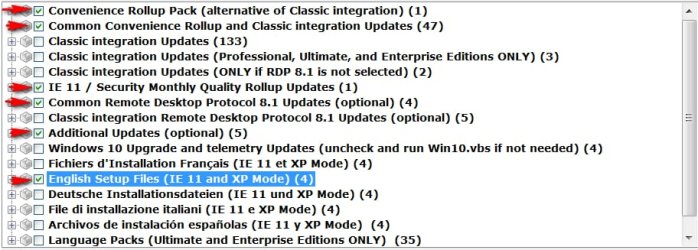
Should we run the classic updates or are these not needed with the rollups I selected?

It did not seen like much as added to my ISO with these settings.

2pq3ql5.png
 

My Computer My Computer

Computer type
PC/Desktop
OS
64 Bit
Looks like you can either go for all the classic (133), or the convenience plus classic (47).

Then one of the RDP, and IE11.

E.G.

WUD.jpg
 

My Computers My Computers

System One System Two

  • Computer type
    PC/Desktop
    OS
    7 X64
    CPU
    i5 8400
    Motherboard
    gigabyte b365m ds3h
    Memory
    2x8gb 3200mhz
    Hard Drives
    various
    PSU
    pure power 11 400w cm
    Case
    Coolermaster
    Cooling
    cryorig m9i
  • Computer type
    PC/Desktop
    OS
    7x64
    CPU
    g5400
    Motherboard
    ga b365m ds3h
    Memory
    8gb ddr4 2400
    PSU
    xfx pro 450w

My Computers My Computers

System One System Two

  • Computer type
    PC/Desktop
    OS
    7 X64
    CPU
    i5 8400
    Motherboard
    gigabyte b365m ds3h
    Memory
    2x8gb 3200mhz
    Hard Drives
    various
    PSU
    pure power 11 400w cm
    Case
    Coolermaster
    Cooling
    cryorig m9i
  • Computer type
    PC/Desktop
    OS
    7x64
    CPU
    g5400
    Motherboard
    ga b365m ds3h
    Memory
    8gb ddr4 2400
    PSU
    xfx pro 450w
Back
Top