TEST -Update 7 installation media

Have a look in the updates folder you downloaded to - there should be a subfolder .NET Framework 3.5.1 Updates.

There should be files in there.

If not you can just d/l that bit with wud. Point it at your existing folder you already downloaded the other updates to.

No need to d/l everything again.
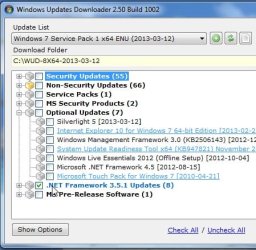
2013-03-19_004735.jpg
 

My Computers

System One System Two

  • Computer type
    PC/Desktop
    OS
    7 X64
    CPU
    i5 8400
    Motherboard
    gigabyte b365m ds3h
    Memory
    2x8gb 3200mhz
    Hard Drives
    various
    PSU
    pure power 11 400w cm
    Case
    Coolermaster
    Cooling
    cryorig m9i
  • Computer type
    PC/Desktop
    OS
    7x64
    CPU
    g5400
    Motherboard
    ga b365m ds3h
    Memory
    8gb ddr4 2400
    PSU
    xfx pro 450w
OK redownloaded NF3.5, remounting image. It must be responding to the unmount command you added as it is Cleaning Up the previous mounted image which is protected from deletion by Trusted Installer.
 
Yes. that's normal.
 

My Computers

System One System Two

  • Computer type
    PC/Desktop
    OS
    7 X64
    CPU
    i5 8400
    Motherboard
    gigabyte b365m ds3h
    Memory
    2x8gb 3200mhz
    Hard Drives
    various
    PSU
    pure power 11 400w cm
    Case
    Coolermaster
    Cooling
    cryorig m9i
  • Computer type
    PC/Desktop
    OS
    7x64
    CPU
    g5400
    Motherboard
    ga b365m ds3h
    Memory
    8gb ddr4 2400
    PSU
    xfx pro 450w
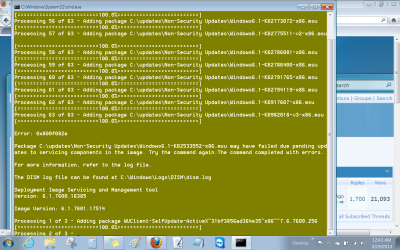
Now I'm getting same earlier error that image is already mounted (after cleaning it up) and Error 50 DISM does not support Vista or earlier OS? Huh?
 
LOL. I have no idea, Greg. That is dism from your current installation.

It seems to think the install.wim you are pointing at is vista or earlier.

Any ideas , Kari?
 

My Computers

System One System Two

  • Computer type
    PC/Desktop
    OS
    7 X64
    CPU
    i5 8400
    Motherboard
    gigabyte b365m ds3h
    Memory
    2x8gb 3200mhz
    Hard Drives
    various
    PSU
    pure power 11 400w cm
    Case
    Coolermaster
    Cooling
    cryorig m9i
  • Computer type
    PC/Desktop
    OS
    7x64
    CPU
    g5400
    Motherboard
    ga b365m ds3h
    Memory
    8gb ddr4 2400
    PSU
    xfx pro 450w

My Computers

System One System Two

  • Computer type
    PC/Desktop
    OS
    7 X64
    CPU
    i5 8400
    Motherboard
    gigabyte b365m ds3h
    Memory
    2x8gb 3200mhz
    Hard Drives
    various
    PSU
    pure power 11 400w cm
    Case
    Coolermaster
    Cooling
    cryorig m9i
  • Computer type
    PC/Desktop
    OS
    7x64
    CPU
    g5400
    Motherboard
    ga b365m ds3h
    Memory
    8gb ddr4 2400
    PSU
    xfx pro 450w
Looks like it's going to work after a reboot allowed me to delete Mount folder, when Take Ownership wouldn't.

Mounting image. :p

Is this error a deal killer?

Untitled4.png

It's completed and prompted to unmount it. Saving image.

Should it prompt to create an ISO?
 
Last edited:
Yes, unmount it and yes it prompts to make an iso

The error is fine - that one can't be integrated. The script will have copied it onto the root of the drive in the image.


After you have installed from the dvd - then you can just run the update - it will be sitting right there on c drive. NF4.5 slim installer will also be on the c drive. That also cannot be integrated, you can just run it after you have installed.

It saves having to faff around with nf 4.0.
 

My Computers

System One System Two

  • Computer type
    PC/Desktop
    OS
    7 X64
    CPU
    i5 8400
    Motherboard
    gigabyte b365m ds3h
    Memory
    2x8gb 3200mhz
    Hard Drives
    various
    PSU
    pure power 11 400w cm
    Case
    Coolermaster
    Cooling
    cryorig m9i
  • Computer type
    PC/Desktop
    OS
    7x64
    CPU
    g5400
    Motherboard
    ga b365m ds3h
    Memory
    8gb ddr4 2400
    PSU
    xfx pro 450w
How do I get NF 4.5 added since it was not in the downloaded Updates folder to be added to image but came with your Update3.0 zip file?
 
The script should have copied it from the v3 folder into the image before unmounting.

Thanks for bringing that up.

That is the new NF4.5 slim installer. I should have renamed it to dotNetFx45_Full_x86_x64_Slim.exe

I forgot that.

Never mind. after installing you can just copy it into your installation from anywhere - another partition, , usb, anything you can get to.

In some ways that is better as Rick does a new NF 4.5slim installer about every month.
 

My Computers

System One System Two

  • Computer type
    PC/Desktop
    OS
    7 X64
    CPU
    i5 8400
    Motherboard
    gigabyte b365m ds3h
    Memory
    2x8gb 3200mhz
    Hard Drives
    various
    PSU
    pure power 11 400w cm
    Case
    Coolermaster
    Cooling
    cryorig m9i
  • Computer type
    PC/Desktop
    OS
    7x64
    CPU
    g5400
    Motherboard
    ga b365m ds3h
    Memory
    8gb ddr4 2400
    PSU
    xfx pro 450w
Very cool. Thanks, Si. :geek:

Saving file now. How long to make the ISO? It's 1 am here.
 
To save it?

Several mins.

Iso is pretty quick. I am using mkisofs. It should be both bios and efi bootable. Not secure boot, obviously.
 

My Computers

System One System Two

  • Computer type
    PC/Desktop
    OS
    7 X64
    CPU
    i5 8400
    Motherboard
    gigabyte b365m ds3h
    Memory
    2x8gb 3200mhz
    Hard Drives
    various
    PSU
    pure power 11 400w cm
    Case
    Coolermaster
    Cooling
    cryorig m9i
  • Computer type
    PC/Desktop
    OS
    7x64
    CPU
    g5400
    Motherboard
    ga b365m ds3h
    Memory
    8gb ddr4 2400
    PSU
    xfx pro 450w
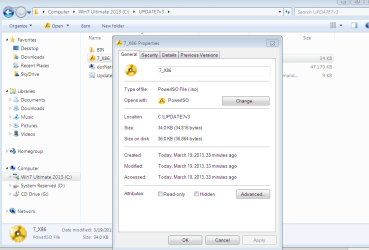
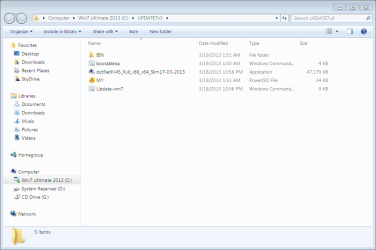
The ISO it saved is only 34kb. Is there a way to redo it without running the whole script again?
 

Attachments

  • Capture.PNG
    Capture.PNG
    40.3 KB · Views: 12
Last edited:
That is odd.

Yes, the folder containing the install files is updated. GRMCULXFRER_EN_DVD or whatever yours is called.

You just need to make an iso of that.

Not sure what happened there. will look at the script to check.

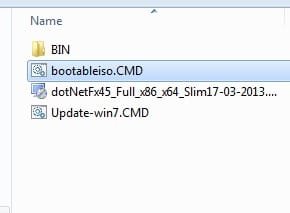
You can use this: View attachment bootableiso.zip

put it in the folder and run it as admin.

It is normal to get a warning about file names.

iso.jpg
 

My Computers

System One System Two

  • Computer type
    PC/Desktop
    OS
    7 X64
    CPU
    i5 8400
    Motherboard
    gigabyte b365m ds3h
    Memory
    2x8gb 3200mhz
    Hard Drives
    various
    PSU
    pure power 11 400w cm
    Case
    Coolermaster
    Cooling
    cryorig m9i
  • Computer type
    PC/Desktop
    OS
    7x64
    CPU
    g5400
    Motherboard
    ga b365m ds3h
    Memory
    8gb ddr4 2400
    PSU
    xfx pro 450w
That's weird - our posts are reversed.

See the one above yours.
Is that still doing 34kb?
 

My Computers

System One System Two

  • Computer type
    PC/Desktop
    OS
    7 X64
    CPU
    i5 8400
    Motherboard
    gigabyte b365m ds3h
    Memory
    2x8gb 3200mhz
    Hard Drives
    various
    PSU
    pure power 11 400w cm
    Case
    Coolermaster
    Cooling
    cryorig m9i
  • Computer type
    PC/Desktop
    OS
    7x64
    CPU
    g5400
    Motherboard
    ga b365m ds3h
    Memory
    8gb ddr4 2400
    PSU
    xfx pro 450w
I think you have the wrong mkisofs.exe. Not sure how that happened. It should be the 336kb mkisofs.

Never mind, use this instead View attachment bootiso2.zip


(BTW- you don't seem to have file extensions showing - how do you manage without? )
 

My Computers

System One System Two

  • Computer type
    PC/Desktop
    OS
    7 X64
    CPU
    i5 8400
    Motherboard
    gigabyte b365m ds3h
    Memory
    2x8gb 3200mhz
    Hard Drives
    various
    PSU
    pure power 11 400w cm
    Case
    Coolermaster
    Cooling
    cryorig m9i
  • Computer type
    PC/Desktop
    OS
    7x64
    CPU
    g5400
    Motherboard
    ga b365m ds3h
    Memory
    8gb ddr4 2400
    PSU
    xfx pro 450w
Copied the ISO files from my bootable flash stick installer since they were somehow missing Setup.

It is making the ISO now. Will this affect the slipstreaming of Updates that was done earlier?

Also this ISO is for Premium but unlocked ei.cfg, so does it matter the folder is labeled for Ultimate as shown in earlier screenshot?

Details, details. I haven't set all folder options on this new install yet. :geek:

Extracting newly completed ISO back to stick now.
 
The updates are slipstreamed into GRMCULXFRER_EN_DVD\souces\install.wim only.

If you leave that as it is - then it will be fine.

If you overwrote install.wim when you extracted the iso files again, then you will just have the original non updated install.wim in there..
 

My Computers

System One System Two

  • Computer type
    PC/Desktop
    OS
    7 X64
    CPU
    i5 8400
    Motherboard
    gigabyte b365m ds3h
    Memory
    2x8gb 3200mhz
    Hard Drives
    various
    PSU
    pure power 11 400w cm
    Case
    Coolermaster
    Cooling
    cryorig m9i
  • Computer type
    PC/Desktop
    OS
    7x64
    CPU
    g5400
    Motherboard
    ga b365m ds3h
    Memory
    8gb ddr4 2400
    PSU
    xfx pro 450w
The updating cmd is working now - thanks for testing.

I have mentioned to Steve about the superseded updates - so he may remove them for next time.

Doesn't matter what the folder is labelled.
 

My Computers

System One System Two

  • Computer type
    PC/Desktop
    OS
    7 X64
    CPU
    i5 8400
    Motherboard
    gigabyte b365m ds3h
    Memory
    2x8gb 3200mhz
    Hard Drives
    various
    PSU
    pure power 11 400w cm
    Case
    Coolermaster
    Cooling
    cryorig m9i
  • Computer type
    PC/Desktop
    OS
    7x64
    CPU
    g5400
    Motherboard
    ga b365m ds3h
    Memory
    8gb ddr4 2400
    PSU
    xfx pro 450w
Back
Top