TEST -Update 7 installation media

4.5 can't be integrated, but the update7.cmd will pop it inside the .wim.

Then after you install from the .wim, 4.5 slim installer will be on the root of the drive. You just run it from within the newly installed os.

It isn't included because Rick updates it regularly, you can get it from here:

http://adf .ly/1713566/dotnet45slim

It is an adfly link coz Rick gets a little something for the effort of doing the work

Then put it in the update7v5 folder.
 

My Computers My Computers

System One System Two

  • Computer type
    PC/Desktop
    OS
    7 X64
    CPU
    i5 8400
    Motherboard
    gigabyte b365m ds3h
    Memory
    2x8gb 3200mhz
    Hard Drives
    various
    PSU
    pure power 11 400w cm
    Case
    Coolermaster
    Cooling
    cryorig m9i
  • Computer type
    PC/Desktop
    OS
    7x64
    CPU
    g5400
    Motherboard
    ga b365m ds3h
    Memory
    8gb ddr4 2400
    PSU
    xfx pro 450w
siw2, thanks for the great guide.

Worked first time. Only few updates were found instead of hundreds. However, .NET 4 updates took really long time, is there a better way to install them in one go?

Do I need to start with clean source files (from DVD) if I rebuild, say after downloading new updates from WUD?

MD7xYSs.png
 

My Computer My Computer

OS
Windows 7 Professional 64bit
You can get net framework 4.5 slim installer from Ricktendo. That supersedes nf4.0. It runs as an exe.

It is in the post directly before yours. You need to remove the space from between the adf and the .ly

http://adf .ly/1713566/dotnet45slim

It is an adfly link coz Rick gets a little something for the effort of doing the work

Then put it in the update7v5 folder.
 

My Computers My Computers

System One System Two

  • Computer type
    PC/Desktop
    OS
    7 X64
    CPU
    i5 8400
    Motherboard
    gigabyte b365m ds3h
    Memory
    2x8gb 3200mhz
    Hard Drives
    various
    PSU
    pure power 11 400w cm
    Case
    Coolermaster
    Cooling
    cryorig m9i
  • Computer type
    PC/Desktop
    OS
    7x64
    CPU
    g5400
    Motherboard
    ga b365m ds3h
    Memory
    8gb ddr4 2400
    PSU
    xfx pro 450w
Do I need to start with clean source files (from DVD) if I rebuild, say after downloading new updates from WUD?

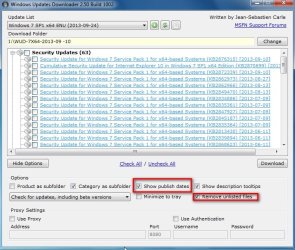
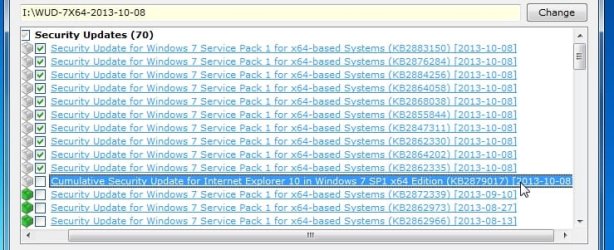
You can see the dates in WUD ,( Click Options > Show Publish Dates ) so you could just d/l the newer ones you didn't get last time , and integrate them into the wim you updated previously.

If you also tick Remove Unlisted files, then it will delete any no longer listed from the updates folder you point it at.

Steven keeps the list for WUD. He does a great job, but there are some superseded/not applicable in his lists.

2013-10-09_032409.jpg
 

My Computers My Computers

System One System Two

  • Computer type
    PC/Desktop
    OS
    7 X64
    CPU
    i5 8400
    Motherboard
    gigabyte b365m ds3h
    Memory
    2x8gb 3200mhz
    Hard Drives
    various
    PSU
    pure power 11 400w cm
    Case
    Coolermaster
    Cooling
    cryorig m9i
  • Computer type
    PC/Desktop
    OS
    7x64
    CPU
    g5400
    Motherboard
    ga b365m ds3h
    Memory
    8gb ddr4 2400
    PSU
    xfx pro 450w
Also, if you get the newest version of IE10 from optional ,

2013-10-09_034541.jpg


then you don't need the cumulative IE 10 update from security updates

2013-10-09_034629.jpg

There is major improvement to win7 just quietly slipped out by MS . It means running cleanmgr.exe will uninstall and clean up any superseded from your running os. Fantastic for anyone who has had an installation for a long while. They don't want to do SP2 so this is a great help . Non security updates KB2852386 - definitely tick that one.
 

My Computers My Computers

System One System Two

  • Computer type
    PC/Desktop
    OS
    7 X64
    CPU
    i5 8400
    Motherboard
    gigabyte b365m ds3h
    Memory
    2x8gb 3200mhz
    Hard Drives
    various
    PSU
    pure power 11 400w cm
    Case
    Coolermaster
    Cooling
    cryorig m9i
  • Computer type
    PC/Desktop
    OS
    7x64
    CPU
    g5400
    Motherboard
    ga b365m ds3h
    Memory
    8gb ddr4 2400
    PSU
    xfx pro 450w
Thanks for the heads up.

If I want a clean setup, can I simply delete the 4 reg files?
 

My Computer My Computer

OS
Windows 7 Professional 64bit
In def.reg, should following lines:

[HKEY_LOCAL_MACHINE\WIM_Admin\Software\Microsoft\Windows\CurrentVersion\Explorer\Advanced]
...
[[HKEY_LOCAL_MACHINE\WIM_Admin\Control Panel\Desktop]
...

be

[HKEY_LOCAL_MACHINE\WIM_Default\Software\Microsoft\Windows\CurrentVersion\Explorer\Advanced]
...
[[HKEY_LOCAL_MACHINE\WIM_Default\Control Panel\Desktop]
...
 

My Computer My Computer

OS
Windows 7 Professional 64bit
In def.reg, should following lines:

[HKEY_LOCAL_MACHINE\WIM_Admin\Software\Microsoft\Windows\CurrentVersion\Explorer\Advanced]
...
[[HKEY_LOCAL_MACHINE\WIM_Admin\Control Panel\Desktop]
...

be

[HKEY_LOCAL_MACHINE\WIM_Default\Software\Microsoft\Windows\CurrentVersion\Explorer\Advanced]
...
[[HKEY_LOCAL_MACHINE\WIM_Default\Control Panel\Desktop]
...
I'd like to know what they are tpoo cos I ahven't got WIM on any of my machines even the one I have just reinstalled se pic.

Edit I have found Wimount in that HKEY but I had to burrow down HKEY > Software > Microsoft > WIMount > mounted images
 

Attachments

  • REG.PNG
    REG.PNG
    6.1 KB · Views: 1

My Computer My Computer

Computer type
PC/Desktop
Computer Manufacturer/Model Number
Own build (new) Desk1 / Asus ROG Win 7 / Desk2 1st build
OS
Desk1 7 Home Prem / Desk2 10 Pro / Main lap Asus ROG 10 Pro 2 laptop Toshiba 7 Pro Asus P2520 7 & 10
CPU
Desk1 i5 3750K / Laptop i7 GTX 860M / Desk2 i5 2500
Motherboard
Desk1 Asus P877-V / Desk2 Gigabyte H67 UD3H / Laptop ?
Memory
Desk1 8GB (1866) / Desk2 16GB (1333) / Laptop 8Gb DDR3
Graphics Card(s)
Desk 1& 2NVidia GTX 650 & Laptops on board Intel
Sound Card
Desk 1 & 2 -XONAR DG Realtek High Def audio Laptop
Monitor(s) Displays
Desk 1 Benq HD 2450 / Desk2 Philips 24" / Laptop 17.5"
Screen Resolution
1920x1080 D1 & D2 & Laptop 1
Hard Drives
Desk1 Samsung 120GB 830 SSD
Asus ROG 256GB 850 Pro SSD
Desk2 Samsung 840 256 SSD
Toshiba 120GB EVO
PSU
Desk 1 Corsair HX 1050/ Laptop ? / Desk 2 Corsair HX 650
Case
Desk 1 Cooler HAF XM ? Toshiba laptop / Desk2 Coolermaster
Cooling
Fans on all Desk1 -2 Desk2 - all Coolermasters 5 Laptop ?
Keyboard
Desk 1 MS Sidewinder X6 Desk 2 MS Sidewinder X 4
Mouse
Desk 1&2 - Gigabyte MS 900 gamer - laptop - Logitec wireless
Internet Speed
ADSL2+
Other Info
One other Desktop (tester) and spare Toshba laptop both with SSD's
Running Kaspersky 2016 ISS on all machines config'd identically
Logitec audio stereo systems on each machine (x3)
Canon MG5250MFC
Router/modem TP-Link running WPA2SK
They go in both hives, Users\default\ntuser.dat and Users\Administrator\ntuser.dat.


In def.reg, should following lines:

[HKEY_LOCAL_MACHINE\WIM_Admin\Software\Microsoft\Windows\CurrentVersion\Explorer\Advanced]
...
[[HKEY_LOCAL_MACHINE\WIM_Admin\Control Panel\Desktop]
...

be

[HKEY_LOCAL_MACHINE\WIM_Default\Software\Microsoft\Windows\CurrentVersion\Explorer\Advanced]
...
[[HKEY_LOCAL_MACHINE\WIM_Default\Control Panel\Desktop]
...
 

My Computers My Computers

System One System Two

  • Computer type
    PC/Desktop
    OS
    7 X64
    CPU
    i5 8400
    Motherboard
    gigabyte b365m ds3h
    Memory
    2x8gb 3200mhz
    Hard Drives
    various
    PSU
    pure power 11 400w cm
    Case
    Coolermaster
    Cooling
    cryorig m9i
  • Computer type
    PC/Desktop
    OS
    7x64
    CPU
    g5400
    Motherboard
    ga b365m ds3h
    Memory
    8gb ddr4 2400
    PSU
    xfx pro 450w
You won't have them on your machine. Those are the names given to the user hives loaded temporarily from the mounted install.wim during the integration process.

In def.reg, should following lines:

[HKEY_LOCAL_MACHINE\WIM_Admin\Software\Microsoft\Windows\CurrentVersion\Explorer\Advanced]
...
[[HKEY_LOCAL_MACHINE\WIM_Admin\Control Panel\Desktop]
...

be

[HKEY_LOCAL_MACHINE\WIM_Default\Software\Microsoft\Windows\CurrentVersion\Explorer\Advanced]
...
[[HKEY_LOCAL_MACHINE\WIM_Default\Control Panel\Desktop]
...
I'd like to know what they are tpoo cos I ahven't got WIM on any of my machines even the one I have just reinstalled se pic.

Edit I have found Wimount in that HKEY but I had to burrow down HKEY > Software > Microsoft > WIMount > mounted images
 

My Computers My Computers

System One System Two

  • Computer type
    PC/Desktop
    OS
    7 X64
    CPU
    i5 8400
    Motherboard
    gigabyte b365m ds3h
    Memory
    2x8gb 3200mhz
    Hard Drives
    various
    PSU
    pure power 11 400w cm
    Case
    Coolermaster
    Cooling
    cryorig m9i
  • Computer type
    PC/Desktop
    OS
    7x64
    CPU
    g5400
    Motherboard
    ga b365m ds3h
    Memory
    8gb ddr4 2400
    PSU
    xfx pro 450w
Yes, if you like, or you can put your own reg tweaks in .

Thanks for the heads up.

If I want a clean setup, can I simply delete the 4 reg files?
 

My Computers My Computers

System One System Two

  • Computer type
    PC/Desktop
    OS
    7 X64
    CPU
    i5 8400
    Motherboard
    gigabyte b365m ds3h
    Memory
    2x8gb 3200mhz
    Hard Drives
    various
    PSU
    pure power 11 400w cm
    Case
    Coolermaster
    Cooling
    cryorig m9i
  • Computer type
    PC/Desktop
    OS
    7x64
    CPU
    g5400
    Motherboard
    ga b365m ds3h
    Memory
    8gb ddr4 2400
    PSU
    xfx pro 450w
You won't have them on your machine. Those are the names given to the user hives loaded temporarily from the mounted install.wim during the integration process.

In def.reg, should following lines:

[HKEY_LOCAL_MACHINE\WIM_Admin\Software\Microsoft\Windows\CurrentVersion\Explorer\Advanced]
...
[[HKEY_LOCAL_MACHINE\WIM_Admin\Control Panel\Desktop]
...

be

[HKEY_LOCAL_MACHINE\WIM_Default\Software\Microsoft\Windows\CurrentVersion\Explorer\Advanced]
...
[[HKEY_LOCAL_MACHINE\WIM_Default\Control Panel\Desktop]
...
I'd like to know what they are tpoo cos I ahven't got WIM on any of my machines even the one I have just reinstalled se pic.

Edit I have found Wimount in that HKEY but I had to burrow down HKEY > Software > Microsoft > WIMount > mounted images
Thanks SIW it still is a bit Klingon to me but I really am not that into that stuff except fo changing a few values etc :)
 

My Computer My Computer

Computer type
PC/Desktop
Computer Manufacturer/Model Number
Own build (new) Desk1 / Asus ROG Win 7 / Desk2 1st build
OS
Desk1 7 Home Prem / Desk2 10 Pro / Main lap Asus ROG 10 Pro 2 laptop Toshiba 7 Pro Asus P2520 7 & 10
CPU
Desk1 i5 3750K / Laptop i7 GTX 860M / Desk2 i5 2500
Motherboard
Desk1 Asus P877-V / Desk2 Gigabyte H67 UD3H / Laptop ?
Memory
Desk1 8GB (1866) / Desk2 16GB (1333) / Laptop 8Gb DDR3
Graphics Card(s)
Desk 1& 2NVidia GTX 650 & Laptops on board Intel
Sound Card
Desk 1 & 2 -XONAR DG Realtek High Def audio Laptop
Monitor(s) Displays
Desk 1 Benq HD 2450 / Desk2 Philips 24" / Laptop 17.5"
Screen Resolution
1920x1080 D1 & D2 & Laptop 1
Hard Drives
Desk1 Samsung 120GB 830 SSD
Asus ROG 256GB 850 Pro SSD
Desk2 Samsung 840 256 SSD
Toshiba 120GB EVO
PSU
Desk 1 Corsair HX 1050/ Laptop ? / Desk 2 Corsair HX 650
Case
Desk 1 Cooler HAF XM ? Toshiba laptop / Desk2 Coolermaster
Cooling
Fans on all Desk1 -2 Desk2 - all Coolermasters 5 Laptop ?
Keyboard
Desk 1 MS Sidewinder X6 Desk 2 MS Sidewinder X 4
Mouse
Desk 1&2 - Gigabyte MS 900 gamer - laptop - Logitec wireless
Internet Speed
ADSL2+
Other Info
One other Desktop (tester) and spare Toshba laptop both with SSD's
Running Kaspersky 2016 ISS on all machines config'd identically
Logitec audio stereo systems on each machine (x3)
Canon MG5250MFC
Router/modem TP-Link running WPA2SK
You're welcome.:)
 

My Computers My Computers

System One System Two

  • Computer type
    PC/Desktop
    OS
    7 X64
    CPU
    i5 8400
    Motherboard
    gigabyte b365m ds3h
    Memory
    2x8gb 3200mhz
    Hard Drives
    various
    PSU
    pure power 11 400w cm
    Case
    Coolermaster
    Cooling
    cryorig m9i
  • Computer type
    PC/Desktop
    OS
    7x64
    CPU
    g5400
    Motherboard
    ga b365m ds3h
    Memory
    8gb ddr4 2400
    PSU
    xfx pro 450w
I want to use this with RT7 Lite. I have a Win 7 ISO and a Win 7 folder with the separate sub folders & files for.

Questions;
1. Step 3 in your OP, what is "this"? Is it the three categories that I checked for the DL that created 3 separate folders all with MSU extensions. Is all of that the "this"?
2. If so, then I take one or the other and copy it to the update7v5 folder?
3. Does this process preserve the original file(s) or does it overwrite them like nLite & RT7 Lite does?
 

My Computers My Computers

System One System Two

  • Computer type
    Laptop
    Computer Manufacturer/Model Number
    Toshiba
    OS
    Win7 x64
    CPU
    AMD
  • Computer type
    PC/Desktop
    System Manufacturer/Model Number
    AMD based MB
    OS
    Win 7 Pro x64
    CPU
    AMD FX-8350
    Motherboard
    Gigabyte GA-970A-D3P
    Memory
    16GB
    Graphics Card(s)
    nVidia GeForce 1060
    Monitor(s) Displays
    25"
    Screen Resolution
    1920x1200
    Hard Drives
    two SSD;
    two 4TB HDD
    PSU
    700watt Seasonic
    Internet Speed
    300MB up & down
    Browser
    Firefox
    Other Info
    BD Recorder
Just wanted to say thanks for this!

I do have one question after windows 7 installation when I open Internet Explorer it goes to the website:

Yandex

Just wondering why that site is the default for IE?
 

My Computer My Computer

Computer type
PC/Desktop
OS
7 64
Just wanted to say thanks for this!

I do have one question after windows 7 installation when I open Internet Explorer it goes to the website:

Yandex

Just wondering why that site is the default for IE?
Hello and welcome jj Mate it is a Russian browser where did you pick it up from?? Personally I would be dumping it real quick
 

My Computer My Computer

Computer type
PC/Desktop
Computer Manufacturer/Model Number
Own build (new) Desk1 / Asus ROG Win 7 / Desk2 1st build
OS
Desk1 7 Home Prem / Desk2 10 Pro / Main lap Asus ROG 10 Pro 2 laptop Toshiba 7 Pro Asus P2520 7 & 10
CPU
Desk1 i5 3750K / Laptop i7 GTX 860M / Desk2 i5 2500
Motherboard
Desk1 Asus P877-V / Desk2 Gigabyte H67 UD3H / Laptop ?
Memory
Desk1 8GB (1866) / Desk2 16GB (1333) / Laptop 8Gb DDR3
Graphics Card(s)
Desk 1& 2NVidia GTX 650 & Laptops on board Intel
Sound Card
Desk 1 & 2 -XONAR DG Realtek High Def audio Laptop
Monitor(s) Displays
Desk 1 Benq HD 2450 / Desk2 Philips 24" / Laptop 17.5"
Screen Resolution
1920x1080 D1 & D2 & Laptop 1
Hard Drives
Desk1 Samsung 120GB 830 SSD
Asus ROG 256GB 850 Pro SSD
Desk2 Samsung 840 256 SSD
Toshiba 120GB EVO
PSU
Desk 1 Corsair HX 1050/ Laptop ? / Desk 2 Corsair HX 650
Case
Desk 1 Cooler HAF XM ? Toshiba laptop / Desk2 Coolermaster
Cooling
Fans on all Desk1 -2 Desk2 - all Coolermasters 5 Laptop ?
Keyboard
Desk 1 MS Sidewinder X6 Desk 2 MS Sidewinder X 4
Mouse
Desk 1&2 - Gigabyte MS 900 gamer - laptop - Logitec wireless
Internet Speed
ADSL2+
Other Info
One other Desktop (tester) and spare Toshba laptop both with SSD's
Running Kaspersky 2016 ISS on all machines config'd identically
Logitec audio stereo systems on each machine (x3)
Canon MG5250MFC
Router/modem TP-Link running WPA2SK
Just wanted to say thanks for this!

I do have one question after windows 7 installation when I open Internet Explorer it goes to the website:

Yandex

Just wondering why that site is the default for IE?
Hello and welcome jj Mate it is a Russian browser where did you pick it up from?? Personally I would be dumping it real quick
Yandex is a totally safe, working and reliable search engine, I do not understand what its Russian origins have to do with its safety? The company is well known, its search engine one of the best.

Siw has included it with purpose (RE: http://www.sevenforums.com/installa...pdate-7-installation-media-5.html#post2330844). He, as many users concerned about Google's take in privacy prefer these search engines which offer better privacy.

Kari
 
Last edited:

My Computer My Computer

Computer type
Laptop
Computer Manufacturer/Model Number
HP ENVY 17-1150eg
OS
Windows 10 Pro x64 EN-GB
CPU
1.6 GHz Intel Core i7-720QM Processor
Memory
6 GB
Graphics Card(s)
ATI Mobility Radeon HD 5850 Graphics
Sound Card
Beats sound system with integrated subwoofer
Monitor(s) Displays
17" laptop display, 22" LED and 32" Full HD TV through HDMI
Screen Resolution
1600*900 (1), 1920*1080 (2&3)
Hard Drives
Internal: 2 x 500 GB SATA Hard Disk Drive 7200 rpm
External: 2TB for backups, 3TB USB3 network drive for media
Cooling
As Envy runs a bit warm, I have it on a Cooler Master pad
Keyboard
Logitech diNovo Media Desktop Laser (bluetooth)
Mouse
Logitech Performance Mouse MX
Internet Speed
50/10 Mbps VDSL
Antivirus
Windows Defender 4.3.9431.0
Browser
Maxthon 3.5.2., IE11
1. All these procedures for 64bits (integrate updates and make a bootable installation ISO) can be done under a W7 32bits (ultimate) installed system or only under W7 64bits installed system?
(I have only 2 HDD to play with: one my regular W7 ultimate 32bits and another one for testing the OS/Software; my system's processor Intel T7200 supports 64bits system)

2. Is there any order to integrate updates (ex. by date release, etc.)?

(Sorry newbie)
Thanks
 

My Computer My Computer

Computer type
Laptop
Computer Manufacturer/Model Number
Dell
OS
Windows 7 Ultimate x32
CPU
T7200
Memory
4G
32 bit works fine. The script asks you to browse to the installation files. Then it asks you to browse to the folder of updates. Win7 built in Dism does the work. If it finds an update that needs to be integrated at the end, dism will tell you.
 

My Computers My Computers

System One System Two

  • Computer type
    PC/Desktop
    OS
    7 X64
    CPU
    i5 8400
    Motherboard
    gigabyte b365m ds3h
    Memory
    2x8gb 3200mhz
    Hard Drives
    various
    PSU
    pure power 11 400w cm
    Case
    Coolermaster
    Cooling
    cryorig m9i
  • Computer type
    PC/Desktop
    OS
    7x64
    CPU
    g5400
    Motherboard
    ga b365m ds3h
    Memory
    8gb ddr4 2400
    PSU
    xfx pro 450w
Back
Top