Testdisk Urgent Help

AlJourgensen

New member
Local time
4:34 PM
Messages
13
Hello community

i need urgent help here, i have a usb sony vaio 2.0, 2TB exfat, and i don´t know why, it´s been a headache to solve this, because all information regarding that kind of error, the CHS and LBA conflict, or is a mess to understand, or is incomplete, and i need someone that can tell me step by step please, how can i solve this problem to get my pen back


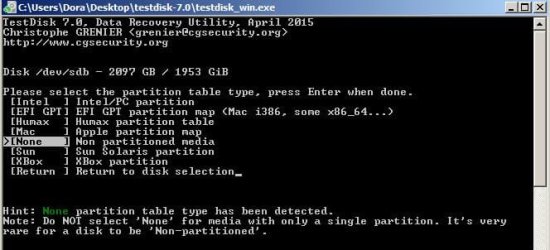
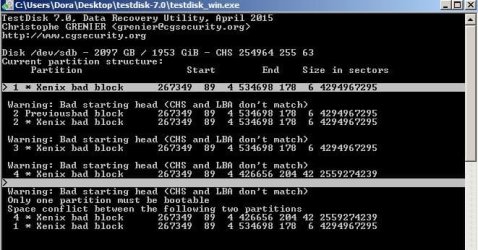
i have "None" partition table type has been detected
i click on "Intel" option
"analyse"
and get the
Warning: Bad starting head (CHS and LBA don't match)
Only one partition must be bootable
Space conflict between the following two partitions
4* Xenix Bad Block
1* Xenix bad block


i choose the intel option, and the result was the first photo

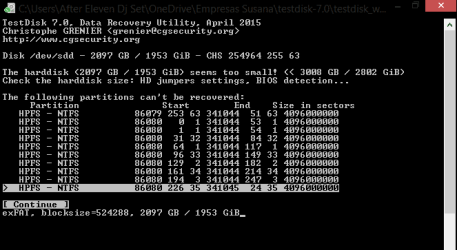
Now, i have made another analysis, and the result of this one, was different from that first photo (see 2nd photo attached).

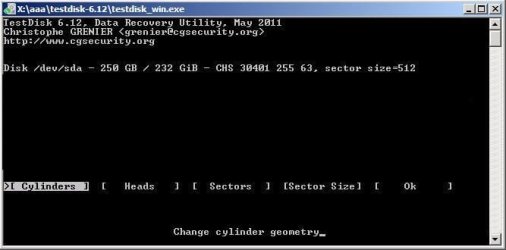
Made another one and now i have only 2 options, and one of them is (create partition pressing in "A"), but i don´t know what to choose from here, because it asks me for the "Geometry, Head, Type, Sectors", and i don´t know nothing about this, i read all the articles related to this, but none has been conclusive, or none says me what to put under this configuration.

as a last resort i can do another analysis, and see where that log file goes and posted here, if that photo, and my description doesn't help you.

Thank you very much in advance, and if you can tell me something, that would be a great help.
 

Attachments
  • 1.jpg
    1.jpg
    48.6 KB · Views: 37
  • 2.jpg
    2.jpg
    34.4 KB · Views: 37
  • 3.png
    3.png
    6.6 KB · Views: 37

My Computer

Computer type
Laptop
Computer Manufacturer/Model Number
Asus G750JX
OS
Windows 8.1
CPU
Intel® Core™ i7 4700HQ Processor
Motherboard
Intel® HM87 Express Chipset
Memory
DDR3L 1600 MHz SDRAM, 32 G
Graphics Card(s)
NVIDIA® GeForce® GTX 770M 3GB GDDR5 VRAM
Hard Drives
750GB HDD 7200 RPM and 256 GB SSD
Antivirus
Kapersky
Browser
Chrome

My Computer

Computer type
PC/Desktop
Computer Manufacturer/Model Number
Custom Build
OS
Windows 7 Ultimate x64 SP1
CPU
AMD Phenom 2 1090T
Motherboard
Gigabyte GA-890FXA-UD5
Memory
2x8GB Kingston HyperX Fury Black 1600Mhz Unganged
Graphics Card(s)
MSI GTX 970 Gaming 4G
Sound Card
Realtek On-Board HD 7.1 Audio / Logitech G35
Monitor(s) Displays
3xAcer GD245HQ
Screen Resolution
1920x1080
Hard Drives
Samsung 850 Pro 512GB SSD - OS /
WD Caviar Black SATA 3 - 1 TBx2 - Dynamic RAID 0 /
WD Caviar Green SATA 2 - 640GBx2 - Dynamic RAID 0 /
WD Caviar Green SATA 2 - 640GB - Internal Backup /
Seagate Barracude SATA 3 - 3TB - External Backup/ Sync
PSU
HighPower 1000W
Case
Cooler Master HAF 932
Cooling
Noctua NH-D14
Keyboard
Logitech G19
Mouse
Logitech G500
Internet Speed
100/4 Mbit Cable (100GB quota)
Antivirus
ZoneAlarm Extreme Security / MBAM Pro / MBAE Free / SAS Free
Browser
IE 11 - Firefox - Chrome
Other Info
Logitech F710/ G27/ G940/ Z5500 // TrackIR 5 // Nvidia 3D Surround Vision
Hello my friend and thank you for your answer

the thing is that when i plug in the pen, it is recognized has a exFAT primary partition, but when i try to format, windows doesn´t let me, i tried all kind of programs to format the pen, but i didn't have success with no one.

so i tried testdisk, and i´m stuck in this problem, because i´m newbie with the program, and i already tried to look for an anwser, but no one reply to those threads that i found.

that´s why i need help
 

My Computer

Computer type
Laptop
Computer Manufacturer/Model Number
Asus G750JX
OS
Windows 8.1
CPU
Intel® Core™ i7 4700HQ Processor
Motherboard
Intel® HM87 Express Chipset
Memory
DDR3L 1600 MHz SDRAM, 32 G
Graphics Card(s)
NVIDIA® GeForce® GTX 770M 3GB GDDR5 VRAM
Hard Drives
750GB HDD 7200 RPM and 256 GB SSD
Antivirus
Kapersky
Browser
Chrome
Also when i try verifying the disk with the tool from windows, from bad sectors or corrupted, it says that have none and everything is ok

i just can´t understand what is happening
 

My Computer

Computer type
Laptop
Computer Manufacturer/Model Number
Asus G750JX
OS
Windows 8.1
CPU
Intel® Core™ i7 4700HQ Processor
Motherboard
Intel® HM87 Express Chipset
Memory
DDR3L 1600 MHz SDRAM, 32 G
Graphics Card(s)
NVIDIA® GeForce® GTX 770M 3GB GDDR5 VRAM
Hard Drives
750GB HDD 7200 RPM and 256 GB SSD
Antivirus
Kapersky
Browser
Chrome
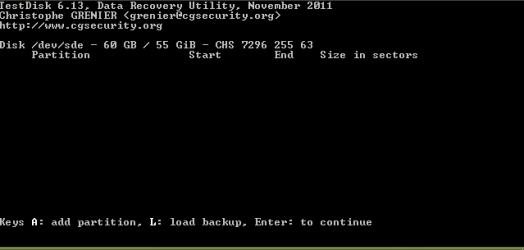
Here are some screen shots of what happens after analyse

When i click create partition, appears some things that i don´t understand like "geometry", "Head", "Type", "Sectors", and here is where i get stuck, because i don´t know the wright values to input, and i can´t pass from this menu.
 

Attachments

  • Screenshot 2.PNG
    Screenshot 2.PNG
    2.3 KB · Views: 35
  • WPEtestdisk012.jpg
    WPEtestdisk012.jpg
    20.8 KB · Views: 36

My Computer

Computer type
Laptop
Computer Manufacturer/Model Number
Asus G750JX
OS
Windows 8.1
CPU
Intel® Core™ i7 4700HQ Processor
Motherboard
Intel® HM87 Express Chipset
Memory
DDR3L 1600 MHz SDRAM, 32 G
Graphics Card(s)
NVIDIA® GeForce® GTX 770M 3GB GDDR5 VRAM
Hard Drives
750GB HDD 7200 RPM and 256 GB SSD
Antivirus
Kapersky
Browser
Chrome
I assume you are connecting your USB drive to a Windows 7 computer.

Why are you using the TestDisk program?

What happens when you plug in to the Windows computer? Does the USB Pen show up under "Computers"? If so can you right click on Computers and go to "Manage".
You should not need any other program to format your USB to exFat (windows 7 SP1 can do it) seehttp://news.techgenie.com/latest/how-to-format-a-drive-of-exfat-formatting-in-windows-7/
 

My Computer

OS
Windows 7 Home Premium
CPU
i3 2100T
Motherboard
ASRock H67M-ITX
Hello my friend and thank you for your answer

I´m running under win 8.1
The pen is detected, but i can´t do anything, with all related tools from widows, with it

Disk manager, she shows up, i try to format it, and just stays there without moving, then he ejects the pen by itself, and the drive disappears, i try to verify the pen with windows tools, for errors, says everything is ok.

When i start win. with the pen inserted, windows says it cannot recognize it, and advise me to unplug and plug in the pen again.
so i don´t know what is going on, and i read, and read, and read, and everything lead me to testdisk.

but now i´m stuck, because i can´t find the wright values/instructions from the menu that i´m in.

And this is the major problem, the pen is only recognized once, if i do anything, he eject the pen after he can resolve any issue with it, so i have to unplug an plug in again the pen, several times.
 

My Computer

Computer type
Laptop
Computer Manufacturer/Model Number
Asus G750JX
OS
Windows 8.1
CPU
Intel® Core™ i7 4700HQ Processor
Motherboard
Intel® HM87 Express Chipset
Memory
DDR3L 1600 MHz SDRAM, 32 G
Graphics Card(s)
NVIDIA® GeForce® GTX 770M 3GB GDDR5 VRAM
Hard Drives
750GB HDD 7200 RPM and 256 GB SSD
Antivirus
Kapersky
Browser
Chrome
Try with partition manager free, I thought you were trying to restore it. Can't link at the moment but search for imageusb osforensics and try that one too
 

My Computer

Computer type
PC/Desktop
Computer Manufacturer/Model Number
Custom Build
OS
Windows 7 Ultimate x64 SP1
CPU
AMD Phenom 2 1090T
Motherboard
Gigabyte GA-890FXA-UD5
Memory
2x8GB Kingston HyperX Fury Black 1600Mhz Unganged
Graphics Card(s)
MSI GTX 970 Gaming 4G
Sound Card
Realtek On-Board HD 7.1 Audio / Logitech G35
Monitor(s) Displays
3xAcer GD245HQ
Screen Resolution
1920x1080
Hard Drives
Samsung 850 Pro 512GB SSD - OS /
WD Caviar Black SATA 3 - 1 TBx2 - Dynamic RAID 0 /
WD Caviar Green SATA 2 - 640GBx2 - Dynamic RAID 0 /
WD Caviar Green SATA 2 - 640GB - Internal Backup /
Seagate Barracude SATA 3 - 3TB - External Backup/ Sync
PSU
HighPower 1000W
Case
Cooler Master HAF 932
Cooling
Noctua NH-D14
Keyboard
Logitech G19
Mouse
Logitech G500
Internet Speed
100/4 Mbit Cable (100GB quota)
Antivirus
ZoneAlarm Extreme Security / MBAM Pro / MBAE Free / SAS Free
Browser
IE 11 - Firefox - Chrome
Other Info
Logitech F710/ G27/ G940/ Z5500 // TrackIR 5 // Nvidia 3D Surround Vision
my friend thank you for your kind help, but the headache continues, and the results are;

imageusb osforensics i tried to zero the USB, failed was the result, i tried to reformat, error size unknown

Partition Manager, let´s me format the drive, but in windows, he presents it has exFAT, when i choose FAT32, and when i try to format under windows, same error windows can´t format it

Thank you my friend for your kind attention, other sugestions will be appreciated
 

My Computer

Computer type
Laptop
Computer Manufacturer/Model Number
Asus G750JX
OS
Windows 8.1
CPU
Intel® Core™ i7 4700HQ Processor
Motherboard
Intel® HM87 Express Chipset
Memory
DDR3L 1600 MHz SDRAM, 32 G
Graphics Card(s)
NVIDIA® GeForce® GTX 770M 3GB GDDR5 VRAM
Hard Drives
750GB HDD 7200 RPM and 256 GB SSD
Antivirus
Kapersky
Browser
Chrome

My Computer

Computer type
PC/Desktop
Computer Manufacturer/Model Number
Custom Build
OS
Windows 7 Ultimate x64 SP1
CPU
AMD Phenom 2 1090T
Motherboard
Gigabyte GA-890FXA-UD5
Memory
2x8GB Kingston HyperX Fury Black 1600Mhz Unganged
Graphics Card(s)
MSI GTX 970 Gaming 4G
Sound Card
Realtek On-Board HD 7.1 Audio / Logitech G35
Monitor(s) Displays
3xAcer GD245HQ
Screen Resolution
1920x1080
Hard Drives
Samsung 850 Pro 512GB SSD - OS /
WD Caviar Black SATA 3 - 1 TBx2 - Dynamic RAID 0 /
WD Caviar Green SATA 2 - 640GBx2 - Dynamic RAID 0 /
WD Caviar Green SATA 2 - 640GB - Internal Backup /
Seagate Barracude SATA 3 - 3TB - External Backup/ Sync
PSU
HighPower 1000W
Case
Cooler Master HAF 932
Cooling
Noctua NH-D14
Keyboard
Logitech G19
Mouse
Logitech G500
Internet Speed
100/4 Mbit Cable (100GB quota)
Antivirus
ZoneAlarm Extreme Security / MBAM Pro / MBAE Free / SAS Free
Browser
IE 11 - Firefox - Chrome
Other Info
Logitech F710/ G27/ G940/ Z5500 // TrackIR 5 // Nvidia 3D Surround Vision
ok my friend results for this two programs

Bootice - failed to format, failed to re-partition, failed to write MBR, only in the boot partition of the pen, i could format, but it didn´t do the job, because windows still can´t format the pen

Sd disk - didn´t try it because it was a program specific to SD cards, and this is not the case

i really am out of solutions here.....i´m desperate, i don´t care about the files in it, i just want to be able to format it, because when i boot the pc, with the pen plugged in, he tells me to take unplug it, and plug it back again, so he recognizes it, as an exFAT 2TB pen, but when i try to format, i just can´t.
 

My Computer

Computer type
Laptop
Computer Manufacturer/Model Number
Asus G750JX
OS
Windows 8.1
CPU
Intel® Core™ i7 4700HQ Processor
Motherboard
Intel® HM87 Express Chipset
Memory
DDR3L 1600 MHz SDRAM, 32 G
Graphics Card(s)
NVIDIA® GeForce® GTX 770M 3GB GDDR5 VRAM
Hard Drives
750GB HDD 7200 RPM and 256 GB SSD
Antivirus
Kapersky
Browser
Chrome
i don´t know if this helps, but first i was trying to format the pen to NTFS system, then everything i posted start happening

thank you for your attention.
 

My Computer

Computer type
Laptop
Computer Manufacturer/Model Number
Asus G750JX
OS
Windows 8.1
CPU
Intel® Core™ i7 4700HQ Processor
Motherboard
Intel® HM87 Express Chipset
Memory
DDR3L 1600 MHz SDRAM, 32 G
Graphics Card(s)
NVIDIA® GeForce® GTX 770M 3GB GDDR5 VRAM
Hard Drives
750GB HDD 7200 RPM and 256 GB SSD
Antivirus
Kapersky
Browser
Chrome

My Computer

Computer type
PC/Desktop
Computer Manufacturer/Model Number
Custom Build
OS
Windows 7 Ultimate x64 SP1
CPU
AMD Phenom 2 1090T
Motherboard
Gigabyte GA-890FXA-UD5
Memory
2x8GB Kingston HyperX Fury Black 1600Mhz Unganged
Graphics Card(s)
MSI GTX 970 Gaming 4G
Sound Card
Realtek On-Board HD 7.1 Audio / Logitech G35
Monitor(s) Displays
3xAcer GD245HQ
Screen Resolution
1920x1080
Hard Drives
Samsung 850 Pro 512GB SSD - OS /
WD Caviar Black SATA 3 - 1 TBx2 - Dynamic RAID 0 /
WD Caviar Green SATA 2 - 640GBx2 - Dynamic RAID 0 /
WD Caviar Green SATA 2 - 640GB - Internal Backup /
Seagate Barracude SATA 3 - 3TB - External Backup/ Sync
PSU
HighPower 1000W
Case
Cooler Master HAF 932
Cooling
Noctua NH-D14
Keyboard
Logitech G19
Mouse
Logitech G500
Internet Speed
100/4 Mbit Cable (100GB quota)
Antivirus
ZoneAlarm Extreme Security / MBAM Pro / MBAE Free / SAS Free
Browser
IE 11 - Firefox - Chrome
Other Info
Logitech F710/ G27/ G940/ Z5500 // TrackIR 5 // Nvidia 3D Surround Vision
ok i´m going to try it and give you feedback my friend

thank you for being there
 

My Computer

Computer type
Laptop
Computer Manufacturer/Model Number
Asus G750JX
OS
Windows 8.1
CPU
Intel® Core™ i7 4700HQ Processor
Motherboard
Intel® HM87 Express Chipset
Memory
DDR3L 1600 MHz SDRAM, 32 G
Graphics Card(s)
NVIDIA® GeForce® GTX 770M 3GB GDDR5 VRAM
Hard Drives
750GB HDD 7200 RPM and 256 GB SSD
Antivirus
Kapersky
Browser
Chrome
In case you missed it:

Is this a pen drive or USB HDD? I am confused :)

You might have overlooked my post earlier. Did you try Partition Wizard free?
Perhaps you can also try HDDGURU: HDD LLF Low Level Format Tool
 

My Computer

Computer type
PC/Desktop
Computer Manufacturer/Model Number
Custom Build
OS
Windows 7 Ultimate x64 SP1
CPU
AMD Phenom 2 1090T
Motherboard
Gigabyte GA-890FXA-UD5
Memory
2x8GB Kingston HyperX Fury Black 1600Mhz Unganged
Graphics Card(s)
MSI GTX 970 Gaming 4G
Sound Card
Realtek On-Board HD 7.1 Audio / Logitech G35
Monitor(s) Displays
3xAcer GD245HQ
Screen Resolution
1920x1080
Hard Drives
Samsung 850 Pro 512GB SSD - OS /
WD Caviar Black SATA 3 - 1 TBx2 - Dynamic RAID 0 /
WD Caviar Green SATA 2 - 640GBx2 - Dynamic RAID 0 /
WD Caviar Green SATA 2 - 640GB - Internal Backup /
Seagate Barracude SATA 3 - 3TB - External Backup/ Sync
PSU
HighPower 1000W
Case
Cooler Master HAF 932
Cooling
Noctua NH-D14
Keyboard
Logitech G19
Mouse
Logitech G500
Internet Speed
100/4 Mbit Cable (100GB quota)
Antivirus
ZoneAlarm Extreme Security / MBAM Pro / MBAE Free / SAS Free
Browser
IE 11 - Firefox - Chrome
Other Info
Logitech F710/ G27/ G940/ Z5500 // TrackIR 5 // Nvidia 3D Surround Vision
it´s a sony vaio usb 2.0 2TB pen
i tried partition manager, and it worked, i could erase the partition and create a new one, but when i was trying to format it under windows, same thing it doesn't format it.

i´m going to try that one to, i´m in my job now, it´s 10:30am here, i only can test this around 18:00 when i get out, i will feedback then, from those 2 programs the SD one, and that one that you posted wright now.

I really am appreciating your kind help, really, thank very very much
 

My Computer

Computer type
Laptop
Computer Manufacturer/Model Number
Asus G750JX
OS
Windows 8.1
CPU
Intel® Core™ i7 4700HQ Processor
Motherboard
Intel® HM87 Express Chipset
Memory
DDR3L 1600 MHz SDRAM, 32 G
Graphics Card(s)
NVIDIA® GeForce® GTX 770M 3GB GDDR5 VRAM
Hard Drives
750GB HDD 7200 RPM and 256 GB SSD
Antivirus
Kapersky
Browser
Chrome
'https://sosfakeflash.wordpress.com/2011/10/14/alibaba-and-the-2tb-thumb-drive-will-you-be-frauded-lvjiayuan-engineering-co-ltd-flash-memory-seller-warning-test-immediately/"

"If you search more web you'll find this discussion dating back to almost 2011. It's a known fake on Alibaba. What they do is format usually 8Gb USB stick to 2Tb using FAT. The first 8Gb exist, the rest give read/write error. OS doesn't check the real capacity - it just believes what's written in FAT."

What my little bird told me. :)
 

My Computer

OS
Windows 7 Home Premium 32 bit
Interesting point on the fake issue. Here's a little more to indicate that this might be part of the problem.

From:
Other Counterfeit USB Flash Drives - ADATA, Sony, VAIO, SanDis, SSK collection on eBay!

"Some counterfeits simply screen print a brand name on a generic design - a design not even manufactured by that brand. The most common fake capacity generic is the metal swivel, but that style also shows up with Kingston, Sony, VAIO, and sometimes other brands names on them. The "VAIO" mark is notable in that Sony never uses that trademark for their flash drives. Sony flash drives are marketed as MicroVault. If a brand name appears on a style that doesn't exist on the manufacturer's we site or on any other *trustworthy* source, it is likely a counterfeit."
 

My Computer

Computer type
PC/Desktop
OS
Windows 7 Home Premium x64
thank you very much for your help my friends, understanding this impossible issue
 

My Computer

Computer type
Laptop
Computer Manufacturer/Model Number
Asus G750JX
OS
Windows 8.1
CPU
Intel® Core™ i7 4700HQ Processor
Motherboard
Intel® HM87 Express Chipset
Memory
DDR3L 1600 MHz SDRAM, 32 G
Graphics Card(s)
NVIDIA® GeForce® GTX 770M 3GB GDDR5 VRAM
Hard Drives
750GB HDD 7200 RPM and 256 GB SSD
Antivirus
Kapersky
Browser
Chrome

My Computer

Computer type
PC/Desktop
Computer Manufacturer/Model Number
Custom Build
OS
Windows 7 Ultimate x64 SP1
CPU
AMD Phenom 2 1090T
Motherboard
Gigabyte GA-890FXA-UD5
Memory
2x8GB Kingston HyperX Fury Black 1600Mhz Unganged
Graphics Card(s)
MSI GTX 970 Gaming 4G
Sound Card
Realtek On-Board HD 7.1 Audio / Logitech G35
Monitor(s) Displays
3xAcer GD245HQ
Screen Resolution
1920x1080
Hard Drives
Samsung 850 Pro 512GB SSD - OS /
WD Caviar Black SATA 3 - 1 TBx2 - Dynamic RAID 0 /
WD Caviar Green SATA 2 - 640GBx2 - Dynamic RAID 0 /
WD Caviar Green SATA 2 - 640GB - Internal Backup /
Seagate Barracude SATA 3 - 3TB - External Backup/ Sync
PSU
HighPower 1000W
Case
Cooler Master HAF 932
Cooling
Noctua NH-D14
Keyboard
Logitech G19
Mouse
Logitech G500
Internet Speed
100/4 Mbit Cable (100GB quota)
Antivirus
ZoneAlarm Extreme Security / MBAM Pro / MBAE Free / SAS Free
Browser
IE 11 - Firefox - Chrome
Other Info
Logitech F710/ G27/ G940/ Z5500 // TrackIR 5 // Nvidia 3D Surround Vision
Back
Top