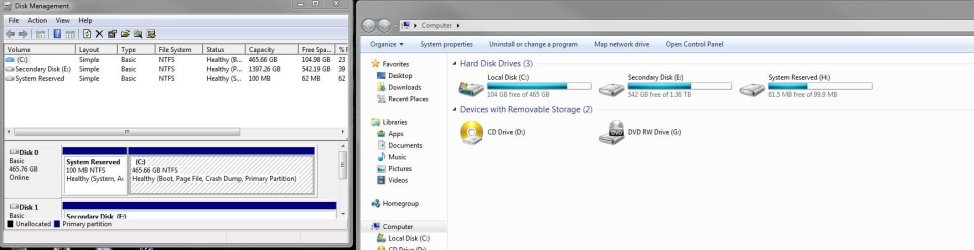
Tested my USB install for Windows 7 and now..

Erick Aguilar

New member
Pro User
Local time
8:50 AM
Messages
679
.. and extra partition was been created.

I accessed the setup and windows started to create temporary files. Upon exiting setup, my Computer now detects my two hard drives, and an additional System Reserved Partition on my main C: Drive.

Can this be safely deleted or hidden?

Thanks!
 

My Computer My Computer

At a glance

Windows 7 professional X64AMD A10-5800K OC@ 4.4Ghz.8GB Kingston HyperX Blu 1333mhzXFX HD7870 2GB Core Edition
Computer type
PC/Desktop
OS
Windows 7 professional X64
CPU
AMD A10-5800K OC@ 4.4Ghz.
Motherboard
Gigabyte F2A85X-UP4
Memory
8GB Kingston HyperX Blu 1333mhz
Graphics Card(s)
XFX HD7870 2GB Core Edition
Monitor(s) Displays
Acer AL2216W
Screen Resolution
1680x1050
Hard Drives
Seagate Barracuda 500gb 7200rpm
Seagate Barracuda 1.5TB 7200rpm
PSU
Cooler Master Silent Pro M 850W
Case
Thermaltake Commander MS-I
Cooling
Cooler Master N520
Mouse
Logitech M504
Internet Speed
10Mbps
You say you were testing the Win7 bootable USB installation media and are concerned it created a System Reserved partition on your second drive? This could not have happened unless you created a new partition on a blank drive with the installer. Just loading files and looking at the drives before bailing out of the install will change nothing at all unless you performed something else.


But to be sure post back a screenshot of Disk Mgmt and tell us what you think is different after you did this: Disk Management - Post a Screen Capture Image
 
You say you were testing the Win7 bootable USB installation media and are concerned it created a System Reserved partition on your second drive? This could not have happened unless you created a new partition on a blank drive with the installer. Just loading files and looking at the drives before bailing out of the install will change nothing at all unless you performed something else.


But to be sure post back a screenshot of Disk Mgmt and tell us what you think is different after you did this: Disk Management - Post a Screen Capture Image

Thank you,

This is how disk management looks like, which to me is normal I believe.
But on the Computer section, it shows 3 "hard drives" two are physical and have always been there, but the third one appeared after I ran the windows 7 set up test.
 

Attachments

  • Capture.JPG
    Capture.JPG
    90.1 KB · Views: 5

My Computer My Computer

At a glance

Windows 7 professional X64AMD A10-5800K OC@ 4.4Ghz.8GB Kingston HyperX Blu 1333mhzXFX HD7870 2GB Core Edition
Computer type
PC/Desktop
OS
Windows 7 professional X64
CPU
AMD A10-5800K OC@ 4.4Ghz.
Motherboard
Gigabyte F2A85X-UP4
Memory
8GB Kingston HyperX Blu 1333mhz
Graphics Card(s)
XFX HD7870 2GB Core Edition
Monitor(s) Displays
Acer AL2216W
Screen Resolution
1680x1050
Hard Drives
Seagate Barracuda 500gb 7200rpm
Seagate Barracuda 1.5TB 7200rpm
PSU
Cooler Master Silent Pro M 850W
Case
Thermaltake Commander MS-I
Cooling
Cooler Master N520
Mouse
Logitech M504
Internet Speed
10Mbps

My Computer My Computer

At a glance

Win 10 Pro x64Intel I5-2500K @3.3GHz16GB G.Skill Ripjaws X (4x4GB)EVGA GeForce 750 Ti SC 2GB
Computer type
PC/Desktop
Computer Manufacturer/Model Number
Self Built
OS
Win 10 Pro x64
CPU
Intel I5-2500K @3.3GHz
Motherboard
Asrock P67 Extreme4
Memory
16GB G.Skill Ripjaws X (4x4GB)
Graphics Card(s)
EVGA GeForce 750 Ti SC 2GB
Sound Card
ASUS Xonar DG 5.1 Channels 24-bit 96KHz PCI Interface Sound
Monitor(s) Displays
auria eq2367
Screen Resolution
1920 x 1080
Hard Drives
250GB Samsung 850 EVO SSD
1TB WD Blue
1TB Hitachi
PSU
SeaSonic X 650W 80 Plus Gold
Case
Corsair Obsidian 750D
Cooling
Corsair H60, Three 140mm case fans
Keyboard
Logitech Wireless Keyboard K520
Mouse
Logitech Wireless Mouse M310
Internet Speed
Wave Broadband ~ 100 dn 5 up
Antivirus
Windows Defender, Malwarebytes Premium
Browser
Edge, IE11, Chrome
Other Info
Laptop specs: HP g7-1365dx /
CPU: AMD A6-3420M APU with Radeon(tm) HD Graphics /
RAM: Crucial 8Gb (2x4Gb) /
SSD: Crucial M4-CT128M4SSD2 ATA Device/ FW 000F /
GFX: AMD Radeon HD 6520G /
OS: Windows 10 Pro x64
Back
Top