
Hi Guys!
I have been struggling with the Text to Speech function on my laptop. I have Windows 7 32 bit Operating System.
In the beginning I had only one voice which was Microsoft Anne TTS on my computer system which was functioning properly. However, I needed a British Voice. I downloaded SAPI 5 and downloaded some other voices such as Marry. After the download, all the voices, including Anne, stopped working and the system started displaying the message " This voice cannot be played...". I downloaded a tool and deleted the old TTS voices and accidentally deleted Microsoft Anne.
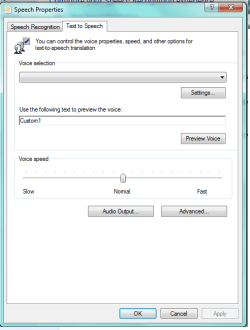
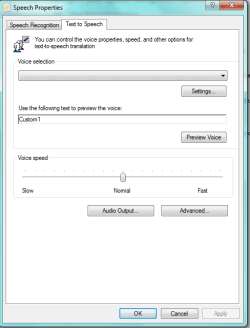
Now, all the voices disappeared and I do not see any voices even though I re-downloaded SAPI 5. ( the photos of the Text to Speech Windows are attached as I could not insert them here)
Could you please help me in solving this issue as it is very important for my study.
Thank you all in advance!
Ibra
I have been struggling with the Text to Speech function on my laptop. I have Windows 7 32 bit Operating System.
In the beginning I had only one voice which was Microsoft Anne TTS on my computer system which was functioning properly. However, I needed a British Voice. I downloaded SAPI 5 and downloaded some other voices such as Marry. After the download, all the voices, including Anne, stopped working and the system started displaying the message " This voice cannot be played...". I downloaded a tool and deleted the old TTS voices and accidentally deleted Microsoft Anne.
Now, all the voices disappeared and I do not see any voices even though I re-downloaded SAPI 5. ( the photos of the Text to Speech Windows are attached as I could not insert them here)
Could you please help me in solving this issue as it is very important for my study.
Thank you all in advance!
Ibra
Attachments
My Computer
At a glance
32
- Computer type
- Laptop
- Computer Manufacturer/Model Number
- Acer
- OS
- 32


