The blinking light of annoyance fix, can anyone help?

crankypenguin

qbasic gorillas champ
Local time
6:04 PM
Messages
590
Location
Eastern Europe
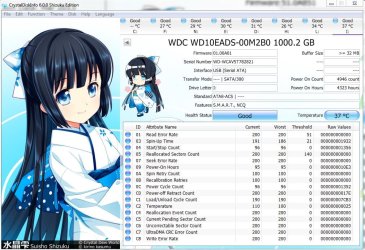
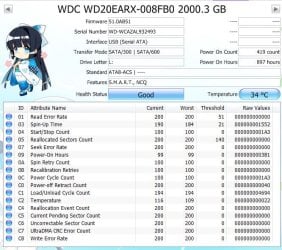
I have 2 external USB3 Western Digital external hard drives. A 1TB and a 2TB. When I turn off the computer, one plays along nice and powers down and the little white light stops blinking / being lit. But the 2TB external hard drive light continues to blink. Now the drive itself is not moving, I checked, no noises coming from inside. Now is this a known bug, should I be worried? The hard drive works ok, there are no other problems with it but I still would like an answer to this question. Now here are some specs on the drive in the form of a picture.
 

Attachments
  • Capture1.JPG
    Capture1.JPG
    84.4 KB · Views: 36

My Computer My Computer

At a glance

Windows 7 Ultimate x64FX 8350 @ 4.8ghz, turbo clocked to 5.4ghzMushkin Enhanced Blackline 16GB 1760mhz 10-10...Gigabyte-660 Windforce OC- GPU Clock 1212MHz ...
Computer type
PC/Desktop
Computer Manufacturer/Model Number
Custom Build
OS
Windows 7 Ultimate x64
CPU
FX 8350 @ 4.8ghz, turbo clocked to 5.4ghz
Motherboard
Asus Sabertooth FX990 Gen 3.0 R2.0
Memory
Mushkin Enhanced Blackline 16GB 1760mhz 10-10-9-24 T1
Graphics Card(s)
Gigabyte-660 Windforce OC- GPU Clock 1212MHz /3504MHz ram
Sound Card
Creative Sound Blaster Recon3D PCIe Sound Card
Monitor(s) Displays
Samsung SyncMaster S27B350H (HDMI)
Screen Resolution
1920x1080 60HZ
Hard Drives
1 x SSD Crucial M4 256GB (Primary OS)
3 x HDD WD 1TB
4 x HDD 2TB
1 x HDD 160GB (Secondary Backup OS)
Raid SATA III 6GB/s 4-port PCI-e Controller Card, Marvel 88SE9215 chipset
PSU
Chieftec-650-14CS (Modular) 80 Plus Gold-650 Watt
Case
Akasa Venom Toxic Gaming Big tower ( Custom Black ) Ver 2.0
Cooling
Water 2.0 PRO / GEIL Cyclone VRM / 6x120mm 2x220mm 2x140mm
Keyboard
Logitech G19
Mouse
Wireless Notebook Presenter Mouse 8000
Internet Speed
Fiber GBS
Antivirus
Don't Announce it to the world :)
Browser
Gotta have at least 1!
I would think it`s more of an issue with the enclosure, dock, not the hard drive. I would say just unplug the thing if it`s not spinning.
 

My Computer My Computer

At a glance

Windows 10 Pro x64Intel Core i7 6700KGSkill TridentZ RGB 16GB 3600 16-16-16-36EVGA GTX 980 Ti SC x2
Computer type
PC/Desktop
Computer Manufacturer/Model Number
Skylake Special #666
OS
Windows 10 Pro x64
CPU
Intel Core i7 6700K
Motherboard
Asus Sabertooth Z170 Mark 1
Memory
GSkill TridentZ RGB 16GB 3600 16-16-16-36
Graphics Card(s)
EVGA GTX 980 Ti SC x2
Sound Card
Realtek High Definition
Monitor(s) Displays
AOC G2460PG
Screen Resolution
1920 x 1080 144Hz
Hard Drives
Samsung 860 Pro 256GB, Seagate Barracuda 4TB x2
PSU
EVGA 1000 P2, EVGA White Custom Braided Cables
Case
Corsair Vengeance C70 Gunmetal Black
Cooling
Corsair H100i v2, Corsair ML120 x2, Thermal Grizzly Kryonaut
Keyboard
Logitech G910 Orion Spectrum
Mouse
Logitech G700s
Internet Speed
Verizon Fios Quantum Gateway 75/75
Antivirus
Windows Defender, Malwarebytes Free 3.8.3
Browser
Chrome
Other Info
Corsair SP120 x4, LG Blu-ray Drive, Durabrand HT-395 100 Watt Dolby Digital Amp, Corsair H2100 Wireless 7.1 Headset
I would think it`s more of an issue with the enclosure, dock, not the hard drive. I would say just unplug the thing if it`s not spinning.
No no, it spins down just fine. Everything about the drive says its turned off, except for the light that blinks in a nonstop pattern, as if searching for a host. I tried changing the S states in the bios, didn't work. I tried turning off all the *Allow USB this and that to turn on the computer* didn't work. What about a firmware update, what do you think about that? WD has a universal updated for the firmware, but I am a bit iffy about doing a firmware update on an external HD if you know what I mean. I just want the light to shut off:cry::cry::cry:
 

My Computer My Computer

At a glance

Windows 7 Ultimate x64FX 8350 @ 4.8ghz, turbo clocked to 5.4ghzMushkin Enhanced Blackline 16GB 1760mhz 10-10...Gigabyte-660 Windforce OC- GPU Clock 1212MHz ...
Computer type
PC/Desktop
Computer Manufacturer/Model Number
Custom Build
OS
Windows 7 Ultimate x64
CPU
FX 8350 @ 4.8ghz, turbo clocked to 5.4ghz
Motherboard
Asus Sabertooth FX990 Gen 3.0 R2.0
Memory
Mushkin Enhanced Blackline 16GB 1760mhz 10-10-9-24 T1
Graphics Card(s)
Gigabyte-660 Windforce OC- GPU Clock 1212MHz /3504MHz ram
Sound Card
Creative Sound Blaster Recon3D PCIe Sound Card
Monitor(s) Displays
Samsung SyncMaster S27B350H (HDMI)
Screen Resolution
1920x1080 60HZ
Hard Drives
1 x SSD Crucial M4 256GB (Primary OS)
3 x HDD WD 1TB
4 x HDD 2TB
1 x HDD 160GB (Secondary Backup OS)
Raid SATA III 6GB/s 4-port PCI-e Controller Card, Marvel 88SE9215 chipset
PSU
Chieftec-650-14CS (Modular) 80 Plus Gold-650 Watt
Case
Akasa Venom Toxic Gaming Big tower ( Custom Black ) Ver 2.0
Cooling
Water 2.0 PRO / GEIL Cyclone VRM / 6x120mm 2x220mm 2x140mm
Keyboard
Logitech G19
Mouse
Wireless Notebook Presenter Mouse 8000
Internet Speed
Fiber GBS
Antivirus
Don't Announce it to the world :)
Browser
Gotta have at least 1!
Are you using two external hard drive docks. One for each drive with separate usb ports? How are these docks powered?
 

My Computer My Computer

At a glance

Windows 10 Pro. 64/ version 1709 Windows 7 Pr...Intel i7-6800K @ 4.3Corsair Platinum 16 gig @2400EVGA GTX 1070 OC
Computer type
PC/Desktop
Computer Manufacturer/Model Number
Home made Desktop
OS
Windows 10 Pro. 64/ version 1709 Windows 7 Pro/64
CPU
Intel i7-6800K @ 4.3
Motherboard
ASUS X-99 Deluxe II
Memory
Corsair Platinum 16 gig @2400
Graphics Card(s)
EVGA GTX 1070 OC
Monitor(s) Displays
Asus 27" LED LCD/VE278Q
Screen Resolution
1920-1080 or 1280-720 HDMI
Hard Drives
INTEL SSD 730-240 Gb Sata 3.0/
PSU
EVGA Platium 1200W
Case
Phanteks Luxe Tempered Glass 8 fans/ one radiator
Cooling
XSPC/ Water Cooled CPU
Keyboard
Das 4 Professional
Mouse
Logitech M705/MX Anywhere 2-S
Internet Speed
100 mbits
Antivirus
Microsoft Security Essentials/ Malwarebytes Premium 3.0/ SAS
Browser
I.E. 11 default/Firefox/ ISP Time Warner Cable/Spectrum
Other Info
LG BluRay Burner/
Sound system-KLipsch-THX/
Icy Dock ssd Hot Swap bays.
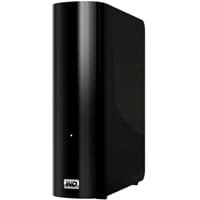
These are 2 normal WD My book externals ( USB3), both powered externally via a cord attached to a strip.Only the newer 2tb is acting up. They look like this:
 

Attachments

  • groupfs_125.jpg
    groupfs_125.jpg
    12.3 KB · Views: 32

My Computer My Computer

At a glance

Windows 7 Ultimate x64FX 8350 @ 4.8ghz, turbo clocked to 5.4ghzMushkin Enhanced Blackline 16GB 1760mhz 10-10...Gigabyte-660 Windforce OC- GPU Clock 1212MHz ...
Computer type
PC/Desktop
Computer Manufacturer/Model Number
Custom Build
OS
Windows 7 Ultimate x64
CPU
FX 8350 @ 4.8ghz, turbo clocked to 5.4ghz
Motherboard
Asus Sabertooth FX990 Gen 3.0 R2.0
Memory
Mushkin Enhanced Blackline 16GB 1760mhz 10-10-9-24 T1
Graphics Card(s)
Gigabyte-660 Windforce OC- GPU Clock 1212MHz /3504MHz ram
Sound Card
Creative Sound Blaster Recon3D PCIe Sound Card
Monitor(s) Displays
Samsung SyncMaster S27B350H (HDMI)
Screen Resolution
1920x1080 60HZ
Hard Drives
1 x SSD Crucial M4 256GB (Primary OS)
3 x HDD WD 1TB
4 x HDD 2TB
1 x HDD 160GB (Secondary Backup OS)
Raid SATA III 6GB/s 4-port PCI-e Controller Card, Marvel 88SE9215 chipset
PSU
Chieftec-650-14CS (Modular) 80 Plus Gold-650 Watt
Case
Akasa Venom Toxic Gaming Big tower ( Custom Black ) Ver 2.0
Cooling
Water 2.0 PRO / GEIL Cyclone VRM / 6x120mm 2x220mm 2x140mm
Keyboard
Logitech G19
Mouse
Wireless Notebook Presenter Mouse 8000
Internet Speed
Fiber GBS
Antivirus
Don't Announce it to the world :)
Browser
Gotta have at least 1!
This is the other 1tb one that acts normally when powering down my rig. In case you want to see how they differ.
 

Attachments

  • Capture1.JPG
    Capture1.JPG
    138.3 KB · Views: 1

My Computer My Computer

At a glance

Windows 7 Ultimate x64FX 8350 @ 4.8ghz, turbo clocked to 5.4ghzMushkin Enhanced Blackline 16GB 1760mhz 10-10...Gigabyte-660 Windforce OC- GPU Clock 1212MHz ...
Computer type
PC/Desktop
Computer Manufacturer/Model Number
Custom Build
OS
Windows 7 Ultimate x64
CPU
FX 8350 @ 4.8ghz, turbo clocked to 5.4ghz
Motherboard
Asus Sabertooth FX990 Gen 3.0 R2.0
Memory
Mushkin Enhanced Blackline 16GB 1760mhz 10-10-9-24 T1
Graphics Card(s)
Gigabyte-660 Windforce OC- GPU Clock 1212MHz /3504MHz ram
Sound Card
Creative Sound Blaster Recon3D PCIe Sound Card
Monitor(s) Displays
Samsung SyncMaster S27B350H (HDMI)
Screen Resolution
1920x1080 60HZ
Hard Drives
1 x SSD Crucial M4 256GB (Primary OS)
3 x HDD WD 1TB
4 x HDD 2TB
1 x HDD 160GB (Secondary Backup OS)
Raid SATA III 6GB/s 4-port PCI-e Controller Card, Marvel 88SE9215 chipset
PSU
Chieftec-650-14CS (Modular) 80 Plus Gold-650 Watt
Case
Akasa Venom Toxic Gaming Big tower ( Custom Black ) Ver 2.0
Cooling
Water 2.0 PRO / GEIL Cyclone VRM / 6x120mm 2x220mm 2x140mm
Keyboard
Logitech G19
Mouse
Wireless Notebook Presenter Mouse 8000
Internet Speed
Fiber GBS
Antivirus
Don't Announce it to the world :)
Browser
Gotta have at least 1!
I know the easiest solution would be to simply unplug the drive at night when I go to sleep, but it is far away from my computer, which would mean I have to get up and do it. I am disabled and an amputee below the knee, so it's not out of laziness that I don't want to get up every night before I go to bed to turn it off, it would just be a pain to do so, literally as my leg is not my only problem. I have to live with a shattered lower spine and pelvis. So it's painful getting out of bed at night. It's why I would prefer to solve this without having to get out of bed.
 

My Computer My Computer

At a glance

Windows 7 Ultimate x64FX 8350 @ 4.8ghz, turbo clocked to 5.4ghzMushkin Enhanced Blackline 16GB 1760mhz 10-10...Gigabyte-660 Windforce OC- GPU Clock 1212MHz ...
Computer type
PC/Desktop
Computer Manufacturer/Model Number
Custom Build
OS
Windows 7 Ultimate x64
CPU
FX 8350 @ 4.8ghz, turbo clocked to 5.4ghz
Motherboard
Asus Sabertooth FX990 Gen 3.0 R2.0
Memory
Mushkin Enhanced Blackline 16GB 1760mhz 10-10-9-24 T1
Graphics Card(s)
Gigabyte-660 Windforce OC- GPU Clock 1212MHz /3504MHz ram
Sound Card
Creative Sound Blaster Recon3D PCIe Sound Card
Monitor(s) Displays
Samsung SyncMaster S27B350H (HDMI)
Screen Resolution
1920x1080 60HZ
Hard Drives
1 x SSD Crucial M4 256GB (Primary OS)
3 x HDD WD 1TB
4 x HDD 2TB
1 x HDD 160GB (Secondary Backup OS)
Raid SATA III 6GB/s 4-port PCI-e Controller Card, Marvel 88SE9215 chipset
PSU
Chieftec-650-14CS (Modular) 80 Plus Gold-650 Watt
Case
Akasa Venom Toxic Gaming Big tower ( Custom Black ) Ver 2.0
Cooling
Water 2.0 PRO / GEIL Cyclone VRM / 6x120mm 2x220mm 2x140mm
Keyboard
Logitech G19
Mouse
Wireless Notebook Presenter Mouse 8000
Internet Speed
Fiber GBS
Antivirus
Don't Announce it to the world :)
Browser
Gotta have at least 1!
A last-ditch solution would be the Homer Simpson black tape over the light.

Does the light blink even with the USB cable unplugged?

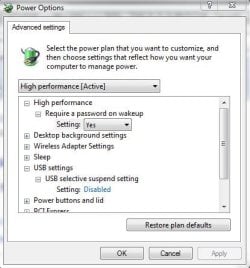
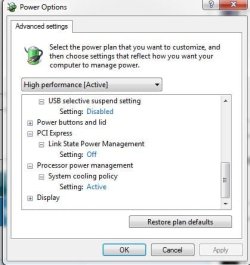
How is USB setting configured in Control Panel\All Control Panel Items\Power Options\Edit Plan Settings\Advanced Settings?
 

My Computer My Computer

At a glance

Windows 7 Ultimate X64 SP1Intel i5-2550K, Differing ~4.4-4.8GHz No buil...16GB G.Skill Sniper 1866MHz @ 2133MHz 2x8GBASUS GTX650TIB-DC2OC-2GD5, (650TI Boost)
Computer type
PC/Desktop
Computer Manufacturer/Model Number
Home Built Desktop By DataTech
OS
Windows 7 Ultimate X64 SP1
CPU
Intel i5-2550K, Differing ~4.4-4.8GHz No built in GPU
Motherboard
ASUS P8Z68-V PRO/GEN3
Memory
16GB G.Skill Sniper 1866MHz @ 2133MHz 2x8GB
Graphics Card(s)
ASUS GTX650TIB-DC2OC-2GD5, (650TI Boost)
Sound Card
Onboard Realtek 5-1
Monitor(s) Displays
Samsung P2570HD
Screen Resolution
1920x1080
Hard Drives
Samsung 840 Pro 256GB SSD for OS, 500GB Seagate Constellation (Enterprise drive) for Data
PSU
Corsair HX650W
Case
Inwin Dragon Rider
Cooling
Hyper 212 EVO w/two Noctua fans, push-pull, @1300 RPM
Keyboard
E-Z Eyes, bright yellow keys with large characters
Mouse
steelseries SENSEI Laser Pro Gaming
Internet Speed
48-51Mbs Mbs down, 11 Mbs up Xfinity Cable
Antivirus
Norton Internet Security 2013
Browser
IE 10, Opera, Pale Moon if needed
Other Info
4 case fans, LG BluRay-RE, ASUS DVD-RW, Mr. Fusion power supply, 1.21 gigawatts.
A last-ditch solution would be the Homer Simpson black tape over the light.

Does the light blink even with the USB cable unplugged?

How is USB setting configured in Control Panel\All Control Panel Items\Power Options\Edit Plan Settings\Advanced Settings?
Funny you should ask that. When I unplug from the motherboard, the light shuts off. Here is a pic of the power plan. I have tried USB selective suspend on/off, no change, I tried all the possible configurations with sleep, no change, I basically tried every config you can think of with the power options, the light continues to blink.
 

Attachments

  • Capture2.JPG
    Capture2.JPG
    34.9 KB · Views: 27
  • Capture4.JPG
    Capture4.JPG
    33.3 KB · Views: 27
  • Capture5.JPG
    Capture5.JPG
    35.6 KB · Views: 27

My Computer My Computer

At a glance

Windows 7 Ultimate x64FX 8350 @ 4.8ghz, turbo clocked to 5.4ghzMushkin Enhanced Blackline 16GB 1760mhz 10-10...Gigabyte-660 Windforce OC- GPU Clock 1212MHz ...
Computer type
PC/Desktop
Computer Manufacturer/Model Number
Custom Build
OS
Windows 7 Ultimate x64
CPU
FX 8350 @ 4.8ghz, turbo clocked to 5.4ghz
Motherboard
Asus Sabertooth FX990 Gen 3.0 R2.0
Memory
Mushkin Enhanced Blackline 16GB 1760mhz 10-10-9-24 T1
Graphics Card(s)
Gigabyte-660 Windforce OC- GPU Clock 1212MHz /3504MHz ram
Sound Card
Creative Sound Blaster Recon3D PCIe Sound Card
Monitor(s) Displays
Samsung SyncMaster S27B350H (HDMI)
Screen Resolution
1920x1080 60HZ
Hard Drives
1 x SSD Crucial M4 256GB (Primary OS)
3 x HDD WD 1TB
4 x HDD 2TB
1 x HDD 160GB (Secondary Backup OS)
Raid SATA III 6GB/s 4-port PCI-e Controller Card, Marvel 88SE9215 chipset
PSU
Chieftec-650-14CS (Modular) 80 Plus Gold-650 Watt
Case
Akasa Venom Toxic Gaming Big tower ( Custom Black ) Ver 2.0
Cooling
Water 2.0 PRO / GEIL Cyclone VRM / 6x120mm 2x220mm 2x140mm
Keyboard
Logitech G19
Mouse
Wireless Notebook Presenter Mouse 8000
Internet Speed
Fiber GBS
Antivirus
Don't Announce it to the world :)
Browser
Gotta have at least 1!
One thing I can think off, is that my motherboard is a 970a-ud3 which contains on/off charge for apple devices even when your computer is off, perhaps the external HD thinks, that since there is power in the USB3 ports, the computer is on? But I tried shutting down computer, unplugging it from the power source via the PSU cable, and the damn light still kept blinking. So this is just strange. Something seems to be forgetting to tell the external to power down. It's why I asked about a firmware update.
 

My Computer My Computer

At a glance

Windows 7 Ultimate x64FX 8350 @ 4.8ghz, turbo clocked to 5.4ghzMushkin Enhanced Blackline 16GB 1760mhz 10-10...Gigabyte-660 Windforce OC- GPU Clock 1212MHz ...
Computer type
PC/Desktop
Computer Manufacturer/Model Number
Custom Build
OS
Windows 7 Ultimate x64
CPU
FX 8350 @ 4.8ghz, turbo clocked to 5.4ghz
Motherboard
Asus Sabertooth FX990 Gen 3.0 R2.0
Memory
Mushkin Enhanced Blackline 16GB 1760mhz 10-10-9-24 T1
Graphics Card(s)
Gigabyte-660 Windforce OC- GPU Clock 1212MHz /3504MHz ram
Sound Card
Creative Sound Blaster Recon3D PCIe Sound Card
Monitor(s) Displays
Samsung SyncMaster S27B350H (HDMI)
Screen Resolution
1920x1080 60HZ
Hard Drives
1 x SSD Crucial M4 256GB (Primary OS)
3 x HDD WD 1TB
4 x HDD 2TB
1 x HDD 160GB (Secondary Backup OS)
Raid SATA III 6GB/s 4-port PCI-e Controller Card, Marvel 88SE9215 chipset
PSU
Chieftec-650-14CS (Modular) 80 Plus Gold-650 Watt
Case
Akasa Venom Toxic Gaming Big tower ( Custom Black ) Ver 2.0
Cooling
Water 2.0 PRO / GEIL Cyclone VRM / 6x120mm 2x220mm 2x140mm
Keyboard
Logitech G19
Mouse
Wireless Notebook Presenter Mouse 8000
Internet Speed
Fiber GBS
Antivirus
Don't Announce it to the world :)
Browser
Gotta have at least 1!
Cranky, there is usually a setting in bios to disable USB charging when the computer is off.
 

My Computers My Computers

  • At a glance

    Windows 11 ProRyzen 9 5900X32GB G Skill DDR4-3600EVGA RTX 3080 FTW 3 Ultra
    Computer type
    PC/Desktop
    Computer Manufacturer/Model Number
    ALWAYS UNDER CONSTRUCTION
    OS
    Windows 11 Pro
    CPU
    Ryzen 9 5900X
    Motherboard
    Asus X570 Crosshair Viii Hero
    Memory
    32GB G Skill DDR4-3600
    Graphics Card(s)
    EVGA RTX 3080 FTW 3 Ultra
    Sound Card
    On Board/Sennheiser PC37X Headset
    Monitor(s) Displays
    3 X Asus 27"
    Screen Resolution
    2560x1440
    Hard Drives
    2 X 1 TB NVME drives
    PSU
    EVGA 850
    Case
    Phanteks Eclipse P400A
    Cooling
    EVGA 280 AIO
    Keyboard
    Logitech G510s/ Logitech G13
    Mouse
    Logitech G502
    Internet Speed
    24/1
    Antivirus
    ESET/MBAM Pro/SAS Pro
    Browser
    Chrome/ Firefox/ Edge
  • At a glance

    Windows 11 ProIntel Ultra 9 288V32 GB LPDDR5X 8533
    Computer type
    Laptop
    System Manufacturer/Model Number
    Dell 16 Plus
    OS
    Windows 11 Pro
    CPU
    Intel Ultra 9 288V
    Memory
    32 GB LPDDR5X 8533
    Monitor(s) Displays
    16" Mini-LED HDR600 Touch 90 Hz
    Screen Resolution
    2560X1600
    Hard Drives
    1 TB NVME
Just as an experiment, turn off the PSU on the computer and see if the lite goes off. I`m betting it will.
 

My Computer My Computer

At a glance

Windows 10 Pro x64Intel Core i7 6700KGSkill TridentZ RGB 16GB 3600 16-16-16-36EVGA GTX 980 Ti SC x2
Computer type
PC/Desktop
Computer Manufacturer/Model Number
Skylake Special #666
OS
Windows 10 Pro x64
CPU
Intel Core i7 6700K
Motherboard
Asus Sabertooth Z170 Mark 1
Memory
GSkill TridentZ RGB 16GB 3600 16-16-16-36
Graphics Card(s)
EVGA GTX 980 Ti SC x2
Sound Card
Realtek High Definition
Monitor(s) Displays
AOC G2460PG
Screen Resolution
1920 x 1080 144Hz
Hard Drives
Samsung 860 Pro 256GB, Seagate Barracuda 4TB x2
PSU
EVGA 1000 P2, EVGA White Custom Braided Cables
Case
Corsair Vengeance C70 Gunmetal Black
Cooling
Corsair H100i v2, Corsair ML120 x2, Thermal Grizzly Kryonaut
Keyboard
Logitech G910 Orion Spectrum
Mouse
Logitech G700s
Internet Speed
Verizon Fios Quantum Gateway 75/75
Antivirus
Windows Defender, Malwarebytes Free 3.8.3
Browser
Chrome
Other Info
Corsair SP120 x4, LG Blu-ray Drive, Durabrand HT-395 100 Watt Dolby Digital Amp, Corsair H2100 Wireless 7.1 Headset
Just as an experiment, turn off the PSU on the computer and see if the lite goes off. I`m betting it will.
Read post #10
 

My Computer My Computer

At a glance

Windows 7 Ultimate x64FX 8350 @ 4.8ghz, turbo clocked to 5.4ghzMushkin Enhanced Blackline 16GB 1760mhz 10-10...Gigabyte-660 Windforce OC- GPU Clock 1212MHz ...
Computer type
PC/Desktop
Computer Manufacturer/Model Number
Custom Build
OS
Windows 7 Ultimate x64
CPU
FX 8350 @ 4.8ghz, turbo clocked to 5.4ghz
Motherboard
Asus Sabertooth FX990 Gen 3.0 R2.0
Memory
Mushkin Enhanced Blackline 16GB 1760mhz 10-10-9-24 T1
Graphics Card(s)
Gigabyte-660 Windforce OC- GPU Clock 1212MHz /3504MHz ram
Sound Card
Creative Sound Blaster Recon3D PCIe Sound Card
Monitor(s) Displays
Samsung SyncMaster S27B350H (HDMI)
Screen Resolution
1920x1080 60HZ
Hard Drives
1 x SSD Crucial M4 256GB (Primary OS)
3 x HDD WD 1TB
4 x HDD 2TB
1 x HDD 160GB (Secondary Backup OS)
Raid SATA III 6GB/s 4-port PCI-e Controller Card, Marvel 88SE9215 chipset
PSU
Chieftec-650-14CS (Modular) 80 Plus Gold-650 Watt
Case
Akasa Venom Toxic Gaming Big tower ( Custom Black ) Ver 2.0
Cooling
Water 2.0 PRO / GEIL Cyclone VRM / 6x120mm 2x220mm 2x140mm
Keyboard
Logitech G19
Mouse
Wireless Notebook Presenter Mouse 8000
Internet Speed
Fiber GBS
Antivirus
Don't Announce it to the world :)
Browser
Gotta have at least 1!
After checking in the bios you could try using another usb port. Maybe a usb 2.0 just for testing the light. Swapping the usb connections of the two externals.
This may allow you to figure out whether the bios, Windows or the external drives is causing the problem.
I don't know why Windows Power Options would only effect one of your external drives or just certain USB ports.
** If you swap the port connection between the two externals it should let you know whether it's the hard drive and its enclosure or the computer.
Here is a goofy thought.
Partition your bigger drive. Could be that Windows doesn't know what to do with a 2 tb drive/partition.
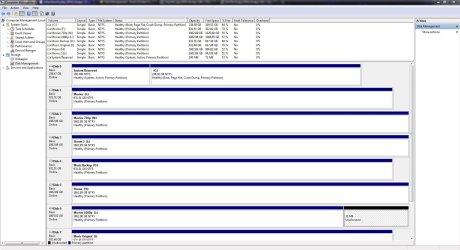
Could you show us a picture of Disk Management with every thing plugged in.

By Golden:
http://www.sevenforums.com/tutorials/274797-disk-management-post-screen-capture-image.html
 

My Computer My Computer

At a glance

Windows 10 Pro. 64/ version 1709 Windows 7 Pr...Intel i7-6800K @ 4.3Corsair Platinum 16 gig @2400EVGA GTX 1070 OC
Computer type
PC/Desktop
Computer Manufacturer/Model Number
Home made Desktop
OS
Windows 10 Pro. 64/ version 1709 Windows 7 Pro/64
CPU
Intel i7-6800K @ 4.3
Motherboard
ASUS X-99 Deluxe II
Memory
Corsair Platinum 16 gig @2400
Graphics Card(s)
EVGA GTX 1070 OC
Monitor(s) Displays
Asus 27" LED LCD/VE278Q
Screen Resolution
1920-1080 or 1280-720 HDMI
Hard Drives
INTEL SSD 730-240 Gb Sata 3.0/
PSU
EVGA Platium 1200W
Case
Phanteks Luxe Tempered Glass 8 fans/ one radiator
Cooling
XSPC/ Water Cooled CPU
Keyboard
Das 4 Professional
Mouse
Logitech M705/MX Anywhere 2-S
Internet Speed
100 mbits
Antivirus
Microsoft Security Essentials/ Malwarebytes Premium 3.0/ SAS
Browser
I.E. 11 default/Firefox/ ISP Time Warner Cable/Spectrum
Other Info
LG BluRay Burner/
Sound system-KLipsch-THX/
Icy Dock ssd Hot Swap bays.
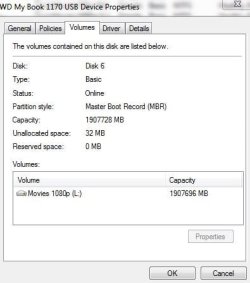
Strange, I never noticed that 31mbs of unallocated space. Do you think I should do anything with it Layback Bear ? Would extending the space that comes before the 32mb be a good idea, or should I make a new simple volume first? Strange indeed. Or move the data off my L drive onto another, and create one large partition with the 32mbs included?
 

Attachments

  • Capture.JPG
    Capture.JPG
    189.2 KB · Views: 13
  • Capture1.JPG
    Capture1.JPG
    26.6 KB · Views: 21

My Computer My Computer

At a glance

Windows 7 Ultimate x64FX 8350 @ 4.8ghz, turbo clocked to 5.4ghzMushkin Enhanced Blackline 16GB 1760mhz 10-10...Gigabyte-660 Windforce OC- GPU Clock 1212MHz ...
Computer type
PC/Desktop
Computer Manufacturer/Model Number
Custom Build
OS
Windows 7 Ultimate x64
CPU
FX 8350 @ 4.8ghz, turbo clocked to 5.4ghz
Motherboard
Asus Sabertooth FX990 Gen 3.0 R2.0
Memory
Mushkin Enhanced Blackline 16GB 1760mhz 10-10-9-24 T1
Graphics Card(s)
Gigabyte-660 Windforce OC- GPU Clock 1212MHz /3504MHz ram
Sound Card
Creative Sound Blaster Recon3D PCIe Sound Card
Monitor(s) Displays
Samsung SyncMaster S27B350H (HDMI)
Screen Resolution
1920x1080 60HZ
Hard Drives
1 x SSD Crucial M4 256GB (Primary OS)
3 x HDD WD 1TB
4 x HDD 2TB
1 x HDD 160GB (Secondary Backup OS)
Raid SATA III 6GB/s 4-port PCI-e Controller Card, Marvel 88SE9215 chipset
PSU
Chieftec-650-14CS (Modular) 80 Plus Gold-650 Watt
Case
Akasa Venom Toxic Gaming Big tower ( Custom Black ) Ver 2.0
Cooling
Water 2.0 PRO / GEIL Cyclone VRM / 6x120mm 2x220mm 2x140mm
Keyboard
Logitech G19
Mouse
Wireless Notebook Presenter Mouse 8000
Internet Speed
Fiber GBS
Antivirus
Don't Announce it to the world :)
Browser
Gotta have at least 1!
Cranky, I do not presume to answer for Laybackbear. However, that 31 MB will not hurt anything if it stays just like it is and is not enough space to be concerned about. I would think you have backups of everything on your computer anyway. If not, it is highly recommended to have backups in at least 2 different places. If the 31 MB bothers you, I see no resaon you could not extend the L partition to include the 31 MB without any issues.
 

My Computers My Computers

  • At a glance

    Windows 11 ProRyzen 9 5900X32GB G Skill DDR4-3600EVGA RTX 3080 FTW 3 Ultra
    Computer type
    PC/Desktop
    Computer Manufacturer/Model Number
    ALWAYS UNDER CONSTRUCTION
    OS
    Windows 11 Pro
    CPU
    Ryzen 9 5900X
    Motherboard
    Asus X570 Crosshair Viii Hero
    Memory
    32GB G Skill DDR4-3600
    Graphics Card(s)
    EVGA RTX 3080 FTW 3 Ultra
    Sound Card
    On Board/Sennheiser PC37X Headset
    Monitor(s) Displays
    3 X Asus 27"
    Screen Resolution
    2560x1440
    Hard Drives
    2 X 1 TB NVME drives
    PSU
    EVGA 850
    Case
    Phanteks Eclipse P400A
    Cooling
    EVGA 280 AIO
    Keyboard
    Logitech G510s/ Logitech G13
    Mouse
    Logitech G502
    Internet Speed
    24/1
    Antivirus
    ESET/MBAM Pro/SAS Pro
    Browser
    Chrome/ Firefox/ Edge
  • At a glance

    Windows 11 ProIntel Ultra 9 288V32 GB LPDDR5X 8533
    Computer type
    Laptop
    System Manufacturer/Model Number
    Dell 16 Plus
    OS
    Windows 11 Pro
    CPU
    Intel Ultra 9 288V
    Memory
    32 GB LPDDR5X 8533
    Monitor(s) Displays
    16" Mini-LED HDR600 Touch 90 Hz
    Screen Resolution
    2560X1600
    Hard Drives
    1 TB NVME
I agree with essenbe. I wouldn't worry about that 31 mb. I'm presuming that both external drives are hook up at the time of the snapshot.
I don't understand why a MBR (Master Boot Record) is on Disk #6 (L) (Movies).
Is (L) one of your external hard drives?
 

My Computer My Computer

At a glance

Windows 10 Pro. 64/ version 1709 Windows 7 Pr...Intel i7-6800K @ 4.3Corsair Platinum 16 gig @2400EVGA GTX 1070 OC
Computer type
PC/Desktop
Computer Manufacturer/Model Number
Home made Desktop
OS
Windows 10 Pro. 64/ version 1709 Windows 7 Pro/64
CPU
Intel i7-6800K @ 4.3
Motherboard
ASUS X-99 Deluxe II
Memory
Corsair Platinum 16 gig @2400
Graphics Card(s)
EVGA GTX 1070 OC
Monitor(s) Displays
Asus 27" LED LCD/VE278Q
Screen Resolution
1920-1080 or 1280-720 HDMI
Hard Drives
INTEL SSD 730-240 Gb Sata 3.0/
PSU
EVGA Platium 1200W
Case
Phanteks Luxe Tempered Glass 8 fans/ one radiator
Cooling
XSPC/ Water Cooled CPU
Keyboard
Das 4 Professional
Mouse
Logitech M705/MX Anywhere 2-S
Internet Speed
100 mbits
Antivirus
Microsoft Security Essentials/ Malwarebytes Premium 3.0/ SAS
Browser
I.E. 11 default/Firefox/ ISP Time Warner Cable/Spectrum
Other Info
LG BluRay Burner/
Sound system-KLipsch-THX/
Icy Dock ssd Hot Swap bays.
Ralph have you had a go at the WD site for Firmware last time that happened to me that fixed it


WD Product Update
 

My Computer My Computer

At a glance

Windows 10 Home Premium 64bit sp1Intel I7-6700K @ 4.6 Ghz 1.344 volts everyday OC32GB G-Skill TridentZ 3200mhz 16-18-18-38 DDR4Sli Gigabyte Windforce GTX 980 G1
Computer type
PC/Desktop
Computer Manufacturer/Model Number
CoreI7-6700K MrFingerIII Special Builds
OS
Windows 10 Home Premium 64bit sp1
CPU
Intel I7-6700K @ 4.6 Ghz 1.344 volts everyday OC
Motherboard
Asrock Fatality K6 Z170 Socket 1151
Memory
32GB G-Skill TridentZ 3200mhz 16-18-18-38 DDR4
Graphics Card(s)
Sli Gigabyte Windforce GTX 980 G1
Sound Card
AC97 Creative Rage Tactic 3D Headphones Bluetooth
Monitor(s) Displays
27" Asus ROG Swift PG278Q G-Sync 48" Vizio Smart HD TV
Screen Resolution
2560x1440p 27"- 48" Currently Gaming at 2560x1440p Res 2K
Hard Drives
250GB Samsung Evo840SSD Seagate baracuda 500 GB WD Mybook 500Gb 1TB Seagate Barracuda
PSU
HX1050w Corsair Silver 80plus certified crosfire/sli
Case
Enthod Pro Full Tower
Cooling
Corsair H110i GT 280 mm High Performance WaterBlock
Keyboard
Logitech wireless keyboard
Mouse
Logitech wireless mouse
Internet Speed
Cox Cable 100+ mb
Antivirus
WebRoot Spysweeper with Antivirus
Browser
IE-10, Chrome, Opera
Other Info
My Other Rig is a AMD FX8320E @4.6Ghz 16GB Ballistic Sport Ram
Mobo Asrock Fatality 990FX 120GB OCZ SSD 1TB Seagate Barracuda Corsair H75 Cooling PSU Corsair CX750
GPU GTX Gigabyte 970G1
crankypenguin can you boot into Windows without Drive (L) hooked up.
That would let you know if a MBR is also installed where it should be and removing it from (L) wouldn't stop you from booting.
 

My Computer My Computer

At a glance

Windows 10 Pro. 64/ version 1709 Windows 7 Pr...Intel i7-6800K @ 4.3Corsair Platinum 16 gig @2400EVGA GTX 1070 OC
Computer type
PC/Desktop
Computer Manufacturer/Model Number
Home made Desktop
OS
Windows 10 Pro. 64/ version 1709 Windows 7 Pro/64
CPU
Intel i7-6800K @ 4.3
Motherboard
ASUS X-99 Deluxe II
Memory
Corsair Platinum 16 gig @2400
Graphics Card(s)
EVGA GTX 1070 OC
Monitor(s) Displays
Asus 27" LED LCD/VE278Q
Screen Resolution
1920-1080 or 1280-720 HDMI
Hard Drives
INTEL SSD 730-240 Gb Sata 3.0/
PSU
EVGA Platium 1200W
Case
Phanteks Luxe Tempered Glass 8 fans/ one radiator
Cooling
XSPC/ Water Cooled CPU
Keyboard
Das 4 Professional
Mouse
Logitech M705/MX Anywhere 2-S
Internet Speed
100 mbits
Antivirus
Microsoft Security Essentials/ Malwarebytes Premium 3.0/ SAS
Browser
I.E. 11 default/Firefox/ ISP Time Warner Cable/Spectrum
Other Info
LG BluRay Burner/
Sound system-KLipsch-THX/
Icy Dock ssd Hot Swap bays.
Ok guys. Answers. I can boot just fine into my PC with L drive not hooked up.( External USB3 ) just fine. Solar - When doing my google searches, yeah I was lead to this all in one WD firmware repair .exe but im afraid to use it, does it wipe the data on the drive while updating, not to mention I have 7 other drives hooked up 1 of which is also external. So yeah, bit of a pickle here. I have backups OF backups, no worries there. I am really anal about backing things up.
 

My Computer My Computer

At a glance

Windows 7 Ultimate x64FX 8350 @ 4.8ghz, turbo clocked to 5.4ghzMushkin Enhanced Blackline 16GB 1760mhz 10-10...Gigabyte-660 Windforce OC- GPU Clock 1212MHz ...
Computer type
PC/Desktop
Computer Manufacturer/Model Number
Custom Build
OS
Windows 7 Ultimate x64
CPU
FX 8350 @ 4.8ghz, turbo clocked to 5.4ghz
Motherboard
Asus Sabertooth FX990 Gen 3.0 R2.0
Memory
Mushkin Enhanced Blackline 16GB 1760mhz 10-10-9-24 T1
Graphics Card(s)
Gigabyte-660 Windforce OC- GPU Clock 1212MHz /3504MHz ram
Sound Card
Creative Sound Blaster Recon3D PCIe Sound Card
Monitor(s) Displays
Samsung SyncMaster S27B350H (HDMI)
Screen Resolution
1920x1080 60HZ
Hard Drives
1 x SSD Crucial M4 256GB (Primary OS)
3 x HDD WD 1TB
4 x HDD 2TB
1 x HDD 160GB (Secondary Backup OS)
Raid SATA III 6GB/s 4-port PCI-e Controller Card, Marvel 88SE9215 chipset
PSU
Chieftec-650-14CS (Modular) 80 Plus Gold-650 Watt
Case
Akasa Venom Toxic Gaming Big tower ( Custom Black ) Ver 2.0
Cooling
Water 2.0 PRO / GEIL Cyclone VRM / 6x120mm 2x220mm 2x140mm
Keyboard
Logitech G19
Mouse
Wireless Notebook Presenter Mouse 8000
Internet Speed
Fiber GBS
Antivirus
Don't Announce it to the world :)
Browser
Gotta have at least 1!
Back
Top