NeverAgain
New member
- Local time
- 11:57 PM
- Messages
- 3
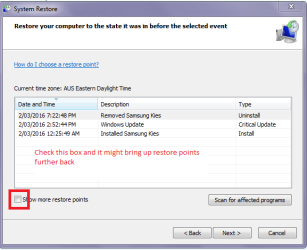
okay I have a Dell XPS 8700 i7-4790 CPU@ 3.6GHz with a GeForce GTX 745, I will be updating. I had a Windows Update pop up to download so I did and sent it to the background. I messed around on Facebook and YouTube when the download was finished there were 20 updates and all I saw when the first window pop up it wouldn't let me see any critical ones. So I reboot my computer. My max Resolution is 1440x900 and after I got finished waiting on the downloads to install I got back to browsing only this time my Resolution was 1600 something x 1000 something All my desktop shortcuts were jumbled and a lot smaller so I arranged them and went back on Firefox and kept doing what I was doing until it hit me let me see how my game plays (Heroes & Generals) the screen was bigger of course so I went to lay a few matches and got a Shader some number wasn't on my video card. I know it has like 348 shaders on it. I cut the game off and went to Widows Restore to go back to later date that it as saved When it stops and Rebooted I got this. and still getting it hitting F12 Because I could reboot in safe mode it would fix it but there was no choice to choose it just a Click here to repair problem or Start Window Normally. I choose to repair and get this
Status: 0xc000000f
Info: The boot selection failed because a required device is inaccessible. Next I try the Normal Boot I get a black screen I was so mad I went to bed with on that black screen all you can see is the mouse Pointer.
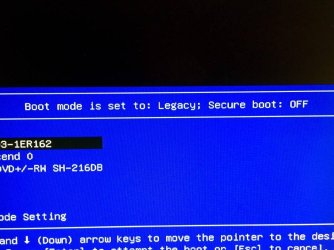
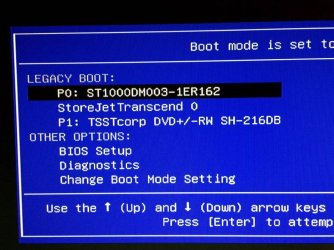
When I ordered this $1200 Dell with Windows 7 Professional I get a Windows 8 or 8.1 boot disc?? WTH. I am on my mamma's Laptop which I hate because I would rather have a Desktop. She ordered the $200 one with no disc drive to even burn a boot disk. I have an 8GB Flashcard and that's not anywhere large enough. Okay I just lucked up with F12 says Boot mode is set to Legacy; Secure Boot; OFF
She does not have the stuff I need to send a picture. This is going to take some time but I will get the picture. Sorry all my Computer info is in a txt File on my computer desktop. My printer quit about a year ago I guess it was it's time I Phone to take them and s bought it before 2005. I hope these pictures help I had to use my mamma's iPhone then send them to her self on Facebook and save them to Picasa 3 then add them to my Photobucket. So here's what I am seeing right now on my Desktop I am trying to fix.Sorry if they are too big I don't have the graphics software like on mine
13884336_1765916843694212_1378489273_n.jpg
The Jet Transcend is a 1TB External Hard rive I ought to save some stuff off and older computer to install on this new one,well bought it Dec 2014 so to me it's still new. I am going to mess with it a little while longer but if this helps anyone see a problem please let me know
Status: 0xc000000f
Info: The boot selection failed because a required device is inaccessible. Next I try the Normal Boot I get a black screen I was so mad I went to bed with on that black screen all you can see is the mouse Pointer.
When I ordered this $1200 Dell with Windows 7 Professional I get a Windows 8 or 8.1 boot disc?? WTH. I am on my mamma's Laptop which I hate because I would rather have a Desktop. She ordered the $200 one with no disc drive to even burn a boot disk. I have an 8GB Flashcard and that's not anywhere large enough. Okay I just lucked up with F12 says Boot mode is set to Legacy; Secure Boot; OFF
She does not have the stuff I need to send a picture. This is going to take some time but I will get the picture. Sorry all my Computer info is in a txt File on my computer desktop. My printer quit about a year ago I guess it was it's time I Phone to take them and s bought it before 2005. I hope these pictures help I had to use my mamma's iPhone then send them to her self on Facebook and save them to Picasa 3 then add them to my Photobucket. So here's what I am seeing right now on my Desktop I am trying to fix.Sorry if they are too big I don't have the graphics software like on mine
13884336_1765916843694212_1378489273_n.jpg
The Jet Transcend is a 1TB External Hard rive I ought to save some stuff off and older computer to install on this new one,well bought it Dec 2014 so to me it's still new. I am going to mess with it a little while longer but if this helps anyone see a problem please let me know
Attachments
Last edited:
My Computer
- Computer type
- PC/Desktop
- Computer Manufacturer/Model Number
- Dell
- OS
- Windows 7 Professional
- CPU
- i7-4790
- Memory
- 1TB
- Graphics Card(s)
- NVIDIA GeForce GTX 745
- Antivirus
- COMODO
- Browser
- Firefox