The case of the LED-less case

Paultx

New member
Member
Local time
3:30 PM
Messages
74
Location
Brazil
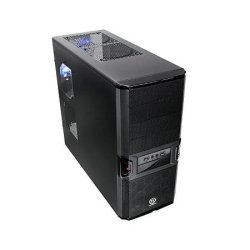
I purchased this PC that came with this Thermaltake V3 Black Edition. Well, it's all right except it hasn't that small front LED that allows me to check disk activity. So I can't see if my PC has that infamous "grinding" that many times means trouble.

So I wonder if there is some app I can put, say, on the system tray to check disk activity the same way of that missing LED.

TIA.
 

My Computer My Computer

At a glance

Windows 7
OS
Windows 7
Hi,

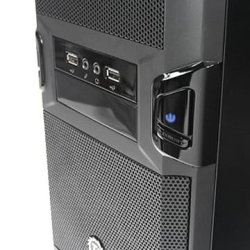
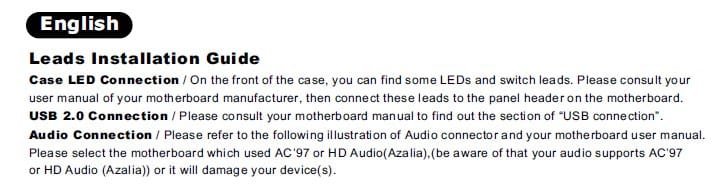
According to the manual of your case and what I could see on pictures of it there should be leds available I think for power-on and hdd activity, maybe if you purchased the computer already assembled they did not connect the leds.
I'm not shure but I think hdd on the left middle and power-on on the right.
If you still want a hdd activity light on your taskbar you can try DKharddrive-light, I don't know if it will work on Windows 7 but you can give it a try: Downloads | DKpcCODE | Custom Software Development

MK2
 

Attachments

  • TT V3-1.jpg
    TT V3-1.jpg
    21 KB · Views: 8
  • TT V3-2.jpg
    TT V3-2.jpg
    13.2 KB · Views: 9
  • Led connection.jpg
    Led connection.jpg
    26 KB · Views: 9

My Computer My Computer

At a glance

7
OS
7
Could you add LEDs off your mobo?
 

My Computer My Computer

At a glance

Systems 1 and 2: Windows 7 Enterprise x64, Wi...System 1: i7 [email protected], System 2: AMD FX-41...System 1: 8GB System 2: 8GBSystem 1: ATI FirePro V4800 System 2: Radeon ...
Computer Manufacturer/Model Number
Dell and Custom
OS
Systems 1 and 2: Windows 7 Enterprise x64, Win 8 Developer
CPU
System 1: i7 [email protected], System 2: AMD FX-4100 Zambezi 3.6G
Motherboard
System 1:Dell 06NWYK System 2: ASUS M5A97 AM3+
Memory
System 1: 8GB System 2: 8GB
Graphics Card(s)
System 1: ATI FirePro V4800 System 2: Radeon HD 6850
Sound Card
System 1: onboard System 2: onboard
Monitor(s) Displays
System1: Viewsonic HDMI 24"
Screen Resolution
System 1: 1920x1080 System 2: 1920x1080
Hard Drives
System 1: Mirrored .5B drives System 2: Seagate Barracuda ST1000DM003 1TB 7200 RPM 64MB Cache SATA 6.0Gb/s
Case
System 1: Dell System 2: Cooler Master
Internet Speed
10 MBPS
That could be as simple as that: someone forgot to connect that wire or connected the appr. plug in reversed polarity.
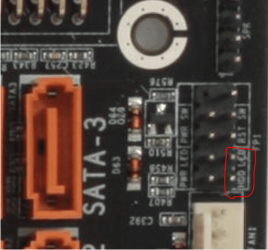
LED's = Light Emitting Diodes which by design allow current flow only in 1 direction. Check your mother board manual for the position of that plug (sometimes labeled HDD LED ;) and turn it around.

Capture.PNG

DG
 

My Computer My Computer

At a glance

Windows 7 Ultimate x86DualCore AMD Athlon 64 X2, 2600 MHz 5200+Samsung 2GB DDR2Onboard NVIDIA GeForce 6150SE nForce 430
Computer Manufacturer/Model Number
HP m8000n
OS
Windows 7 Ultimate x86
CPU
DualCore AMD Athlon 64 X2, 2600 MHz 5200+
Motherboard
Asus M2N68-LA (Narra)
Memory
Samsung 2GB DDR2
Graphics Card(s)
Onboard NVIDIA GeForce 6150SE nForce 430
Sound Card
Onboard nVIDIA nForce 6100-430 (MCP61P)
Monitor(s) Displays
Westinghouse 19" LED
Screen Resolution
1280x1024
Hard Drives
SATA II Seagate Barracuda 500GB
USB II WD Elements 500GB
USB II WD My Book 1TB
USB II WD My Book 2TB
PSU
Stock (HP)
Case
Stock (HP)
Cooling
Stock
Keyboard
Logitech Classic KB 200
Mouse
Standard HP opticle USB mouse
Thanks, MK2, Lemur and SledgeDG. I think that will solve the case. I'll ask a friend of mine who works with PCs to fix that. Then I'll let you know.
 

My Computer My Computer

At a glance

Windows 7
OS
Windows 7
Ok, your friend should get it working, we will hear from you.
 

My Computer My Computer

At a glance

7
OS
7
As shown above, doesn't your case have an LED already? If not, I'd probably grab one from an old case, make a hole in one of the drive bay covers, and connect it to the motherboard.
 

My Computer My Computer

At a glance

Windows 7 Ultimate x64 SP1Intel Core i7-260012 GB Patriot Extreme DDR3-1333Nvidia GTX 470
OS
Windows 7 Ultimate x64 SP1
CPU
Intel Core i7-2600
Motherboard
Gigabyte GA-P67A-UD3P-B3
Memory
12 GB Patriot Extreme DDR3-1333
Graphics Card(s)
Nvidia GTX 470
Monitor(s) Displays
Dell UltraSharp 2209WA
Hard Drives
OCZ Agility3 240 GB, WD5001AALS, WD7501AALS
PSU
OCZ ModStream 700W
Case
CoolerMaster HAF 912 Advanced
Cooling
CoolerMaster Hyper 212 Plus
After a "big" while, I finally found time to try to fix this stuff, but my friend couldn't do it.
 

My Computer My Computer

At a glance

Windows 7
OS
Windows 7
Are you sure you are connecting them properly to your motherboard, using the proper headers? You could pull one out of an old case and just connect it to the mobo to test.
 

My Computer My Computer

At a glance

Windows 7 Ultimate x64 SP1Intel Core i7-260012 GB Patriot Extreme DDR3-1333Nvidia GTX 470
OS
Windows 7 Ultimate x64 SP1
CPU
Intel Core i7-2600
Motherboard
Gigabyte GA-P67A-UD3P-B3
Memory
12 GB Patriot Extreme DDR3-1333
Graphics Card(s)
Nvidia GTX 470
Monitor(s) Displays
Dell UltraSharp 2209WA
Hard Drives
OCZ Agility3 240 GB, WD5001AALS, WD7501AALS
PSU
OCZ ModStream 700W
Case
CoolerMaster HAF 912 Advanced
Cooling
CoolerMaster Hyper 212 Plus
Back
Top