Solved The default gateway is not available

blankpicture

New member
Local time
11:38 PM
Messages
7
Hello,
Up until now I've always been able to fix problems with my PC myself or with some help of the almighty internet, but this time no matter what I tried, nothing seemed to work.
I was doing a tutorial with WAMP server, then went downstairs to make myself some food, after an hour, I came back and had no internet connection. Messed around, tried to fix it. Even carried my desktop PC to other room, just to see if fault is cable. I'm connected to the internet via modem.
Funny thing is.. Other computer which is connected to the internet via same modem can access internet. I tried a lot of suggestions for this issue, have spent last 4 hours just "googl'ing and googl'ing" for solution. And on top of that, when I go in my internet sharing thingy, there are no yellow icons or red crosses, but when I do press diagnose after some 7-10 minutes it comes up with "The default gateway is not available".
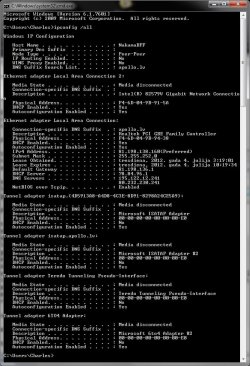
I will attach an "ipconfig all" to this post, if it helps.
I will provide any information you ask of.

Thanks in advance!
 

Attachments
  • ipconfigall.jpg
    ipconfigall.jpg
    108.6 KB · Views: 420

My Computer

OS
Windows 7 Ultimate x64
CPU
Intel core i7-2600k @ 3.40ghz
Motherboard
Asus P8P67 EVO
Memory
Corsair, 8GB, DDR3
Graphics Card(s)
AMD Radeon HD 6850
Monitor(s) Displays
Samsung S24A300BL
Hard Drives
1TB Sata
30 GB Kingston SSDNOW
Welcome to Seven Forums,

Your ipconfig /all is not showing Private IPs like 192.168.1.X. What is the Make and Model of the Modem that you are connected to? Is this supposed to be a Modem/Router device?

You might want to release/renew your IPs and see if that helps. Here's a Tutorial.

If this didn't help at all, is it possible to get an ipconfig /all output of one of the working computers in your network?
 

My Computer

Computer Manufacturer/Model Number
Lenovo Desktop/Samsung Laptop
OS
Win7 & Win8 64bit
CPU
Intel i5
Internet Speed
Charter-20 Mbps
Antivirus
Avast
Browser
FF, IE9 and Chrome
Thanks for replying.
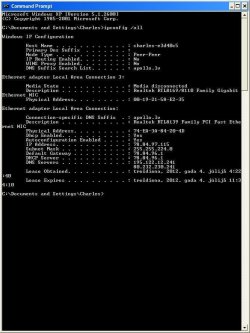
As for modem - Thomson SpeedTouch ST546 v6
This computer is connected to the same Modem as my other computer which has the issue with the internet connection.

Releasing and renewing didn't help.

I'll add "ipconfig" all from this computer as well.

P.s. Sorry if I end up double posting, this computer is in a poor state.
 

Attachments

  • ipconfigall2.JPG
    ipconfigall2.JPG
    62.3 KB · Views: 116
Last edited:

My Computer

OS
Windows 7 Ultimate x64
CPU
Intel core i7-2600k @ 3.40ghz
Motherboard
Asus P8P67 EVO
Memory
Corsair, 8GB, DDR3
Graphics Card(s)
AMD Radeon HD 6850
Monitor(s) Displays
Samsung S24A300BL
Hard Drives
1TB Sata
30 GB Kingston SSDNOW
Thanks for the latest info provided. :D

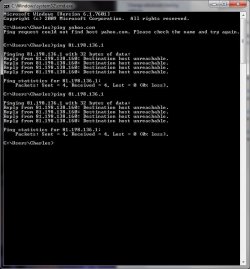
While the problematic computer is wired directly to the modem can we do some pings?
Open up a command prompt and type:
ping yahoo.com press enter
ping 81.198.136.1 press enter

Also, do you have a spare network cable that you could try if you have not done this yet?

Another request, restart your computer continue tapping F8 then select Safe Mode with Networking, see if you're able to replicate the issue.
 

My Computer

Computer Manufacturer/Model Number
Lenovo Desktop/Samsung Laptop
OS
Win7 & Win8 64bit
CPU
Intel i5
Internet Speed
Charter-20 Mbps
Antivirus
Avast
Browser
FF, IE9 and Chrome
I'll add a screenshot regarding that pinging. Reason why I pinged twice 81.198.136.1 is because before when I pinged it, there were 2 lost as well. But accidentally closed CMD.

I tried 3 different cables. Original one I had from the start, this one and a spare one. It doesn't seem to be the issue.

I started it in SM with Networking and I'd not access the internet either way.

Not sure if I mentioned this before, but at times, it shows that I'm indeed connected to the internet, yet can't access anything regarding internet, but at times I still see both yellow triangle and red cross.

Oh, just for the info -> I have 2 network adapters originally, but one of them is pretty much dead, since lighting struck my house recently.

I'm sorry for all the random information, but I'm not sure what could be useful in this situation.

And thanks for taking your time and helping me, I appreciate it.
 

Attachments

  • pingping.jpg
    pingping.jpg
    52.9 KB · Views: 135

My Computer

OS
Windows 7 Ultimate x64
CPU
Intel core i7-2600k @ 3.40ghz
Motherboard
Asus P8P67 EVO
Memory
Corsair, 8GB, DDR3
Graphics Card(s)
AMD Radeon HD 6850
Monitor(s) Displays
Samsung S24A300BL
Hard Drives
1TB Sata
30 GB Kingston SSDNOW
Hmmm...ping results doesn't look good at all.

Can you try a System Restore and see if you can restore it to a point before this issue occurred?
System Restore - Windows 7 features - Microsoft Windows

If that's not applicable at all, download the latest driver from the Manufacture's site, uninstall the current network driver then manually install the new driver. Please do this from Safe Mode with Networking.

Also, what's your AV/Security Software?

Please update us with your progress.
 

My Computer

Computer Manufacturer/Model Number
Lenovo Desktop/Samsung Laptop
OS
Win7 & Win8 64bit
CPU
Intel i5
Internet Speed
Charter-20 Mbps
Antivirus
Avast
Browser
FF, IE9 and Chrome
Sadly, I don't have a restore point before it happened. As I said earlier, I left computer on and went away for a hour, when I came back, I could not access the internet anymore. No software was installed before that, in that time gap or even after it.

I did do as you said, even so, I did try uninstalling and installing newest drivers before already to try and fix this problem.

I'm using MSE (Microsoft Security Essentials). I did try uninstalling it to see if by any chance it could be causing problems, but that didn't help.

I've a spare network adapter, would trying to connect to the internet via that is worth a try?
 

My Computer

OS
Windows 7 Ultimate x64
CPU
Intel core i7-2600k @ 3.40ghz
Motherboard
Asus P8P67 EVO
Memory
Corsair, 8GB, DDR3
Graphics Card(s)
AMD Radeon HD 6850
Monitor(s) Displays
Samsung S24A300BL
Hard Drives
1TB Sata
30 GB Kingston SSDNOW
This was going to be my next suggestion, it might be worth giving it a shot. Your network adapter might be faulty. :D
I've a spare network adapter, would trying to connect to the internet via that is worth a try?
 

My Computer

Computer Manufacturer/Model Number
Lenovo Desktop/Samsung Laptop
OS
Win7 & Win8 64bit
CPU
Intel i5
Internet Speed
Charter-20 Mbps
Antivirus
Avast
Browser
FF, IE9 and Chrome
It works. As of now, I'm writing this on my "problematic computer". I'm not sure. Does it mean that it's a hardware issue or maybe driver is simply being affected by something?
 

My Computer

OS
Windows 7 Ultimate x64
CPU
Intel core i7-2600k @ 3.40ghz
Motherboard
Asus P8P67 EVO
Memory
Corsair, 8GB, DDR3
Graphics Card(s)
AMD Radeon HD 6850
Monitor(s) Displays
Samsung S24A300BL
Hard Drives
1TB Sata
30 GB Kingston SSDNOW
It works. As of now, I'm writing this on my "problematic computer". I'm not sure. Does it mean that it's a hardware issue or maybe driver is simply being affected by something?
If it works after you've changed your NIC then the other one is faulty. :rolleyes:
 

My Computer

Computer Manufacturer/Model Number
Lenovo Desktop/Samsung Laptop
OS
Win7 & Win8 64bit
CPU
Intel i5
Internet Speed
Charter-20 Mbps
Antivirus
Avast
Browser
FF, IE9 and Chrome
It somewhat doesn't make sense. I mean, does stuff die on its own that often? Since it wasn't affected by anything as far as I know. o_x
Either way, thank you for helping me, appreciate it.

Should have tried this from the start, but it's the first time that something simply stops working. Maybe if it was an older computer I would have tried this earlier, but given that it's not been a long time since I bought this computer, it didn't even touch my mind that my NIC could've died.
 

My Computer

OS
Windows 7 Ultimate x64
CPU
Intel core i7-2600k @ 3.40ghz
Motherboard
Asus P8P67 EVO
Memory
Corsair, 8GB, DDR3
Graphics Card(s)
AMD Radeon HD 6850
Monitor(s) Displays
Samsung S24A300BL
Hard Drives
1TB Sata
30 GB Kingston SSDNOW
Anything can be unpredictable and behave differently in general. I have seen a brand new computer that will not play nice during the first week that I set it up. I have experienced/encountered technology devices that dies quickly and the good thing about them, they are replaceable.

Glad that you have a good spare network card adapter and that resolved your issue.
 

My Computer

Computer Manufacturer/Model Number
Lenovo Desktop/Samsung Laptop
OS
Win7 & Win8 64bit
CPU
Intel i5
Internet Speed
Charter-20 Mbps
Antivirus
Avast
Browser
FF, IE9 and Chrome
Thanks again for helping me!
 

My Computer

OS
Windows 7 Ultimate x64
CPU
Intel core i7-2600k @ 3.40ghz
Motherboard
Asus P8P67 EVO
Memory
Corsair, 8GB, DDR3
Graphics Card(s)
AMD Radeon HD 6850
Monitor(s) Displays
Samsung S24A300BL
Hard Drives
1TB Sata
30 GB Kingston SSDNOW
It's a pleasure. You might want to buy a spare NIC just in case. :D
 

My Computer

Computer Manufacturer/Model Number
Lenovo Desktop/Samsung Laptop
OS
Win7 & Win8 64bit
CPU
Intel i5
Internet Speed
Charter-20 Mbps
Antivirus
Avast
Browser
FF, IE9 and Chrome
Yeah, hardware can die sadly. It might even be DOA when you get your latest widget in the mail.
 

My Computer

Computer type
PC/Desktop
Computer Manufacturer/Model Number
custom build
OS
Windows 7 64bit
CPU
Intel Core i5-4670 3.40GHz
Motherboard
ASUSTek H87-PLUS
Memory
DDR3 4 GBytes
Graphics Card(s)
AMD Radeon HD 6870
Back
Top