The diagnostics policy service is not running

contactRaul

New member
Local time
10:42 PM
Messages
1
While doing maintenance on Windows 7, I got this troubleshooting report: THE DIAGNOSTICS POLICY SERVICE IS NOT RUNNING. What and where is this service, and how can I get it running? What does it do, and why did it stop running? This is the first time I hear about such service. Anyone? Thanks.:confused:
 

My Computer My Computer

At a glance

Windows 7 Home Premium 64 bit?6GB DDR3ATI RADEON HD4200 Integrated Graphics
Computer type
PC/Desktop
Computer Manufacturer/Model Number
HP Pavilion p6720f, AMD Phenom II 840T Quadcore processor
OS
Windows 7 Home Premium 64 bit
CPU
?
Motherboard
?
Memory
6GB DDR3
Graphics Card(s)
ATI RADEON HD4200 Integrated Graphics
Hard Drives
1TB
Antivirus
Microsoft Security Essentials
Browser
IE9 64bit
Welcome to Seven Forums contactRaul.

The Diagnostic Policy Service enables problem detection, troubleshooting and resolution for Windows components. If this service is stopped, diagnostics will no longer function.

Start> In search box type services.msc> Enter> Scroll down to Diagnostic Policy Service> Left click on Diagnostic Policy Service and upper left click on Start the service> If you see instead Stop the service, click on Restart the service under that

ab6p02.jpg


See if that doesn't restart the service. If it does, now right click on Diagnostic Policy Service> Properties> Make sure the Startup type is set to Automatic> If it is not, click on the arrow on the drop down menu and choose Automatic> Save and OK your way out

2pzwxfs.jpg


If you get any errors when trying to start or restart the service, post some screenshots of any errors

http://www.sevenforums.com/tutorials/9733-screenshots-files-upload-post-seven-forums.html

A Guy
 

My Computer My Computer

At a glance

Windows 10 Home x64INTEL Core i5-750 Quad-Core 3.37GHzHyperX Fury Black Series 8GB (2 x 4GB) 1866MhzEVGA GeForce GTX 750 Superclocked 1GB 128-Bit...
Computer type
PC/Desktop
OS
Windows 10 Home x64
CPU
INTEL Core i5-750 Quad-Core 3.37GHz
Motherboard
ASUS P7P55D
Memory
HyperX Fury Black Series 8GB (2 x 4GB) 1866Mhz
Graphics Card(s)
EVGA GeForce GTX 750 Superclocked 1GB 128-Bit GDDR5
Monitor(s) Displays
LG 32MA68HY 32" IPS
Screen Resolution
1920 x 1080
Hard Drives
Samsung 840 Evo 120GB, SEAGATE 500GB Barracuda® 7200.12, SATA 3 Gb/s, 7200 RPM, 16MB cache
PSU
ANTEC TruePower New TP-550, 80 PLUS, 550W
Case
ANTEC Three Hundred Illusion
Cooling
COOLER MASTER Hyper 212 Plus, 4 x 120mm 1 x 140mm Noctua's
Internet Speed
85 + Mbps
Antivirus
Avast
Browser
Vivaldi
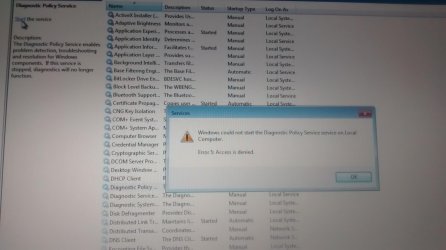
I did all the written down but the message in my words was that the windows does not succeed to start the diagnostic policy service
error num. 5

??????


Start> In search box type services.msc> Enter> Scroll down to Diagnostic Policy Service> Left click on Diagnostic Policy Service and upper left click on Start the service> If you see instead Stop the service, click on Restart the service under that
 

My Computer My Computer

At a glance

Windows 7 Home Premium 64bit.amd dual core e-450
Computer type
Laptop
Computer Manufacturer/Model Number
msi
OS
Windows 7 Home Premium 64bit.
CPU
amd dual core e-450

My Computer My Computer

At a glance

Windows 10 Home x64INTEL Core i5-750 Quad-Core 3.37GHzHyperX Fury Black Series 8GB (2 x 4GB) 1866MhzEVGA GeForce GTX 750 Superclocked 1GB 128-Bit...
Computer type
PC/Desktop
OS
Windows 10 Home x64
CPU
INTEL Core i5-750 Quad-Core 3.37GHz
Motherboard
ASUS P7P55D
Memory
HyperX Fury Black Series 8GB (2 x 4GB) 1866Mhz
Graphics Card(s)
EVGA GeForce GTX 750 Superclocked 1GB 128-Bit GDDR5
Monitor(s) Displays
LG 32MA68HY 32" IPS
Screen Resolution
1920 x 1080
Hard Drives
Samsung 840 Evo 120GB, SEAGATE 500GB Barracuda® 7200.12, SATA 3 Gb/s, 7200 RPM, 16MB cache
PSU
ANTEC TruePower New TP-550, 80 PLUS, 550W
Case
ANTEC Three Hundred Illusion
Cooling
COOLER MASTER Hyper 212 Plus, 4 x 120mm 1 x 140mm Noctua's
Internet Speed
85 + Mbps
Antivirus
Avast
Browser
Vivaldi
I'm a little bit new here and don't know much but when I followed your directions I got this
 

Attachments

  • 1420263209280-1551458081.jpg
    1420263209280-1551458081.jpg
    212.2 KB · Views: 4

My Computer My Computer

At a glance

North Carolina
Computer type
PC/Desktop
Computer Manufacturer/Model Number
dell
OS
North Carolina

My Computer My Computer

At a glance

Windows 10 Home x64INTEL Core i5-750 Quad-Core 3.37GHzHyperX Fury Black Series 8GB (2 x 4GB) 1866MhzEVGA GeForce GTX 750 Superclocked 1GB 128-Bit...
Computer type
PC/Desktop
OS
Windows 10 Home x64
CPU
INTEL Core i5-750 Quad-Core 3.37GHz
Motherboard
ASUS P7P55D
Memory
HyperX Fury Black Series 8GB (2 x 4GB) 1866Mhz
Graphics Card(s)
EVGA GeForce GTX 750 Superclocked 1GB 128-Bit GDDR5
Monitor(s) Displays
LG 32MA68HY 32" IPS
Screen Resolution
1920 x 1080
Hard Drives
Samsung 840 Evo 120GB, SEAGATE 500GB Barracuda® 7200.12, SATA 3 Gb/s, 7200 RPM, 16MB cache
PSU
ANTEC TruePower New TP-550, 80 PLUS, 550W
Case
ANTEC Three Hundred Illusion
Cooling
COOLER MASTER Hyper 212 Plus, 4 x 120mm 1 x 140mm Noctua's
Internet Speed
85 + Mbps
Antivirus
Avast
Browser
Vivaldi
Thank you but the computer that has the problem can not acess the internet at all. so I can not just download it from the site. Is there another way or do you think I can somehow download it here and then transfer it from my thumb drive to the broken computer.

I also steps as well but they did not work.

If the error is related to the Diagnostic Policy Service, follow these steps:
  1. Click the Start button, then type regedit in the Search box.
  2. Right click regedit.exe, then click Run as administrator. If prompted, enter your user name and password and click OK.
  3. Browse to the following key: HKEY_LOCAL_MACHINE\SYSTEM\CurrentControlSet\Services\DPS\Parameters
  4. Right click the key, and click Permissions.
  5. Under Group or user names, select your account.
  6. Under the Allow column in Permissions, make sure the Full Control and Read boxes are checked.
  7. Click Apply, then click OK.
 

My Computer My Computer

At a glance

North Carolina
Computer type
PC/Desktop
Computer Manufacturer/Model Number
dell
OS
North Carolina
Back
Top