
"the drive or network connection that the short cut "lnk" unavail"....
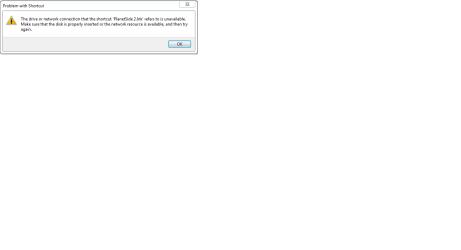
Hi, so currently i have a problem, every time i click on a launcher this message appears "The drive or network connection that the shortcut 'Planetside 2.lnk' refers to is unavailable. Make sure that the disk is properly inserted or the network resource is available, and then try again". (please refer to the attachment to see the message for yourself)
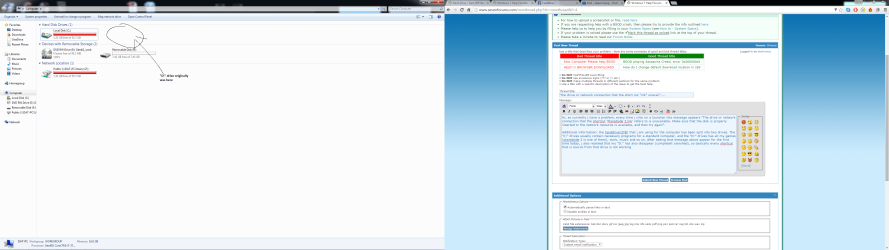
Additional information: the harddrive(2TB) that i am using for the computer has been split into two drives. The "C:" drives usually contain necessary programs for a standard computer, and the "D:" drives has all my games (planetside 2 is one of them), work, music and so on. After seeing that message above appear for the first time today, i also realised that my "D:" has also disappear (completelt vanished), so basically every shortcut that is source from that drive is not working. I dont think it is anything to do with the wiring, as the "C:" drive is still there, it is part of the same hard drive.
I have look at other post, saying reinstall the program bla bla bla. But that isn't my main problem at this moment, the major problem is taht i dont have that secondary drive anymore, so even if i can reinstall the program, where will i put it, my major program drive "C:" is almost full, and this drive have other important document in it, so i cant really reinstall that :S.
Please help me out, its really urgent, and just an FYI my knowledge with computer is really limited, so it would help if you guys can dumb it down for me, thank you for your help.
Hi, so currently i have a problem, every time i click on a launcher this message appears "The drive or network connection that the shortcut 'Planetside 2.lnk' refers to is unavailable. Make sure that the disk is properly inserted or the network resource is available, and then try again". (please refer to the attachment to see the message for yourself)
Additional information: the harddrive(2TB) that i am using for the computer has been split into two drives. The "C:" drives usually contain necessary programs for a standard computer, and the "D:" drives has all my games (planetside 2 is one of them), work, music and so on. After seeing that message above appear for the first time today, i also realised that my "D:" has also disappear (completelt vanished), so basically every shortcut that is source from that drive is not working. I dont think it is anything to do with the wiring, as the "C:" drive is still there, it is part of the same hard drive.
I have look at other post, saying reinstall the program bla bla bla. But that isn't my main problem at this moment, the major problem is taht i dont have that secondary drive anymore, so even if i can reinstall the program, where will i put it, my major program drive "C:" is almost full, and this drive have other important document in it, so i cant really reinstall that :S.
Please help me out, its really urgent, and just an FYI my knowledge with computer is really limited, so it would help if you guys can dumb it down for me, thank you for your help.
Attachments
My Computer
At a glance
window 7 ultimate x64bit
- Computer type
- PC/Desktop
- OS
- window 7 ultimate x64bit

