Solved The mouse pointer changes because of a scroll??

DanshuP

New member
Local time
12:05 PM
Messages
13
HEY EVERYBODY!:D:D:D:D
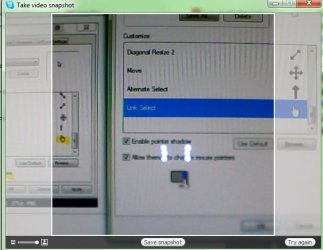
The 1st pic is of my normal mouse pointer,but as soon as i scroll down,as in use the scroll button in my computer,the mouse pointer changes to a weird shape(which is the other pic.)(which works though). i do not know what is causing this and have changed several mouses but the problem still doesn't leave :(
:mad:this is continuing science 2 months now...in the beginning it didn't matter but now it is a headache and a nuisance...
DOES ANY ONE HAVE A REMEDY?????I HAVE GOOGLED IT TOO,even there an answer isn't available :cry:

Thanks in advance :)


p.s.i have a windows 7 ultimate x32 and intel dual core,and 4 gb ram:geek:
 

Attachments

  • Snapshot of me 12.jpg
    Snapshot of me 12.jpg
    4.3 KB · Views: 6,065
  • Snapshot of me 3.jpg
    Snapshot of me 3.jpg
    3.3 KB · Views: 6,069

My Computer

OS
Windows 7 Ultimate x32
Which cursor theme do you use, or does your cursors inbuilt with your custom theme ? You may try one thing ..... that is .....

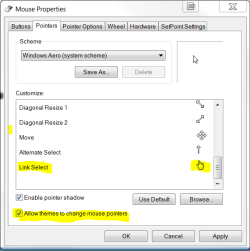
Click start button > Control Panel (large icons view) > Choose "Mouse". now go to the pointer tab , Click on the arrow under "Schemes" and apply "Windows Aero(System Scheme)" . Finally uncheck the box in front of "allow themes to change mouse pointer" .

Follow the snip below . It might work .
 

Attachments

  • Untitled.jpg
    Untitled.jpg
    37.7 KB · Views: 68

My Computer

Computer type
PC/Desktop
Computer Manufacturer/Model Number
Self Assembled
OS
Microsoft Windows 10 Pro Insider Preview 64-bit
CPU
Intel(R) Core(TM) i3-4130 CPU @ 3.40GHz
Motherboard
Gigabyte Technology Co., Ltd. B85M-D3H
Memory
Corsair Vengence 4GB x2 (8.00GB Dual-Channel DDR3 @ 798MHz)
Graphics Card(s)
2047MB GeForce GTS 450 (ZOTAC International)
Sound Card
Onboard (Realtek High Definition Audio)
Monitor(s) Displays
LG Flatron E2040T
Screen Resolution
1600x900
Hard Drives
Western Digital 1 TB
Seagate 500 GB
PSU
Corsair VS550
Case
Cooler Master K380
Cooling
Cooler Master Seidon 120V Plus
Keyboard
Logitech MK260r
Mouse
Logitech MK260r
Internet Speed
PMPL Broadband
Antivirus
Windows Defender + MBAM
Browser
Firefox
Other Info
Dell Studio 15" Laptop
Its whatever driver, I assume touchpad driver for your laptop, that is doing this.
 

My Computer

Computer type
PC/Desktop
Computer Manufacturer/Model Number
Alienware Aurora ALX R4
OS
Windows 10 Pro (x64)
CPU
Intel Core i7-3930K (3.2GHz - 4.5GHz)
Motherboard
Alienware Aurora-R4 x79
Memory
4x Samsung 4GB PC3-12800 DDR3 (16GB 1600MHz)
Graphics Card(s)
Nvidia Geforce GTX 690
Sound Card
SteelSeries Siberia Elite
Monitor(s) Displays
Dell UltraSharp U3011
Screen Resolution
2560x1600
Hard Drives
Samsung 850 Pro 256 GB, Seagate 1TB Desktop Hybrid HDD, 2x Western Digital 4TB Green HDD
PSU
875W Some Dell PSU <.<
Case
Alienware Aurora ALX
Cooling
Custom Liquid Cooling (EK CPU & GPU blocks) dual EK 480RAD
Keyboard
Logitech G710+ Mechanical
Mouse
Logitech G700s
Internet Speed
Verizon Fios (50 mbps average)
Other Info
Server: Intel NUC D54250WYK: i5-4250U, 16GB, 256 GB mSATA, Windows Server 2012 R2
ummm..

Which cursor theme do you use, or does your cursors inbuilt with your custom theme ? You may try one thing ..... that is .....

Click start button > Control Panel (large icons view) > Choose "Mouse". now go to the pointer tab , Click on the arrow under "Schemes" and apply "Windows Aero(System Scheme)" . Finally uncheck the box in front of "allow themes to change mouse pointer" .

Follow the snip below . It might work

yo arc.thanks for the fast reply.
but it didn't work out though.
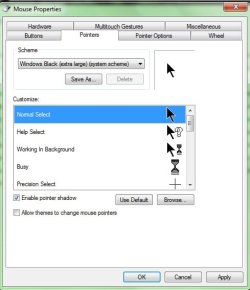
i have done that b4 and the thing is,the mouse pointer stays that way until i scroll.
as in the windows black(System scheme)
and becomes the other as soon as i scroll.:confused:
 

Attachments

  • aaaa.jpg
    aaaa.jpg
    29.8 KB · Views: 35
  • Snapshot of me 12.jpg
    Snapshot of me 12.jpg
    4.3 KB · Views: 6,053
  • Snapshot of me 3.jpg
    Snapshot of me 3.jpg
    3.3 KB · Views: 6,049

My Computer

OS
Windows 7 Ultimate x32
I don't really know what your problem is, but that hand is supposed to be what it becomes when hovering over a link. I noticed in your screenshot that you do not have the option to permit the theme to change cursors. It seems the opposite of what one would expect, but try enabling it and see what happens.
 

Attachments

  • Mouse.PNG
    Mouse.PNG
    14.2 KB · Views: 29

My Computer

Computer Manufacturer/Model Number
DIY
OS
W7x64 Pro, SuSe 12.1/** W7 x64 Pro, XP MCE
CPU
Phenom II 1090T w/Noctua NH-D14 /**4400+ X2 w/CM Hyper TX 3
Motherboard
ASRock 890FX Deluxe 4/**A8N-SLI
Memory
2 x 2GB Patriot PGS34g1600LLKA/**4x1GB Corsair VS
Graphics Card(s)
EVGA GTX460 SC/**EVGA 8800GTS
Sound Card
Asus Xonar D2X/**Xonar D1
Monitor(s) Displays
Acer X233H, Dell E152FPc /**LG M237-WD
Screen Resolution
1920x1080 & 1024x768/**1980x1080
Hard Drives
WDC 2TB, 1.5TB, 1TB, 500GB,Seagate 500GB , Maxtor 80GB /**500GB Seagate & WDC 1TB Black
PSU
CM RS600 w/ APC BX1000G/**Antec 500 TP w/ APC BX1000
Case
HAF922/**Antec 1040IIB
Cooling
3x200mm, 1x140 and 1x120mm/**5x80mm fans
Keyboard
Logitech Media USB/**Saitek Eclipse
Mouse
Cordless Trackman Wheel/**Ditto
Internet Speed
3.3Mbps
Other Info
SB 560 5.1 w/ Sennheiser RS140/**Creative T20 speakers, Dvico FusionHDTV7 Gold RT, Cisco E3000, HP 5510V AIO, Linksys E3000, Belkin F5U237 hub and **F5D8055 adapter
(** = 2nd rig)
Did you install the software that came with your mouse? The icon of the finger on the scroll wheel might be a feature of that program.
 

My Computer

Computer Manufacturer/Model Number
Dell Inspiron 580s
OS
Windows 7 Home Premium SP1
CPU
i3
Memory
6 GB
Graphics Card(s)
ATI Radeon
yo,seeker meister

I don't really know what your problem is, but that hand is supposed to be what it becomes when hovering over a link. I noticed in your screenshot that you do not have the option to permit the theme to change cursors. It seems the opposite of what one would expect, but try enabling it and see what happens.


hey seekermeister,
here,
it was enabled but still no difference.
thanks for the reply though :)

p.s.the icon is not what it is supposed to be when it is hovering over a link.
 

Attachments

  • aaaaaaaa.jpg
    aaaaaaaa.jpg
    34.4 KB · Views: 55

My Computer

OS
Windows 7 Ultimate x32
Hi Dan and welcome to seven forums. Do you have mouse software which produces an "Autoscroll" feature when you start to scroll?
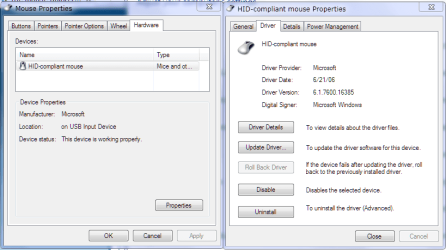
You can try uninstalling the mouse driver then reinstalling. This may not work since MS's mouse drive is older than dirt.
Mouse props.PNG
 

My Computer

Computer type
PC/Desktop
Computer Manufacturer/Model Number
Home Built Desktop By DataTech
OS
Windows 7 Ultimate X64 SP1
CPU
Intel i5-2550K, Differing ~4.4-4.8GHz No built in GPU
Motherboard
ASUS P8Z68-V PRO/GEN3
Memory
16GB G.Skill Sniper 1866MHz @ 2133MHz 2x8GB
Graphics Card(s)
ASUS GTX650TIB-DC2OC-2GD5, (650TI Boost)
Sound Card
Onboard Realtek 5-1
Monitor(s) Displays
Samsung P2570HD
Screen Resolution
1920x1080
Hard Drives
Samsung 840 Pro 256GB SSD for OS, 500GB Seagate Constellation (Enterprise drive) for Data
PSU
Corsair HX650W
Case
Inwin Dragon Rider
Cooling
Hyper 212 EVO w/two Noctua fans, push-pull, @1300 RPM
Keyboard
E-Z Eyes, bright yellow keys with large characters
Mouse
steelseries SENSEI Laser Pro Gaming
Internet Speed
48-51Mbs Mbs down, 11 Mbs up Xfinity Cable
Antivirus
Norton Internet Security 2013
Browser
IE 10, Opera, Pale Moon if needed
Other Info
4 case fans, LG BluRay-RE, ASUS DVD-RW, Mr. Fusion power supply, 1.21 gigawatts.

My Computer

Computer type
PC/Desktop
Computer Manufacturer/Model Number
Dell inspiron 1564
OS
MS Windows 8
CPU
Intel Core i5 @ 2.27GHz Arrandale 32nm Technology
Motherboard
Dell Inc. 0M9XW4 (U2E1)
Memory
8.0GB Dual-Channel DDR3 @ 532MHz (7-7-7-20)
Graphics Card(s)
ATI Mobility Radeon HD 4300 Series (Dell)
Sound Card
Realtek High Definition Audio
Monitor(s) Displays
Generic PnP Monitor on ATI Mobility Radeon HD 4330
Screen Resolution
1366x768 pixels
Hard Drives
1 tb TOSHIBA (SATA)
PSU
built-in
Case
Dell Laptop
Cooling
built-in
Keyboard
built-in
Mouse
Dell Touchpad/Microsoft Arc Mouse
Other Info
Snake Laptop Skin, Detachable Alfa USB wifi with custom 15dbi antenna (for better signal range)
It's definitely the software that came with the mouse....what brand is it?
 

My Computer

Computer Manufacturer/Model Number
Custom
OS
Windows 7 Ultimate RTM (Technet)
CPU
3.00 gigahertz Intel Core2 Duo E8400
Motherboard
ASUSTeK Computer INC. P5K/EPU Rev 1.xx
Memory
4GB
Graphics Card(s)
ATI Radeon X1950 Pro
Sound Card
Built in HD Audio
Monitor(s) Displays
22" Gateway LCD
Screen Resolution
1920 x 1200
Hard Drives
ST3160023A [Hard drive] (160.04 GB) -- drive 0, rev 8.01, ST3500630AS [Hard drive] (500.11 GB) -- drive 2, rev 3.AAK
ST3500630AS [Hard drive] (500.11 GB) -- drive 1, rev 3.AAK
Keyboard
Logitech G11
Mouse
Microsoft Wireless Laser Mouse 5000
Internet Speed
13.44 Mbps
have you visited a website that offers you to download a mouse cursor? could be one of those comet cursor? you may want to scan you computer for spyware and malware.

How to Remove the Comet Cursor Virus | eHow.com


Malwarebytes : Malwarebytes Anti-Malware PRO removes malware including viruses, spyware, worms and trojans, plus it protects your computer

hey rbeldua,
no i haven't downloaded any of that malware thingi...
there is still a problem. :(
thanks for the rply though :)
 

My Computer

OS
Windows 7 Ultimate x32
It's definitely the software that came with the mouse....what brand is it?

heyy MacGyvr,
no,i have changed several mouses,being acer,hp and i ball.
still the problem persists
thanks for the concern though :)
 

My Computer

OS
Windows 7 Ultimate x32
Gah...serious come on it cannot be that hard. It is from the software for the mouse whatever it may be that you installed. This is not a Windows thing, it doesn't do the above.
 

My Computer

Computer type
PC/Desktop
Computer Manufacturer/Model Number
Alienware Aurora ALX R4
OS
Windows 10 Pro (x64)
CPU
Intel Core i7-3930K (3.2GHz - 4.5GHz)
Motherboard
Alienware Aurora-R4 x79
Memory
4x Samsung 4GB PC3-12800 DDR3 (16GB 1600MHz)
Graphics Card(s)
Nvidia Geforce GTX 690
Sound Card
SteelSeries Siberia Elite
Monitor(s) Displays
Dell UltraSharp U3011
Screen Resolution
2560x1600
Hard Drives
Samsung 850 Pro 256 GB, Seagate 1TB Desktop Hybrid HDD, 2x Western Digital 4TB Green HDD
PSU
875W Some Dell PSU <.<
Case
Alienware Aurora ALX
Cooling
Custom Liquid Cooling (EK CPU & GPU blocks) dual EK 480RAD
Keyboard
Logitech G710+ Mechanical
Mouse
Logitech G700s
Internet Speed
Verizon Fios (50 mbps average)
Other Info
Server: Intel NUC D54250WYK: i5-4250U, 16GB, 256 GB mSATA, Windows Server 2012 R2
It's definitely the software that came with the mouse....what brand is it?

heyy MacGyvr,
no,i have changed several mouses,being acer,hp and i ball.
still the problem persists
thanks for the concern though :)

If the software from the original mouse is still installed, then it wouldn't make any difference which mouse you used.
 

My Computer

Computer type
PC/Desktop
Computer Manufacturer/Model Number
Systems by SmartEyeball
OS
8 Pro x64
CPU
i7 3770K 4.6GHz
Motherboard
ASUS P8Z77 WS
Memory
16GB G.Skill Trident X 2666mhz
Graphics Card(s)
x2 EVGA 780 Ti Superclocked SLI
Sound Card
SB X-FI Surround 5.1 PRO USB / ATH-AD900 Headphones
Monitor(s) Displays
x3 Dell U2410 / 58" Samsung
Screen Resolution
5760*1200/ 1920*1200
Hard Drives
2x Intel 520 240GB (RAID 0) * 2x WD Caviar Blacks 2TB (RAID 0) * 2TB WD Caviar Black * Sony Optirac DVD
PSU
Silverstone Strider Evolution 1200W
Case
Thermaltake Level 10 GT Snow Edition
Cooling
Noctua NH-D14
Keyboard
Topre Realforce // Ducky Shine MX Black // Filco Ninja TKL
Mouse
Thermaltake Theron (Highly Recommended) + Razer Imperator
Antivirus
MSE
Browser
IE, FF, WaterFox
Other Info
GT Extreme V2 Sim Racing Cockpit + 40" LCD and K/B Mouse stand ▼
Fanatec CSR Elite Wheel + Clubsport V1 Pedals + CSR shifter/7G-H ▼Saitek X52 Pro ▼ TrackIR 5 Pro
Buttkicker v2 Seat Rumbler with Dedicated 5.1 and Sub Woofer attached to frame ▼
=
Bloody Big Grin
It's definitely the software that came with the mouse....what brand is it?

heyy MacGyvr,
no,i have changed several mouses,being acer,hp and i ball.
still the problem persists
thanks for the concern though :)

If the software from the original mouse is still installed, then it wouldn't make any difference which mouse you used.

i removed the software for the mouse.
it still continues........
 

My Computer

OS
Windows 7 Ultimate x32
What is the brand/model of the mouse?
Go to Device Manager, Mice and Other Pointing Devices, HID-Compliant Mouse. Uninstall it with delete driver, reboot, use the generic Windows driver.
 

My Computer

Computer type
PC/Desktop
Computer Manufacturer/Model Number
Home Built Desktop By DataTech
OS
Windows 7 Ultimate X64 SP1
CPU
Intel i5-2550K, Differing ~4.4-4.8GHz No built in GPU
Motherboard
ASUS P8Z68-V PRO/GEN3
Memory
16GB G.Skill Sniper 1866MHz @ 2133MHz 2x8GB
Graphics Card(s)
ASUS GTX650TIB-DC2OC-2GD5, (650TI Boost)
Sound Card
Onboard Realtek 5-1
Monitor(s) Displays
Samsung P2570HD
Screen Resolution
1920x1080
Hard Drives
Samsung 840 Pro 256GB SSD for OS, 500GB Seagate Constellation (Enterprise drive) for Data
PSU
Corsair HX650W
Case
Inwin Dragon Rider
Cooling
Hyper 212 EVO w/two Noctua fans, push-pull, @1300 RPM
Keyboard
E-Z Eyes, bright yellow keys with large characters
Mouse
steelseries SENSEI Laser Pro Gaming
Internet Speed
48-51Mbs Mbs down, 11 Mbs up Xfinity Cable
Antivirus
Norton Internet Security 2013
Browser
IE 10, Opera, Pale Moon if needed
Other Info
4 case fans, LG BluRay-RE, ASUS DVD-RW, Mr. Fusion power supply, 1.21 gigawatts.
You still have something installed from a previous mouse....it isn't even a question. It's there.
 

My Computer

Computer Manufacturer/Model Number
Custom
OS
Windows 7 Ultimate RTM (Technet)
CPU
3.00 gigahertz Intel Core2 Duo E8400
Motherboard
ASUSTeK Computer INC. P5K/EPU Rev 1.xx
Memory
4GB
Graphics Card(s)
ATI Radeon X1950 Pro
Sound Card
Built in HD Audio
Monitor(s) Displays
22" Gateway LCD
Screen Resolution
1920 x 1200
Hard Drives
ST3160023A [Hard drive] (160.04 GB) -- drive 0, rev 8.01, ST3500630AS [Hard drive] (500.11 GB) -- drive 2, rev 3.AAK
ST3500630AS [Hard drive] (500.11 GB) -- drive 1, rev 3.AAK
Keyboard
Logitech G11
Mouse
Microsoft Wireless Laser Mouse 5000
Internet Speed
13.44 Mbps
I have 1 question and a couple suggestions.

-The strange scroll cursor, does it show up anywhere on your list of pointers?

1. Even I'll be banging my head if this works, but try clicking "Use Defaut" (Control Panel>Mouse>Pointers) & "Apply."
-Also, what happens when you try to change to a different scheme?

2. I second a malware/virsus/etc scan. Just because you didn't knowingly do anything dangerous, doesn't mean there isn't a virus or something around somewhere.
 

My Computer

Computer type
PC/Desktop
OS
Windows 7 Pro x64 SP1
CPU
AMD Phenom II x6 1090T Black Edition 3.2GHz
Motherboard
ASUS M4A88TD-V EVO/USB3
Memory
Patriot G ‘Sector 5’ Edition 8GB (2 x 4GB) 1600MHz
Sound Card
(onboard) Realtek® ALC 892 8-Channel High Definition Audio
Monitor(s) Displays
ViewSonic VX2253 22"
Screen Resolution
1920x1080
Hard Drives
Transcend SSD720 2.5" SATAIII 64GB SSD; Western Digital Caviar Green WD20EARS 2TB 64MB 3.5" HDD
LG WH10LS30 10X Blu-ray Burner with LightScribe
PSU
CORSAIR TX Series 950W ATX12V 80 Plus Bronze
Case
Cooler Master HAF X NVidia Edition; 5 Green LED Fans!
Cooling
CORSAIR A70 120mm Dual-Fan
Keyboard
Verbatim 97472 Mini Wireless Slim
Mouse
bundled Verbatim 97472 Wireless
Antivirus
Avast
Browser
Chrome
Other Info
Ultraportable/Desktop Replacement Laptop:
circa Oct 2006,
Dell XPS M1210,
Windows 7 Professional 32-bit,
Intel Core 2 Duo T7200 2.0GHz,
3.25 (4) GB of RAM,
NVidia GeForce Go 7400,
500GB Seagate Momentus 7200RPM HDD
DanshuP what have you tried so far?:confused:
 

My Computer

Computer type
PC/Desktop
Computer Manufacturer/Model Number
Home Built Desktop By DataTech
OS
Windows 7 Ultimate X64 SP1
CPU
Intel i5-2550K, Differing ~4.4-4.8GHz No built in GPU
Motherboard
ASUS P8Z68-V PRO/GEN3
Memory
16GB G.Skill Sniper 1866MHz @ 2133MHz 2x8GB
Graphics Card(s)
ASUS GTX650TIB-DC2OC-2GD5, (650TI Boost)
Sound Card
Onboard Realtek 5-1
Monitor(s) Displays
Samsung P2570HD
Screen Resolution
1920x1080
Hard Drives
Samsung 840 Pro 256GB SSD for OS, 500GB Seagate Constellation (Enterprise drive) for Data
PSU
Corsair HX650W
Case
Inwin Dragon Rider
Cooling
Hyper 212 EVO w/two Noctua fans, push-pull, @1300 RPM
Keyboard
E-Z Eyes, bright yellow keys with large characters
Mouse
steelseries SENSEI Laser Pro Gaming
Internet Speed
48-51Mbs Mbs down, 11 Mbs up Xfinity Cable
Antivirus
Norton Internet Security 2013
Browser
IE 10, Opera, Pale Moon if needed
Other Info
4 case fans, LG BluRay-RE, ASUS DVD-RW, Mr. Fusion power supply, 1.21 gigawatts.
Back
Top