Solved the partition with windows 7 is full. how to enlarge

arthos

New member
Local time
12:28 PM
Messages
8
i have vista and windows 7 on my computer but i did,nt make partition J big enough for windows 7.
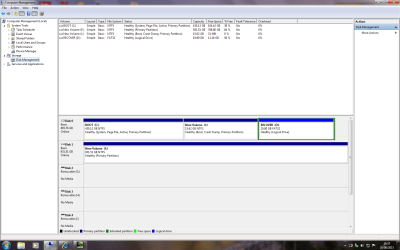
vista is on drive C.(162gb free)
i presume partition D is recovery for vista ?(11.1gb of 19.9 free )
new volume f just hold a fewfilms.(786gb free)
J is now full.?(.5GB of 15.6 free)(just deleted some photos)
can you advise what to do to make partition J bigger ?
regards
arthos
 

Attachments
  • drives.png
    drives.png
    58.1 KB · Views: 21

My Computer My Computer

At a glance

32 bit vista and 7
Computer type
PC/Desktop
Computer Manufacturer/Model Number
medion
OS
32 bit vista and 7
You've got plenty room on Disk1 so why don't you reinstall win7 on that disk.
Repartition it, and make ie. 100gB primary partition for system and programs, then make two logical partitions, one for data and the other for backup. Just a thought...
 

My Computer My Computer

At a glance

Windows 7 Ultimate x64 SP1Intel Core i5-3570K @ 4GHzCorsair Vengeance DDR3 8 GB Dual ChannelAsus Radeon RX 570 Strix OC 4GB
Computer type
PC/Desktop
Computer Manufacturer/Model Number
built by myself
OS
Windows 7 Ultimate x64 SP1
CPU
Intel Core i5-3570K @ 4GHz
Motherboard
Asus P8Z77-V Deluxe
Memory
Corsair Vengeance DDR3 8 GB Dual Channel
Graphics Card(s)
Asus Radeon RX 570 Strix OC 4GB
Monitor(s) Displays
LG 24BK550Y-B IPS
Screen Resolution
1920x1080
Hard Drives
SSD SAMSUNG 860 EVO SATA III 2.5'' 500GB
SSD CRUCIAL MX500 SATA III 2.5'' 250GB
Seagate ST1000DM003 SATA III
TOSHIBA HDWD110 SATA III
PSU
Corsair HX750i
Case
Corsair Carbide 400R
Cooling
CPU Cooler Master Hyper 412 Slim
Keyboard
Logitech K200
Mouse
Logitech G400
Antivirus
Norton Security
Browser
Firefox
I've got two tutorials for you: Shrink partition (the bigger one) when running Windows 7 and extend partition (the smaller one) when running Vista.

Enlarge the windows 7 partition to at least 30 GB.

The above makes sense too. If you want to move the current windows 7 to the other disk, move the movies out of it, and then follow this tutorial to move windows 7 on it.
 

My Computer My Computer

At a glance

Win 7 Pro 64-bit 7601AMD Phenom 9650 QuadCore, revision DR-B35 GB yes I run 2x 2GB and 1x 1GB, different b...NVIDIA GeForce 9800 GT 512 Mb, unknown manufa...
Computer type
PC/Desktop
Computer Manufacturer/Model Number
custom built
OS
Win 7 Pro 64-bit 7601
CPU
AMD Phenom 9650 QuadCore, revision DR-B3
Motherboard
ASUS M4A78
Memory
5 GB yes I run 2x 2GB and 1x 1GB, different brand, spank me.
Graphics Card(s)
NVIDIA GeForce 9800 GT 512 Mb, unknown manufacturer.
Sound Card
Crappy Realtek Integrated Audio
Monitor(s) Displays
Fujitsu Siemens P19-3P
Screen Resolution
1280 x 1024 x 32 bits @ 60 Hz Oh yeah, 4:3 rocks!
Hard Drives
(1) MAXTOR S TM3320613AS SATA Disk Device (2) STM35004 18AS SATA Disk Device (3) TOSHIBA USB 2.5"-HDD
PSU
whatever, around 450w
Case
Scavenged from old company PC, 10+ years old
Cooling
CPU fan, GPU fan, case fan, nothing fancy
Keyboard
Microsoft, PS/2, white.
Mouse
Optical, logitec.
Internet Speed
effective max speeds: 70-ish kB/s down 30-ish kB/s up
Antivirus
Avira, free edition.
Browser
Firefox with FXChrome to make it look like Google Chrome :P
Other Info
Was discarded by previous owner due to "horrible performance".
Was running Win Xp from a IDE drive. Yeah. Was a pain.
SATA II drive and Win7 and it zips away! Yay!
It appears you installed Win7 on the tiny J drive from C. We know J is the one booted by the presence of the Boot flag. Normally Win7 will always be on C when it is correctly installed from boot and not from another OS.

You must have run the WIn7 installer from C and installed another copy to J. Do you have a Dual Boot menu when you start your PC?

You need to start over and reinstall Win7, this time correctly booting the installer, choose Custom Install, then at Steps 7 and 8 in Clean Install Windows 7 delete all partitions, create and format a new one or just highlight the Unallocated space you've created to click Next for installer to do it for you.

In addition read over these steps to get and keep a perfect Clean Reinstall - Factory OEM Windows 7 which will help you remember everything to prepare, do the install correctly this time, then set it up with the tools and methods that work best.

If you don't mind Win7 being on J then you can download and burn to CD with Windows Image Burner free Partition Wizard, boot CD to follow these video steps How to extend partition easily with Partition Wizard on your J partition choosing the free space in C. However it is very irregular and not recommended to have your System Boot files on a data partition.
 
hi no offence to anyone else but i tried BOBAFETT first cos it looked the easiest :)
BOB i shrunk boot C down to 392 gb and got 37 gb unallocated.but part J can only shrink not expand ?
so i formatted the new I part to ntfs. but still in part J the expand function is greyed out in vista and windows 7.
so how to expand windows 7 in partition J ?
regards
arthos
 

My Computer My Computer

At a glance

32 bit vista and 7
Computer type
PC/Desktop
Computer Manufacturer/Model Number
medion
OS
32 bit vista and 7
Meh, it's still detecting it as system partition. Easiest way is doing it with another program.

Download and install this, (on Windows 7 is better but should work on Vista too) then make sure there is unallocated space on the disk (delete the new partition you made in the unallocated space), and expand the j partition. (select the partition and on the panel on the left you see all things you can do with it)

When you selected all operations you want to do, click on the Apply button in the upper left corner.
This will begin the re-partitioning operation. What you did before is not done until you click on Apply.
If you screwed up you can remove operations by clicking on the Undo button, with Discard all the operations are removed from the list.

It will popup a small window and say that it needs to reboot. Click Ok when you are ready to do so. Then it will reboot and do its thing (might take a while). Then will reboot again and you will have your normal boot screen again.
Should now have a bigger windows 7 partition.
 

My Computer My Computer

At a glance

Win 7 Pro 64-bit 7601AMD Phenom 9650 QuadCore, revision DR-B35 GB yes I run 2x 2GB and 1x 1GB, different b...NVIDIA GeForce 9800 GT 512 Mb, unknown manufa...
Computer type
PC/Desktop
Computer Manufacturer/Model Number
custom built
OS
Win 7 Pro 64-bit 7601
CPU
AMD Phenom 9650 QuadCore, revision DR-B3
Motherboard
ASUS M4A78
Memory
5 GB yes I run 2x 2GB and 1x 1GB, different brand, spank me.
Graphics Card(s)
NVIDIA GeForce 9800 GT 512 Mb, unknown manufacturer.
Sound Card
Crappy Realtek Integrated Audio
Monitor(s) Displays
Fujitsu Siemens P19-3P
Screen Resolution
1280 x 1024 x 32 bits @ 60 Hz Oh yeah, 4:3 rocks!
Hard Drives
(1) MAXTOR S TM3320613AS SATA Disk Device (2) STM35004 18AS SATA Disk Device (3) TOSHIBA USB 2.5"-HDD
PSU
whatever, around 450w
Case
Scavenged from old company PC, 10+ years old
Cooling
CPU fan, GPU fan, case fan, nothing fancy
Keyboard
Microsoft, PS/2, white.
Mouse
Optical, logitec.
Internet Speed
effective max speeds: 70-ish kB/s down 30-ish kB/s up
Antivirus
Avira, free edition.
Browser
Firefox with FXChrome to make it look like Google Chrome :P
Other Info
Was discarded by previous owner due to "horrible performance".
Was running Win Xp from a IDE drive. Yeah. Was a pain.
SATA II drive and Win7 and it zips away! Yay!
You've got plenty room on Disk1 so why don't you reinstall win7 on that disk.
Repartition it, and make ie. 100gB primary partition for system and programs, then make two logical partitions, one for data and the other for backup. Just a thought...

This is exactly what I was going to suggest, no sense even messin with the J partition, it should be deleted and joined to C.
 

My Computer My Computer

At a glance

Windows 10 Pro x64Intel Core i7 6700KGSkill TridentZ RGB 16GB 3600 16-16-16-36EVGA GTX 980 Ti SC x2
Computer type
PC/Desktop
Computer Manufacturer/Model Number
Skylake Special #666
OS
Windows 10 Pro x64
CPU
Intel Core i7 6700K
Motherboard
Asus Sabertooth Z170 Mark 1
Memory
GSkill TridentZ RGB 16GB 3600 16-16-16-36
Graphics Card(s)
EVGA GTX 980 Ti SC x2
Sound Card
Realtek High Definition
Monitor(s) Displays
AOC G2460PG
Screen Resolution
1920 x 1080 144Hz
Hard Drives
Samsung 860 Pro 256GB, Seagate Barracuda 4TB x2
PSU
EVGA 1000 P2, EVGA White Custom Braided Cables
Case
Corsair Vengeance C70 Gunmetal Black
Cooling
Corsair H100i v2, Corsair ML120 x2, Thermal Grizzly Kryonaut
Keyboard
Logitech G910 Orion Spectrum
Mouse
Logitech G700s
Internet Speed
Verizon Fios Quantum Gateway 75/75
Antivirus
Windows Defender, Malwarebytes Free 3.8.3
Browser
Chrome
Other Info
Corsair SP120 x4, LG Blu-ray Drive, Durabrand HT-395 100 Watt Dolby Digital Amp, Corsair H2100 Wireless 7.1 Headset
expanding partition of windows 7

since last reply i have moved files off volume k which is now empty.
so as i see it i have 37gb on disk 0 which i cant expand J (windows 7 OS ) into.?
or can i move windows 7 to disk1 volume K ?
note vista was origonal OS, then medion later gave me windows 7 .so now have dual boot system.
i mainly use vista ,but when i went to update windows 7,there was not enough room.
hense the need to make J partition bigger.
 

My Computer My Computer

At a glance

32 bit vista and 7
Computer type
PC/Desktop
Computer Manufacturer/Model Number
medion
OS
32 bit vista and 7
partition

sorry its getting very confusing .
if i delete J i will have no windows 7, i only have recovery disk for windows 7
 

My Computer My Computer

At a glance

32 bit vista and 7
Computer type
PC/Desktop
Computer Manufacturer/Model Number
medion
OS
32 bit vista and 7
{delete the new partition you made in the unallocated space), and expand the j partition:}

in disk management

i have deleted the 37gb partition and it shows up as UNALLOCATED

but J volume still has the expand volume greyed out i cant expand
 

My Computer My Computer

At a glance

32 bit vista and 7
Computer type
PC/Desktop
Computer Manufacturer/Model Number
medion
OS
32 bit vista and 7
Windows Disk Management can't extend the partition to the free space on the left side of the partition.
You need to use the Partition Wizard tool Greg gave in Post #4 to extend your current "J" partiton:
If you don't mind Windows 7 being on J then you can download and burn to CD with Windows Image Burner free Partition Wizard, boot CD to follow these video steps How to extend partition easily with Partition Wizard on your J partition choosing the free space in C. However it is very irregular and not recommended to have your System Boot files on a data partition.
You should re-read Post#4...

Whatever you do, you should make sure you have backups of everything, including System Backup Images ... just in case something goes wrong...
 

My Computer My Computer

At a glance

Multi-Boot W7_Pro_x64 W8.1_Pro_x64 W10_Pro_x6...AMD Athlon II x4 6206GB GSkill DDR2 800AMD 4670 GPU + AMD 4200 IGP
Computer type
PC/Desktop
Computer Manufacturer/Model Number
home built
OS
Multi-Boot W7_Pro_x64 W8.1_Pro_x64 W10_Pro_x64 +Linux_VMs +Chromium_VM
CPU
AMD Athlon II x4 620
Motherboard
Gigabyte GA-MA785G-UD3H
Memory
6GB GSkill DDR2 800
Graphics Card(s)
AMD 4670 GPU + AMD 4200 IGP
Sound Card
on board Realtek ALC889A
Monitor(s) Displays
RCA 40" LCD TV, Insignia 32" LCD TV, HP 15" LCD monitor
Screen Resolution
1680 x 1050
Hard Drives
OCZ Vertex 3 120GB,
Samsung F3 1TB (3),
Several others - WD, Seagate, Hitachi, ...
PSU
Corsair 500 W
Case
Rosewill mid tower
Cooling
CM 90mm rifle
Keyboard
Gyration wireless, Logitech wireless, Dell USB wired
Mouse
Gyration wireless, Logitech wireless, V7 USB wired
Internet Speed
Spectrum - 100Mbps D / 10Mbps U
Antivirus
Avast, MBAM3, EMET, WinPatrol
Browser
Pale Moon, Firefox, IE
Other Info
2 multi-boot PC's
Mainly HTPC/Office/Gen purpose (no gaming).
Trendnet USB KVM.
LG DVD burner/Blue Ray Player.
Tray system for removable SATA backup drives.

Not currently OCd, under-volted.
I use Hybrid sleep, rarely re-boot or shutdown.

Hauppauge HD-PVR, Avermedia PCIe TV Tuner, Hauppauge PCI TV Tuner.
I also highly recommend making and using the Partition Wizard Boot CD to do your partitioning, it works perfectly every time.
 

My Computer My Computer

At a glance

Windows 10 Pro x64Intel Core i7 6700KGSkill TridentZ RGB 16GB 3600 16-16-16-36EVGA GTX 980 Ti SC x2
Computer type
PC/Desktop
Computer Manufacturer/Model Number
Skylake Special #666
OS
Windows 10 Pro x64
CPU
Intel Core i7 6700K
Motherboard
Asus Sabertooth Z170 Mark 1
Memory
GSkill TridentZ RGB 16GB 3600 16-16-16-36
Graphics Card(s)
EVGA GTX 980 Ti SC x2
Sound Card
Realtek High Definition
Monitor(s) Displays
AOC G2460PG
Screen Resolution
1920 x 1080 144Hz
Hard Drives
Samsung 860 Pro 256GB, Seagate Barracuda 4TB x2
PSU
EVGA 1000 P2, EVGA White Custom Braided Cables
Case
Corsair Vengeance C70 Gunmetal Black
Cooling
Corsair H100i v2, Corsair ML120 x2, Thermal Grizzly Kryonaut
Keyboard
Logitech G910 Orion Spectrum
Mouse
Logitech G700s
Internet Speed
Verizon Fios Quantum Gateway 75/75
Antivirus
Windows Defender, Malwarebytes Free 3.8.3
Browser
Chrome
Other Info
Corsair SP120 x4, LG Blu-ray Drive, Durabrand HT-395 100 Watt Dolby Digital Amp, Corsair H2100 Wireless 7.1 Headset
partition windows 7 problem

thanks to everyone who helped me :)
i knew nothing 24 hrs ago ,but you got me thro it .
regards
arthos
 

My Computer My Computer

At a glance

32 bit vista and 7
Computer type
PC/Desktop
Computer Manufacturer/Model Number
medion
OS
32 bit vista and 7
Spend some money and get a good Disk Manager Program. Then you can do whatever you want with your existing partitions, make system images etc. I use Paragon Hard Disk Manager 2012. It does everything you could possibly want.
 

My Computer My Computer

At a glance

Windows 7 64 BitAMD FX 8350 8 CoreCorsair Vengeance Pro 16GB 2x8GB DDR3 2400MHzEVGA GeForce GTX 970 4GB
Computer type
PC/Desktop
Computer Manufacturer/Model Number
Custom Build Feb 2015
OS
Windows 7 64 Bit
CPU
AMD FX 8350 8 Core
Motherboard
Asus M5A97 R2.0
Memory
Corsair Vengeance Pro 16GB 2x8GB DDR3 2400MHz
Graphics Card(s)
EVGA GeForce GTX 970 4GB
Monitor(s) Displays
BenQ RL2455HM 24' 1920x1080 1ms
Screen Resolution
1280 x 1024
Hard Drives
Samsung SSD 250 GB
Secondary: WD HDD 600GB
PSU
Corsair 750
Case
NZXT Phantom 410 Mid Tower USB 3.0 Gaming Case
Cooling
Corsair Hydro H60 Liquid CPU Cooler
Internet Speed
100mbps
Browser
IE, GC and FF
Please post back another Disk Mgmt screenshot so we can see where you are.

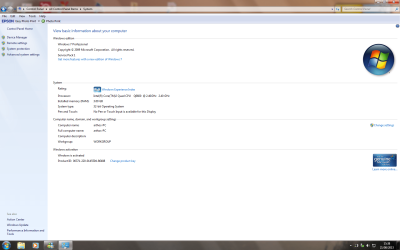
I don't think you understand that you may have two Win7 installs on your PC.

You have C which is normally where Win7 is installed.

Then you have J which was a booted OS as we know from the screenshot showing it is "Boot" partition meaning it was the one which was booted.

This is not at all right and could be troublesome. I gave you the way to solve it and you ignored it.

Do you understand that Win7 is normally booted on the C partition, but in your last screenshot you have J booted, meaning that Win7 must have been installed from C partition to J?

I asked you if you have a Dual Boot menu for two Win7's when you start up? Yes or No?

If not then do you want to keep WIn7 on J. If so be aware that it is being booted by C. You can extend J into C and take up the unusued space there by using the tool shown in this link's video: How to extend partition easily with Partition Wizard - video help.
 
windows 7 expansion

hi gregrocker,
i,ll try to explain but i,m not as comp. lit. as you guys.
when i bought this medion computer from aldi 2 years ago ?? it was vista with windows 7 included to be activated later,if i phoned up for a password i think?
Any way it was vista drive C.
A month later i phoned up and some how got to add windows 7.
When i went to install it ,it gave me the choice of changing completely to W7,or make a partition for W7 and dual boot.
I made partition J and it installed W7.
So now i have vista on C and Windows 7 on J. I was happy with vista so never used W7 till i looked yesterday and tried to update,and found no room on J.
K is now empty,i put my films on drive C (vista)
Hope this is all ok ???
regards
arthos
 

Attachments

  • disc management.png
    disc management.png
    56.6 KB · Views: 3
  • system.png
    system.png
    88.7 KB · Views: 0

My Computer My Computer

At a glance

32 bit vista and 7
Computer type
PC/Desktop
Computer Manufacturer/Model Number
medion
OS
32 bit vista and 7
Which OS would you like to keep? You are not entitled to use Vista any longer if you used a Vista-to-Win7 Upgrade Kit to clean install Win7.

Do you still have the packaging for the Upgrade Kit with the Product Key, which MS required your PC maker to provide you? If not audit it now using Belarc Advisor so you have the $100+ value key backed up now as it should have been when you installed it.

Once you decide which OS you want to keep we will help you remove the other one safely as we have done many times before here.

If you have less than a perfect Win7 install, you can also consider doing a perfect Clean Reinstall - Factory OEM Windows 7 with our help since you're here now where we specialize in this. Look over the steps to see the tools and methods which work best to decide and then let us know.
 
The issue is not if you can Dual Boot Win7, which you can even though you did it entirely the wrong way by not booting the installer and have stuck yourself with Win7 which when booted is on another letter besides C. Most users don't want that.

The issue is you used a Win7 Upgrade kit to replace Vista, so as with any Upgrade it requires you give up the OS which qualifies you for using the Upgrade for the time you are using the Upgraded version. However this is on the honor system so you have not been notified of this during activation or later.

What I would do when you're ready is to follow these same steps to get a perfect Clean Reinstall - Factory OEM Windows 7 . During the actual steps while following these illustrated steps to Clean Install Windows 7 use the Drive Options in Steps 7 and 8 to delete all partitions, create and format new one(s) as you wish, or just click Next and the installer will do it it for you and begin install.

Meanwhile to add more space to Win7, you can extend partition easily with Partition Wizard - video help. If you want to gradually shrink down the Vista partition this way and then delete it we can help you move the boot files to Win7 so it can boot itself. But I would do the reinstall so you have Win7 on C as is preferred.
 
Back
Top