Solved The specified module could not be found msls31.dll When press Sart

For the missing .dll, you're running 32 bit Windows 7, right? Browse to folder C:\Windows\winsxs

Scroll down to find the folder names that begin x86_microsoft-windows-msls31. There will most likely be more than one. Open the folder with the most recent date/time stamp. Copy the msls31.dll file from there to C:\Windows\System32
 

My Computer My Computer

At a glance

Desk 1: Win 7 Pro x32; Desk 2: Windows 10 x64
Computer type
PC/Desktop
Computer Manufacturer/Model Number
Dell Optiplex 360 and Optiplex 755
OS
Desk 1: Win 7 Pro x32; Desk 2: Windows 10 x64
Hard Drives
500GB Crucial SSD in both Desktops
Other Info
Buffalo 6TB NAS, Raid 1
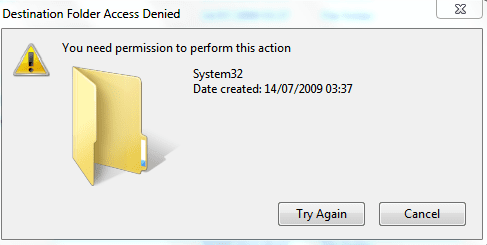
This message pops up when I try to copy and replace the file.
 

Attachments

  • capture 1.PNG
    capture 1.PNG
    9.6 KB · Views: 15

My Computer My Computer

At a glance

Windows 7 Home Premium 64 bit
Computer type
Laptop
Computer Manufacturer/Model Number
HP G56 Intel Pentium
OS
Windows 7 Home Premium 64 bit
Browser
Chrome
Are you sure you're logged in as a user with Admin privileges?

Just to clarify, when you say you're "replacing" the file - the file doesn't currently exist, yes? Or are you trying to overwrite a copy already there?
 

My Computer My Computer

At a glance

Desk 1: Win 7 Pro x32; Desk 2: Windows 10 x64
Computer type
PC/Desktop
Computer Manufacturer/Model Number
Dell Optiplex 360 and Optiplex 755
OS
Desk 1: Win 7 Pro x32; Desk 2: Windows 10 x64
Hard Drives
500GB Crucial SSD in both Desktops
Other Info
Buffalo 6TB NAS, Raid 1
I have Admin privileges and the file does exist. I was trying to replace it.
 

My Computer My Computer

At a glance

Windows 7 Home Premium 64 bit
Computer type
Laptop
Computer Manufacturer/Model Number
HP G56 Intel Pentium
OS
Windows 7 Home Premium 64 bit
Browser
Chrome
I'm sorry. I saw the title of your post and quickly skimmed the thread but didn't get all the detail and history.

As I now see, Carwiz already noted, you have several corrupt files. Windows repository copies won't help in your case.

A repair shop would probably back up your files and then do a clean install. You can try a repair install first. See http://www.sevenforums.com/tutorials/3413-repair-install.html. It includes instructions to download the disc

There are also tools to allow you to recover your Windows activation key.. if you wanted to try a re-install yourself or you might be more comfortable letting a repair shop do it for you. Is up to you. We can provide more info and a guide should you want to do the re-install yourself
 

My Computer My Computer

At a glance

Desk 1: Win 7 Pro x32; Desk 2: Windows 10 x64
Computer type
PC/Desktop
Computer Manufacturer/Model Number
Dell Optiplex 360 and Optiplex 755
OS
Desk 1: Win 7 Pro x32; Desk 2: Windows 10 x64
Hard Drives
500GB Crucial SSD in both Desktops
Other Info
Buffalo 6TB NAS, Raid 1
I've replaced 3 files that someone sent me via email. the files are, msls31.dll, WSDMon.dll and audiodg.

I don't have the msls31.dll error any more when I click on Start, but my sound is still not working. Everything seems to be on, but there is still no audio.

The only error I get is when I click on "Test" "Failed to play test tone" in the Advanced tab in Speakers property or if I try to start a video game, this message pops up "Grand Theft Auto SA cannot find Audio card installed.
 

My Computer My Computer

At a glance

Windows 7 Home Premium 64 bit
Computer type
Laptop
Computer Manufacturer/Model Number
HP G56 Intel Pentium
OS
Windows 7 Home Premium 64 bit
Browser
Chrome
Glad to hear you got past the corrupt files. Here's a few more things we can do at this point

Try re-running the Fixit carwiz provided in post #13. If that doesn't help List any Problem devices
  • Make sure devices are connected and powered on
  • Click Start->Run, enter: msinfo32. Click the + sign next to Components to expand it
  • Click Problem Devices. Anything appear?
  • If yes, click on it, Ctrl-A to select all, Ctrl-C to copy it, Ctrl-V to paste into next post
  • On the other hand, if no devices are listed, tell me so
Generate and attach a DirectX report
  • Click Start->Run, enter dxdiag and click OK
    ===> If you’re running 32 bit Windows, dxdiag will launch on its own
    ===> If you’re running 64 bit Windows, you’ll see 64-bit DxDiag. Click it to launch the 64-bit version of dxdiag
  • Notice progress in lower left window corner
  • When done, click Save Information button and save as a text file to your Desktop
  • Then upload the file to your next post
 

My Computer My Computer

At a glance

Desk 1: Win 7 Pro x32; Desk 2: Windows 10 x64
Computer type
PC/Desktop
Computer Manufacturer/Model Number
Dell Optiplex 360 and Optiplex 755
OS
Desk 1: Win 7 Pro x32; Desk 2: Windows 10 x64
Hard Drives
500GB Crucial SSD in both Desktops
Other Info
Buffalo 6TB NAS, Raid 1
I'm using a HP Compaq 6730s Laptop

The "Automatically diagnose and fix Windows audio playback problems" did not detect any problems.

No devices are listed in Problem Devices.

I'm getting this popup when opening DirectX Diagnostic Tool, "problem getting extra sound info"
 

Attachments

Last edited:

My Computer My Computer

At a glance

Windows 7 Home Premium 64 bit
Computer type
Laptop
Computer Manufacturer/Model Number
HP G56 Intel Pentium
OS
Windows 7 Home Premium 64 bit
Browser
Chrome
I'm getting this popup when opening DirectX Diagnostic Tool, "problem getting extra sound info"
Hmmm... I've never seen that error message before, but let's keep plodding along. What i DO see

You have the generic Windows audio driver installed. Look at your Sound device in Device Manager. It's currently called "High Definition Audio device". Install the audio driver on the HP support site HERE

Does it install OK? Reboot and test your sound again. if still a problem give me a new DxDiag report. does the error message still occur?
 

My Computer My Computer

At a glance

Desk 1: Win 7 Pro x32; Desk 2: Windows 10 x64
Computer type
PC/Desktop
Computer Manufacturer/Model Number
Dell Optiplex 360 and Optiplex 755
OS
Desk 1: Win 7 Pro x32; Desk 2: Windows 10 x64
Hard Drives
500GB Crucial SSD in both Desktops
Other Info
Buffalo 6TB NAS, Raid 1
It says "SoundMax integrated digital HD sound".

I've just updated the driver after I've Unistalled it and restarted my laptop. Windows automatically installed audio software.

Still no luck..

EDIT: Wait, let me try your link.
 

Attachments

My Computer My Computer

At a glance

Windows 7 Home Premium 64 bit
Computer type
Laptop
Computer Manufacturer/Model Number
HP G56 Intel Pentium
OS
Windows 7 Home Premium 64 bit
Browser
Chrome
Still no luck with the sound and I'm still getting that "Error: Problem getting extra sound info" message.

By the way, There was one file that was also corrupt in the sfc scannow that I have not fixed, because someone told me that it's not important and that he didn't have the replacement file in his Windows 7 computer.

This is the file:
"Cannot repair member file [l:46{23}]"Windows Logon Sound.wav" of Microsoft-Windows-Shell-Sounds"

Doesn't sound important, but you never know.
 

Attachments

Last edited:

My Computer My Computer

At a glance

Windows 7 Home Premium 64 bit
Computer type
Laptop
Computer Manufacturer/Model Number
HP G56 Intel Pentium
OS
Windows 7 Home Premium 64 bit
Browser
Chrome
Welcome to Seven Forums Izzywizzy. You can find the key from your registry, assuming it is legit. Install and run Belarc Advisor, then scroll down to the Software Licenses section where your key should be listed. You can then follow the instructions to do the Repair Install.

Belarc Advisor

A Guy
 

My Computer My Computer

At a glance

Windows 10 Home x64INTEL Core i5-750 Quad-Core 3.37GHzHyperX Fury Black Series 8GB (2 x 4GB) 1866MhzEVGA GeForce GTX 750 Superclocked 1GB 128-Bit...
Computer type
PC/Desktop
OS
Windows 10 Home x64
CPU
INTEL Core i5-750 Quad-Core 3.37GHz
Motherboard
ASUS P7P55D
Memory
HyperX Fury Black Series 8GB (2 x 4GB) 1866Mhz
Graphics Card(s)
EVGA GeForce GTX 750 Superclocked 1GB 128-Bit GDDR5
Monitor(s) Displays
LG 32MA68HY 32" IPS
Screen Resolution
1920 x 1080
Hard Drives
Samsung 840 Evo 120GB, SEAGATE 500GB Barracuda® 7200.12, SATA 3 Gb/s, 7200 RPM, 16MB cache
PSU
ANTEC TruePower New TP-550, 80 PLUS, 550W
Case
ANTEC Three Hundred Illusion
Cooling
COOLER MASTER Hyper 212 Plus, 4 x 120mm 1 x 140mm Noctua's
Internet Speed
85 + Mbps
Antivirus
Avast
Browser
Vivaldi
Thank you, A Guy.

I've bought this laptop online a few years ago and the Windows might not be legit.

One other thing, I've found out that my BIOS is locked with a password.

Do I need to access the BIOS to do a Repair Install?
 

My Computer My Computer

At a glance

Windows 7 Home Premium 64 bit
Computer type
Laptop
Computer Manufacturer/Model Number
HP G56 Intel Pentium
OS
Windows 7 Home Premium 64 bit
Browser
Chrome
I suspect you have more problems than have been fixed so far -
Please follow the Windows Update Posting Instructions and post the requested data
If the file is too large (8MB compressed), remove the older CBSPersist cab files until the final file is below the limit - you can always post them separately after zipping them. (the forum doesn't allow the upload of bare CAB files, for a number of reasons)
 

My Computer My Computer

At a glance

Win 7 x64 Home Premium (and x86 VirtualBox VM...i3 370M/i7 6500U8GB - finally :)/8GBit's an i3, dude!/dual Intel&nVidia
Computer type
Laptop
Computer Manufacturer/Model Number
Asus K52F or Lenovo B51-80
OS
Win 7 x64 Home Premium (and x86 VirtualBox VM)/Win10
CPU
i3 370M/i7 6500U
Motherboard
Asus/Lenovo
Memory
8GB - finally :)/8GB
Graphics Card(s)
it's an i3, dude!/dual Intel&nVidia
Sound Card
onboard
Monitor(s) Displays
15.6" built-in
Screen Resolution
1366x768/1920x1080
Hard Drives
750GB Seagate internal
Sundry external drives attached to other computers on the local network
1TB SSD on the Lenovo
PSU
n/a
Internet Speed
as much as I can get - usually on a dongle/phone, so <1MB/s
Antivirus
MSE/Defender
Browser
IE11/12/Edge/Chrome/FF(if I must)
Hello, NoelDP.

Could you please make it easier for me to understand?

Edit: Do you mean, post a SFC Scan log on here?

I'm downloading "System Update Readiness Tool for Windows" at the moment.
"x86-based (32-bit) versions of Windows 7 SP1 and Windows 7"
 

My Computer My Computer

At a glance

Windows 7 Home Premium 64 bit
Computer type
Laptop
Computer Manufacturer/Model Number
HP G56 Intel Pentium
OS
Windows 7 Home Premium 64 bit
Browser
Chrome
Yes, I need the full CBS.log file and CheckSUR.log file at least - and preferably at least the latest CBSPersist CAB file.
 

My Computer My Computer

At a glance

Win 7 x64 Home Premium (and x86 VirtualBox VM...i3 370M/i7 6500U8GB - finally :)/8GBit's an i3, dude!/dual Intel&nVidia
Computer type
Laptop
Computer Manufacturer/Model Number
Asus K52F or Lenovo B51-80
OS
Win 7 x64 Home Premium (and x86 VirtualBox VM)/Win10
CPU
i3 370M/i7 6500U
Motherboard
Asus/Lenovo
Memory
8GB - finally :)/8GB
Graphics Card(s)
it's an i3, dude!/dual Intel&nVidia
Sound Card
onboard
Monitor(s) Displays
15.6" built-in
Screen Resolution
1366x768/1920x1080
Hard Drives
750GB Seagate internal
Sundry external drives attached to other computers on the local network
1TB SSD on the Lenovo
PSU
n/a
Internet Speed
as much as I can get - usually on a dongle/phone, so <1MB/s
Antivirus
MSE/Defender
Browser
IE11/12/Edge/Chrome/FF(if I must)
Ok, I know how to get the CBS.log file, but I don't know where to find the CheckSUR.log file and CBSPersist CAB file

Shall I do a SFC scan again?

And what do you mean by "remove the older CBSPersist cab files until the final file is below the limit"?

I have no errors when updating Windows.
 
Last edited:

My Computer My Computer

At a glance

Windows 7 Home Premium 64 bit
Computer type
Laptop
Computer Manufacturer/Model Number
HP G56 Intel Pentium
OS
Windows 7 Home Premium 64 bit
Browser
Chrome
Did you read the tutorial I linked to - it tells you exactly how to post the needed data.

The files will reveal the extent of file corruption present - and whether there is any registry corruption relating to updates.
They may also point us to other problems.
 

My Computer My Computer

At a glance

Win 7 x64 Home Premium (and x86 VirtualBox VM...i3 370M/i7 6500U8GB - finally :)/8GBit's an i3, dude!/dual Intel&nVidia
Computer type
Laptop
Computer Manufacturer/Model Number
Asus K52F or Lenovo B51-80
OS
Win 7 x64 Home Premium (and x86 VirtualBox VM)/Win10
CPU
i3 370M/i7 6500U
Motherboard
Asus/Lenovo
Memory
8GB - finally :)/8GB
Graphics Card(s)
it's an i3, dude!/dual Intel&nVidia
Sound Card
onboard
Monitor(s) Displays
15.6" built-in
Screen Resolution
1366x768/1920x1080
Hard Drives
750GB Seagate internal
Sundry external drives attached to other computers on the local network
1TB SSD on the Lenovo
PSU
n/a
Internet Speed
as much as I can get - usually on a dongle/phone, so <1MB/s
Antivirus
MSE/Defender
Browser
IE11/12/Edge/Chrome/FF(if I must)
Here are the log files.

Would you like to give me Remote Assistance, NoelDP?
 

Attachments

Last edited:

My Computer My Computer

At a glance

Windows 7 Home Premium 64 bit
Computer type
Laptop
Computer Manufacturer/Model Number
HP G56 Intel Pentium
OS
Windows 7 Home Premium 64 bit
Browser
Chrome
Can't even think about remote assistance with my internet connection :(

Your SFC scan shows you still have the following errors...
Code:
 Line 2179: 2014-07-06 19:16:39, Info                  CSI    000001dc [SR] Repairing 4 components
 Line 2180: 2014-07-06 19:16:39, Info                  CSI    000001dd [SR] Beginning Verify and Repair transaction
 Line 2181: 2014-07-06 19:16:39, Info                  CSI    000001de [SR] Cannot repair member file [l:22{11}]"audiodg.exe" of Microsoft-Windows-Audio-AudioCore, Version = 6.1.7601.17514, pA = PROCESSOR_ARCHITECTURE_INTEL (0), Culture neutral, VersionScope = 1 nonSxS, PublicKeyToken = {l:8 b:31bf3856ad364e35}, Type neutral, TypeName neutral, PublicKey neutral in the store, file cannot be checked
 Line 2182: 2014-07-06 19:16:39, Info                  CSI    000001df [SR] Cannot repair member file [l:20{10}]"msls31.dll" of Microsoft-Windows-MSLS31, Version = 11.2.9600.16428, pA = PROCESSOR_ARCHITECTURE_INTEL (0), Culture neutral, VersionScope = 1 nonSxS, PublicKeyToken = {l:8 b:31bf3856ad364e35}, Type neutral, TypeName neutral, PublicKey neutral in the store, file cannot be checked
 Line 2183: 2014-07-06 19:16:39, Info                  CSI    000001e0 [SR] Cannot repair member file [l:20{10}]"WSDMon.dll" of Microsoft-Windows-Printing-WSDPortMonitor, Version = 6.1.7600.16385, pA = PROCESSOR_ARCHITECTURE_INTEL (0), Culture neutral, VersionScope = 1 nonSxS, PublicKeyToken = {l:8 b:31bf3856ad364e35}, Type neutral, TypeName neutral, PublicKey neutral in the store, file cannot be checked
 Line 2186: 2014-07-06 19:16:39, Info                  CSI    000001e2 [SR] Cannot repair member file [l:46{23}]"Windows Logon Sound.wav" of Microsoft-Windows-Shell-Sounds, Version = 6.1.7600.16385, pA = PROCESSOR_ARCHITECTURE_INTEL (0), Culture neutral, VersionScope = 1 nonSxS, PublicKeyToken = {l:8 b:31bf3856ad364e35}, Type neutral, TypeName neutral, PublicKey neutral in the store, hash mismatch

I'll post a fix protocol for them in a few minutes.
 

My Computer My Computer

At a glance

Win 7 x64 Home Premium (and x86 VirtualBox VM...i3 370M/i7 6500U8GB - finally :)/8GBit's an i3, dude!/dual Intel&nVidia
Computer type
Laptop
Computer Manufacturer/Model Number
Asus K52F or Lenovo B51-80
OS
Win 7 x64 Home Premium (and x86 VirtualBox VM)/Win10
CPU
i3 370M/i7 6500U
Motherboard
Asus/Lenovo
Memory
8GB - finally :)/8GB
Graphics Card(s)
it's an i3, dude!/dual Intel&nVidia
Sound Card
onboard
Monitor(s) Displays
15.6" built-in
Screen Resolution
1366x768/1920x1080
Hard Drives
750GB Seagate internal
Sundry external drives attached to other computers on the local network
1TB SSD on the Lenovo
PSU
n/a
Internet Speed
as much as I can get - usually on a dongle/phone, so <1MB/s
Antivirus
MSE/Defender
Browser
IE11/12/Edge/Chrome/FF(if I must)
Back
Top