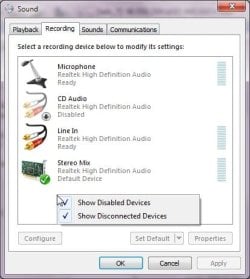
The volume bar shows sound but no sound through speakers.

City Green

New member
Local time
12:09 PM
Messages
11
Hi,

I am pretty stumped with this one.

I upgraded my office to windows 7 32bit pro. 10 computers all the same, but one of them has audio issues.

When I play the sample music the volume bar shows the equalizer bouncing like it is sending out audio, but any speakers I plug into it produce no sound.

I have tried: different speakers, different jacks, 4 on the back 1 on the front, updating the audio driver, windows updates, rebooting, and yelling and now I am out of ideas.

When I use a usb based headphone I can get sound.

it lists the default sound device as a S/pdif high definition audio device...


Any suggestions on how to fix this?

Thanks.
 

My Computer My Computer

At a glance

Windows 7 pro 32 bite5200 intel2GNvidia NVS 295
OS
Windows 7 pro 32 bit
CPU
e5200 intel
Memory
2G
Graphics Card(s)
Nvidia NVS 295
re: S/pdif high definition audio device

That's the digital output, you won't get any sound with that. Does it show "Speakers" listed in the same Window?

Right click on the Microsoft speaker icon in the taskbar, select playback devices, if you have Speakers listed, single left click on them and select "Set Default".

If you don't have speakers listed, make sure you have a pair of speakers plugged into the light green audio jack in the back then open the playback devices window as above... right click in the middle of the window and enable both "show disconnected/disabled devices".

Any speakers showing up yet?

Ap
 

My Computer My Computer

At a glance

Windows 7 Home PremiumIntel Core 2 Duo @ 3.00gHz4 GBATI Radeon HD 2600 XT
Computer Manufacturer/Model Number
Assembled in my workshop
OS
Windows 7 Home Premium
CPU
Intel Core 2 Duo @ 3.00gHz
Motherboard
Gigabyte GA-P35-S3G
Memory
4 GB
Graphics Card(s)
ATI Radeon HD 2600 XT
Sound Card
RME 24/96 Card, Realtek Internal Audio PreSonus FireStudio
Monitor(s) Displays
Acer 1917 (x2)
Screen Resolution
1280 x 1024 on both monitors
Hard Drives
Three 250GB Seagate SATA Barracuda 7200rpm
PSU
Rosewill 500-watt
Case
Rosewill mid-tower
Cooling
Noctua NH-U9B (CPU), PwrSupply fan + single large case Fan
Keyboard
Macally w/2/USB ports.
Mouse
Trackman Wheel
Other Info
Event 20/20 bas studio monitors, Yamaha sub.
Rackmount Korg/Roland/Yamaha synthesizers,
Cubase MIDI/audio recording. Sony Soundforge audio/mastering software. CD Architect Mastering. RME & Presonus audio interfaces.
it does not show any speakers listed, when I click show disconnected and disabled devices still nothing is shown.

When I plug in the usb head set a second icon does show up, and the configure button is able to be selected, but the configure button is not active when only the spdif connection is shown.
 

My Computer My Computer

At a glance

Windows 7 pro 32 bite5200 intel2GNvidia NVS 295
OS
Windows 7 pro 32 bit
CPU
e5200 intel
Memory
2G
Graphics Card(s)
Nvidia NVS 295
At this point you can forgo any speaker, cable or jack testing as digital audio will output nothing.

With speakers plugged in and on, (green audio jack in back) go to Device Manager and un-install the audio driver, then reboot.

Also, you can try going to Control Panel/Programs and Features and see if your audio driver is listed there, if so, un-install and reboot.

What is the name of the audio system, Realtek, Conexant, VIA....?

If you look at one of the other office PCs you will probably see the speaker icon with the green default check mark beside it, this is what you need to see to get audio.

Ap
 

My Computer My Computer

At a glance

Windows 7 Home PremiumIntel Core 2 Duo @ 3.00gHz4 GBATI Radeon HD 2600 XT
Computer Manufacturer/Model Number
Assembled in my workshop
OS
Windows 7 Home Premium
CPU
Intel Core 2 Duo @ 3.00gHz
Motherboard
Gigabyte GA-P35-S3G
Memory
4 GB
Graphics Card(s)
ATI Radeon HD 2600 XT
Sound Card
RME 24/96 Card, Realtek Internal Audio PreSonus FireStudio
Monitor(s) Displays
Acer 1917 (x2)
Screen Resolution
1280 x 1024 on both monitors
Hard Drives
Three 250GB Seagate SATA Barracuda 7200rpm
PSU
Rosewill 500-watt
Case
Rosewill mid-tower
Cooling
Noctua NH-U9B (CPU), PwrSupply fan + single large case Fan
Keyboard
Macally w/2/USB ports.
Mouse
Trackman Wheel
Other Info
Event 20/20 bas studio monitors, Yamaha sub.
Rackmount Korg/Roland/Yamaha synthesizers,
Cubase MIDI/audio recording. Sony Soundforge audio/mastering software. CD Architect Mastering. RME & Presonus audio interfaces.
tried both of those with no result.

I am not sure how to find the name of audio system.

I really appriciate your help on this, its confused me to no end.
 

My Computer My Computer

At a glance

Windows 7 pro 32 bite5200 intel2GNvidia NVS 295
OS
Windows 7 pro 32 bit
CPU
e5200 intel
Memory
2G
Graphics Card(s)
Nvidia NVS 295
tried both of those with no result.

I am not sure how to find the name of audio system.

I really appriciate your help on this, its confused me to no end.

Finding the name of the audio system:

System Information/Components/Sound

(System Info is located in Accessories/System Tools)

Someone mentioned using the Windows 7 troubleshooter, might want to give that a try.

Ap
 

My Computer My Computer

At a glance

Windows 7 Home PremiumIntel Core 2 Duo @ 3.00gHz4 GBATI Radeon HD 2600 XT
Computer Manufacturer/Model Number
Assembled in my workshop
OS
Windows 7 Home Premium
CPU
Intel Core 2 Duo @ 3.00gHz
Motherboard
Gigabyte GA-P35-S3G
Memory
4 GB
Graphics Card(s)
ATI Radeon HD 2600 XT
Sound Card
RME 24/96 Card, Realtek Internal Audio PreSonus FireStudio
Monitor(s) Displays
Acer 1917 (x2)
Screen Resolution
1280 x 1024 on both monitors
Hard Drives
Three 250GB Seagate SATA Barracuda 7200rpm
PSU
Rosewill 500-watt
Case
Rosewill mid-tower
Cooling
Noctua NH-U9B (CPU), PwrSupply fan + single large case Fan
Keyboard
Macally w/2/USB ports.
Mouse
Trackman Wheel
Other Info
Event 20/20 bas studio monitors, Yamaha sub.
Rackmount Korg/Roland/Yamaha synthesizers,
Cubase MIDI/audio recording. Sony Soundforge audio/mastering software. CD Architect Mastering. RME & Presonus audio interfaces.
Name High Definition Audio Device
Manufacturer Microsoft
Status OK
PNP Device ID HDAUDIO\FUNC_01&VEN_10EC&DEV_0662&SUBSYS_1043837F&REV_1001\4&2C2530A5&0&0001
Driver c:\windows\system32\drivers\hdaudio.sys (6.1.7600.16385, 297.00 KB (304,128 bytes), 13/07/2009 4:51 PM)
 

My Computer My Computer

At a glance

Windows 7 pro 32 bite5200 intel2GNvidia NVS 295
OS
Windows 7 pro 32 bit
CPU
e5200 intel
Memory
2G
Graphics Card(s)
Nvidia NVS 295
Name High Definition Audio Device
Manufacturer Microsoft
Status OK
PNP Device ID HDAUDIO\FUNC_01&VEN_10EC&DEV_0662&SUBSYS_1043837F&REV_1001\4&2C2530A5&0&0001
Driver c:\windows\system32\drivers\hdaudio.sys (6.1.7600.16385, 297.00 KB (304,128 bytes), 13/07/2009 4:51 PM)


Ok, that's a Realtek audio chip, same one that's on my motherboard (0662)

I suggest going to the Realtek site:

Realtek

And downloading the latest Realtek driver for the stubborn PC.

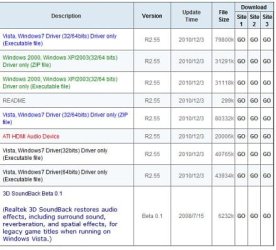
The one you want is the 6th driver from the top, first one in black ink.
File size 40765.

Realtek.jpg

The first install may only remove the exisiting drivers... in that case reinstall them again.

Not sure about that as the drivers in there are Realtek/Microsoft drivers.

Check Device manager after the first install, you should see Realtek High Definition Audio.

Ap
 

My Computer My Computer

At a glance

Windows 7 Home PremiumIntel Core 2 Duo @ 3.00gHz4 GBATI Radeon HD 2600 XT
Computer Manufacturer/Model Number
Assembled in my workshop
OS
Windows 7 Home Premium
CPU
Intel Core 2 Duo @ 3.00gHz
Motherboard
Gigabyte GA-P35-S3G
Memory
4 GB
Graphics Card(s)
ATI Radeon HD 2600 XT
Sound Card
RME 24/96 Card, Realtek Internal Audio PreSonus FireStudio
Monitor(s) Displays
Acer 1917 (x2)
Screen Resolution
1280 x 1024 on both monitors
Hard Drives
Three 250GB Seagate SATA Barracuda 7200rpm
PSU
Rosewill 500-watt
Case
Rosewill mid-tower
Cooling
Noctua NH-U9B (CPU), PwrSupply fan + single large case Fan
Keyboard
Macally w/2/USB ports.
Mouse
Trackman Wheel
Other Info
Event 20/20 bas studio monitors, Yamaha sub.
Rackmount Korg/Roland/Yamaha synthesizers,
Cubase MIDI/audio recording. Sony Soundforge audio/mastering software. CD Architect Mastering. RME & Presonus audio interfaces.
I tried that out. When I Installed the file it went through the process but when checking in device manager it still listed high definition audio device, it never updated to Realtek.

I installed flat out, then removed the current, then installed. I also tried removing then updating the driver from the location I had the new driver saved.

Nothing!
 

My Computer My Computer

At a glance

Windows 7 pro 32 bite5200 intel2GNvidia NVS 295
OS
Windows 7 pro 32 bit
CPU
e5200 intel
Memory
2G
Graphics Card(s)
Nvidia NVS 295
I tried that out. When I Installed the file it went through the process but when checking in device manager it still listed high definition audio device, it never updated to Realtek.

I installed flat out, then removed the current, then installed. I also tried removing then updating the driver from the location I had the new driver saved.

Nothing!


I'm almost stumped... can you boot into the BIOS and see what it's set at for Audio, and what the choices are?

Ap
 

My Computer My Computer

At a glance

Windows 7 Home PremiumIntel Core 2 Duo @ 3.00gHz4 GBATI Radeon HD 2600 XT
Computer Manufacturer/Model Number
Assembled in my workshop
OS
Windows 7 Home Premium
CPU
Intel Core 2 Duo @ 3.00gHz
Motherboard
Gigabyte GA-P35-S3G
Memory
4 GB
Graphics Card(s)
ATI Radeon HD 2600 XT
Sound Card
RME 24/96 Card, Realtek Internal Audio PreSonus FireStudio
Monitor(s) Displays
Acer 1917 (x2)
Screen Resolution
1280 x 1024 on both monitors
Hard Drives
Three 250GB Seagate SATA Barracuda 7200rpm
PSU
Rosewill 500-watt
Case
Rosewill mid-tower
Cooling
Noctua NH-U9B (CPU), PwrSupply fan + single large case Fan
Keyboard
Macally w/2/USB ports.
Mouse
Trackman Wheel
Other Info
Event 20/20 bas studio monitors, Yamaha sub.
Rackmount Korg/Roland/Yamaha synthesizers,
Cubase MIDI/audio recording. Sony Soundforge audio/mastering software. CD Architect Mastering. RME & Presonus audio interfaces.
Have you checked the mixer window? make sure there are no types (line out, speakers, headphones, CD, WAV) that are muted. Make sure the fader is UP on each type.
 

My Computer My Computer

At a glance

windows 7 32Intel i7 4770KCorsair Vengeance 8gb DDR3 2133(PC3 17000)nVidia GTX 660 2gb
Computer type
PC/Desktop
Computer Manufacturer/Model Number
Homebuilt
OS
windows 7 32
CPU
Intel i7 4770K
Motherboard
Asus Z97-A
Memory
Corsair Vengeance 8gb DDR3 2133(PC3 17000)
Graphics Card(s)
nVidia GTX 660 2gb
Sound Card
Asus Xonar D1
Monitor(s) Displays
Dell Ultrasharp UM2913WM
Screen Resolution
2560x1080 32
Hard Drives
PNY 240gb SSD
Seagate 500gb SSD
PSU
Corsair CXM 600
Case
Fractal Design Define R4
Cooling
Arctic Freezer Xtreme rev 2
Keyboard
Logitech K800 Wireless Illuminated
Mouse
MicroSoft 5000
Internet Speed
Cable
Antivirus
MSE
Browser
IE 11 and Chrome
Other Info
Samsung DVD-RW
Cambridge 4.1 speakers
Hauppauge HVR-950 USB Tuner
Asus Optimized Overclock to 4.4ghz
in the BIOS the HD Audio controler was set to [auto] the other option was [disabled]

Under front panel support it was set to [AC97] and the other option was [hd audio]
 

My Computer My Computer

At a glance

Windows 7 pro 32 bite5200 intel2GNvidia NVS 295
OS
Windows 7 pro 32 bit
CPU
e5200 intel
Memory
2G
Graphics Card(s)
Nvidia NVS 295
in the BIOS the HD Audio controler was set to [auto] the other option was [disabled]

Under front panel support it was set to [AC97] and the other option was [hd audio]


If it's the Mixer with a low level I'm going to go out and kick a cinder block... but it could be.

Ok... if it wasn't the mixer... (whick I always forget about)

Set the audio to disabled, reboot, after the machine is settled reboot and get into the BIOS, set audio to Auto and set front panel support to HD Audio.

see what happens.

Ap
 

My Computer My Computer

At a glance

Windows 7 Home PremiumIntel Core 2 Duo @ 3.00gHz4 GBATI Radeon HD 2600 XT
Computer Manufacturer/Model Number
Assembled in my workshop
OS
Windows 7 Home Premium
CPU
Intel Core 2 Duo @ 3.00gHz
Motherboard
Gigabyte GA-P35-S3G
Memory
4 GB
Graphics Card(s)
ATI Radeon HD 2600 XT
Sound Card
RME 24/96 Card, Realtek Internal Audio PreSonus FireStudio
Monitor(s) Displays
Acer 1917 (x2)
Screen Resolution
1280 x 1024 on both monitors
Hard Drives
Three 250GB Seagate SATA Barracuda 7200rpm
PSU
Rosewill 500-watt
Case
Rosewill mid-tower
Cooling
Noctua NH-U9B (CPU), PwrSupply fan + single large case Fan
Keyboard
Macally w/2/USB ports.
Mouse
Trackman Wheel
Other Info
Event 20/20 bas studio monitors, Yamaha sub.
Rackmount Korg/Roland/Yamaha synthesizers,
Cubase MIDI/audio recording. Sony Soundforge audio/mastering software. CD Architect Mastering. RME & Presonus audio interfaces.
I checked the mixer right off the start.

I tried changing around the bios settings and there was no change.

Also tried disabling the audio then installing the new driver, still nothing.
 

My Computer My Computer

At a glance

Windows 7 pro 32 bite5200 intel2GNvidia NVS 295
OS
Windows 7 pro 32 bit
CPU
e5200 intel
Memory
2G
Graphics Card(s)
Nvidia NVS 295
I checked the mixer right off the start.

I tried changing around the bios settings and there was no change.

Also tried disabling the audio then installing the new driver, still nothing.


Whimper...

Seriously, that's all I can think of, strange that your other machines work without problems.

Can you try plugging the speakers in the front panel "Blue" jack.

Ap
 

My Computer My Computer

At a glance

Windows 7 Home PremiumIntel Core 2 Duo @ 3.00gHz4 GBATI Radeon HD 2600 XT
Computer Manufacturer/Model Number
Assembled in my workshop
OS
Windows 7 Home Premium
CPU
Intel Core 2 Duo @ 3.00gHz
Motherboard
Gigabyte GA-P35-S3G
Memory
4 GB
Graphics Card(s)
ATI Radeon HD 2600 XT
Sound Card
RME 24/96 Card, Realtek Internal Audio PreSonus FireStudio
Monitor(s) Displays
Acer 1917 (x2)
Screen Resolution
1280 x 1024 on both monitors
Hard Drives
Three 250GB Seagate SATA Barracuda 7200rpm
PSU
Rosewill 500-watt
Case
Rosewill mid-tower
Cooling
Noctua NH-U9B (CPU), PwrSupply fan + single large case Fan
Keyboard
Macally w/2/USB ports.
Mouse
Trackman Wheel
Other Info
Event 20/20 bas studio monitors, Yamaha sub.
Rackmount Korg/Roland/Yamaha synthesizers,
Cubase MIDI/audio recording. Sony Soundforge audio/mastering software. CD Architect Mastering. RME & Presonus audio interfaces.
I have tried every jack in the thing.

Is it possible that just the sound portion of the motherboard died?
 

My Computer My Computer

At a glance

Windows 7 pro 32 bite5200 intel2GNvidia NVS 295
OS
Windows 7 pro 32 bit
CPU
e5200 intel
Memory
2G
Graphics Card(s)
Nvidia NVS 295
It is possible, was it working with XP?

Since I have the same audio chip, I'll post some graphics later this even, I have a gig in an hour.

Ap
 

My Computer My Computer

At a glance

Windows 7 Home PremiumIntel Core 2 Duo @ 3.00gHz4 GBATI Radeon HD 2600 XT
Computer Manufacturer/Model Number
Assembled in my workshop
OS
Windows 7 Home Premium
CPU
Intel Core 2 Duo @ 3.00gHz
Motherboard
Gigabyte GA-P35-S3G
Memory
4 GB
Graphics Card(s)
ATI Radeon HD 2600 XT
Sound Card
RME 24/96 Card, Realtek Internal Audio PreSonus FireStudio
Monitor(s) Displays
Acer 1917 (x2)
Screen Resolution
1280 x 1024 on both monitors
Hard Drives
Three 250GB Seagate SATA Barracuda 7200rpm
PSU
Rosewill 500-watt
Case
Rosewill mid-tower
Cooling
Noctua NH-U9B (CPU), PwrSupply fan + single large case Fan
Keyboard
Macally w/2/USB ports.
Mouse
Trackman Wheel
Other Info
Event 20/20 bas studio monitors, Yamaha sub.
Rackmount Korg/Roland/Yamaha synthesizers,
Cubase MIDI/audio recording. Sony Soundforge audio/mastering software. CD Architect Mastering. RME & Presonus audio interfaces.
It was working in XP, but we did change the location of the computer after the upgrade...

Thanks again for the help, no rush.
 

My Computer My Computer

At a glance

Windows 7 pro 32 bite5200 intel2GNvidia NVS 295
OS
Windows 7 pro 32 bit
CPU
e5200 intel
Memory
2G
Graphics Card(s)
Nvidia NVS 295
It was working in XP, but we did change the location of the computer after the upgrade...

Doubtful that did anything... and you've tried more than one set of speakers.

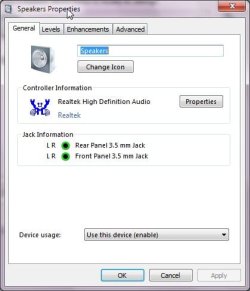
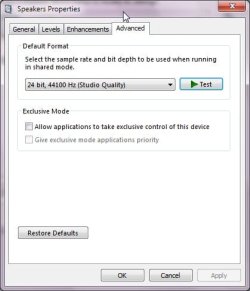
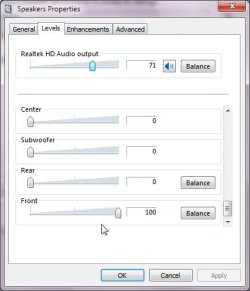
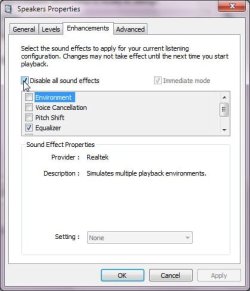
Here's some related graphics.

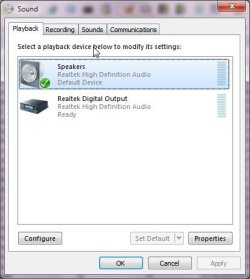
What I show under "Playback Devices"

Speakers.jpg


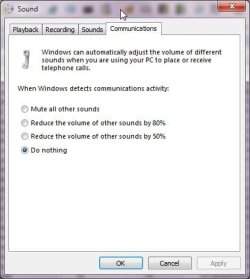
This is my "Communications" tab setting
Communications.jpg

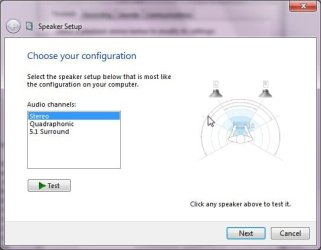
Back to the first graphic with Speakers selected, the Configure Button, try the test, any sound?
Config.jpg

Under the Properties button.
properties.jpg

The Advanced tab.
Advanced.jpg

The levels tab, notice I've scrolled down and have the "Front" level at 100%.
levels.jpg

Disabled Enhancements, select Immediate mode first.
Enhance.jpg

Under the Recording tab.
Recording.jpg

Considering you couldn't install the Realtek driver the problem may be hardware related, perhaps that motherboard has an older BIOS.

Ap
 

My Computer My Computer

At a glance

Windows 7 Home PremiumIntel Core 2 Duo @ 3.00gHz4 GBATI Radeon HD 2600 XT
Computer Manufacturer/Model Number
Assembled in my workshop
OS
Windows 7 Home Premium
CPU
Intel Core 2 Duo @ 3.00gHz
Motherboard
Gigabyte GA-P35-S3G
Memory
4 GB
Graphics Card(s)
ATI Radeon HD 2600 XT
Sound Card
RME 24/96 Card, Realtek Internal Audio PreSonus FireStudio
Monitor(s) Displays
Acer 1917 (x2)
Screen Resolution
1280 x 1024 on both monitors
Hard Drives
Three 250GB Seagate SATA Barracuda 7200rpm
PSU
Rosewill 500-watt
Case
Rosewill mid-tower
Cooling
Noctua NH-U9B (CPU), PwrSupply fan + single large case Fan
Keyboard
Macally w/2/USB ports.
Mouse
Trackman Wheel
Other Info
Event 20/20 bas studio monitors, Yamaha sub.
Rackmount Korg/Roland/Yamaha synthesizers,
Cubase MIDI/audio recording. Sony Soundforge audio/mastering software. CD Architect Mastering. RME & Presonus audio interfaces.

My Computer My Computer

At a glance

Windows 7 pro 32 bite5200 intel2GNvidia NVS 295
OS
Windows 7 pro 32 bit
CPU
e5200 intel
Memory
2G
Graphics Card(s)
Nvidia NVS 295
Back
Top