
The wrong partition is marked as "system"
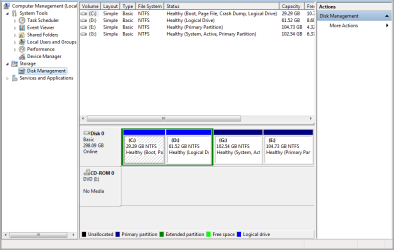
I recently installed Windows 7. I have four partitions . Windows is installed on C:, and I also have D: , E: and G: as storage partitions . However, although C: is the boot partition it managed to mark G: as the system partition. This is causing a few problems with the Windows 7 backup feature as it automatically makes a backup of both C: and G: as System partition, and it's using up a lot of space on the backup partition.
C: Healthy (Boot, Page file, logical Drive)
D: Healthy (logical Drive)
E: Healthy (Primary Partition)
G: Healthy (system, Active, Primary Partition)
Help me
I recently installed Windows 7. I have four partitions . Windows is installed on C:, and I also have D: , E: and G: as storage partitions . However, although C: is the boot partition it managed to mark G: as the system partition. This is causing a few problems with the Windows 7 backup feature as it automatically makes a backup of both C: and G: as System partition, and it's using up a lot of space on the backup partition.
C: Healthy (Boot, Page file, logical Drive)
D: Healthy (logical Drive)
E: Healthy (Primary Partition)
G: Healthy (system, Active, Primary Partition)
Help me
Last edited:
My Computer
At a glance
Windows 7 Ultimate 32bitintell core 2 due320 gbgeforce 9300
- Computer type
- Laptop
- Computer Manufacturer/Model Number
- Dell
- OS
- Windows 7 Ultimate 32bit
- CPU
- intell core 2 due
- Memory
- 320 gb
- Graphics Card(s)
- geforce 9300
- Antivirus
- nod 32



 (Four logical drives on one disk, that is.)


