Theme - How to Apply Custom Themes

How to Apply Custom Themes in Windows 7

   Information
This will show you how to apply a custom theme from deviantART as your theme in Windows 7.


Here's How:
1. First you will need to click on the Download button below to download and install either the 32-bit (x86) or 64-bit (x64) Universal Theme Patcher (auto installer) below for your 32-bit or 64-bit Windows 7.
32-bit:

Download


64-bit:

Download


2. When downloaded, unrar the file using winrar, and run the exe.

3. Select your user interface language
2ngahdt.png

4. Click OK

5. The click yes when this box appear.
2dv7u3a.png

6. The you need to patch these 3 files (As you see i already have mine patched) Click the patch outside each file, after patching them all reboot.
2f09cp2.png

7. Now you need a custom theme, i will advise you to check these out:
New Orleans Saints by ~sergiogarcia9 on deviantART

Aero Evolution 1.0 by ~sergiogarcia9 on deviantART

Majestic Excellence by ~sergiogarcia9 on deviantART

Midnight by ~MrGRiM01 on deviantART

My DA profile: sergiogarcia9 on deviantART
Mr Grim's DA profile: MrGRiM01 on deviantART

   Note
You can also find more themes on Deviantart, but make sure they work with windows 7.

They need to be unzipped first.


8. Now navigate to the Windows folder, find the folder called resources and click on the themes folder. (C:\Windows\Resources\Themes)
These are the files that has to be placed in the folder:

6dsthk.png

9. Then paste the folder and theme provided, then the theme should appear in your personalization menu :)

NOTE: In most themes there are only 2 files (a folder and a theme file)

Good luck :)


Attachments

Last edited by a moderator:
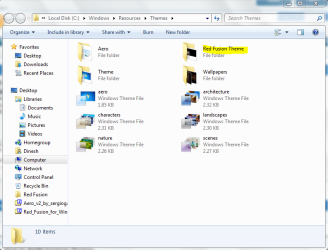
Ok somethin's wrong. I d/l the red fusion theme. Copied the Red Fusion theme to %windir%\Resources\Themes folder(as seen in the screenshot).
1.PNG

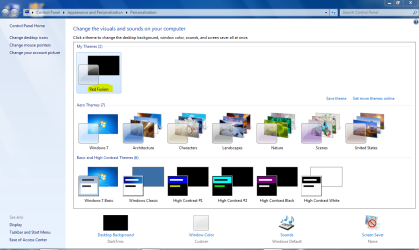
Then I clicked on the Red Fusion theme under Personalize to activate the theme. But nothing's changed. Is there something else that I need to do?
2.PNG
 

My Computer My Computer

Computer Manufacturer/Model Number
Samsung NP530U4B-S02IN
OS
Windows® 8 Pro (64-bit)
CPU
Intel® Core™ i5 Processor 2467M (1.60GHz, 3MB L3 Cache)
Motherboard
Samsung Electronics
Memory
6GB DDR3 System Memory at 1,333MHz (on BD 4GB + 2GB x 1)
Graphics Card(s)
AMD Radeon™ HD7550M 1GB DDR3 (Ext. Graphic)
Sound Card
Realtek High Definition Audio
Monitor(s) Displays
35.56cm (14.0) SuperBright 300nit HD LED Display
Screen Resolution
1366x768
Hard Drives
1TB S-ATA II Hard Drive (5400RPM) with ExpressCache 16GB SSD
Internet Speed
sucks
Antivirus
Microsoft Security Essentials
Browser
Google Chrome (Sync enabled)
Ok somethin's wrong. I d/l the red fusion theme. Copied the Red Fusion theme to %windir%\Resources\Themes folder(as seen in the screenshot).
View attachment 36808

Then I clicked on the Red Fusion theme under Personalize to activate the theme. But nothing's changed. Is there something else that I need to do?
View attachment 36809

The same thing as last time :p the files you need to place there is inside the red fusion theme folder. ;)
 
Ok somethin's wrong. I d/l the red fusion theme. Copied the Red Fusion theme to %windir%\Resources\Themes folder(as seen in the screenshot).
View attachment 36808

Then I clicked on the Red Fusion theme under Personalize to activate the theme. But nothing's changed. Is there something else that I need to do?
View attachment 36809

The same thing as last time :p the files you need to place there is inside the red fusion theme folder. ;)
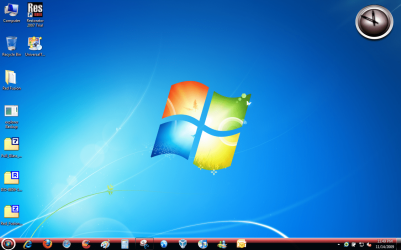
Ah now I know what you mean. Ok I got the theme running now. :)
Capture.PNG

next is to change the icons. I have d/l the Full Glass Icon pack by Mr. Grim. How do I install it? Is there a tutorial for the same?

Thanks.
 

My Computer My Computer

Computer Manufacturer/Model Number
Samsung NP530U4B-S02IN
OS
Windows® 8 Pro (64-bit)
CPU
Intel® Core™ i5 Processor 2467M (1.60GHz, 3MB L3 Cache)
Motherboard
Samsung Electronics
Memory
6GB DDR3 System Memory at 1,333MHz (on BD 4GB + 2GB x 1)
Graphics Card(s)
AMD Radeon™ HD7550M 1GB DDR3 (Ext. Graphic)
Sound Card
Realtek High Definition Audio
Monitor(s) Displays
35.56cm (14.0) SuperBright 300nit HD LED Display
Screen Resolution
1366x768
Hard Drives
1TB S-ATA II Hard Drive (5400RPM) with ExpressCache 16GB SSD
Internet Speed
sucks
Antivirus
Microsoft Security Essentials
Browser
Google Chrome (Sync enabled)
Thanks for this I've been looking everywhere for a reliable patch.
 

My Computer My Computer

Computer Manufacturer/Model Number
Custom built
OS
Windows 7 Ultimate x64
CPU
AMD Phenom II Triple Core 720 AM3 + Socket /DDR3 PIB CPU
Motherboard
Asus M4A79XTD EVO
Memory
4gb
Graphics Card(s)
Palit GF GTX 260+ Sonic (216SP) PCI-E 2.0 1792MB DDR3
Monitor(s) Displays
hp lp2475w 24" wide
Hard Drives
2x Western Digital Caviar Green 808.8 GB, 32 MB Cache, SATA 3 Gb/s SATA Hard Drives
PSU
cooler master 650w extreme power plus
Case
cooler master sileo 500 mid tower hd-audio atx micro-atx sou
Hi

Guys do you think it will work in Spanish Windows 7 Ultimate ? (32bit), i was going to try but i'm afraid the diference between languajes might render my system unstable.
 

My Computer My Computer

Computer Manufacturer/Model Number
Custom build
OS
Windows 7 Ultimate
CPU
AMD Phenom ll X2 550 BE
Motherboard
ASUS M3N78 Pro
Memory
4GB (2 x Corsair Dominator CM2X2048-8500C5D)
Graphics Card(s)
Integrated nVidia GeForce 8300 (256MB Shared)
Sound Card
Integrated Realtek ALC888/1200 nVidia MCP78
Monitor(s) Displays
1) Samsung SyncMaster 794V, 2) USB Samsung SyncMaster U70
Screen Resolution
1) 1027x768, 2) 800x480
Hard Drives
1 x Western Digital WD1600AAJS-00PSA0
PSU
400w Generic-type PSU certified by Cooler Master
Case
Cooler Master Elite 360
Cooling
Stock
Keyboard
USB Generic
Mouse
USB Generic
Internet Speed
2MB/512Kbit ADSL
Thank you, i will give it a try then !! =3
 

My Computer My Computer

Computer Manufacturer/Model Number
Custom build
OS
Windows 7 Ultimate
CPU
AMD Phenom ll X2 550 BE
Motherboard
ASUS M3N78 Pro
Memory
4GB (2 x Corsair Dominator CM2X2048-8500C5D)
Graphics Card(s)
Integrated nVidia GeForce 8300 (256MB Shared)
Sound Card
Integrated Realtek ALC888/1200 nVidia MCP78
Monitor(s) Displays
1) Samsung SyncMaster 794V, 2) USB Samsung SyncMaster U70
Screen Resolution
1) 1027x768, 2) 800x480
Hard Drives
1 x Western Digital WD1600AAJS-00PSA0
PSU
400w Generic-type PSU certified by Cooler Master
Case
Cooler Master Elite 360
Cooling
Stock
Keyboard
USB Generic
Mouse
USB Generic
Internet Speed
2MB/512Kbit ADSL
Hi - I am trying to install third party themes (just for changing the wallpaper, desktop icons, pointers, and sounds – no .msstyles files included - not trying to apply any Aero effects). I've tried using UxStyle (user account control is turned off) but after installing and trying to double click on a .theme file I get this error message: "This theme cannot be applied to the desktop". I know that I can re-create the theme and re-save it in the personalization area but I’m looking for something quicker as I have hundreds of themes. Also, is there a way to have these themes automatically show up in the Personalization area – some way to “import” them? I'm driving myself crazy trying to figure this one out. :cry: Does anyone have any ideas? Thanks in advance for any help and for your time.
 

My Computer My Computer

OS
Windows 7
Hi - I am trying to install third party themes (just for changing the wallpaper, desktop icons, pointers, and sounds – no .msstyles files included - not trying to apply any Aero effects). I've tried using UxStyle (user account control is turned off) but after installing and trying to double click on a .theme file I get this error message: "This theme cannot be applied to the desktop". I know that I can re-create the theme and re-save it in the personalization area but I’m looking for something quicker as I have hundreds of themes. Also, is there a way to have these themes automatically show up in the Personalization area – some way to “import” them? I'm driving myself crazy trying to figure this one out. :cry: Does anyone have any ideas? Thanks in advance for any help and for your time.
If they are just themepacks or theme files, just click on them. You dont need to patch system files or nothing since it isnt a msstyles.
 
Still Didn't Work

Hi - Thank you for your reply. I uninstalled Uxstyle and restarted. I then tried to double click on a .theme file and I still got the "This theme cannot be applied to the desktop" message. Is there anything else I can try?
 

My Computer My Computer

OS
Windows 7
Hi guys I just patched my files and restarted my comp and all is fine except that I cannot delete the universalthemepatcher file or the zip file, its says it is write protected. can someone please tell me how to delete or at least move them =]
 

My Computer My Computer

Computer Manufacturer/Model Number
Custom built
OS
Windows 7 Ultimate x64
CPU
AMD Phenom II Triple Core 720 AM3 + Socket /DDR3 PIB CPU
Motherboard
Asus M4A79XTD EVO
Memory
4gb
Graphics Card(s)
Palit GF GTX 260+ Sonic (216SP) PCI-E 2.0 1792MB DDR3
Monitor(s) Displays
hp lp2475w 24" wide
Hard Drives
2x Western Digital Caviar Green 808.8 GB, 32 MB Cache, SATA 3 Gb/s SATA Hard Drives
PSU
cooler master 650w extreme power plus
Case
cooler master sileo 500 mid tower hd-audio atx micro-atx sou
Thank for the tutorial, but in my computer not run well. I patch files, reboot and all is okay but when i restart computer again, windows 7 arrive to logon and stopped. I must start windows in safe mode, restore original file and windows 7 start this time normally, but naturally without custom themes ??

Why this ??
Thank
Hispanico
 

My Computer My Computer

OS
windows 7
I have Win7 ultimate 64bit

I got the F1 theme
I cant seem to get the wallpapers to Auto change :(

what am i doning wrong

Please
 

My Computer My Computer

Computer Manufacturer/Model Number
Alienware m17
OS
Windows 7 Ultimate
CPU
Core 2 Extreme CPU Q9300 @ 2.53GHz
Memory
4 GB
Graphics Card(s)
2x3870 Ati
Hard Drives
2x500 GB Samsung 7200rpm
Universal Theme Patcher

Hi, I seem to be having issues when trying to patch the files, I patch the files(run as administrator), and restart my computer. The issue happens when I get to the login screen, it says "Please wait.." and thats as far as it gets. The screen goes black and then again the Login screen appears, but it never gives me the option to input my password. Any ideas on how to solve this?
 

My Computer My Computer

OS
Windows 7
I used difrent patches for win 7 x64 and in every one of them is problem witch transparency of .png's in msstyles. for example png responsible for resizing window is untransparet. Fisycly png in photoshop is transparent so thats why i know it's correct.
 

Attachments

  • Untitled-1.png
    Untitled-1.png
    2.9 KB · Views: 2,427

My Computer My Computer

OS
win 7 x64
Why does it only shoe 2 files, so I can't patch the last one. Anyone know what i need to do? thanks
 

My Computer My Computer

OS
Windows 7
welldone
 

My Computer My Computer

OS
Windows 7 Ultimate x32
CPU
Intel core 2 duo E7400 2.8
Motherboard
Intel DG31PR
Memory
3GB
Graphics Card(s)
Sapphire Radeon HD 4670 1Gb ddr3
Sound Card
Creative 5.1
Monitor(s) Displays
ViewSonic 17 widescreen
Hard Drives
320gb Sata
PSU
600watt
Case
Antec 900
ok, i am confused. i followed the directions to install themes and can not get the theme to install. it shows up personalization window but will not install. i can select it but nothing happens. i know i am missing something obvious so please be gentle :o the 3 files that are listed i can not find anywhere, where are they located? i do not see them in the themes folder. see here for screenshot http://www.sevenforums.com/tutorials/280-theme-change-save.html#post547288
 

My Computer My Computer

Computer Manufacturer/Model Number
self built
OS
windows 7 ultimate x64
CPU
intel core 2 quad 9450
Motherboard
gigabyte EP45-DQ6
Memory
4X2GB Gskill pc6400
Graphics Card(s)
visiontek radeon 4870x2 2gb
Sound Card
X-Fi Fatal1ty FPS 7.1
Monitor(s) Displays
dell 2408 WFP
Screen Resolution
1920X1200
Hard Drives
Intel X-25M G2 80GB, WD velociraptor 150gb, wd black 750gb internal. seagate 1tb Esata external storage, wd elements 750gb USB 2.0 external
PSU
Antec TruePower New TP-750 watt
Case
cooler master HAF932
Cooling
XIGMATEK HDT-S1283 120mm Rifle CPU Cooler
Keyboard
microsoft digital media pro
Mouse
microsoft trackball explorer
Internet Speed
16mb\sec comcast
Other Info
Samsung SH-S243N 24X DVD-RW
I've applied the patches, yet I have had ZERO success with any customizations. In particular(Virtual Customs - View topic - Dark7 Ultimate Theme for Windows 7 (Final Version)) I don't know or rather seem to grasp how to customize properly. I don't know where to put/use msstyles, customize the task manager,etc.....even when I put a theme in the resources/theme folder it doesn't turn out correctly.I had tried the uxstyle core to no avail and restored to before I installed it. Now, as far as I can tell I have successfully patched the three files needed with the theme patcher to customize with with windows 7. Now I need a good Samaritan to "hold my widdle hand"....or as least help me figure this shit out once and for all.

I would really be grateful for any/all help.

Thanx in advance....
 

My Computer My Computer

Computer type
PC/Desktop
Computer Manufacturer/Model Number
Gateway FX6840
OS
Windows 7
CPU
Intel Core i7 860 @ 2.80
Motherboard
Gateway FX6840
Memory
8GB
Graphics Card(s)
ATI Radeon HD 5770
Sound Card
Creative XB - X-FI
Monitor(s) Displays
26in Samsung Syncmaster 2693
Screen Resolution
1920x1280
Hard Drives
Seagate ST310000528AS
Hitachi HDS721010CLA332
Fantom Greendrive 500Gb External
Mouse
Logitech MX Performance
Internet Speed
7.1mg download
Back
Top