Theme not Changing?

Sandalllz

New member
Local time
1:28 AM
Messages
26
Hi, I have downloaded many new windows 7 themes, but my current theme does not change. Only the ones loaded on to the computer work. I've done alot of browsing on this problem an none of the solutions has worked yet. I have Windows 7 Home Premium 64 bit os.
 

My Computer

Computer Manufacturer/Model Number
Acer Aspire 5551G
OS
Windows 7 Home Premium 64bit
CPU
AMD Turion II P520 Dual-Core Processor 2.30 Ghz
Motherboard
Acer JE50_DN
Memory
4 GB
Graphics Card(s)
ATI Mobility Radeon HD 5470
Hard Drives
C 283 GB

My Computer

Computer type
Laptop
Computer Manufacturer/Model Number
Sager NP9170
OS
Win 7 Pro x64 / Win 10 Pro
CPU
Intel(R) Core(TM) i7-3630QM CPU @ 2.40GHz
Motherboard
CLEVO P170EM
Memory
12 GB
Graphics Card(s)
(1) Intel(R) HD Graphics 4000 (2) NVIDIA GeForce GTX 675M
Sound Card
(1) Realtek High Definition Audio (2) Intel(R) Display Aud
Monitor(s) Displays
17.3
Screen Resolution
1920x1080
Hard Drives
(1) Samsung 860 EVO 500GB(OS) (1) Samsung 860 EVO 500GB(Data)
Keyboard
Backlite
Antivirus
MSE, Malwarebytes Pro
Browser
Firefox
Other Info
DESKTOP: Custom-built.
OS: Win 10 Pro x64.
CASE: Rosewill R5.
CPU: Intel I5 4670K CPU @ 3.40GHz.
CPU COOLER: Cool Master Hyper 212 EVO.
MOTHERBOARD: Asus Z87-A.
MEMORY: Kingston HyperX 2x4 GB.
GPU: Nvidia Geforce 650 TI.
PSU: Corsair TX750.
DRIVES: (1) Samsung 840 120 GB SSD (2) Western Digital blue 500 GB 7200 RPM.
Last edited:

My Computer

Computer Manufacturer/Model Number
Acer Aspire 5551G
OS
Windows 7 Home Premium 64bit
CPU
AMD Turion II P520 Dual-Core Processor 2.30 Ghz
Motherboard
Acer JE50_DN
Memory
4 GB
Graphics Card(s)
ATI Mobility Radeon HD 5470
Hard Drives
C 283 GB
Dark Pearl VS 1.1 by ~MorpheusNS on deviantART

hmmm, this is frustarting the tutorial you provided did not help?
I downloaded it & works for me
Did you patch the files with Universal Theme Patcher http://www.sevenforums.com/tutorials/28377-theme-how-apply-custom-themes.html? & can you use other custom themes? If so than uninstall what I told you http://www.sevenforums.com/tutorials/34579-enabling-custom-themes-windows-7-a.html & then follow this http://www.sevenforums.com/tutorials/1538-sfc-scannow-command-system-file-checker.html & then use then use 1 of the 2 ways in the link Universal Theme Patcher or UxStyle
& try the theme again
Jerry
 

My Computer

Computer type
Laptop
Computer Manufacturer/Model Number
Sager NP9170
OS
Win 7 Pro x64 / Win 10 Pro
CPU
Intel(R) Core(TM) i7-3630QM CPU @ 2.40GHz
Motherboard
CLEVO P170EM
Memory
12 GB
Graphics Card(s)
(1) Intel(R) HD Graphics 4000 (2) NVIDIA GeForce GTX 675M
Sound Card
(1) Realtek High Definition Audio (2) Intel(R) Display Aud
Monitor(s) Displays
17.3
Screen Resolution
1920x1080
Hard Drives
(1) Samsung 860 EVO 500GB(OS) (1) Samsung 860 EVO 500GB(Data)
Keyboard
Backlite
Antivirus
MSE, Malwarebytes Pro
Browser
Firefox
Other Info
DESKTOP: Custom-built.
OS: Win 10 Pro x64.
CASE: Rosewill R5.
CPU: Intel I5 4670K CPU @ 3.40GHz.
CPU COOLER: Cool Master Hyper 212 EVO.
MOTHERBOARD: Asus Z87-A.
MEMORY: Kingston HyperX 2x4 GB.
GPU: Nvidia Geforce 650 TI.
PSU: Corsair TX750.
DRIVES: (1) Samsung 840 120 GB SSD (2) Western Digital blue 500 GB 7200 RPM.
I ran the system file checker and it did find corrupted system files. I tried both the Universal Theme patcher and uxstle and rebooted. It still does not work nor can i use other custom themes?
 

My Computer

Computer Manufacturer/Model Number
Acer Aspire 5551G
OS
Windows 7 Home Premium 64bit
CPU
AMD Turion II P520 Dual-Core Processor 2.30 Ghz
Motherboard
Acer JE50_DN
Memory
4 GB
Graphics Card(s)
ATI Mobility Radeon HD 5470
Hard Drives
C 283 GB
I ran the system file checker and it did find corrupted system files. I tried both the Universal Theme patcher and uxstle and rebooted. It still does not work nor can i use other custom themes?

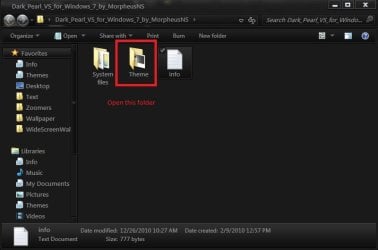
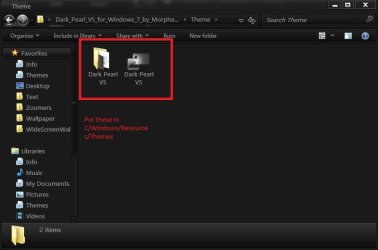
Are you putting the theme in C:\Windows\Resources\Themes?
Do not use both Universal Theme patcher & UxStyle at the same time
Did you turn off User Account Control when you installed Uxstyle & use the right 1 64 bit?
Let me know & we will go from there
Jerry
 

Attachments

  • open.jpg
    open.jpg
    32 KB · Views: 11
  • put in.jpg
    put in.jpg
    28.7 KB · Views: 12

My Computer

Computer type
Laptop
Computer Manufacturer/Model Number
Sager NP9170
OS
Win 7 Pro x64 / Win 10 Pro
CPU
Intel(R) Core(TM) i7-3630QM CPU @ 2.40GHz
Motherboard
CLEVO P170EM
Memory
12 GB
Graphics Card(s)
(1) Intel(R) HD Graphics 4000 (2) NVIDIA GeForce GTX 675M
Sound Card
(1) Realtek High Definition Audio (2) Intel(R) Display Aud
Monitor(s) Displays
17.3
Screen Resolution
1920x1080
Hard Drives
(1) Samsung 860 EVO 500GB(OS) (1) Samsung 860 EVO 500GB(Data)
Keyboard
Backlite
Antivirus
MSE, Malwarebytes Pro
Browser
Firefox
Other Info
DESKTOP: Custom-built.
OS: Win 10 Pro x64.
CASE: Rosewill R5.
CPU: Intel I5 4670K CPU @ 3.40GHz.
CPU COOLER: Cool Master Hyper 212 EVO.
MOTHERBOARD: Asus Z87-A.
MEMORY: Kingston HyperX 2x4 GB.
GPU: Nvidia Geforce 650 TI.
PSU: Corsair TX750.
DRIVES: (1) Samsung 840 120 GB SSD (2) Western Digital blue 500 GB 7200 RPM.
Yes i am placing the themes in C:\Windows\Resources\Themes and I only tried the Uxstyle(64 bit) and patcher one at a time cause the other did not work at first. ???
 

My Computer

Computer Manufacturer/Model Number
Acer Aspire 5551G
OS
Windows 7 Home Premium 64bit
CPU
AMD Turion II P520 Dual-Core Processor 2.30 Ghz
Motherboard
Acer JE50_DN
Memory
4 GB
Graphics Card(s)
ATI Mobility Radeon HD 5470
Hard Drives
C 283 GB
Are any of the themes showing up in Personalization?
Jerry
 

My Computer

Computer type
Laptop
Computer Manufacturer/Model Number
Sager NP9170
OS
Win 7 Pro x64 / Win 10 Pro
CPU
Intel(R) Core(TM) i7-3630QM CPU @ 2.40GHz
Motherboard
CLEVO P170EM
Memory
12 GB
Graphics Card(s)
(1) Intel(R) HD Graphics 4000 (2) NVIDIA GeForce GTX 675M
Sound Card
(1) Realtek High Definition Audio (2) Intel(R) Display Aud
Monitor(s) Displays
17.3
Screen Resolution
1920x1080
Hard Drives
(1) Samsung 860 EVO 500GB(OS) (1) Samsung 860 EVO 500GB(Data)
Keyboard
Backlite
Antivirus
MSE, Malwarebytes Pro
Browser
Firefox
Other Info
DESKTOP: Custom-built.
OS: Win 10 Pro x64.
CASE: Rosewill R5.
CPU: Intel I5 4670K CPU @ 3.40GHz.
CPU COOLER: Cool Master Hyper 212 EVO.
MOTHERBOARD: Asus Z87-A.
MEMORY: Kingston HyperX 2x4 GB.
GPU: Nvidia Geforce 650 TI.
PSU: Corsair TX750.
DRIVES: (1) Samsung 840 120 GB SSD (2) Western Digital blue 500 GB 7200 RPM.
Yes they show up but, of course they don't change anything ??
 

My Computer

Computer Manufacturer/Model Number
Acer Aspire 5551G
OS
Windows 7 Home Premium 64bit
CPU
AMD Turion II P520 Dual-Core Processor 2.30 Ghz
Motherboard
Acer JE50_DN
Memory
4 GB
Graphics Card(s)
ATI Mobility Radeon HD 5470
Hard Drives
C 283 GB
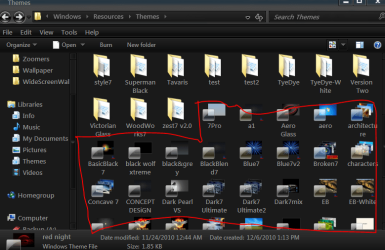
Go to C:\Windows\Resources\Themes and double click on a theme file (screenshot)
Jerry
 

Attachments

  • e.PNG
    e.PNG
    46.3 KB · Views: 9

My Computer

Computer type
Laptop
Computer Manufacturer/Model Number
Sager NP9170
OS
Win 7 Pro x64 / Win 10 Pro
CPU
Intel(R) Core(TM) i7-3630QM CPU @ 2.40GHz
Motherboard
CLEVO P170EM
Memory
12 GB
Graphics Card(s)
(1) Intel(R) HD Graphics 4000 (2) NVIDIA GeForce GTX 675M
Sound Card
(1) Realtek High Definition Audio (2) Intel(R) Display Aud
Monitor(s) Displays
17.3
Screen Resolution
1920x1080
Hard Drives
(1) Samsung 860 EVO 500GB(OS) (1) Samsung 860 EVO 500GB(Data)
Keyboard
Backlite
Antivirus
MSE, Malwarebytes Pro
Browser
Firefox
Other Info
DESKTOP: Custom-built.
OS: Win 10 Pro x64.
CASE: Rosewill R5.
CPU: Intel I5 4670K CPU @ 3.40GHz.
CPU COOLER: Cool Master Hyper 212 EVO.
MOTHERBOARD: Asus Z87-A.
MEMORY: Kingston HyperX 2x4 GB.
GPU: Nvidia Geforce 650 TI.
PSU: Corsair TX750.
DRIVES: (1) Samsung 840 120 GB SSD (2) Western Digital blue 500 GB 7200 RPM.
ok i did
 

My Computer

Computer Manufacturer/Model Number
Acer Aspire 5551G
OS
Windows 7 Home Premium 64bit
CPU
AMD Turion II P520 Dual-Core Processor 2.30 Ghz
Motherboard
Acer JE50_DN
Memory
4 GB
Graphics Card(s)
ATI Mobility Radeon HD 5470
Hard Drives
C 283 GB
ok i did, but none of the custom themes work?
 

My Computer

Computer Manufacturer/Model Number
Acer Aspire 5551G
OS
Windows 7 Home Premium 64bit
CPU
AMD Turion II P520 Dual-Core Processor 2.30 Ghz
Motherboard
Acer JE50_DN
Memory
4 GB
Graphics Card(s)
ATI Mobility Radeon HD 5470
Hard Drives
C 283 GB
This might be a blind guess but make sure you doesn't have the options like Prevent theme change or similar options enabled in group policy and then try changing theme. Refer to below link for explanation.
Group Policy Settings for Personalization
 

My Computer

Computer Manufacturer/Model Number
HCL
OS
Winbdows 7 ultimate x64 | Ubuntu 12.04 x64 LTS
CPU
Core 2 Duo e7400 @ 2.90GHz
Motherboard
Gigabyte G31M-ES2L
Memory
3GB DDR2
Graphics Card(s)
Asus Nvidia GTX 560Ti 1GB
Sound Card
On-board
Monitor(s) Displays
HCL eZeeBee 18.5" LCD
Screen Resolution
1366x768 @ 60Hz
Hard Drives
Western Digital 320GB
PSU
Corsair CX500 V2 500W
Cooling
Stock
Keyboard
Stock
Mouse
Stock
Internet Speed
15-25kBps D/L | 10kBps U/L | Hey Don't laugh
With one are you using now Universal Theme Patcher or UxStyle ?
Jerry
 

My Computer

Computer type
Laptop
Computer Manufacturer/Model Number
Sager NP9170
OS
Win 7 Pro x64 / Win 10 Pro
CPU
Intel(R) Core(TM) i7-3630QM CPU @ 2.40GHz
Motherboard
CLEVO P170EM
Memory
12 GB
Graphics Card(s)
(1) Intel(R) HD Graphics 4000 (2) NVIDIA GeForce GTX 675M
Sound Card
(1) Realtek High Definition Audio (2) Intel(R) Display Aud
Monitor(s) Displays
17.3
Screen Resolution
1920x1080
Hard Drives
(1) Samsung 860 EVO 500GB(OS) (1) Samsung 860 EVO 500GB(Data)
Keyboard
Backlite
Antivirus
MSE, Malwarebytes Pro
Browser
Firefox
Other Info
DESKTOP: Custom-built.
OS: Win 10 Pro x64.
CASE: Rosewill R5.
CPU: Intel I5 4670K CPU @ 3.40GHz.
CPU COOLER: Cool Master Hyper 212 EVO.
MOTHERBOARD: Asus Z87-A.
MEMORY: Kingston HyperX 2x4 GB.
GPU: Nvidia Geforce 650 TI.
PSU: Corsair TX750.
DRIVES: (1) Samsung 840 120 GB SSD (2) Western Digital blue 500 GB 7200 RPM.
I am using Uxstyle currently?
 

My Computer

Computer Manufacturer/Model Number
Acer Aspire 5551G
OS
Windows 7 Home Premium 64bit
CPU
AMD Turion II P520 Dual-Core Processor 2.30 Ghz
Motherboard
Acer JE50_DN
Memory
4 GB
Graphics Card(s)
ATI Mobility Radeon HD 5470
Hard Drives
C 283 GB
windows 7 home premium has the group policy editor? I believe thats only in enterprise and Ultimate versions of windows?
 

My Computer

Computer Manufacturer/Model Number
Acer Aspire 5551G
OS
Windows 7 Home Premium 64bit
CPU
AMD Turion II P520 Dual-Core Processor 2.30 Ghz
Motherboard
Acer JE50_DN
Memory
4 GB
Graphics Card(s)
ATI Mobility Radeon HD 5470
Hard Drives
C 283 GB

My Computer

Computer type
Laptop
Computer Manufacturer/Model Number
Sager NP9170
OS
Win 7 Pro x64 / Win 10 Pro
CPU
Intel(R) Core(TM) i7-3630QM CPU @ 2.40GHz
Motherboard
CLEVO P170EM
Memory
12 GB
Graphics Card(s)
(1) Intel(R) HD Graphics 4000 (2) NVIDIA GeForce GTX 675M
Sound Card
(1) Realtek High Definition Audio (2) Intel(R) Display Aud
Monitor(s) Displays
17.3
Screen Resolution
1920x1080
Hard Drives
(1) Samsung 860 EVO 500GB(OS) (1) Samsung 860 EVO 500GB(Data)
Keyboard
Backlite
Antivirus
MSE, Malwarebytes Pro
Browser
Firefox
Other Info
DESKTOP: Custom-built.
OS: Win 10 Pro x64.
CASE: Rosewill R5.
CPU: Intel I5 4670K CPU @ 3.40GHz.
CPU COOLER: Cool Master Hyper 212 EVO.
MOTHERBOARD: Asus Z87-A.
MEMORY: Kingston HyperX 2x4 GB.
GPU: Nvidia Geforce 650 TI.
PSU: Corsair TX750.
DRIVES: (1) Samsung 840 120 GB SSD (2) Western Digital blue 500 GB 7200 RPM.
Yes i did disable UAC settings , an i unpatched my files before i used UXstyle. I still do have it though
 

My Computer

Computer Manufacturer/Model Number
Acer Aspire 5551G
OS
Windows 7 Home Premium 64bit
CPU
AMD Turion II P520 Dual-Core Processor 2.30 Ghz
Motherboard
Acer JE50_DN
Memory
4 GB
Graphics Card(s)
ATI Mobility Radeon HD 5470
Hard Drives
C 283 GB
From the Uxstyle guide
Q: I installed the program but I can't see the process nor can I use a theme...help!
A: This normally is the result of not turning off UAC completely before installing the program. Uninstall UxStyle Core Beta from Programs and Features, restart the computer, turn off UAC, restart the computer, install UxStyle Core Beta, restart the computer. Your theme should work then.​
Did you restart after disabling UAC
Jerry
 

My Computer

Computer type
Laptop
Computer Manufacturer/Model Number
Sager NP9170
OS
Win 7 Pro x64 / Win 10 Pro
CPU
Intel(R) Core(TM) i7-3630QM CPU @ 2.40GHz
Motherboard
CLEVO P170EM
Memory
12 GB
Graphics Card(s)
(1) Intel(R) HD Graphics 4000 (2) NVIDIA GeForce GTX 675M
Sound Card
(1) Realtek High Definition Audio (2) Intel(R) Display Aud
Monitor(s) Displays
17.3
Screen Resolution
1920x1080
Hard Drives
(1) Samsung 860 EVO 500GB(OS) (1) Samsung 860 EVO 500GB(Data)
Keyboard
Backlite
Antivirus
MSE, Malwarebytes Pro
Browser
Firefox
Other Info
DESKTOP: Custom-built.
OS: Win 10 Pro x64.
CASE: Rosewill R5.
CPU: Intel I5 4670K CPU @ 3.40GHz.
CPU COOLER: Cool Master Hyper 212 EVO.
MOTHERBOARD: Asus Z87-A.
MEMORY: Kingston HyperX 2x4 GB.
GPU: Nvidia Geforce 650 TI.
PSU: Corsair TX750.
DRIVES: (1) Samsung 840 120 GB SSD (2) Western Digital blue 500 GB 7200 RPM.
I did restart and I alredy tried dat an unfortunatly it didn wrk
 

My Computer

Computer Manufacturer/Model Number
Acer Aspire 5551G
OS
Windows 7 Home Premium 64bit
CPU
AMD Turion II P520 Dual-Core Processor 2.30 Ghz
Motherboard
Acer JE50_DN
Memory
4 GB
Graphics Card(s)
ATI Mobility Radeon HD 5470
Hard Drives
C 283 GB
Back
Top