Theme Pack - Create, Save, Install, and Delete

How to Make your own Windows 7 Theme Pack

   Information
A theme pack is a cab file (.themepack) that includes a desktop background, window colors, sounds, screen saver, icons, and mouse pointers (cursors) used to change your Windows 7 theme all at once instead of each individual item.

A theme pack (.themepack) file will allow you to share your theme with family and friends.

This will show you how to create, save, install, and delete a theme pack.

The Windows 7 Starter and Home Basic editions do not have this feature included in them.


   Tip


OPTION ONE

To Make a Theme Pack


NOTE: If you have not already, then you will need to customize your current Windows 7 theme to how you want the theme pack to be saved as by changing the items you want listed below.
1. Change the Desktop Background picture and settings.

2. Change the Window Color and Appearance settings.

3. Change the Sounds for the Windows 7 sound events to any sound file that you would like instead.

4. Change the Screen Saver and settings to be used for this theme pack.

5. Change the Mouse Pointers (cursors) to use pointers of your choice.

6. Save this theme.

7. Proceed to OPTION TWO below to save your customized theme as a theme pack.


OPTION TWO

To Save Current Theme as a Theme Pack File


NOTE: This will save the current customized theme you have running now as a .themepack file with any name you like to any location that you select.
1. Right click on a empty space on the desktop and click on Personalize. (See screenshot below)
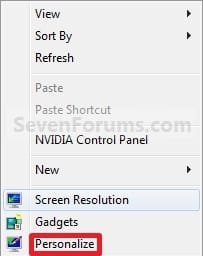
Right_Click.jpg
2. Under My Themes, click on the Save theme link towards the right. (See screenshot above)
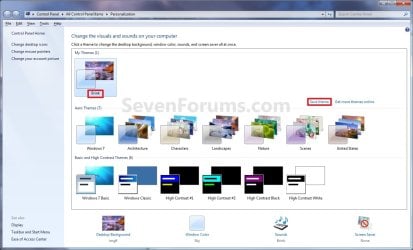
Personalization.jpg
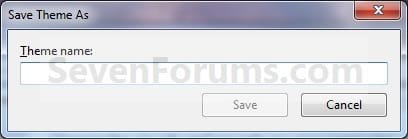
3. Type in a name you want for this theme, and click on the Save button. (See screenshot below)
Name.jpg
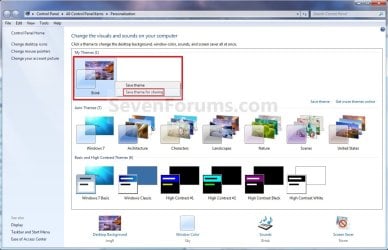
4. Under My Themes, right click on the current theme and click on Save theme for sharing. (See sceenshot below)
Personalization-2.jpg
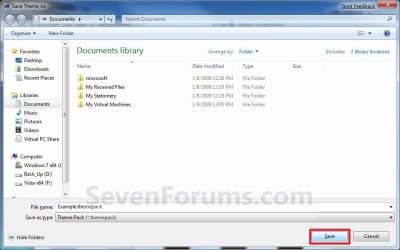
5. Navigate to the location that you want to save the .themepack file at, type in a file name for the .themepack, and click on the Save button. (See screenshot below)
Save_Theme_As-2.jpg
6. You can now close the Personalization window. (See screenshot under step 2)


OPTION THREE

To Install a Theme Pack


NOTE: This will show you how to install a .themepack file so that it will become your current theme and be available to select in the Personaliztion window under My Themes.
1. Download and save a .themepack file of your choice to your desktop.
NOTE: For example, the Example.themepack file used in OPTION TWO.

2. Double click on the .themepack file to install it on your computer.
NOTE: This will install the .themepack to a folder with the themepack name in the hidden
C:\Users\User-Name\AppData\Local\Microsoft\Windows\Themes folder.

3. You will notice that this .themepack file is now your current theme and has been added to the Personalization window under My Themes. (See screenshot below)
Personalization-3.jpg


OPTION FOUR

To Delete a Installed Theme Pack


NOTE: This will show you how to delete a theme that you have installed to remove it from the My Themes section in the Personalization windows.
1. Right click on a empty space on the desktop and click on Personalize. (See screenshot below)
Right_Click.jpg
2. Select another theme other than the one that you want to delete in the My Themes section. (See screenshot below step 3)

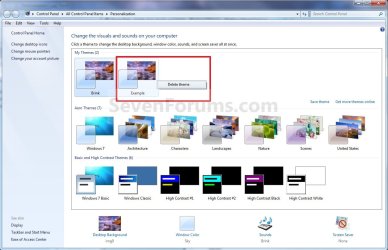
3. Right click on the theme (ex: Example) in the My Themes section that you want to delete, and click on Delete Theme. (See screenshot below)
Personalization-Delete.jpg
4. Click on Yes to confirm the deletion. (See screenshot below)
Confirm_Deletion.jpg
5. When done, close the Personalization window. (See screenshot below step 3)
That's it,
Shawn


Last edited:
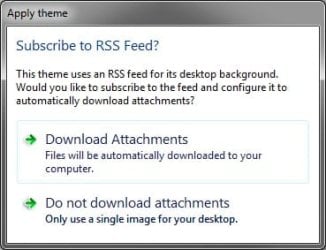
It's because of the RSS wallpaper. When I install you themepack file, it asks to "Download Attachments" to setup and configure the RSS feed. The RSS feed will have to be configured on the computer first before it will work. Not sure about the screen saver unless it's part of the RSS as well.

RSS.jpg

The themepack would work automatically if it was just a normal desktop background image instead of one through a RSS though.
 

My Computer

Computer type
PC/Desktop
Computer Manufacturer/Model Number
Self built custom
OS
64-bit Windows 11 Pro for Workstations
CPU
Intel i7-8700K OC'd to 5 GHz
Motherboard
ASUS ROG Maximus XI Formula Z390
Memory
64 GB (4x16GB) G.SKILL TridentZ RGB DDR4 3600 MHz
Graphics Card(s)
ASUS ROG-STRIX-GTX1080TI-O11G-GAMING
Sound Card
Integrated
Monitor(s) Displays
2 x Samsung Odyssey G7 27"
Screen Resolution
2560x1440
Hard Drives
1TB Samsung 990 PRO M.2,
4TB Samsung 990 PRO PRO M.2,
TerraMaster F8 SSD Plus NAS
PSU
Seasonic Prime Titanium 850W
Case
Thermaltake Core P3
Cooling
Corsair Hydro H115i
Keyboard
Logitech wireless K800
Mouse
Logitech MX Master 4
Internet Speed
2 Gb/s Download and 100 Mb/s Upload
Antivirus
Malwarebyte Anti-Malware Premium
Browser
Google Chrome
Other Info
Logitech Z625 speaker system,
Logitech BRIO 4K Pro webcam,
HP Color LaserJet Pro MFP M477fdn,
APC SMART-UPS RT 1000 XL - SURT1000XLI,
Galaxy S23 Plus phone
I created the theme so that people who like my photography can install it and their wallpaper will be a slideshow of my photographs which automatically update with new photos and their screensaver will be a screensaver I created with my photographs.

Is there any way I can get it working with the RSS feed?

Thanks for your help.
 

My Computer

Computer Manufacturer/Model Number
Gateway E-295C
OS
Windows 7 Ultimate x64 [Signature Edition]
CPU
Intel Core 2 Duo T7700 (2.40GHz, 800MHz FSB, 4MB L2 Cache)
Memory
4GB 667MHz DDR2 Dual-Channel
Graphics Card(s)
ATI Radeon X2300 HD 256MB (128MB GDDR3 Dedicated)
Hard Drives
HITACHI 500GB 5400 RPM 8MB Cache SATA 3.0Gb/s HDD
I never used a RSS feed, but it looks like if you clicked on the "Download Attachments" option, it should start working.
 

My Computer

Computer type
PC/Desktop
Computer Manufacturer/Model Number
Self built custom
OS
64-bit Windows 11 Pro for Workstations
CPU
Intel i7-8700K OC'd to 5 GHz
Motherboard
ASUS ROG Maximus XI Formula Z390
Memory
64 GB (4x16GB) G.SKILL TridentZ RGB DDR4 3600 MHz
Graphics Card(s)
ASUS ROG-STRIX-GTX1080TI-O11G-GAMING
Sound Card
Integrated
Monitor(s) Displays
2 x Samsung Odyssey G7 27"
Screen Resolution
2560x1440
Hard Drives
1TB Samsung 990 PRO M.2,
4TB Samsung 990 PRO PRO M.2,
TerraMaster F8 SSD Plus NAS
PSU
Seasonic Prime Titanium 850W
Case
Thermaltake Core P3
Cooling
Corsair Hydro H115i
Keyboard
Logitech wireless K800
Mouse
Logitech MX Master 4
Internet Speed
2 Gb/s Download and 100 Mb/s Upload
Antivirus
Malwarebyte Anti-Malware Premium
Browser
Google Chrome
Other Info
Logitech Z625 speaker system,
Logitech BRIO 4K Pro webcam,
HP Color LaserJet Pro MFP M477fdn,
APC SMART-UPS RT 1000 XL - SURT1000XLI,
Galaxy S23 Plus phone

My Computer

Computer Manufacturer/Model Number
Gateway E-295C
OS
Windows 7 Ultimate x64 [Signature Edition]
CPU
Intel Core 2 Duo T7700 (2.40GHz, 800MHz FSB, 4MB L2 Cache)
Memory
4GB 667MHz DDR2 Dual-Channel
Graphics Card(s)
ATI Radeon X2300 HD 256MB (128MB GDDR3 Dedicated)
Hard Drives
HITACHI 500GB 5400 RPM 8MB Cache SATA 3.0Gb/s HDD
You might post this as a separate post in the Customization forum to see what you may get there for suggestions.
 

My Computer

Computer type
PC/Desktop
Computer Manufacturer/Model Number
Self built custom
OS
64-bit Windows 11 Pro for Workstations
CPU
Intel i7-8700K OC'd to 5 GHz
Motherboard
ASUS ROG Maximus XI Formula Z390
Memory
64 GB (4x16GB) G.SKILL TridentZ RGB DDR4 3600 MHz
Graphics Card(s)
ASUS ROG-STRIX-GTX1080TI-O11G-GAMING
Sound Card
Integrated
Monitor(s) Displays
2 x Samsung Odyssey G7 27"
Screen Resolution
2560x1440
Hard Drives
1TB Samsung 990 PRO M.2,
4TB Samsung 990 PRO PRO M.2,
TerraMaster F8 SSD Plus NAS
PSU
Seasonic Prime Titanium 850W
Case
Thermaltake Core P3
Cooling
Corsair Hydro H115i
Keyboard
Logitech wireless K800
Mouse
Logitech MX Master 4
Internet Speed
2 Gb/s Download and 100 Mb/s Upload
Antivirus
Malwarebyte Anti-Malware Premium
Browser
Google Chrome
Other Info
Logitech Z625 speaker system,
Logitech BRIO 4K Pro webcam,
HP Color LaserJet Pro MFP M477fdn,
APC SMART-UPS RT 1000 XL - SURT1000XLI,
Galaxy S23 Plus phone
dear Brink,

i've installed this attached theme, and i can uninstall/delete it from "My Themes"
by the method that you showed me in earlier page in this thread

but when i click the "Desktop Background" and "Picture Location"
there still a location/menu that create by this theme
the location/menu called DesktopBackground

could you help me how to remove this location/menu from my "Picture Location"
thanks
 

Attachments

My Computer

Computer Manufacturer/Model Number
Benq Joybook S32B
OS
windows 7 enterprise 32 bit
CPU
intel core 2 duo T7250
Motherboard
benq
Memory
2GB PC2-5300
Graphics Card(s)
intel 965
Hello Bonggo, and welcome to Seven Forums.

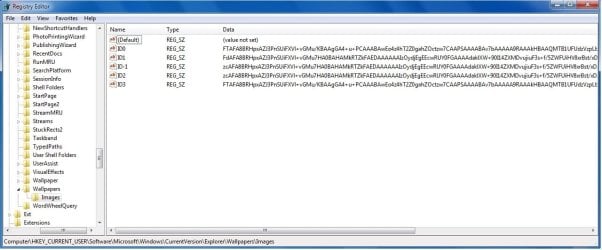
They are listed in this registry location:
HKEY_CURRENT_USER\Software\Microsoft\Windows\CurrentVersion\Explorer\Wallpapers\Images

The default ones are coded, but you should see the extra ones listed in the right pane of "Images".

Hope this helps,
Shawn
 

My Computer

Computer type
PC/Desktop
Computer Manufacturer/Model Number
Self built custom
OS
64-bit Windows 11 Pro for Workstations
CPU
Intel i7-8700K OC'd to 5 GHz
Motherboard
ASUS ROG Maximus XI Formula Z390
Memory
64 GB (4x16GB) G.SKILL TridentZ RGB DDR4 3600 MHz
Graphics Card(s)
ASUS ROG-STRIX-GTX1080TI-O11G-GAMING
Sound Card
Integrated
Monitor(s) Displays
2 x Samsung Odyssey G7 27"
Screen Resolution
2560x1440
Hard Drives
1TB Samsung 990 PRO M.2,
4TB Samsung 990 PRO PRO M.2,
TerraMaster F8 SSD Plus NAS
PSU
Seasonic Prime Titanium 850W
Case
Thermaltake Core P3
Cooling
Corsair Hydro H115i
Keyboard
Logitech wireless K800
Mouse
Logitech MX Master 4
Internet Speed
2 Gb/s Download and 100 Mb/s Upload
Antivirus
Malwarebyte Anti-Malware Premium
Browser
Google Chrome
Other Info
Logitech Z625 speaker system,
Logitech BRIO 4K Pro webcam,
HP Color LaserJet Pro MFP M477fdn,
APC SMART-UPS RT 1000 XL - SURT1000XLI,
Galaxy S23 Plus phone
Hello Bonggo, and welcome to Seven Forums.

They are listed in this registry location:
HKEY_CURRENT_USER\Software\Microsoft\Windows\CurrentVersion\Explorer\Wallpapers\Images

The default ones are coded, but you should see the extra ones listed in the right pane of "Images".

Hope this helps,
Shawn

thanks for welcoming me here :D

but forgive me i'm not quite understand what you mean
due to english is not my mother tongue

here's the screen shot from my registry
so is it safe for me to delete "ID0", "ID1", "ID-1", "ID2", and "ID3"
to delete the location/menu called DesktopBackground

fyi, i've installed a couple of the themes like the one i gave to you
 

Attachments

  • screen shot.jpg
    screen shot.jpg
    80 KB · Views: 287

My Computer

Computer Manufacturer/Model Number
Benq Joybook S32B
OS
windows 7 enterprise 32 bit
CPU
intel core 2 duo T7250
Motherboard
benq
Memory
2GB PC2-5300
Graphics Card(s)
intel 965
I was able to get the theme working with the RSS. I guess the way the RSS is in Photobucket isn't compatible but when I did it through frameit it worked. Now my only problem is that the screensaver isn't working. For some reason it seems like the screensaver line doesn't work unless it's one of the Windows defaults. Any user-installed screensavers don't seem to work. If anyone is able to figure out how to get a custom screensaver to work please let me know.

Either way, I'm just happy I got the RSS to work. Thanks again for all the help!
 

My Computer

Computer Manufacturer/Model Number
Gateway E-295C
OS
Windows 7 Ultimate x64 [Signature Edition]
CPU
Intel Core 2 Duo T7700 (2.40GHz, 800MHz FSB, 4MB L2 Cache)
Memory
4GB 667MHz DDR2 Dual-Channel
Graphics Card(s)
ATI Radeon X2300 HD 256MB (128MB GDDR3 Dedicated)
Hard Drives
HITACHI 500GB 5400 RPM 8MB Cache SATA 3.0Gb/s HDD
Hello Bonggo, and welcome to Seven Forums.

They are listed in this registry location:
HKEY_CURRENT_USER\Software\Microsoft\Windows\CurrentVersion\Explorer\Wallpapers\Images

The default ones are coded, but you should see the extra ones listed in the right pane of "Images".

Hope this helps,
Shawn

thanks for welcoming me here :D

but forgive me i'm not quite understand what you mean
due to english is not my mother tongue

here's the screen shot from my registry
so is it safe for me to delete "ID0", "ID1", "ID-1", "ID2", and "ID3"
to delete the location/menu called DesktopBackground

fyi, i've installed a couple of the themes like the one i gave to you

Err, it looks like they are all coded now. There's no way to tell which one is for what folder by looking at it now. I'm not sure how to remove a listed "Picture Location" now. :(
 

My Computer

Computer type
PC/Desktop
Computer Manufacturer/Model Number
Self built custom
OS
64-bit Windows 11 Pro for Workstations
CPU
Intel i7-8700K OC'd to 5 GHz
Motherboard
ASUS ROG Maximus XI Formula Z390
Memory
64 GB (4x16GB) G.SKILL TridentZ RGB DDR4 3600 MHz
Graphics Card(s)
ASUS ROG-STRIX-GTX1080TI-O11G-GAMING
Sound Card
Integrated
Monitor(s) Displays
2 x Samsung Odyssey G7 27"
Screen Resolution
2560x1440
Hard Drives
1TB Samsung 990 PRO M.2,
4TB Samsung 990 PRO PRO M.2,
TerraMaster F8 SSD Plus NAS
PSU
Seasonic Prime Titanium 850W
Case
Thermaltake Core P3
Cooling
Corsair Hydro H115i
Keyboard
Logitech wireless K800
Mouse
Logitech MX Master 4
Internet Speed
2 Gb/s Download and 100 Mb/s Upload
Antivirus
Malwarebyte Anti-Malware Premium
Browser
Google Chrome
Other Info
Logitech Z625 speaker system,
Logitech BRIO 4K Pro webcam,
HP Color LaserJet Pro MFP M477fdn,
APC SMART-UPS RT 1000 XL - SURT1000XLI,
Galaxy S23 Plus phone
Hello Bonggo, and welcome to Seven Forums.

They are listed in this registry location:
HKEY_CURRENT_USER\Software\Microsoft\Windows\CurrentVersion\Explorer\Wallpapers\Images

The default ones are coded, but you should see the extra ones listed in the right pane of "Images".

Hope this helps,
Shawn

thanks for welcoming me here :D

but forgive me i'm not quite understand what you mean
due to english is not my mother tongue

here's the screen shot from my registry
so is it safe for me to delete "ID0", "ID1", "ID-1", "ID2", and "ID3"
to delete the location/menu called DesktopBackground

fyi, i've installed a couple of the themes like the one i gave to you

Err, it looks like they are all coded now. There's no way to tell which one is for what folder by looking at it now. I'm not sure how to remove a listed "Picture Location" now. :(

hmmm okey,
i'll try to see my friends registry to see what they have

thank you so much to give me the hint

it's worked
my friends only have (Default) and "ID3"
so i deleted "ID0", "ID1", "ID-1", and "ID2"
 
Last edited:

My Computer

Computer Manufacturer/Model Number
Benq Joybook S32B
OS
windows 7 enterprise 32 bit
CPU
intel core 2 duo T7250
Motherboard
benq
Memory
2GB PC2-5300
Graphics Card(s)
intel 965
That's great news Bonggo. Thank you for posting back with your results. :)
 

My Computer

Computer type
PC/Desktop
Computer Manufacturer/Model Number
Self built custom
OS
64-bit Windows 11 Pro for Workstations
CPU
Intel i7-8700K OC'd to 5 GHz
Motherboard
ASUS ROG Maximus XI Formula Z390
Memory
64 GB (4x16GB) G.SKILL TridentZ RGB DDR4 3600 MHz
Graphics Card(s)
ASUS ROG-STRIX-GTX1080TI-O11G-GAMING
Sound Card
Integrated
Monitor(s) Displays
2 x Samsung Odyssey G7 27"
Screen Resolution
2560x1440
Hard Drives
1TB Samsung 990 PRO M.2,
4TB Samsung 990 PRO PRO M.2,
TerraMaster F8 SSD Plus NAS
PSU
Seasonic Prime Titanium 850W
Case
Thermaltake Core P3
Cooling
Corsair Hydro H115i
Keyboard
Logitech wireless K800
Mouse
Logitech MX Master 4
Internet Speed
2 Gb/s Download and 100 Mb/s Upload
Antivirus
Malwarebyte Anti-Malware Premium
Browser
Google Chrome
Other Info
Logitech Z625 speaker system,
Logitech BRIO 4K Pro webcam,
HP Color LaserJet Pro MFP M477fdn,
APC SMART-UPS RT 1000 XL - SURT1000XLI,
Galaxy S23 Plus phone
I was able to get the theme working with the RSS. I guess the way the RSS is in Photobucket isn't compatible but when I did it through frameit it worked. Now my only problem is that the screensaver isn't working. For some reason it seems like the screensaver line doesn't work unless it's one of the Windows defaults. Any user-installed screensavers don't seem to work. If anyone is able to figure out how to get a custom screensaver to work please let me know.

Either way, I'm just happy I got the RSS to work. Thanks again for all the help!

You're welcome. :)
 

My Computer

Computer type
PC/Desktop
Computer Manufacturer/Model Number
Self built custom
OS
64-bit Windows 11 Pro for Workstations
CPU
Intel i7-8700K OC'd to 5 GHz
Motherboard
ASUS ROG Maximus XI Formula Z390
Memory
64 GB (4x16GB) G.SKILL TridentZ RGB DDR4 3600 MHz
Graphics Card(s)
ASUS ROG-STRIX-GTX1080TI-O11G-GAMING
Sound Card
Integrated
Monitor(s) Displays
2 x Samsung Odyssey G7 27"
Screen Resolution
2560x1440
Hard Drives
1TB Samsung 990 PRO M.2,
4TB Samsung 990 PRO PRO M.2,
TerraMaster F8 SSD Plus NAS
PSU
Seasonic Prime Titanium 850W
Case
Thermaltake Core P3
Cooling
Corsair Hydro H115i
Keyboard
Logitech wireless K800
Mouse
Logitech MX Master 4
Internet Speed
2 Gb/s Download and 100 Mb/s Upload
Antivirus
Malwarebyte Anti-Malware Premium
Browser
Google Chrome
Other Info
Logitech Z625 speaker system,
Logitech BRIO 4K Pro webcam,
HP Color LaserJet Pro MFP M477fdn,
APC SMART-UPS RT 1000 XL - SURT1000XLI,
Galaxy S23 Plus phone
just one question :

is it possible to create a themepack that also includes shellicons like explorerfolders and such.
i have modified imageres.dll and shell32.dll, explorer.exe and more to create a custom theme, but saving a themepack doesn't include these things...

or do i have to use a different method ?
 

My Computer

OS
Windows 7 Ultimate 32bit RTM
Hello MallRat,

Sorry, but a .themepack will only include the items in OPTION ONE of the tutorial. :(

Usually what you are wanting to do involves a 3rd party program to modify and change the skin of Windows 7 instead.
 

My Computer

Computer type
PC/Desktop
Computer Manufacturer/Model Number
Self built custom
OS
64-bit Windows 11 Pro for Workstations
CPU
Intel i7-8700K OC'd to 5 GHz
Motherboard
ASUS ROG Maximus XI Formula Z390
Memory
64 GB (4x16GB) G.SKILL TridentZ RGB DDR4 3600 MHz
Graphics Card(s)
ASUS ROG-STRIX-GTX1080TI-O11G-GAMING
Sound Card
Integrated
Monitor(s) Displays
2 x Samsung Odyssey G7 27"
Screen Resolution
2560x1440
Hard Drives
1TB Samsung 990 PRO M.2,
4TB Samsung 990 PRO PRO M.2,
TerraMaster F8 SSD Plus NAS
PSU
Seasonic Prime Titanium 850W
Case
Thermaltake Core P3
Cooling
Corsair Hydro H115i
Keyboard
Logitech wireless K800
Mouse
Logitech MX Master 4
Internet Speed
2 Gb/s Download and 100 Mb/s Upload
Antivirus
Malwarebyte Anti-Malware Premium
Browser
Google Chrome
Other Info
Logitech Z625 speaker system,
Logitech BRIO 4K Pro webcam,
HP Color LaserJet Pro MFP M477fdn,
APC SMART-UPS RT 1000 XL - SURT1000XLI,
Galaxy S23 Plus phone
Hello MallRat,

Sorry, but a .themepack will only include the items in OPTION ONE of the tutorial. :(

Usually what you are wanting to do involves a 3rd party program to modify and change the skin of Windows 7 instead.

And what do you recommend ? I want to have my mods all packed together (like a themepack) that needs just a few mouseclicks to install all icons, shell mods visual styles, etc...
 

My Computer

OS
Windows 7 Ultimate 32bit RTM
MallRat,

I suppose one the Stardock programs that has the features that you need may work fine for this.
 

My Computer

Computer type
PC/Desktop
Computer Manufacturer/Model Number
Self built custom
OS
64-bit Windows 11 Pro for Workstations
CPU
Intel i7-8700K OC'd to 5 GHz
Motherboard
ASUS ROG Maximus XI Formula Z390
Memory
64 GB (4x16GB) G.SKILL TridentZ RGB DDR4 3600 MHz
Graphics Card(s)
ASUS ROG-STRIX-GTX1080TI-O11G-GAMING
Sound Card
Integrated
Monitor(s) Displays
2 x Samsung Odyssey G7 27"
Screen Resolution
2560x1440
Hard Drives
1TB Samsung 990 PRO M.2,
4TB Samsung 990 PRO PRO M.2,
TerraMaster F8 SSD Plus NAS
PSU
Seasonic Prime Titanium 850W
Case
Thermaltake Core P3
Cooling
Corsair Hydro H115i
Keyboard
Logitech wireless K800
Mouse
Logitech MX Master 4
Internet Speed
2 Gb/s Download and 100 Mb/s Upload
Antivirus
Malwarebyte Anti-Malware Premium
Browser
Google Chrome
Other Info
Logitech Z625 speaker system,
Logitech BRIO 4K Pro webcam,
HP Color LaserJet Pro MFP M477fdn,
APC SMART-UPS RT 1000 XL - SURT1000XLI,
Galaxy S23 Plus phone
Hi Shawn, great tutorial!

I have a quick question... if its been answered already, I've probably missed it...
How would the themepack be applied to new users logging in for the first time from a domain?

Domain accounts that gain local admin access, the theme copies over from the default user profile.
However, non-admin accounts, it doesnt.

Cheers,

Edit: Or, how to apply it from command prompt, if possible?
 

My Computer

OS
Windows 7 Enterprise
CPU
Intel Pentium Dual E2200 @2.2GHz
Motherboard
Gigabyte II-G31
Memory
4GB
Graphics Card(s)
Palit GForce 9500GT 1GB
Sound Card
onBoard
Hard Drives
WesternDigital: 250GB + 1TB + 1TB + 2TB
PSU
450W
Case
CoolerMaster CM690
Cooling
Corsair H50
Mouse
Logitech MX518

My Computer

Computer type
PC/Desktop
Computer Manufacturer/Model Number
Self built custom
OS
64-bit Windows 11 Pro for Workstations
CPU
Intel i7-8700K OC'd to 5 GHz
Motherboard
ASUS ROG Maximus XI Formula Z390
Memory
64 GB (4x16GB) G.SKILL TridentZ RGB DDR4 3600 MHz
Graphics Card(s)
ASUS ROG-STRIX-GTX1080TI-O11G-GAMING
Sound Card
Integrated
Monitor(s) Displays
2 x Samsung Odyssey G7 27"
Screen Resolution
2560x1440
Hard Drives
1TB Samsung 990 PRO M.2,
4TB Samsung 990 PRO PRO M.2,
TerraMaster F8 SSD Plus NAS
PSU
Seasonic Prime Titanium 850W
Case
Thermaltake Core P3
Cooling
Corsair Hydro H115i
Keyboard
Logitech wireless K800
Mouse
Logitech MX Master 4
Internet Speed
2 Gb/s Download and 100 Mb/s Upload
Antivirus
Malwarebyte Anti-Malware Premium
Browser
Google Chrome
Other Info
Logitech Z625 speaker system,
Logitech BRIO 4K Pro webcam,
HP Color LaserJet Pro MFP M477fdn,
APC SMART-UPS RT 1000 XL - SURT1000XLI,
Galaxy S23 Plus phone
Hey Shawn, I'm having an issue with it saving the sound scheme. I went step by step but when I import it into my virtual machine, it defaults to Windows' sound scheme. Did I miss something?
 

My Computer

Computer Manufacturer/Model Number
ASUS
OS
Windows 7 Ultimate x64
CPU
AMD Athlon 240 II @ 2.8-4.004 ghz
Motherboard
M4A78LT-M LE
Memory
SuperTalent 4gb DDR3
Graphics Card(s)
ATI Radeon 3000HD
Screen Resolution
1440*900
Case
Re-modded Dell Dimension 4550
Cooling
Vantec 92mm Tornado x2
Other Info
It looks pretty.
Back
Top