Solved Theme ruining programs! Do I need to use multiple shell32.dll?

KS17

New member
Local time
11:05 AM
Messages
24
I recently installed a theme that made me change files such as shell32.dll and explorer.dll. Unfortunately, the theme is now messing with things such as Microsoft Word (Page colour is always grey instead of white -.- ) and a calender organization software. I'll show a picture of what I mean:
yZNI

Other than this, everything seems to look good, but this program doesn't have themes you can change. So basically is there a chance I can use an original shell32.dll files for example and have this organizer program use those files, while everything else uses the custom shell32.dll? Or are there any other solutions anybody can think of? Hopefully this is in the best possible section... There were several areas I could have put it.

Thanks in advance anyways!
 

My Computer

Computer Manufacturer/Model Number
Desktop
OS
MS Windows 7 Home Premium 64-bit SP1
CPU
Intel Core i5 2500K @ 3.30GHz
Motherboard
Gigabyte Technology Co., Ltd. P67A-D3-B3 (Socket 1155)
Memory
16.0 GB Dual-Channel DDR3 @ 798MHz (11-11-11-28)
Graphics Card(s)
1024MB GeForce GTX 560 Ti (Gigabyte)
Sound Card
High Definition Audio Device
Monitor(s) Displays
S22B350 (1920x1080@60Hz)
Screen Resolution
1920x1080
Hard Drives
488GB Western Digital WDC WD5000AAKX-001CA0 ATA Device (SATA)
PSU
Corsair 650W
Keyboard
Logitech HID-compliant Unifying keyboard
Mouse
Logitech HID-compliant Unifying Mouse
When you install a theme you do not have to change the shell32.dll or the explorer.exe it is just for of the looks of things.
Have you tried using the default Aero theme to see if you still have the same problem? If you switch to the default theme in your Windows look like they should that means is the theme, some dark themes will make programs like Microsoft Word hard to use.
There is no way to use the custom shell32.dll in the default one at the same time.
Jerry
 

My Computer

Computer type
Laptop
Computer Manufacturer/Model Number
Sager NP9170
OS
Win 7 Pro x64 / Win 10 Pro
CPU
Intel(R) Core(TM) i7-3630QM CPU @ 2.40GHz
Motherboard
CLEVO P170EM
Memory
12 GB
Graphics Card(s)
(1) Intel(R) HD Graphics 4000 (2) NVIDIA GeForce GTX 675M
Sound Card
(1) Realtek High Definition Audio (2) Intel(R) Display Aud
Monitor(s) Displays
17.3
Screen Resolution
1920x1080
Hard Drives
(1) Samsung 860 EVO 500GB(OS) (1) Samsung 860 EVO 500GB(Data)
Keyboard
Backlite
Antivirus
MSE, Malwarebytes Pro
Browser
Firefox
Other Info
DESKTOP: Custom-built.
OS: Win 10 Pro x64.
CASE: Rosewill R5.
CPU: Intel I5 4670K CPU @ 3.40GHz.
CPU COOLER: Cool Master Hyper 212 EVO.
MOTHERBOARD: Asus Z87-A.
MEMORY: Kingston HyperX 2x4 GB.
GPU: Nvidia Geforce 650 TI.
PSU: Corsair TX750.
DRIVES: (1) Samsung 840 120 GB SSD (2) Western Digital blue 500 GB 7200 RPM.
is it possible to change a blank page color to white then save it as a template then open the template every time you want to use word,
 

My Computer

Computer Manufacturer/Model Number
Hewlett packard/p6512uk
OS
Microsoft Windows 7 Home Premium 64-bit 7600
CPU
IIx4 amd athelon 635 processor
Motherboard
FOXCONN 2AA9
Memory
2x2gb
Graphics Card(s)
ati radeon HD 5450
Sound Card
(1) Realtek High Definition Audio (2) AMD High Definition
Monitor(s) Displays
samsung lcd tv 32"
Screen Resolution
1360x 768
Hard Drives
(1) WDC WD10 01FAES-60Z2A0 SATA Disk Device (2) Maxtor OneTouch USB Device (3) ST310003 33AS USB Device (4) WD My Book 1111 USB Device
PSU
?
Cooling
air!
Keyboard
wireless hp
Mouse
wireless Hp,optical
Internet Speed
1.10mb/s
Antivirus
MSE
Browser
Firefox
Thanks for the responses. Yes I had to change shell32.dll and explorer.dll and wmploc.dll I believe. I had to change them in order to allow the theme to customized other components such as windows explorer, etc. But in doing this, it messed up other things. Yes I agree with Word 2010 you can change the color of the paper, but with other programs like this organizer that has no themes whatsoever, what must be done? Absolutely nothing? That's a shame :/
 

My Computer

Computer Manufacturer/Model Number
Desktop
OS
MS Windows 7 Home Premium 64-bit SP1
CPU
Intel Core i5 2500K @ 3.30GHz
Motherboard
Gigabyte Technology Co., Ltd. P67A-D3-B3 (Socket 1155)
Memory
16.0 GB Dual-Channel DDR3 @ 798MHz (11-11-11-28)
Graphics Card(s)
1024MB GeForce GTX 560 Ti (Gigabyte)
Sound Card
High Definition Audio Device
Monitor(s) Displays
S22B350 (1920x1080@60Hz)
Screen Resolution
1920x1080
Hard Drives
488GB Western Digital WDC WD5000AAKX-001CA0 ATA Device (SATA)
PSU
Corsair 650W
Keyboard
Logitech HID-compliant Unifying keyboard
Mouse
Logitech HID-compliant Unifying Mouse
Post a link to the theme you are using and I will look at it.

What does it look like when you change to the default aero theme?

Jerry
 

My Computer

Computer type
Laptop
Computer Manufacturer/Model Number
Sager NP9170
OS
Win 7 Pro x64 / Win 10 Pro
CPU
Intel(R) Core(TM) i7-3630QM CPU @ 2.40GHz
Motherboard
CLEVO P170EM
Memory
12 GB
Graphics Card(s)
(1) Intel(R) HD Graphics 4000 (2) NVIDIA GeForce GTX 675M
Sound Card
(1) Realtek High Definition Audio (2) Intel(R) Display Aud
Monitor(s) Displays
17.3
Screen Resolution
1920x1080
Hard Drives
(1) Samsung 860 EVO 500GB(OS) (1) Samsung 860 EVO 500GB(Data)
Keyboard
Backlite
Antivirus
MSE, Malwarebytes Pro
Browser
Firefox
Other Info
DESKTOP: Custom-built.
OS: Win 10 Pro x64.
CASE: Rosewill R5.
CPU: Intel I5 4670K CPU @ 3.40GHz.
CPU COOLER: Cool Master Hyper 212 EVO.
MOTHERBOARD: Asus Z87-A.
MEMORY: Kingston HyperX 2x4 GB.
GPU: Nvidia Geforce 650 TI.
PSU: Corsair TX750.
DRIVES: (1) Samsung 840 120 GB SSD (2) Western Digital blue 500 GB 7200 RPM.
Post a link to the theme you are using and I will look at it.

What does it look like when you change to the default aero theme?

Jerry

The link for the theme is here: Placebo Theme

And here is a picture of the thing on a regular theme:
zpdl


So it seems like it actually isn't the .dll files that are messing with it, as my explorer is messed up on this theme because I have the edited .dll files:
zpf5


Now I'm even more lost on how to make the program work with the theme... I guess I would have to try to contact the developer? Or learn how to make an exception on that one program somehow. More insight would be helpful! Thanks!
 

My Computer

Computer Manufacturer/Model Number
Desktop
OS
MS Windows 7 Home Premium 64-bit SP1
CPU
Intel Core i5 2500K @ 3.30GHz
Motherboard
Gigabyte Technology Co., Ltd. P67A-D3-B3 (Socket 1155)
Memory
16.0 GB Dual-Channel DDR3 @ 798MHz (11-11-11-28)
Graphics Card(s)
1024MB GeForce GTX 560 Ti (Gigabyte)
Sound Card
High Definition Audio Device
Monitor(s) Displays
S22B350 (1920x1080@60Hz)
Screen Resolution
1920x1080
Hard Drives
488GB Western Digital WDC WD5000AAKX-001CA0 ATA Device (SATA)
PSU
Corsair 650W
Keyboard
Logitech HID-compliant Unifying keyboard
Mouse
Logitech HID-compliant Unifying Mouse
I kind of thought it was just the theme the .dll change just little things like your second picture the navigation buttons in the top of the control panel.
You have three choices.
#1 try to find a different theme (but most dark themes will probably be like that).
#2 try to contact the theme maker and see if he can make changes.
#3 Purchase Windows Style Builder Ave's Windows7 Style Builder and change it yourself, it is most likely a fill color not an image. If you do purchase it I can help you locate the fill color.
Jerry
 

My Computer

Computer type
Laptop
Computer Manufacturer/Model Number
Sager NP9170
OS
Win 7 Pro x64 / Win 10 Pro
CPU
Intel(R) Core(TM) i7-3630QM CPU @ 2.40GHz
Motherboard
CLEVO P170EM
Memory
12 GB
Graphics Card(s)
(1) Intel(R) HD Graphics 4000 (2) NVIDIA GeForce GTX 675M
Sound Card
(1) Realtek High Definition Audio (2) Intel(R) Display Aud
Monitor(s) Displays
17.3
Screen Resolution
1920x1080
Hard Drives
(1) Samsung 860 EVO 500GB(OS) (1) Samsung 860 EVO 500GB(Data)
Keyboard
Backlite
Antivirus
MSE, Malwarebytes Pro
Browser
Firefox
Other Info
DESKTOP: Custom-built.
OS: Win 10 Pro x64.
CASE: Rosewill R5.
CPU: Intel I5 4670K CPU @ 3.40GHz.
CPU COOLER: Cool Master Hyper 212 EVO.
MOTHERBOARD: Asus Z87-A.
MEMORY: Kingston HyperX 2x4 GB.
GPU: Nvidia Geforce 650 TI.
PSU: Corsair TX750.
DRIVES: (1) Samsung 840 120 GB SSD (2) Western Digital blue 500 GB 7200 RPM.
I kind of thought it was just the theme the .dll change just little things like your second picture the navigation buttons in the top of the control panel.
You have three choices.
#1 try to find a different theme (but most dark themes will probably be like that).
#2 try to contact the theme maker and see if he can make changes.
#3 Purchase Windows Style Builder Ave's Windows7 Style Builder and change it yourself, it is most likely a fill color not an image. If you do purchase it I can help you locate the fill color.
Jerry

Sure, I might get it, looks like it's only $20. Then I can fully customize other things :) Do you mind explaining how to fix my issue in only that program with this Ave's Style Builder?
 

My Computer

Computer Manufacturer/Model Number
Desktop
OS
MS Windows 7 Home Premium 64-bit SP1
CPU
Intel Core i5 2500K @ 3.30GHz
Motherboard
Gigabyte Technology Co., Ltd. P67A-D3-B3 (Socket 1155)
Memory
16.0 GB Dual-Channel DDR3 @ 798MHz (11-11-11-28)
Graphics Card(s)
1024MB GeForce GTX 560 Ti (Gigabyte)
Sound Card
High Definition Audio Device
Monitor(s) Displays
S22B350 (1920x1080@60Hz)
Screen Resolution
1920x1080
Hard Drives
488GB Western Digital WDC WD5000AAKX-001CA0 ATA Device (SATA)
PSU
Corsair 650W
Keyboard
Logitech HID-compliant Unifying keyboard
Mouse
Logitech HID-compliant Unifying Mouse
Yeah I have no idea how to use this program haha, little help or direction to what needs editing would be perfect, thanks Bongo.
 

My Computer

Computer Manufacturer/Model Number
Desktop
OS
MS Windows 7 Home Premium 64-bit SP1
CPU
Intel Core i5 2500K @ 3.30GHz
Motherboard
Gigabyte Technology Co., Ltd. P67A-D3-B3 (Socket 1155)
Memory
16.0 GB Dual-Channel DDR3 @ 798MHz (11-11-11-28)
Graphics Card(s)
1024MB GeForce GTX 560 Ti (Gigabyte)
Sound Card
High Definition Audio Device
Monitor(s) Displays
S22B350 (1920x1080@60Hz)
Screen Resolution
1920x1080
Hard Drives
488GB Western Digital WDC WD5000AAKX-001CA0 ATA Device (SATA)
PSU
Corsair 650W
Keyboard
Logitech HID-compliant Unifying keyboard
Mouse
Logitech HID-compliant Unifying Mouse
You cannot edit the .msstyles if it is in use switch to the default Aero theme log off and then log on and then open up Windows style builder.
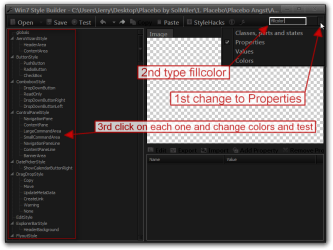
You will need to navigate to the theme .msstyles to edit it. Look at screenshots below.

I do not have Microsoft Word so little be hard for me to test unless you can come up with another program(That is free or has a trial) or area that you have the same problem with and let me know.

You could try changing the color at
Fonts, Colors & System Metrics > Fonts & System Metrics > WINDOWS: COLOR
and then use the test button and see if that get it if not let me know.
Jerry
1.png

2.png

3.png

4.png

5.png
 

My Computer

Computer type
Laptop
Computer Manufacturer/Model Number
Sager NP9170
OS
Win 7 Pro x64 / Win 10 Pro
CPU
Intel(R) Core(TM) i7-3630QM CPU @ 2.40GHz
Motherboard
CLEVO P170EM
Memory
12 GB
Graphics Card(s)
(1) Intel(R) HD Graphics 4000 (2) NVIDIA GeForce GTX 675M
Sound Card
(1) Realtek High Definition Audio (2) Intel(R) Display Aud
Monitor(s) Displays
17.3
Screen Resolution
1920x1080
Hard Drives
(1) Samsung 860 EVO 500GB(OS) (1) Samsung 860 EVO 500GB(Data)
Keyboard
Backlite
Antivirus
MSE, Malwarebytes Pro
Browser
Firefox
Other Info
DESKTOP: Custom-built.
OS: Win 10 Pro x64.
CASE: Rosewill R5.
CPU: Intel I5 4670K CPU @ 3.40GHz.
CPU COOLER: Cool Master Hyper 212 EVO.
MOTHERBOARD: Asus Z87-A.
MEMORY: Kingston HyperX 2x4 GB.
GPU: Nvidia Geforce 650 TI.
PSU: Corsair TX750.
DRIVES: (1) Samsung 840 120 GB SSD (2) Western Digital blue 500 GB 7200 RPM.
You cannot edit the .msstyles if it is in use switch to the default Aero theme log off and then log on and then open up Windows style builder.
You will need to navigate to the theme .msstyles to edit it. Look at screenshots below.

I do not have Microsoft Word so little be hard for me to test unless you can come up with another program(That is free or has a trial) or area that you have the same problem with and let me know.

You could try changing the color at
Fonts, Colors & System Metrics > Fonts & System Metrics > WINDOWS: COLOR
and then use the test button and see if that get it if not let me know.
Jerry
View attachment 215650

View attachment 215651

View attachment 215652

View attachment 215653

View attachment 215654

Thanks, I just tried that, but no luck, the program looks the same as before editing.
 

My Computer

Computer Manufacturer/Model Number
Desktop
OS
MS Windows 7 Home Premium 64-bit SP1
CPU
Intel Core i5 2500K @ 3.30GHz
Motherboard
Gigabyte Technology Co., Ltd. P67A-D3-B3 (Socket 1155)
Memory
16.0 GB Dual-Channel DDR3 @ 798MHz (11-11-11-28)
Graphics Card(s)
1024MB GeForce GTX 560 Ti (Gigabyte)
Sound Card
High Definition Audio Device
Monitor(s) Displays
S22B350 (1920x1080@60Hz)
Screen Resolution
1920x1080
Hard Drives
488GB Western Digital WDC WD5000AAKX-001CA0 ATA Device (SATA)
PSU
Corsair 650W
Keyboard
Logitech HID-compliant Unifying keyboard
Mouse
Logitech HID-compliant Unifying Mouse
I do not have Microsoft Word so little be hard for me to test unless you can come up with another program(That is free or has a trial) or area that you have the same problem with and let me know.
Can you answer this?

Look at the screenshot for an explanation on how to search for a fill color.
Jerry
6.png
 

My Computer

Computer type
Laptop
Computer Manufacturer/Model Number
Sager NP9170
OS
Win 7 Pro x64 / Win 10 Pro
CPU
Intel(R) Core(TM) i7-3630QM CPU @ 2.40GHz
Motherboard
CLEVO P170EM
Memory
12 GB
Graphics Card(s)
(1) Intel(R) HD Graphics 4000 (2) NVIDIA GeForce GTX 675M
Sound Card
(1) Realtek High Definition Audio (2) Intel(R) Display Aud
Monitor(s) Displays
17.3
Screen Resolution
1920x1080
Hard Drives
(1) Samsung 860 EVO 500GB(OS) (1) Samsung 860 EVO 500GB(Data)
Keyboard
Backlite
Antivirus
MSE, Malwarebytes Pro
Browser
Firefox
Other Info
DESKTOP: Custom-built.
OS: Win 10 Pro x64.
CASE: Rosewill R5.
CPU: Intel I5 4670K CPU @ 3.40GHz.
CPU COOLER: Cool Master Hyper 212 EVO.
MOTHERBOARD: Asus Z87-A.
MEMORY: Kingston HyperX 2x4 GB.
GPU: Nvidia Geforce 650 TI.
PSU: Corsair TX750.
DRIVES: (1) Samsung 840 120 GB SSD (2) Western Digital blue 500 GB 7200 RPM.
Microsoft Word 2010 does have a trial pack, but that program isn't really the biggest problem. I just need to play around a bit with the templates to create a new one with the white page colour instead of the "No Colour", which is actually the grey. I'll try messing around with the program, and if I can't figure it out, I'll report back here and try to find a free program that has similar issues. Thanks though. I'm just hoping that if I fix the program I wan't fixed, that it doesn't ruin anything else :P
 

My Computer

Computer Manufacturer/Model Number
Desktop
OS
MS Windows 7 Home Premium 64-bit SP1
CPU
Intel Core i5 2500K @ 3.30GHz
Motherboard
Gigabyte Technology Co., Ltd. P67A-D3-B3 (Socket 1155)
Memory
16.0 GB Dual-Channel DDR3 @ 798MHz (11-11-11-28)
Graphics Card(s)
1024MB GeForce GTX 560 Ti (Gigabyte)
Sound Card
High Definition Audio Device
Monitor(s) Displays
S22B350 (1920x1080@60Hz)
Screen Resolution
1920x1080
Hard Drives
488GB Western Digital WDC WD5000AAKX-001CA0 ATA Device (SATA)
PSU
Corsair 650W
Keyboard
Logitech HID-compliant Unifying keyboard
Mouse
Logitech HID-compliant Unifying Mouse
Here's a little update, I went in the menu you had me go to earlier, and changed everything I could to random colours that were vibrant, etc so I could see them. Then I tested, but still didn't colour the correct area. Here's what the screen looked like:
zzzK

Suppose I'll have to try other areas
 

My Computer

Computer Manufacturer/Model Number
Desktop
OS
MS Windows 7 Home Premium 64-bit SP1
CPU
Intel Core i5 2500K @ 3.30GHz
Motherboard
Gigabyte Technology Co., Ltd. P67A-D3-B3 (Socket 1155)
Memory
16.0 GB Dual-Channel DDR3 @ 798MHz (11-11-11-28)
Graphics Card(s)
1024MB GeForce GTX 560 Ti (Gigabyte)
Sound Card
High Definition Audio Device
Monitor(s) Displays
S22B350 (1920x1080@60Hz)
Screen Resolution
1920x1080
Hard Drives
488GB Western Digital WDC WD5000AAKX-001CA0 ATA Device (SATA)
PSU
Corsair 650W
Keyboard
Logitech HID-compliant Unifying keyboard
Mouse
Logitech HID-compliant Unifying Mouse
So I found the right one, it was under Toolbar <default>. Hopefully this won't make anything else look strange, but here it is :
zzES


Thanks for the help, I guess I can mark this as solved now :) Wouldn't have done this without your help!
 

My Computer

Computer Manufacturer/Model Number
Desktop
OS
MS Windows 7 Home Premium 64-bit SP1
CPU
Intel Core i5 2500K @ 3.30GHz
Motherboard
Gigabyte Technology Co., Ltd. P67A-D3-B3 (Socket 1155)
Memory
16.0 GB Dual-Channel DDR3 @ 798MHz (11-11-11-28)
Graphics Card(s)
1024MB GeForce GTX 560 Ti (Gigabyte)
Sound Card
High Definition Audio Device
Monitor(s) Displays
S22B350 (1920x1080@60Hz)
Screen Resolution
1920x1080
Hard Drives
488GB Western Digital WDC WD5000AAKX-001CA0 ATA Device (SATA)
PSU
Corsair 650W
Keyboard
Logitech HID-compliant Unifying keyboard
Mouse
Logitech HID-compliant Unifying Mouse
You're welcome, good to hear you got it, sometimes you have to hunt it down to find it especially when it comes to a program.
Jerry
 

My Computer

Computer type
Laptop
Computer Manufacturer/Model Number
Sager NP9170
OS
Win 7 Pro x64 / Win 10 Pro
CPU
Intel(R) Core(TM) i7-3630QM CPU @ 2.40GHz
Motherboard
CLEVO P170EM
Memory
12 GB
Graphics Card(s)
(1) Intel(R) HD Graphics 4000 (2) NVIDIA GeForce GTX 675M
Sound Card
(1) Realtek High Definition Audio (2) Intel(R) Display Aud
Monitor(s) Displays
17.3
Screen Resolution
1920x1080
Hard Drives
(1) Samsung 860 EVO 500GB(OS) (1) Samsung 860 EVO 500GB(Data)
Keyboard
Backlite
Antivirus
MSE, Malwarebytes Pro
Browser
Firefox
Other Info
DESKTOP: Custom-built.
OS: Win 10 Pro x64.
CASE: Rosewill R5.
CPU: Intel I5 4670K CPU @ 3.40GHz.
CPU COOLER: Cool Master Hyper 212 EVO.
MOTHERBOARD: Asus Z87-A.
MEMORY: Kingston HyperX 2x4 GB.
GPU: Nvidia Geforce 650 TI.
PSU: Corsair TX750.
DRIVES: (1) Samsung 840 120 GB SSD (2) Western Digital blue 500 GB 7200 RPM.
Still unsuccessful with Microsoft Word 2010, but I guess that's fine, I just have to manually change the paper color when I make a new document. Tried everything including editing the Normal.dotm template, etc. but it never worked :s Oh well thanks :)
 

My Computer

Computer Manufacturer/Model Number
Desktop
OS
MS Windows 7 Home Premium 64-bit SP1
CPU
Intel Core i5 2500K @ 3.30GHz
Motherboard
Gigabyte Technology Co., Ltd. P67A-D3-B3 (Socket 1155)
Memory
16.0 GB Dual-Channel DDR3 @ 798MHz (11-11-11-28)
Graphics Card(s)
1024MB GeForce GTX 560 Ti (Gigabyte)
Sound Card
High Definition Audio Device
Monitor(s) Displays
S22B350 (1920x1080@60Hz)
Screen Resolution
1920x1080
Hard Drives
488GB Western Digital WDC WD5000AAKX-001CA0 ATA Device (SATA)
PSU
Corsair 650W
Keyboard
Logitech HID-compliant Unifying keyboard
Mouse
Logitech HID-compliant Unifying Mouse
Back
Top