
You are using an out of date browser. It may not display this or other websites correctly.
You should upgrade or use an alternative browser.
You should upgrade or use an alternative browser.
Solved Themes
- Thread starter Rose1
- Start date
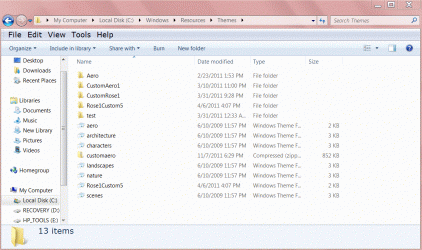

You put the zip folder in there Put it back on the desktop
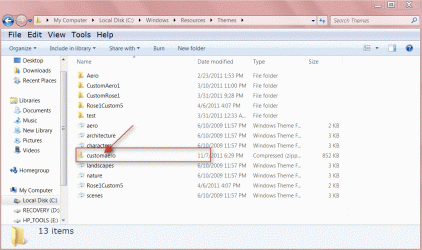
You need to unzip the folder and put what's in the Folder in C:\Windows\Resources\Themes
Jerry
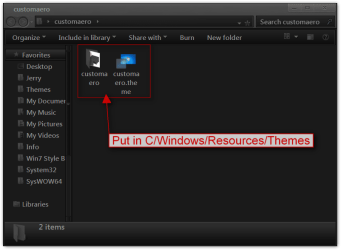
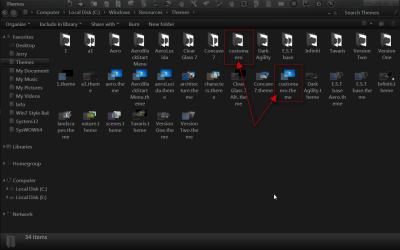
You need to unzip the folder and put what's in the Folder in C:\Windows\Resources\Themes
Jerry
My Computer
- Computer type
- Laptop
- Computer Manufacturer/Model Number
- Sager NP9170
- OS
- Win 7 Pro x64 / Win 10 Pro
- CPU
- Intel(R) Core(TM) i7-3630QM CPU @ 2.40GHz
- Motherboard
- CLEVO P170EM
- Memory
- 12 GB
- Graphics Card(s)
- (1) Intel(R) HD Graphics 4000 (2) NVIDIA GeForce GTX 675M
- Sound Card
- (1) Realtek High Definition Audio (2) Intel(R) Display Aud
- Monitor(s) Displays
- 17.3
- Screen Resolution
- 1920x1080
- Hard Drives
- (1) Samsung 860 EVO 500GB(OS) (1) Samsung 860 EVO 500GB(Data)
- Keyboard
- Backlite
- Antivirus
- MSE, Malwarebytes Pro
- Browser
- Firefox
- Other Info
- DESKTOP: Custom-built.
OS: Win 10 Pro x64.
CASE: Rosewill R5.
CPU: Intel I5 4670K CPU @ 3.40GHz.
CPU COOLER: Cool Master Hyper 212 EVO.
MOTHERBOARD: Asus Z87-A.
MEMORY: Kingston HyperX 2x4 GB.
GPU: Nvidia Geforce 650 TI.
PSU: Corsair TX750.
DRIVES: (1) Samsung 840 120 GB SSD (2) Western Digital blue 500 GB 7200 RPM.

- Local time
- 2:50 AM
- Messages
- 416
I put it on the desktop, but its not unzip it.You put the zip folder in there Put it back on the desktop
View attachment 182674
You need to unzip the folder and put what's in the Folder in C:\Windows\Resources\Themes
View attachment 182675View attachment 182676
Jerry
My Computer
- Computer type
- Laptop
- Computer Manufacturer/Model Number
- compaq
- OS
- windows Ultimate
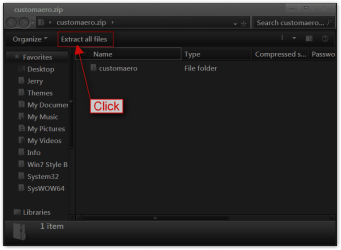
Double click on the zip folder on the desktop when the window opens click on Extract All Files.
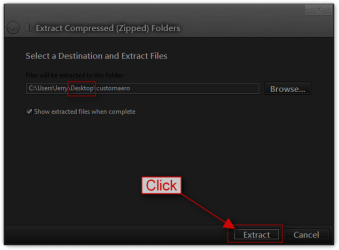
In the address field make sure it says desktop and click on the Extract button.
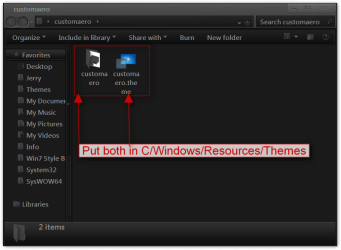
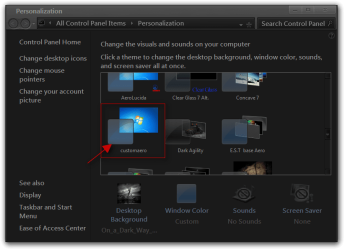
Open that folder and put both 1 theme folder and 1 .theme file in C/Windows/Resources/themes now it should be in Personalize as customaero
Jerry
In the address field make sure it says desktop and click on the Extract button.
Open that folder and put both 1 theme folder and 1 .theme file in C/Windows/Resources/themes now it should be in Personalize as customaero
Jerry
My Computer
- Computer type
- Laptop
- Computer Manufacturer/Model Number
- Sager NP9170
- OS
- Win 7 Pro x64 / Win 10 Pro
- CPU
- Intel(R) Core(TM) i7-3630QM CPU @ 2.40GHz
- Motherboard
- CLEVO P170EM
- Memory
- 12 GB
- Graphics Card(s)
- (1) Intel(R) HD Graphics 4000 (2) NVIDIA GeForce GTX 675M
- Sound Card
- (1) Realtek High Definition Audio (2) Intel(R) Display Aud
- Monitor(s) Displays
- 17.3
- Screen Resolution
- 1920x1080
- Hard Drives
- (1) Samsung 860 EVO 500GB(OS) (1) Samsung 860 EVO 500GB(Data)
- Keyboard
- Backlite
- Antivirus
- MSE, Malwarebytes Pro
- Browser
- Firefox
- Other Info
- DESKTOP: Custom-built.
OS: Win 10 Pro x64.
CASE: Rosewill R5.
CPU: Intel I5 4670K CPU @ 3.40GHz.
CPU COOLER: Cool Master Hyper 212 EVO.
MOTHERBOARD: Asus Z87-A.
MEMORY: Kingston HyperX 2x4 GB.
GPU: Nvidia Geforce 650 TI.
PSU: Corsair TX750.
DRIVES: (1) Samsung 840 120 GB SSD (2) Western Digital blue 500 GB 7200 RPM.
- Local time
- 2:50 AM
- Messages
- 416
Double click on the zip folder on the desktop when the window opens click on Extract All Files.
View attachment 182687
In the address field make sure it says desktop and click on the Extract button.
View attachment 182688
Open that folder and put both 1 theme folder and 1 .theme file in C/Windows/Resources/themes now it should be in Personalize as customaero
View attachment 182689View attachment 182690
Jerry
I'm getting error when I try to extract it. The error is. Compressed (zipped) Folders was unable to create the specific directory. Ensure that the directory does not already exist and the path entered is valid.
My Computer
- Computer type
- Laptop
- Computer Manufacturer/Model Number
- compaq
- OS
- windows Ultimate
Delete that zip folder then and downloading new one from post #14 http://www.sevenforums.com/themes-styles/195832-themes-2.html#post1646797
and try it again.
Jerry
and try it again.
Jerry
My Computer
- Computer type
- Laptop
- Computer Manufacturer/Model Number
- Sager NP9170
- OS
- Win 7 Pro x64 / Win 10 Pro
- CPU
- Intel(R) Core(TM) i7-3630QM CPU @ 2.40GHz
- Motherboard
- CLEVO P170EM
- Memory
- 12 GB
- Graphics Card(s)
- (1) Intel(R) HD Graphics 4000 (2) NVIDIA GeForce GTX 675M
- Sound Card
- (1) Realtek High Definition Audio (2) Intel(R) Display Aud
- Monitor(s) Displays
- 17.3
- Screen Resolution
- 1920x1080
- Hard Drives
- (1) Samsung 860 EVO 500GB(OS) (1) Samsung 860 EVO 500GB(Data)
- Keyboard
- Backlite
- Antivirus
- MSE, Malwarebytes Pro
- Browser
- Firefox
- Other Info
- DESKTOP: Custom-built.
OS: Win 10 Pro x64.
CASE: Rosewill R5.
CPU: Intel I5 4670K CPU @ 3.40GHz.
CPU COOLER: Cool Master Hyper 212 EVO.
MOTHERBOARD: Asus Z87-A.
MEMORY: Kingston HyperX 2x4 GB.
GPU: Nvidia Geforce 650 TI.
PSU: Corsair TX750.
DRIVES: (1) Samsung 840 120 GB SSD (2) Western Digital blue 500 GB 7200 RPM.
- Local time
- 2:50 AM
- Messages
- 416
Still doesn't work.Delete that zip folder then and downloading new one from post #14 http://www.sevenforums.com/themes-styles/195832-themes-2.html#post1646797
and try it again.
Jerry
My Computer
- Computer type
- Laptop
- Computer Manufacturer/Model Number
- compaq
- OS
- windows Ultimate
My Computer
- Computer type
- Laptop
- Computer Manufacturer/Model Number
- Sager NP9170
- OS
- Win 7 Pro x64 / Win 10 Pro
- CPU
- Intel(R) Core(TM) i7-3630QM CPU @ 2.40GHz
- Motherboard
- CLEVO P170EM
- Memory
- 12 GB
- Graphics Card(s)
- (1) Intel(R) HD Graphics 4000 (2) NVIDIA GeForce GTX 675M
- Sound Card
- (1) Realtek High Definition Audio (2) Intel(R) Display Aud
- Monitor(s) Displays
- 17.3
- Screen Resolution
- 1920x1080
- Hard Drives
- (1) Samsung 860 EVO 500GB(OS) (1) Samsung 860 EVO 500GB(Data)
- Keyboard
- Backlite
- Antivirus
- MSE, Malwarebytes Pro
- Browser
- Firefox
- Other Info
- DESKTOP: Custom-built.
OS: Win 10 Pro x64.
CASE: Rosewill R5.
CPU: Intel I5 4670K CPU @ 3.40GHz.
CPU COOLER: Cool Master Hyper 212 EVO.
MOTHERBOARD: Asus Z87-A.
MEMORY: Kingston HyperX 2x4 GB.
GPU: Nvidia Geforce 650 TI.
PSU: Corsair TX750.
DRIVES: (1) Samsung 840 120 GB SSD (2) Western Digital blue 500 GB 7200 RPM.
- Local time
- 2:50 AM
- Messages
- 416
Still no luck.Try this 1
Jerry
My Computer
- Computer type
- Laptop
- Computer Manufacturer/Model Number
- compaq
- OS
- windows Ultimate
Download 7-Zip and install it. Make sure you get the right version 32 bit or 64-bit.

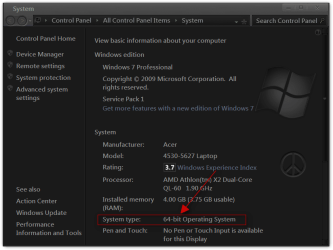
To tell what version you have in the start menu right-click on computer go to properties.
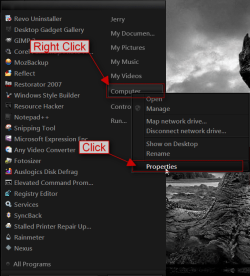
Look for system type.
After you have installed the right version right click on the zip folder go down to 7-zip and then over to and click on Extract Here see if that will extract that zip.

Jerry
To tell what version you have in the start menu right-click on computer go to properties.
Look for system type.
After you have installed the right version right click on the zip folder go down to 7-zip and then over to and click on Extract Here see if that will extract that zip.
Jerry
My Computer
- Computer type
- Laptop
- Computer Manufacturer/Model Number
- Sager NP9170
- OS
- Win 7 Pro x64 / Win 10 Pro
- CPU
- Intel(R) Core(TM) i7-3630QM CPU @ 2.40GHz
- Motherboard
- CLEVO P170EM
- Memory
- 12 GB
- Graphics Card(s)
- (1) Intel(R) HD Graphics 4000 (2) NVIDIA GeForce GTX 675M
- Sound Card
- (1) Realtek High Definition Audio (2) Intel(R) Display Aud
- Monitor(s) Displays
- 17.3
- Screen Resolution
- 1920x1080
- Hard Drives
- (1) Samsung 860 EVO 500GB(OS) (1) Samsung 860 EVO 500GB(Data)
- Keyboard
- Backlite
- Antivirus
- MSE, Malwarebytes Pro
- Browser
- Firefox
- Other Info
- DESKTOP: Custom-built.
OS: Win 10 Pro x64.
CASE: Rosewill R5.
CPU: Intel I5 4670K CPU @ 3.40GHz.
CPU COOLER: Cool Master Hyper 212 EVO.
MOTHERBOARD: Asus Z87-A.
MEMORY: Kingston HyperX 2x4 GB.
GPU: Nvidia Geforce 650 TI.
PSU: Corsair TX750.
DRIVES: (1) Samsung 840 120 GB SSD (2) Western Digital blue 500 GB 7200 RPM.
- Local time
- 2:50 AM
- Messages
- 416
I did the extract before and still nothing.Download 7-Zip and install it. Make sure you get the right version 32 bit or 64-bit.
View attachment 182759
To tell what version you have in the start menu right-click on computer go to properties.
View attachment 182760
Look for system type.
View attachment 182761
After you have installed the right version right click on the zip folder go down to 7-zip and then over to and click on Extract Here see if that will extract that zip.
View attachment 182762
Jerry
My Computer
- Computer type
- Laptop
- Computer Manufacturer/Model Number
- compaq
- OS
- windows Ultimate
are you saying you have the zip extracted and the theme is not working?
Jerry
Jerry
My Computer
- Computer type
- Laptop
- Computer Manufacturer/Model Number
- Sager NP9170
- OS
- Win 7 Pro x64 / Win 10 Pro
- CPU
- Intel(R) Core(TM) i7-3630QM CPU @ 2.40GHz
- Motherboard
- CLEVO P170EM
- Memory
- 12 GB
- Graphics Card(s)
- (1) Intel(R) HD Graphics 4000 (2) NVIDIA GeForce GTX 675M
- Sound Card
- (1) Realtek High Definition Audio (2) Intel(R) Display Aud
- Monitor(s) Displays
- 17.3
- Screen Resolution
- 1920x1080
- Hard Drives
- (1) Samsung 860 EVO 500GB(OS) (1) Samsung 860 EVO 500GB(Data)
- Keyboard
- Backlite
- Antivirus
- MSE, Malwarebytes Pro
- Browser
- Firefox
- Other Info
- DESKTOP: Custom-built.
OS: Win 10 Pro x64.
CASE: Rosewill R5.
CPU: Intel I5 4670K CPU @ 3.40GHz.
CPU COOLER: Cool Master Hyper 212 EVO.
MOTHERBOARD: Asus Z87-A.
MEMORY: Kingston HyperX 2x4 GB.
GPU: Nvidia Geforce 650 TI.
PSU: Corsair TX750.
DRIVES: (1) Samsung 840 120 GB SSD (2) Western Digital blue 500 GB 7200 RPM.
- Local time
- 2:50 AM
- Messages
- 416
The theme is working, but the taskbar doesn't change color its like windows basic classic.Also, shadows, bubbles and language bar color doesn't change back to what it was.are you saying you have the zip extracted and the theme is not working?
Jerry
My Computer
- Computer type
- Laptop
- Computer Manufacturer/Model Number
- compaq
- OS
- windows Ultimate
Post another full-screen shot of C:\Windows\Resources\Themes
Jerry
Jerry
My Computer
- Computer type
- Laptop
- Computer Manufacturer/Model Number
- Sager NP9170
- OS
- Win 7 Pro x64 / Win 10 Pro
- CPU
- Intel(R) Core(TM) i7-3630QM CPU @ 2.40GHz
- Motherboard
- CLEVO P170EM
- Memory
- 12 GB
- Graphics Card(s)
- (1) Intel(R) HD Graphics 4000 (2) NVIDIA GeForce GTX 675M
- Sound Card
- (1) Realtek High Definition Audio (2) Intel(R) Display Aud
- Monitor(s) Displays
- 17.3
- Screen Resolution
- 1920x1080
- Hard Drives
- (1) Samsung 860 EVO 500GB(OS) (1) Samsung 860 EVO 500GB(Data)
- Keyboard
- Backlite
- Antivirus
- MSE, Malwarebytes Pro
- Browser
- Firefox
- Other Info
- DESKTOP: Custom-built.
OS: Win 10 Pro x64.
CASE: Rosewill R5.
CPU: Intel I5 4670K CPU @ 3.40GHz.
CPU COOLER: Cool Master Hyper 212 EVO.
MOTHERBOARD: Asus Z87-A.
MEMORY: Kingston HyperX 2x4 GB.
GPU: Nvidia Geforce 650 TI.
PSU: Corsair TX750.
DRIVES: (1) Samsung 840 120 GB SSD (2) Western Digital blue 500 GB 7200 RPM.
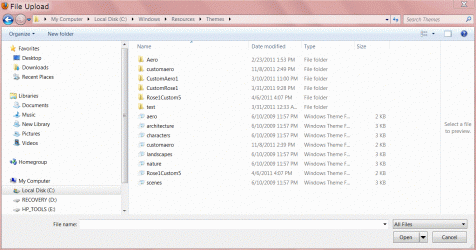
OK I just tested it on a another computer and it must be corrupt sorry.
Give me the rest of the day and I will make a new one and try to post it later today or tomorrow morning.
Go ahead and switch to the default Aero theme and then logoff logon and then go ahead and delete what I have highlighted in red they are not needed.
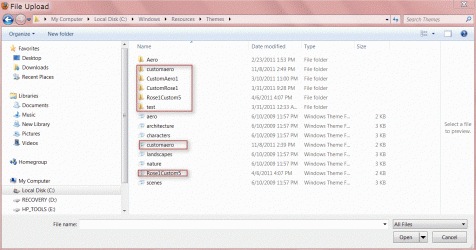
Jerry
Give me the rest of the day and I will make a new one and try to post it later today or tomorrow morning.
Go ahead and switch to the default Aero theme and then logoff logon and then go ahead and delete what I have highlighted in red they are not needed.
Jerry
My Computer
- Computer type
- Laptop
- Computer Manufacturer/Model Number
- Sager NP9170
- OS
- Win 7 Pro x64 / Win 10 Pro
- CPU
- Intel(R) Core(TM) i7-3630QM CPU @ 2.40GHz
- Motherboard
- CLEVO P170EM
- Memory
- 12 GB
- Graphics Card(s)
- (1) Intel(R) HD Graphics 4000 (2) NVIDIA GeForce GTX 675M
- Sound Card
- (1) Realtek High Definition Audio (2) Intel(R) Display Aud
- Monitor(s) Displays
- 17.3
- Screen Resolution
- 1920x1080
- Hard Drives
- (1) Samsung 860 EVO 500GB(OS) (1) Samsung 860 EVO 500GB(Data)
- Keyboard
- Backlite
- Antivirus
- MSE, Malwarebytes Pro
- Browser
- Firefox
- Other Info
- DESKTOP: Custom-built.
OS: Win 10 Pro x64.
CASE: Rosewill R5.
CPU: Intel I5 4670K CPU @ 3.40GHz.
CPU COOLER: Cool Master Hyper 212 EVO.
MOTHERBOARD: Asus Z87-A.
MEMORY: Kingston HyperX 2x4 GB.
GPU: Nvidia Geforce 650 TI.
PSU: Corsair TX750.
DRIVES: (1) Samsung 840 120 GB SSD (2) Western Digital blue 500 GB 7200 RPM.
Make sure you deleted what I ask you to delete in the above post
This should work now I test it on both 32-bit and 64-bit. I am pretty sure I got all the changes in their.
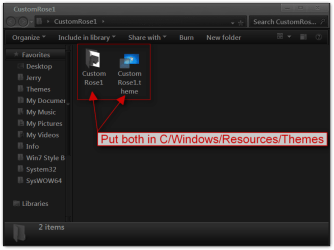
After you extract the zip folder put both 1 theme folder and 1 .theme file in C/Windows/Resources/Themes
It will show up in Personalize as CustomRose1
Jerry
This should work now I test it on both 32-bit and 64-bit. I am pretty sure I got all the changes in their.
After you extract the zip folder put both 1 theme folder and 1 .theme file in C/Windows/Resources/Themes
It will show up in Personalize as CustomRose1
Jerry
Attachments
My Computer
- Computer type
- Laptop
- Computer Manufacturer/Model Number
- Sager NP9170
- OS
- Win 7 Pro x64 / Win 10 Pro
- CPU
- Intel(R) Core(TM) i7-3630QM CPU @ 2.40GHz
- Motherboard
- CLEVO P170EM
- Memory
- 12 GB
- Graphics Card(s)
- (1) Intel(R) HD Graphics 4000 (2) NVIDIA GeForce GTX 675M
- Sound Card
- (1) Realtek High Definition Audio (2) Intel(R) Display Aud
- Monitor(s) Displays
- 17.3
- Screen Resolution
- 1920x1080
- Hard Drives
- (1) Samsung 860 EVO 500GB(OS) (1) Samsung 860 EVO 500GB(Data)
- Keyboard
- Backlite
- Antivirus
- MSE, Malwarebytes Pro
- Browser
- Firefox
- Other Info
- DESKTOP: Custom-built.
OS: Win 10 Pro x64.
CASE: Rosewill R5.
CPU: Intel I5 4670K CPU @ 3.40GHz.
CPU COOLER: Cool Master Hyper 212 EVO.
MOTHERBOARD: Asus Z87-A.
MEMORY: Kingston HyperX 2x4 GB.
GPU: Nvidia Geforce 650 TI.
PSU: Corsair TX750.
DRIVES: (1) Samsung 840 120 GB SSD (2) Western Digital blue 500 GB 7200 RPM.
Switch to the default Aero theme then do this.
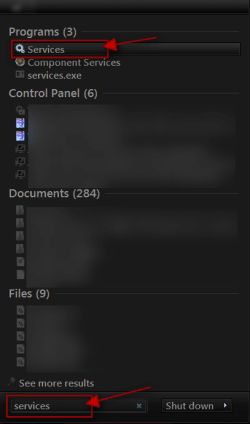
Click on the rb: Start Button type in Services In the search box and then click on Services
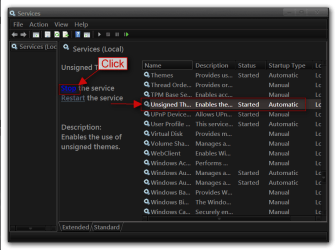
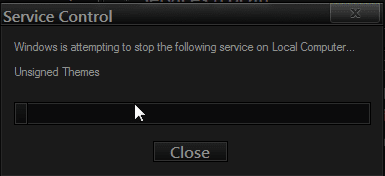
Scroll down until you see Unsigned Themes select it in click on the Stop text and let it stop after that click on Start text. Your screen may blink when you do this.
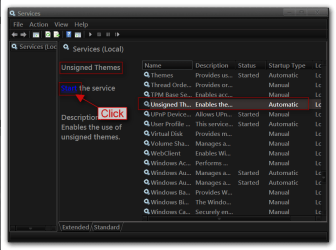
Now try your new theme.
Jerry
Click on the
rb: Start Button type in Services In the search box and then click on ServicesScroll down until you see Unsigned Themes select it in click on the Stop text and let it stop after that click on Start text. Your screen may blink when you do this.
Now try your new theme.
Jerry
My Computer
- Computer type
- Laptop
- Computer Manufacturer/Model Number
- Sager NP9170
- OS
- Win 7 Pro x64 / Win 10 Pro
- CPU
- Intel(R) Core(TM) i7-3630QM CPU @ 2.40GHz
- Motherboard
- CLEVO P170EM
- Memory
- 12 GB
- Graphics Card(s)
- (1) Intel(R) HD Graphics 4000 (2) NVIDIA GeForce GTX 675M
- Sound Card
- (1) Realtek High Definition Audio (2) Intel(R) Display Aud
- Monitor(s) Displays
- 17.3
- Screen Resolution
- 1920x1080
- Hard Drives
- (1) Samsung 860 EVO 500GB(OS) (1) Samsung 860 EVO 500GB(Data)
- Keyboard
- Backlite
- Antivirus
- MSE, Malwarebytes Pro
- Browser
- Firefox
- Other Info
- DESKTOP: Custom-built.
OS: Win 10 Pro x64.
CASE: Rosewill R5.
CPU: Intel I5 4670K CPU @ 3.40GHz.
CPU COOLER: Cool Master Hyper 212 EVO.
MOTHERBOARD: Asus Z87-A.
MEMORY: Kingston HyperX 2x4 GB.
GPU: Nvidia Geforce 650 TI.
PSU: Corsair TX750.
DRIVES: (1) Samsung 840 120 GB SSD (2) Western Digital blue 500 GB 7200 RPM.