Solved There is a problem with the Hard Disk

Vasanth M S

New member
Local time
12:56 AM
Messages
51
Location
India
Hello there,

Recently I have been receiving error after I start the computer. As soon as the boot menu is gone, a message is displayed telling me that "There is a problem with your Hard Disk". Then after a few seconds it automatically goes to the Windows are functions properly.

So what can be the problem and how do I fix it? Please I need help.
 

My Computer

Computer type
PC/Desktop
Computer Manufacturer/Model Number
Unknown
OS
Windows 7 Ultimate 64 bit
CPU
Intel Pentium(R) Dual Core 2.60GHz each
Motherboard
DG41RQ G41 Chipset
Memory
4 GB
Graphics Card(s)
NVIDIA GeForce GT 610 2GB Zotac Synergy Edition
Screen Resolution
1920x1080
Hard Drives
1 TB Seagate Hard Drive

My Computer

Computer type
PC/Desktop
Computer Manufacturer/Model Number
Custom Bulid/Self made
OS
Windows 11 x64
CPU
i5 2500K @ 3.3 GHz
Motherboard
ASUS P8 Z77 V pro
Memory
16 GB DDR 3 @ 1600Mhz
Graphics Card(s)
MSI 1050TI 4GB OC version
Sound Card
On Board (Realtek HD audio)
Monitor(s) Displays
Samsung 22" LCD
Screen Resolution
1920*1080
Hard Drives
Seagate 1 TB, WD 1TB, Seagate 2 TB ( I use a lot of space)
PSU
coolermaster 750 W
Case
Coolermaster HAF912
Cooling
Coolermaster hyper 212 EVO
Keyboard
Samsung
Mouse
Dell Wireless
Internet Speed
Wireless 50 Mbps
Antivirus
AVG 2016 Internet Security
Browser
Google Chrome

My Computer

Computer type
PC/Desktop
Computer Manufacturer/Model Number
Hewlett-Packard
OS
Windows 7 Ultimate x64
CPU
Intel Core i5-2410M
Motherboard
Hewlett-Packard 1651
Memory
2 x 4 GB ELPIDA 667Mhz 1.5V
Graphics Card(s)
Radeon (TM) HD 7650M
Hard Drives
750GB WD7500BPVT
There is no mechanical error i guess, and after using sea tools i came to know that the disk failed in SMART check and Short Drive Self Test. I did not go for advanced since i did not take a backup.
I have planned to backup everything in an external hard disk and wipe out everything in my hard disk.

But would that help?
 

My Computer

Computer type
PC/Desktop
Computer Manufacturer/Model Number
Unknown
OS
Windows 7 Ultimate 64 bit
CPU
Intel Pentium(R) Dual Core 2.60GHz each
Motherboard
DG41RQ G41 Chipset
Memory
4 GB
Graphics Card(s)
NVIDIA GeForce GT 610 2GB Zotac Synergy Edition
Screen Resolution
1920x1080
Hard Drives
1 TB Seagate Hard Drive
Is your drive Seagate HDD?

If SeaTools short Test failed, you should have gone for the extended Test and check whether it would have repaired your drive of whatever could be repaired.

In any case do back up all your important data onto another drive and carryout the long Test.

If the long test repairs your drive and passes the test, redo the backup.

( I do not rule out that your data on the drive may be unreadable in some marginally bad sectors in the normal circumstances and a back up under that condition can also result in bad photos and video. If the long test repairs those marginally unreadable sectors and make those readable the problem would have been corrected. So the need for fresh backup.)
 

My Computer

OS
Windows 7 Home Premium 32 bit
I have planned to backup everything in an external hard disk
Do it! (and always do some regular backup'ing even when there are no signs of disk problems).
For w7 I have been using Easeus todo and Macrium Reflect, both working very well here. W8 am using macrium. Good luck.
 

My Computer

Computer type
Laptop
Computer Manufacturer/Model Number
Dell \ Lenovo\ HP \ Toshiba
OS
W7, W8.1
Antivirus
MSE, Malwarebytes
Browser
FF
Thanks for all your replies.
 

My Computer

Computer type
PC/Desktop
Computer Manufacturer/Model Number
Unknown
OS
Windows 7 Ultimate 64 bit
CPU
Intel Pentium(R) Dual Core 2.60GHz each
Motherboard
DG41RQ G41 Chipset
Memory
4 GB
Graphics Card(s)
NVIDIA GeForce GT 610 2GB Zotac Synergy Edition
Screen Resolution
1920x1080
Hard Drives
1 TB Seagate Hard Drive
Did you solve the issue?
 

My Computer

Computer type
PC/Desktop
Computer Manufacturer/Model Number
Custom Bulid/Self made
OS
Windows 11 x64
CPU
i5 2500K @ 3.3 GHz
Motherboard
ASUS P8 Z77 V pro
Memory
16 GB DDR 3 @ 1600Mhz
Graphics Card(s)
MSI 1050TI 4GB OC version
Sound Card
On Board (Realtek HD audio)
Monitor(s) Displays
Samsung 22" LCD
Screen Resolution
1920*1080
Hard Drives
Seagate 1 TB, WD 1TB, Seagate 2 TB ( I use a lot of space)
PSU
coolermaster 750 W
Case
Coolermaster HAF912
Cooling
Coolermaster hyper 212 EVO
Keyboard
Samsung
Mouse
Dell Wireless
Internet Speed
Wireless 50 Mbps
Antivirus
AVG 2016 Internet Security
Browser
Google Chrome

Attachments

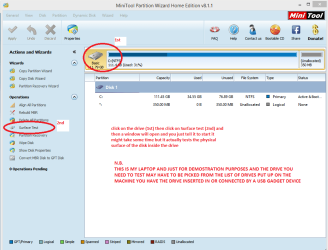
  • MINI TOOL SURFACE.PNG
    MINI TOOL SURFACE.PNG
    35.1 KB · Views: 0

My Computer

Computer type
PC/Desktop
Computer Manufacturer/Model Number
Own build (new) Desk1 / Asus ROG Win 7 / Desk2 1st build
OS
Desk1 7 Home Prem / Desk2 10 Pro / Main lap Asus ROG 10 Pro 2 laptop Toshiba 7 Pro Asus P2520 7 & 10
CPU
Desk1 i5 3750K / Laptop i7 GTX 860M / Desk2 i5 2500
Motherboard
Desk1 Asus P877-V / Desk2 Gigabyte H67 UD3H / Laptop ?
Memory
Desk1 8GB (1866) / Desk2 16GB (1333) / Laptop 8Gb DDR3
Graphics Card(s)
Desk 1& 2NVidia GTX 650 & Laptops on board Intel
Sound Card
Desk 1 & 2 -XONAR DG Realtek High Def audio Laptop
Monitor(s) Displays
Desk 1 Benq HD 2450 / Desk2 Philips 24" / Laptop 17.5"
Screen Resolution
1920x1080 D1 & D2 & Laptop 1
Hard Drives
Desk1 Samsung 120GB 830 SSD
Asus ROG 256GB 850 Pro SSD
Desk2 Samsung 840 256 SSD
Toshiba 120GB EVO
PSU
Desk 1 Corsair HX 1050/ Laptop ? / Desk 2 Corsair HX 650
Case
Desk 1 Cooler HAF XM ? Toshiba laptop / Desk2 Coolermaster
Cooling
Fans on all Desk1 -2 Desk2 - all Coolermasters 5 Laptop ?
Keyboard
Desk 1 MS Sidewinder X6 Desk 2 MS Sidewinder X 4
Mouse
Desk 1&2 - Gigabyte MS 900 gamer - laptop - Logitec wireless
Internet Speed
ADSL2+
Other Info
One other Desktop (tester) and spare Toshba laptop both with SSD's
Running Kaspersky 2016 ISS on all machines config'd identically
Logitec audio stereo systems on each machine (x3)
Canon MG5250MFC
Router/modem TP-Link running WPA2SK
Thanks friends but I have planned to have a complete wipe out of my hard disk with a backup in an external hard disk. In case if the problem occurs again, then I will have to buy another hard disk.
 

My Computer

Computer type
PC/Desktop
Computer Manufacturer/Model Number
Unknown
OS
Windows 7 Ultimate 64 bit
CPU
Intel Pentium(R) Dual Core 2.60GHz each
Motherboard
DG41RQ G41 Chipset
Memory
4 GB
Graphics Card(s)
NVIDIA GeForce GT 610 2GB Zotac Synergy Edition
Screen Resolution
1920x1080
Hard Drives
1 TB Seagate Hard Drive

Attachments

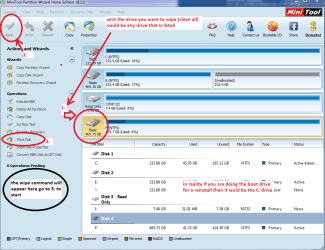
  • MINI TOOL WIPE.PNG
    MINI TOOL WIPE.PNG
    50.6 KB · Views: 0

My Computer

Computer type
PC/Desktop
Computer Manufacturer/Model Number
Own build (new) Desk1 / Asus ROG Win 7 / Desk2 1st build
OS
Desk1 7 Home Prem / Desk2 10 Pro / Main lap Asus ROG 10 Pro 2 laptop Toshiba 7 Pro Asus P2520 7 & 10
CPU
Desk1 i5 3750K / Laptop i7 GTX 860M / Desk2 i5 2500
Motherboard
Desk1 Asus P877-V / Desk2 Gigabyte H67 UD3H / Laptop ?
Memory
Desk1 8GB (1866) / Desk2 16GB (1333) / Laptop 8Gb DDR3
Graphics Card(s)
Desk 1& 2NVidia GTX 650 & Laptops on board Intel
Sound Card
Desk 1 & 2 -XONAR DG Realtek High Def audio Laptop
Monitor(s) Displays
Desk 1 Benq HD 2450 / Desk2 Philips 24" / Laptop 17.5"
Screen Resolution
1920x1080 D1 & D2 & Laptop 1
Hard Drives
Desk1 Samsung 120GB 830 SSD
Asus ROG 256GB 850 Pro SSD
Desk2 Samsung 840 256 SSD
Toshiba 120GB EVO
PSU
Desk 1 Corsair HX 1050/ Laptop ? / Desk 2 Corsair HX 650
Case
Desk 1 Cooler HAF XM ? Toshiba laptop / Desk2 Coolermaster
Cooling
Fans on all Desk1 -2 Desk2 - all Coolermasters 5 Laptop ?
Keyboard
Desk 1 MS Sidewinder X6 Desk 2 MS Sidewinder X 4
Mouse
Desk 1&2 - Gigabyte MS 900 gamer - laptop - Logitec wireless
Internet Speed
ADSL2+
Other Info
One other Desktop (tester) and spare Toshba laptop both with SSD's
Running Kaspersky 2016 ISS on all machines config'd identically
Logitec audio stereo systems on each machine (x3)
Canon MG5250MFC
Router/modem TP-Link running WPA2SK
Back
Top