
There is high CPU usage when using a USB audio device connected to...

SvB4EvA

New member
Local time
10:15 AM
Messages
7
... a USB 2.0 EHCI host controller

What was happening was I was getting CPU usage spikes on a single CPU core. Every 40 seconds or so it would spike to 100% on my 4th CPU core (using xperf I could see this was only about 4 to 6 tenths of a second from start to finish, but still not right). I finally narrowed it down to an audio issue, then finally down to a USB only audio issue. This happens with any USB audio device. I have two different headsets, one uses Microsoft Generic USB audio drivers and the other uses Logitech G930 drivers.

Then I found this hotfix: There is high CPU usage when using a USB audio device connected to a USB 2.0 EHCI host controller

I thought my prayers were answered. Turns out this hotfix only helped it by ~50%. This hotfix has made my 4th CPU core spike to about 50% instead of 100%, it is better than nothing, but I am still not satisfied.

I have tried everything that I can think of but a fresh Win7 install at this point (which I would like to avoid, and I think the problem would remain anyway). This includes disabling all enhancements in audio properties, reinstalling drivers, updated firmware, BIOS, "clean boots", disabling any and all anti virus/anti malware/antispam/anti-whatevers, disable firewalls, using no other USB devices, removing ghosted devices, checked event viewer for problems, used Malwarebytes and SuperAntiSpyware in safemode to search for problems, etc...

Also, if it helps, this problem does NOT happen if I am not playing any audio. Also I have noticed when playing audio alone, it will only spike to about 25%, but when using input from a USB mic as well, it will go to 50%. Seems that its doubled when using input and output. Ventrilo is very good at aggravating this problem, when connected to a Ventrilo server I will get a spike almost exactly every ~40 seconds. Please note that the spikes do not coincide with audio input/output usage, they are almost like clock work every 40 or so seconds regardless of how much audio traffic is going on.

One more thing to note is that when I change the USB headset to different USB root hubs, the same problem happens, BUT it will spike my second CPU core instead of the fourth. I don't think this has any thing to do with it, just putting it out there. The problem also exists when I plug into a USB 3.0 port.

I believe the parent file causing the spikes is audiodg.exe, and specifically audioeng.dll and audiokse.dll.

Here is a screen shot of Process Manager, this shot is at the tail end of a spike. It's very hard to get a screen shot of it using more CPU because it happens so fast:
437546845978.png


Here is a shot of a gadget on my desktop that is a CONSTANT reminder. Also oddly enough its doing double spikes now that you can see by looking at the orange lines:
2373474368.png


Can anyone help? I am at my wits end with this.
 

My Computer My Computer

OS
Windows 7 Ultimate x64
CPU
i5 760 @ 4013Mhz
Motherboard
ASUS P7P55D-E LX
Memory
Corsair CMX8GX3M2A1600C9
Graphics Card(s)
ASUS HD6950 w/ASUS 6970 BIOS
Monitor(s) Displays
ASUS VW246
Hard Drives
Crucial RealSSD C300 256GB
Seagate 750GB
WDC 200GB
PSU
Corsair tx750w
Case
ULTRA Aluminous ATX
Cooling
Sunbeamtech Core-Contact Freezer 120mm
Bump?
 

My Computer My Computer

OS
Windows 7 Ultimate x64
CPU
i5 760 @ 4013Mhz
Motherboard
ASUS P7P55D-E LX
Memory
Corsair CMX8GX3M2A1600C9
Graphics Card(s)
ASUS HD6950 w/ASUS 6970 BIOS
Monitor(s) Displays
ASUS VW246
Hard Drives
Crucial RealSSD C300 256GB
Seagate 750GB
WDC 200GB
PSU
Corsair tx750w
Case
ULTRA Aluminous ATX
Cooling
Sunbeamtech Core-Contact Freezer 120mm
The MS hotfix you linked is good and was made for that.

You might want to run now a SFC/SCANNOW at start up to check the files. Might be also the dsound.dll corrupted.

SFC /SCANNOW
 

My Computer My Computer

Computer type
PC/Desktop
Computer Manufacturer/Model Number
Custom Build
OS
Windows 7 Professional SP1 - x64 [Non-UEFI Boot]
CPU
Ivy Bridge Core i5 3570K (Delidded)
Motherboard
Asus P8Z77-V LE PLUS
Memory
G.Skill "Ares" DDR3 PC3-12800 - 1600MHz (16Gb)
Graphics Card(s)
Asus Dual-RX480-O4G
Sound Card
Creative Sound Blaster Z w/5.1 sound system
Monitor(s) Displays
Asus IPS 23"
Screen Resolution
16/9
Hard Drives
Internal:
500Go Sata 6Gb/s (x2)
500Go Sata 3Gb/s (x2)
SSD 60Go Sata 6Gb/s
PSU
In Win C 900W Series 80+ Platinum
Case
Thermaltake Chaser A71
Cooling
Custom Water Cooling Loop
Keyboard
Cooler Master QuickFire XTi
Mouse
Razer Imperator 2012 (4G)
Antivirus
MSE
Browser
IE 11.0.xxx Rtm
Other Info
"Raid0" with Intel Smart Response Technology (HDD/SSD)
Thanks for the reply NoN. Unfortunately sfc did not find any errors. Would SFC find a problem with dsound.dll if it was corrupted? Or should I just try to replace dsound.dll anyway?
 

My Computer My Computer

OS
Windows 7 Ultimate x64
CPU
i5 760 @ 4013Mhz
Motherboard
ASUS P7P55D-E LX
Memory
Corsair CMX8GX3M2A1600C9
Graphics Card(s)
ASUS HD6950 w/ASUS 6970 BIOS
Monitor(s) Displays
ASUS VW246
Hard Drives
Crucial RealSSD C300 256GB
Seagate 750GB
WDC 200GB
PSU
Corsair tx750w
Case
ULTRA Aluminous ATX
Cooling
Sunbeamtech Core-Contact Freezer 120mm
Thanks for the reply NoN. Unfortunately sfc did not find any errors. Would SFC find a problem with dsound.dll if it was corrupted? Or should I just try to replace dsound.dll anyway?

No, dsound.dll is part of Windows 7 but it get corrupted sometimes by install of 3rd Party, and during the files checker process it get fixed, so...

Just run once more Sfc /Scannow in case.

But i dare after that it could be done much to lower the CPU without a software that could mess more the computer.

PS:
I though that soon it will be the Windows 7 SP1 on Windows Update, including many fixes, not only securities updates. Could be wise to wait and see.
 

My Computer My Computer

Computer type
PC/Desktop
Computer Manufacturer/Model Number
Custom Build
OS
Windows 7 Professional SP1 - x64 [Non-UEFI Boot]
CPU
Ivy Bridge Core i5 3570K (Delidded)
Motherboard
Asus P8Z77-V LE PLUS
Memory
G.Skill "Ares" DDR3 PC3-12800 - 1600MHz (16Gb)
Graphics Card(s)
Asus Dual-RX480-O4G
Sound Card
Creative Sound Blaster Z w/5.1 sound system
Monitor(s) Displays
Asus IPS 23"
Screen Resolution
16/9
Hard Drives
Internal:
500Go Sata 6Gb/s (x2)
500Go Sata 3Gb/s (x2)
SSD 60Go Sata 6Gb/s
PSU
In Win C 900W Series 80+ Platinum
Case
Thermaltake Chaser A71
Cooling
Custom Water Cooling Loop
Keyboard
Cooler Master QuickFire XTi
Mouse
Razer Imperator 2012 (4G)
Antivirus
MSE
Browser
IE 11.0.xxx Rtm
Other Info
"Raid0" with Intel Smart Response Technology (HDD/SSD)
Thanks for the reply NoN. Unfortunately sfc did not find any errors. Would SFC find a problem with dsound.dll if it was corrupted? Or should I just try to replace dsound.dll anyway?

No, dsound.dll is part of Windows 7 but it get corrupted sometimes by install of 3rd Party, and during the files checker process it get fixed, so...

Just run once more Sfc /Scannow in case.

But i dare after that it could be done much to lower the CPU without a software that could mess more the computer.

PS:
I though that soon it will be the Windows 7 SP1 on Windows Update, including many fixes, not only securities updates. Could be wise to wait and see.

SFC isn't finding anything.

Yes, I am kind of banking on SP1... I really hope it fixes this problem.
 

My Computer My Computer

OS
Windows 7 Ultimate x64
CPU
i5 760 @ 4013Mhz
Motherboard
ASUS P7P55D-E LX
Memory
Corsair CMX8GX3M2A1600C9
Graphics Card(s)
ASUS HD6950 w/ASUS 6970 BIOS
Monitor(s) Displays
ASUS VW246
Hard Drives
Crucial RealSSD C300 256GB
Seagate 750GB
WDC 200GB
PSU
Corsair tx750w
Case
ULTRA Aluminous ATX
Cooling
Sunbeamtech Core-Contact Freezer 120mm
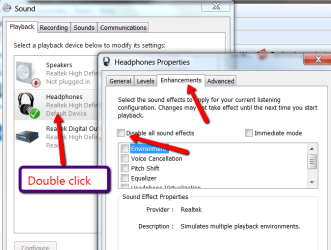
Have a look whether you have any "Enhancements" running. If yes, disable them all.
 

Attachments

  • 2011-02-14_1514.png
    2011-02-14_1514.png
    34.7 KB · Views: 32

My Computer My Computer

Computer Manufacturer/Model Number
HP, Dell, Gateway, Toshiba - 4 laptops and 2 desktops
OS
Vista, Windows7, Mint Mate, Zorin, Windows 8
CPU
from 1.6GHz Duo to i7
Monitor(s) Displays
2x HP w2207
Hard Drives
5x HDD, 7x SSD, 12x Externals
Keyboard
with trackball - no mices
Mouse
Trackball mice
Internet Speed
DSL 6000
Have a look whether you have any "Enhancements" running. If yes, disable them all.

Thanks for the reply whs. As stated in my original post, I have already done this.
 

My Computer My Computer

OS
Windows 7 Ultimate x64
CPU
i5 760 @ 4013Mhz
Motherboard
ASUS P7P55D-E LX
Memory
Corsair CMX8GX3M2A1600C9
Graphics Card(s)
ASUS HD6950 w/ASUS 6970 BIOS
Monitor(s) Displays
ASUS VW246
Hard Drives
Crucial RealSSD C300 256GB
Seagate 750GB
WDC 200GB
PSU
Corsair tx750w
Case
ULTRA Aluminous ATX
Cooling
Sunbeamtech Core-Contact Freezer 120mm
Have a look whether you have any "Enhancements" running. If yes, disable them all.

Thanks for the reply whs. As stated in my original post, I have already done this.

Looks stable for me...just some little picks in the CPU, that can be latency or throttling maybe...I suggest you to watch out the time SP1 comes around.
 

My Computer My Computer

Computer type
PC/Desktop
Computer Manufacturer/Model Number
Custom Build
OS
Windows 7 Professional SP1 - x64 [Non-UEFI Boot]
CPU
Ivy Bridge Core i5 3570K (Delidded)
Motherboard
Asus P8Z77-V LE PLUS
Memory
G.Skill "Ares" DDR3 PC3-12800 - 1600MHz (16Gb)
Graphics Card(s)
Asus Dual-RX480-O4G
Sound Card
Creative Sound Blaster Z w/5.1 sound system
Monitor(s) Displays
Asus IPS 23"
Screen Resolution
16/9
Hard Drives
Internal:
500Go Sata 6Gb/s (x2)
500Go Sata 3Gb/s (x2)
SSD 60Go Sata 6Gb/s
PSU
In Win C 900W Series 80+ Platinum
Case
Thermaltake Chaser A71
Cooling
Custom Water Cooling Loop
Keyboard
Cooler Master QuickFire XTi
Mouse
Razer Imperator 2012 (4G)
Antivirus
MSE
Browser
IE 11.0.xxx Rtm
Other Info
"Raid0" with Intel Smart Response Technology (HDD/SSD)
Looks stable for me...just some little picks in the CPU, that can be latency or throttling maybe...I suggest you to watch out the time SP1 comes around.

Yes, my system is stable. I'm an avid overclocker and that is obviously something I take very seriously. Before any one asks about the overclocking, yes I have set my BIOS to default settings and the problem is the same. It isn't really affecting system performance (although I am sure it would make a difference when running a stressful benchmark with audio playing via USB), it just should not be happening. It is NOT normal, nor is it latency or throttling.

For example, when I use my video cards HDMI for audio out to my TV and watch a movie, my CPU never goes over 3-5% on any core.

This is strictly a USB audio problem, and Microsoft knows about. Only when I use a USB audio device AND I am actually playing audio or recording, do I get CPU usage spikes.

I will install SP1 on Tuesday when its released. I have hope, but I am not getting my hopes high. I am assuming the hotfix that I have installed will probably be the same version in SP1. I hope I'm wrong tho!
 

My Computer My Computer

OS
Windows 7 Ultimate x64
CPU
i5 760 @ 4013Mhz
Motherboard
ASUS P7P55D-E LX
Memory
Corsair CMX8GX3M2A1600C9
Graphics Card(s)
ASUS HD6950 w/ASUS 6970 BIOS
Monitor(s) Displays
ASUS VW246
Hard Drives
Crucial RealSSD C300 256GB
Seagate 750GB
WDC 200GB
PSU
Corsair tx750w
Case
ULTRA Aluminous ATX
Cooling
Sunbeamtech Core-Contact Freezer 120mm
Looks stable for me...just some little picks in the CPU, that can be latency or throttling maybe...I suggest you to watch out the time SP1 comes around.

Yes, my system is stable. I'm an avid overclocker and that is obviously something I take very seriously. Before any one asks about the overclocking, yes I have set my BIOS to default settings and the problem is the same. It isn't really affecting system performance (although I am sure it would make a difference when running a stressful benchmark with audio playing via USB), it just should not be happening. It is NOT normal, nor is it latency or throttling.

For example, when I use my video cards HDMI for audio out to my TV and watch a movie, my CPU never goes over 3-5% on any core.

This is strictly a USB audio problem, and Microsoft knows about. Only when I use a USB audio device AND I am actually playing audio or recording, do I get CPU usage spikes.

I will install SP1 on Tuesday when its released. I have hope, but I am not getting my hopes high. I am assuming the hotfix that I have installed will probably be the same version in SP1. I hope I'm wrong tho!

Since you already applyed the hotfix, it might not fix this particular issue you're encountering. Let's hope MS provide another fix as they know it.

SP1 is in two days!!:shock:

PS: When i play music with my USB external soundcard, cpu goes around 5% to 21% and mostly 15%...i don't feel heavy cpu load...i've applyed the hotfix aswell.
 
Last edited:

My Computer My Computer

Computer type
PC/Desktop
Computer Manufacturer/Model Number
Custom Build
OS
Windows 7 Professional SP1 - x64 [Non-UEFI Boot]
CPU
Ivy Bridge Core i5 3570K (Delidded)
Motherboard
Asus P8Z77-V LE PLUS
Memory
G.Skill "Ares" DDR3 PC3-12800 - 1600MHz (16Gb)
Graphics Card(s)
Asus Dual-RX480-O4G
Sound Card
Creative Sound Blaster Z w/5.1 sound system
Monitor(s) Displays
Asus IPS 23"
Screen Resolution
16/9
Hard Drives
Internal:
500Go Sata 6Gb/s (x2)
500Go Sata 3Gb/s (x2)
SSD 60Go Sata 6Gb/s
PSU
In Win C 900W Series 80+ Platinum
Case
Thermaltake Chaser A71
Cooling
Custom Water Cooling Loop
Keyboard
Cooler Master QuickFire XTi
Mouse
Razer Imperator 2012 (4G)
Antivirus
MSE
Browser
IE 11.0.xxx Rtm
Other Info
"Raid0" with Intel Smart Response Technology (HDD/SSD)
... a USB 2.0 EHCI host controller

Can anyone help? I am at my wits end with this.

Hi,
I have the same problem, when using my USB audio interface ESI UGM96 I get CPU spikes on one of the CPU cores. Doesn't influence the performance of the system but it's there and it's abnormal.
Did you find a solution?
 

My Computer My Computer

OS
Windows 8.1
... a USB 2.0 EHCI host controller

Can anyone help? I am at my wits end with this.

Hi,
I have the same problem, when using my USB audio interface ESI UGM96 I get CPU spikes on one of the CPU cores. Doesn't influence the performance of the system but it's there and it's abnormal.
Did you find a solution?

Never did... I literally tried everything to try. :(
 

My Computer My Computer

OS
Windows 7 Ultimate x64
CPU
i5 760 @ 4013Mhz
Motherboard
ASUS P7P55D-E LX
Memory
Corsair CMX8GX3M2A1600C9
Graphics Card(s)
ASUS HD6950 w/ASUS 6970 BIOS
Monitor(s) Displays
ASUS VW246
Hard Drives
Crucial RealSSD C300 256GB
Seagate 750GB
WDC 200GB
PSU
Corsair tx750w
Case
ULTRA Aluminous ATX
Cooling
Sunbeamtech Core-Contact Freezer 120mm
Back
Top