There is no sound in hp540 notebook laptop , inc window sounds

Well narrowed it down some. Good chance it's the laptop speakers
 

My Computer My Computer

At a glance

win 10
Computer type
PC/Desktop
Computer Manufacturer/Model Number
dell xps 9000
OS
win 10
Hi, Oscer, The speaker item in the system device in the dev,manager (driver details tab )says that no drivers were required to be installed for this device or appeared to have been installed for this device.
When i double clicked the speaker properties, it shows no drivers are installed for this device. Is this the real problem. How to get drivers for speakers separately. Or is it a normal entry and no drivers were required to be installed for internal speakers of laptop
 

My Computer My Computer

At a glance

Microsoft Windows 7 Ultimate 64-bit 7601 Mult...Intel(R) Core(TM)2 Duo CPU E7200 @ 2.53GHz4.00 GBNVIDIA GeForce 210
Computer type
PC/Desktop
Computer Manufacturer/Model Number
custom build
OS
Microsoft Windows 7 Ultimate 64-bit 7601 Multiprocessor Free Service Pack 1
CPU
Intel(R) Core(TM)2 Duo CPU E7200 @ 2.53GHz
Motherboard
To be filled by O.E.M. To be filled by O.E.M.
Memory
4.00 GB
Graphics Card(s)
NVIDIA GeForce 210
Sound Card
(1) NVIDIA High Definition Audio (2) Realtek High Definiti
Screen Resolution
1920 x 1080 x 32 bits (4294967296 colors) @ 60 Hz
Hard Drives
ST3500312CS ATA Device
Theirs no driver for speakers. Could be the speakers are bad or the output jack for headphone. If computer thinks that their is headphones plugged in it shuts speakers off. Older laptops have a tiny switch that tells if headphones are plugged in. It could be the switch is bad. Would bring into someone to check it out for you
 

My Computer My Computer

At a glance

win 10
Computer type
PC/Desktop
Computer Manufacturer/Model Number
dell xps 9000
OS
win 10
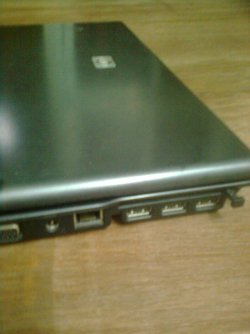
Hi, Great information oscer. By the by what is the latch kind of switch at the corner of the laptop. If i press it it releases and i could notice nothing happening. It is a kind of small square type with a small bar like thing.
Which tiny switch. Of course, it is older model. where it is located so that i could try. I have not plugged in any jack in the headphone. Only i tested with the jack with headphone jack with other outside speakers. Oscer1 pl answer
 

My Computer My Computer

At a glance

Microsoft Windows 7 Ultimate 64-bit 7601 Mult...Intel(R) Core(TM)2 Duo CPU E7200 @ 2.53GHz4.00 GBNVIDIA GeForce 210
Computer type
PC/Desktop
Computer Manufacturer/Model Number
custom build
OS
Microsoft Windows 7 Ultimate 64-bit 7601 Multiprocessor Free Service Pack 1
CPU
Intel(R) Core(TM)2 Duo CPU E7200 @ 2.53GHz
Motherboard
To be filled by O.E.M. To be filled by O.E.M.
Memory
4.00 GB
Graphics Card(s)
NVIDIA GeForce 210
Sound Card
(1) NVIDIA High Definition Audio (2) Realtek High Definiti
Screen Resolution
1920 x 1080 x 32 bits (4294967296 colors) @ 60 Hz
Hard Drives
ST3500312CS ATA Device
Hi, Great information oscer. By the by what is the latch kind of switch at the corner of the laptop. If i press it it releases and i could notice nothing happening. It is a kind of small square type with a small bar like thing.
Which tiny switch. Of course, it is older model. where it is located so that i could try. I have not plugged in any jack in the headphone. Only i tested with the jack with headphone jack with other outside speakers. Oscer1 pl answer

the switch would be in the back part of the socket. not to much you will be able to do without taking laptop apart.


"By the by what is the latch kind of switch at the corner of the laptop. If i press it it releases and i could notice nothing happening. It is a kind of small square type with a small bar like thing. "
can you take a picture of it so we know what you are talking about?
 

My Computer My Computer

At a glance

win 10
Computer type
PC/Desktop
Computer Manufacturer/Model Number
dell xps 9000
OS
win 10
Hi, here is the jpg of the laptop switch, i mean the extreme right switch, that is pressed one. Should the switch should be in this position
 

Attachments

  • laptopswitch.jpg
    laptopswitch.jpg
    131.8 KB · Views: 0

My Computer My Computer

At a glance

Microsoft Windows 7 Ultimate 64-bit 7601 Mult...Intel(R) Core(TM)2 Duo CPU E7200 @ 2.53GHz4.00 GBNVIDIA GeForce 210
Computer type
PC/Desktop
Computer Manufacturer/Model Number
custom build
OS
Microsoft Windows 7 Ultimate 64-bit 7601 Multiprocessor Free Service Pack 1
CPU
Intel(R) Core(TM)2 Duo CPU E7200 @ 2.53GHz
Motherboard
To be filled by O.E.M. To be filled by O.E.M.
Memory
4.00 GB
Graphics Card(s)
NVIDIA GeForce 210
Sound Card
(1) NVIDIA High Definition Audio (2) Realtek High Definiti
Screen Resolution
1920 x 1080 x 32 bits (4294967296 colors) @ 60 Hz
Hard Drives
ST3500312CS ATA Device
well i do not know what that is. hard to tell by the picture. that on the front of laptop or back? i think this is a service manual for your notebook let me know if this is not the right one. http://h10032.www1.hp.com/ctg/Manual/c01977895.pdf

doesn't look to hard to replace speaker board.
 

My Computer My Computer

At a glance

win 10
Computer type
PC/Desktop
Computer Manufacturer/Model Number
dell xps 9000
OS
win 10
By my self. Next to impossible in laptop. You have to totally dis assemble all the parts.
I really thank you for giving my laptop link, which i have been searching for long. But this switch is not given in the parts.
It is located at the left side bottom, that is keyboard part. It is located at the left side. If it presses , it may , i do not know close the headphone jack.
Please say, which switch you mean by the way, i could locate on my computer. I only will take the laptop to hp mechanic if i am sure that the speaker is the cause of sound problem
 

My Computer My Computer

At a glance

Microsoft Windows 7 Ultimate 64-bit 7601 Mult...Intel(R) Core(TM)2 Duo CPU E7200 @ 2.53GHz4.00 GBNVIDIA GeForce 210
Computer type
PC/Desktop
Computer Manufacturer/Model Number
custom build
OS
Microsoft Windows 7 Ultimate 64-bit 7601 Multiprocessor Free Service Pack 1
CPU
Intel(R) Core(TM)2 Duo CPU E7200 @ 2.53GHz
Motherboard
To be filled by O.E.M. To be filled by O.E.M.
Memory
4.00 GB
Graphics Card(s)
NVIDIA GeForce 210
Sound Card
(1) NVIDIA High Definition Audio (2) Realtek High Definiti
Screen Resolution
1920 x 1080 x 32 bits (4294967296 colors) @ 60 Hz
Hard Drives
ST3500312CS ATA Device
like i said their really is no way to know without testing the speaker board or the headphone jack whick one is causing the problem but if i had to guess i would change out the speaker board. they are around $25 us
 

My Computer My Computer

At a glance

win 10
Computer type
PC/Desktop
Computer Manufacturer/Model Number
dell xps 9000
OS
win 10
Hi, Oscer,
Yesterday i tried headphones with headphones jack. The sound was coming. Is this output not related to internal speakers? If not, how come the sound to this jack , does it has a separate speaker?
Moreover i have my questions title at the end of the page and also a recommended fix. Is it given by sevenforums. Can i proceed with that?
Many thanks to you for having given the link to the manual. Is there any diagnostic tool by HP to test my hardware in the laptop for windows xp. When i went to help support and clicked the link with the laptop, it goes to page error and not to the HP site. I tried the HP assistant but it says that it has to be used with floppy disc, which is not available.
Thanks and expecting
 

My Computer My Computer

At a glance

Microsoft Windows 7 Ultimate 64-bit 7601 Mult...Intel(R) Core(TM)2 Duo CPU E7200 @ 2.53GHz4.00 GBNVIDIA GeForce 210
Computer type
PC/Desktop
Computer Manufacturer/Model Number
custom build
OS
Microsoft Windows 7 Ultimate 64-bit 7601 Multiprocessor Free Service Pack 1
CPU
Intel(R) Core(TM)2 Duo CPU E7200 @ 2.53GHz
Motherboard
To be filled by O.E.M. To be filled by O.E.M.
Memory
4.00 GB
Graphics Card(s)
NVIDIA GeForce 210
Sound Card
(1) NVIDIA High Definition Audio (2) Realtek High Definiti
Screen Resolution
1920 x 1080 x 32 bits (4294967296 colors) @ 60 Hz
Hard Drives
ST3500312CS ATA Device
Theirs a chip on motherboard for the sound so we know the chip is good since headphone works. Still believe the speaker board is faulty. Your welcome I do not of software to test speaker board.
 

My Computer My Computer

At a glance

win 10
Computer type
PC/Desktop
Computer Manufacturer/Model Number
dell xps 9000
OS
win 10
Back
Top
