There is not enough free memory to run this program.

bananakma

New member
Two days ago I tried to uninstall WinZip but it wouldn't let me uninstall it through Control Panel > Add/Remove Programs. It gave me an error: Error 1402 while installing or uninstalling WinZip - WinZip Computing :: Knowledgebase. I ran the .exe and waited. It went on for about 10-15 minutes before I stopped it because of the amount of time it was taking.
I began to experience problems with my sound soon after. It had a big X right over the icon and when I clicked it, it said that There was an error and it would try to troubleshoot this problem. Right after, it said "An error occured while troubleshooting". The error code is 0x8007000E. I tried to reboot but when I logged back in, it was still there. It also had 2 new problems. It showed that I had no internet connection even though I was able to access the internet. The other was that "There is not enough free memory to run this program" when I clicked on any folder or Control Panel or Computer, etc.

I've tried running Malwarebytes and ESET Smart Security. Both have said there were no viruses. I've also rebooted about 4-5 times now. I tried this: How to Reset Windows Registry Permissions | Tech XE but it didn't work. System restore says that I don't have enough free memory. CCleaner didn't do anything. And I tried "chkdsk /r" as a suggestion from someone but that didn't work. Finally, I looked at the Resource Monitor and there is nothing that is significantly taking up my memory apart from Chrome, SVC Host and my security programs.

My computer is a Sony Vaio with Windows 7 Professional 64 bit SP1. It has 4 GB of RAM. It's about 3-4 years old.

Any help would be appreciated!
 

My Computer

Computer type
Laptop
Computer Manufacturer/Model Number
Sony Vaio
OS
Windows 7 Professional 64 Bit
My Computer

Computer type
PC/Desktop
Computer Manufacturer/Model Number
Home made Desktop
OS
Windows 10 Pro. 64/ version 1709 Windows 7 Pro/64
CPU
Intel i7-6800K @ 4.3
Motherboard
ASUS X-99 Deluxe II
Memory
Corsair Platinum 16 gig @2400
Graphics Card(s)
EVGA GTX 1070 OC
Monitor(s) Displays
Asus 27" LED LCD/VE278Q
Screen Resolution
1920-1080 or 1280-720 HDMI
Hard Drives
INTEL SSD 730-240 Gb Sata 3.0/
PSU
EVGA Platium 1200W
Case
Phanteks Luxe Tempered Glass 8 fans/ one radiator
Cooling
XSPC/ Water Cooled CPU
Keyboard
Das 4 Professional
Mouse
Logitech M705/MX Anywhere 2-S
Internet Speed
100 mbits
Antivirus
Microsoft Security Essentials/ Malwarebytes Premium 3.0/ SAS
Browser
I.E. 11 default/Firefox/ ISP Time Warner Cable/Spectrum
Other Info
LG BluRay Burner/
Sound system-KLipsch-THX/
Icy Dock ssd Hot Swap bays.
I get this error when I run the System Info program.
imgur: the simple image sharer

But from what I remember, there is plenty of space on the hard drive. I'm probably using about 30% of it.
 

My Computer

Computer type
Laptop
Computer Manufacturer/Model Number
Sony Vaio
OS
Windows 7 Professional 64 Bit
Can you boot in Safe Mode?
Do you anything set to auto scan?
Do you have Office installed?
What security programs are you using?
 

My Computer

Computer type
PC/Desktop
Computer Manufacturer/Model Number
Home made Desktop
OS
Windows 10 Pro. 64/ version 1709 Windows 7 Pro/64
CPU
Intel i7-6800K @ 4.3
Motherboard
ASUS X-99 Deluxe II
Memory
Corsair Platinum 16 gig @2400
Graphics Card(s)
EVGA GTX 1070 OC
Monitor(s) Displays
Asus 27" LED LCD/VE278Q
Screen Resolution
1920-1080 or 1280-720 HDMI
Hard Drives
INTEL SSD 730-240 Gb Sata 3.0/
PSU
EVGA Platium 1200W
Case
Phanteks Luxe Tempered Glass 8 fans/ one radiator
Cooling
XSPC/ Water Cooled CPU
Keyboard
Das 4 Professional
Mouse
Logitech M705/MX Anywhere 2-S
Internet Speed
100 mbits
Antivirus
Microsoft Security Essentials/ Malwarebytes Premium 3.0/ SAS
Browser
I.E. 11 default/Firefox/ ISP Time Warner Cable/Spectrum
Other Info
LG BluRay Burner/
Sound system-KLipsch-THX/
Icy Dock ssd Hot Swap bays.
I can get into safe mode, but I don't really know what I can do to stop this from happening regularly.
Nothing is set to auto-scan, if I understand your question.
I don't have anything from Microsoft Office installed.
And I'm using Malwarebytes and ESET Smart Security
 

My Computer

Computer type
Laptop
Computer Manufacturer/Model Number
Sony Vaio
OS
Windows 7 Professional 64 Bit
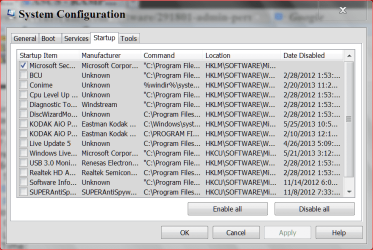
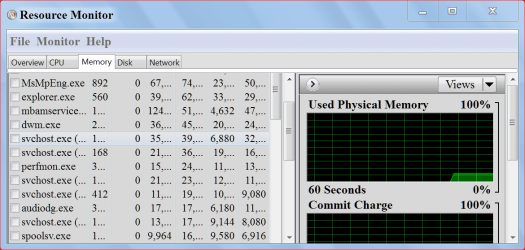
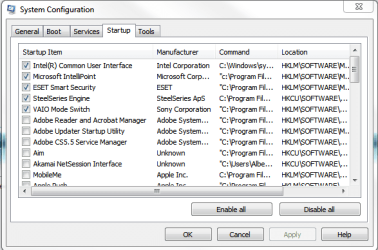
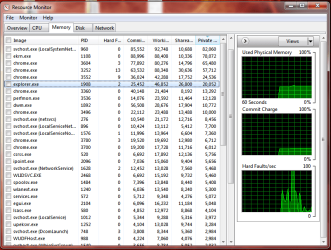
If you can use Safe Mode check msconfig and see if anything is in Startup that shouldn't be. Picture of my Start up and Resource Monitor. What I'm looking for is to see if Windows is giving you that message or something else.

msconfig start up5 29 2013.PNG

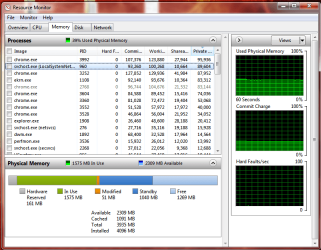
Resource Monitor will show what Windows 7 is doing with your ram.

Resource Monitor RAM.PNG

Resource Monitor nr 2.PNG
 

My Computer

Computer type
PC/Desktop
Computer Manufacturer/Model Number
Home made Desktop
OS
Windows 10 Pro. 64/ version 1709 Windows 7 Pro/64
CPU
Intel i7-6800K @ 4.3
Motherboard
ASUS X-99 Deluxe II
Memory
Corsair Platinum 16 gig @2400
Graphics Card(s)
EVGA GTX 1070 OC
Monitor(s) Displays
Asus 27" LED LCD/VE278Q
Screen Resolution
1920-1080 or 1280-720 HDMI
Hard Drives
INTEL SSD 730-240 Gb Sata 3.0/
PSU
EVGA Platium 1200W
Case
Phanteks Luxe Tempered Glass 8 fans/ one radiator
Cooling
XSPC/ Water Cooled CPU
Keyboard
Das 4 Professional
Mouse
Logitech M705/MX Anywhere 2-S
Internet Speed
100 mbits
Antivirus
Microsoft Security Essentials/ Malwarebytes Premium 3.0/ SAS
Browser
I.E. 11 default/Firefox/ ISP Time Warner Cable/Spectrum
Other Info
LG BluRay Burner/
Sound system-KLipsch-THX/
Icy Dock ssd Hot Swap bays.
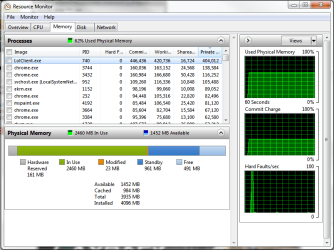
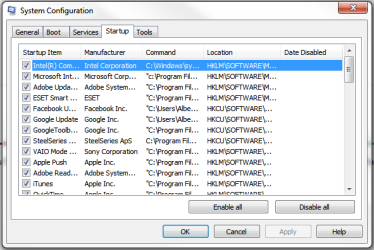
I don't need to start it in Safe Mode to be able to access those, will it matter? Here's the screen shots for both. Lolclient is the game I'm playing and it's not the problem.
resource monitor.png

msconfig.png
 

My Computer

Computer type
Laptop
Computer Manufacturer/Model Number
Sony Vaio
OS
Windows 7 Professional 64 Bit
Your bottom picture shows your problem.
Way to many thing in startup running in the background that are not needed. Compare it to my picture.
Remember just because it is not checked in Startup doesn't mean you can't use it. It just stops it from starting at boot and running in the background when not needed.
You choose when you need the program to run and just tick on it like you normally would.
 

My Computer

Computer type
PC/Desktop
Computer Manufacturer/Model Number
Home made Desktop
OS
Windows 10 Pro. 64/ version 1709 Windows 7 Pro/64
CPU
Intel i7-6800K @ 4.3
Motherboard
ASUS X-99 Deluxe II
Memory
Corsair Platinum 16 gig @2400
Graphics Card(s)
EVGA GTX 1070 OC
Monitor(s) Displays
Asus 27" LED LCD/VE278Q
Screen Resolution
1920-1080 or 1280-720 HDMI
Hard Drives
INTEL SSD 730-240 Gb Sata 3.0/
PSU
EVGA Platium 1200W
Case
Phanteks Luxe Tempered Glass 8 fans/ one radiator
Cooling
XSPC/ Water Cooled CPU
Keyboard
Das 4 Professional
Mouse
Logitech M705/MX Anywhere 2-S
Internet Speed
100 mbits
Antivirus
Microsoft Security Essentials/ Malwarebytes Premium 3.0/ SAS
Browser
I.E. 11 default/Firefox/ ISP Time Warner Cable/Spectrum
Other Info
LG BluRay Burner/
Sound system-KLipsch-THX/
Icy Dock ssd Hot Swap bays.
Do you know why my computer would start having these problems though? I didn't add anything new to my startup and it started doing this.

I'll start clearing them out and I'll see if that settles it.

EDIT:
I just restarted and the problem still exists. I checked msconfig and the settings are saved.
 

My Computer

Computer type
Laptop
Computer Manufacturer/Model Number
Sony Vaio
OS
Windows 7 Professional 64 Bit
You don't have to personally add things there. Programs will do that all by them selfs. You have to check now and again to make sure a bunch of programs don't add them selfs.
Laptop have a few extra things compared to a Desktop because of touch pad and other laptop things only. I really don't know all of them I use Desktops only.
For a Desktop you would only need your Security programs running.
You might have other problems but lets take care of this on first.

I have went back to the ranch and asked for some help with laptop Startup. We have many good members that have laptops. Hopefully someone will show up soon. I thinking you could have that list down to 3 or 4 checked or less.
 

My Computer

Computer type
PC/Desktop
Computer Manufacturer/Model Number
Home made Desktop
OS
Windows 10 Pro. 64/ version 1709 Windows 7 Pro/64
CPU
Intel i7-6800K @ 4.3
Motherboard
ASUS X-99 Deluxe II
Memory
Corsair Platinum 16 gig @2400
Graphics Card(s)
EVGA GTX 1070 OC
Monitor(s) Displays
Asus 27" LED LCD/VE278Q
Screen Resolution
1920-1080 or 1280-720 HDMI
Hard Drives
INTEL SSD 730-240 Gb Sata 3.0/
PSU
EVGA Platium 1200W
Case
Phanteks Luxe Tempered Glass 8 fans/ one radiator
Cooling
XSPC/ Water Cooled CPU
Keyboard
Das 4 Professional
Mouse
Logitech M705/MX Anywhere 2-S
Internet Speed
100 mbits
Antivirus
Microsoft Security Essentials/ Malwarebytes Premium 3.0/ SAS
Browser
I.E. 11 default/Firefox/ ISP Time Warner Cable/Spectrum
Other Info
LG BluRay Burner/
Sound system-KLipsch-THX/
Icy Dock ssd Hot Swap bays.
I edited the previous reply but I might've done it too slow.
I restarted and the problem still persists.
 

My Computer

Computer type
Laptop
Computer Manufacturer/Model Number
Sony Vaio
OS
Windows 7 Professional 64 Bit
Please post another picture of msconfig Startup.

We also need system specs posted so they show up in (My System Spec) in the lower left corner of your post.
Look in the lower left corner of this post and you will see what I mean.

http://www.sevenforums.com/tutorials/180324-system-info-see-your-system-specs.html

If you are playing a game at the present stop playing. Let me know if that helps your problem.
 

My Computer

Computer type
PC/Desktop
Computer Manufacturer/Model Number
Home made Desktop
OS
Windows 10 Pro. 64/ version 1709 Windows 7 Pro/64
CPU
Intel i7-6800K @ 4.3
Motherboard
ASUS X-99 Deluxe II
Memory
Corsair Platinum 16 gig @2400
Graphics Card(s)
EVGA GTX 1070 OC
Monitor(s) Displays
Asus 27" LED LCD/VE278Q
Screen Resolution
1920-1080 or 1280-720 HDMI
Hard Drives
INTEL SSD 730-240 Gb Sata 3.0/
PSU
EVGA Platium 1200W
Case
Phanteks Luxe Tempered Glass 8 fans/ one radiator
Cooling
XSPC/ Water Cooled CPU
Keyboard
Das 4 Professional
Mouse
Logitech M705/MX Anywhere 2-S
Internet Speed
100 mbits
Antivirus
Microsoft Security Essentials/ Malwarebytes Premium 3.0/ SAS
Browser
I.E. 11 default/Firefox/ ISP Time Warner Cable/Spectrum
Other Info
LG BluRay Burner/
Sound system-KLipsch-THX/
Icy Dock ssd Hot Swap bays.
Here is the picture:
msconfig 2.png

Like I said, the .exe in the post you linked me doesn't work. I linked the error message.
And the game was just in lobby so nothing was running besides that. I closed it, do you want another screenshot of my resource monitor?
 

My Computer

Computer type
Laptop
Computer Manufacturer/Model Number
Sony Vaio
OS
Windows 7 Professional 64 Bit
Did you reboot? If not do so. What I would like to see is Resource Monitor after the reboot with nothing but this Forum running. No games in any fashion. No torrants just this Forum.

That will let us know if your ram is being used by a hidden program somewhere.

This worries me from your post #1.

How to Reset Windows Registry Permissions | Tech
 

My Computer

Computer type
PC/Desktop
Computer Manufacturer/Model Number
Home made Desktop
OS
Windows 10 Pro. 64/ version 1709 Windows 7 Pro/64
CPU
Intel i7-6800K @ 4.3
Motherboard
ASUS X-99 Deluxe II
Memory
Corsair Platinum 16 gig @2400
Graphics Card(s)
EVGA GTX 1070 OC
Monitor(s) Displays
Asus 27" LED LCD/VE278Q
Screen Resolution
1920-1080 or 1280-720 HDMI
Hard Drives
INTEL SSD 730-240 Gb Sata 3.0/
PSU
EVGA Platium 1200W
Case
Phanteks Luxe Tempered Glass 8 fans/ one radiator
Cooling
XSPC/ Water Cooled CPU
Keyboard
Das 4 Professional
Mouse
Logitech M705/MX Anywhere 2-S
Internet Speed
100 mbits
Antivirus
Microsoft Security Essentials/ Malwarebytes Premium 3.0/ SAS
Browser
I.E. 11 default/Firefox/ ISP Time Warner Cable/Spectrum
Other Info
LG BluRay Burner/
Sound system-KLipsch-THX/
Icy Dock ssd Hot Swap bays.
Here it is. Chrome and the Resource Monitor are the only 2 things that I have manually opened.
resource monitor 2.png
 

My Computer

Computer type
Laptop
Computer Manufacturer/Model Number
Sony Vaio
OS
Windows 7 Professional 64 Bit
And one of these.

271428d1370563084t-there-not-enough-free-memory-run-program-resource-monitor-ram.png
 

My Computer

Computer type
PC/Desktop
Computer Manufacturer/Model Number
Home made Desktop
OS
Windows 10 Pro. 64/ version 1709 Windows 7 Pro/64
CPU
Intel i7-6800K @ 4.3
Motherboard
ASUS X-99 Deluxe II
Memory
Corsair Platinum 16 gig @2400
Graphics Card(s)
EVGA GTX 1070 OC
Monitor(s) Displays
Asus 27" LED LCD/VE278Q
Screen Resolution
1920-1080 or 1280-720 HDMI
Hard Drives
INTEL SSD 730-240 Gb Sata 3.0/
PSU
EVGA Platium 1200W
Case
Phanteks Luxe Tempered Glass 8 fans/ one radiator
Cooling
XSPC/ Water Cooled CPU
Keyboard
Das 4 Professional
Mouse
Logitech M705/MX Anywhere 2-S
Internet Speed
100 mbits
Antivirus
Microsoft Security Essentials/ Malwarebytes Premium 3.0/ SAS
Browser
I.E. 11 default/Firefox/ ISP Time Warner Cable/Spectrum
Other Info
LG BluRay Burner/
Sound system-KLipsch-THX/
Icy Dock ssd Hot Swap bays.
  • Like
Reactions: Dom
Before you had problems of running out of ram.
Sound problems, removing and installing programs problems, couldn't open any programs including control panel or my computer. You could run anti virus scans and play games. 2+2 is not adding up to 4.

Open up comand prompt and run this
sfc /scannow and let me know what it tell you when completed.

I don't see a ram problem.
 

My Computer

Computer type
PC/Desktop
Computer Manufacturer/Model Number
Home made Desktop
OS
Windows 10 Pro. 64/ version 1709 Windows 7 Pro/64
CPU
Intel i7-6800K @ 4.3
Motherboard
ASUS X-99 Deluxe II
Memory
Corsair Platinum 16 gig @2400
Graphics Card(s)
EVGA GTX 1070 OC
Monitor(s) Displays
Asus 27" LED LCD/VE278Q
Screen Resolution
1920-1080 or 1280-720 HDMI
Hard Drives
INTEL SSD 730-240 Gb Sata 3.0/
PSU
EVGA Platium 1200W
Case
Phanteks Luxe Tempered Glass 8 fans/ one radiator
Cooling
XSPC/ Water Cooled CPU
Keyboard
Das 4 Professional
Mouse
Logitech M705/MX Anywhere 2-S
Internet Speed
100 mbits
Antivirus
Microsoft Security Essentials/ Malwarebytes Premium 3.0/ SAS
Browser
I.E. 11 default/Firefox/ ISP Time Warner Cable/Spectrum
Other Info
LG BluRay Burner/
Sound system-KLipsch-THX/
Icy Dock ssd Hot Swap bays.
It says "Windows Resource Protection could not start the repair service."
I ran it as Admin, just in case that made a difference.
 

My Computer

Computer type
Laptop
Computer Manufacturer/Model Number
Sony Vaio
OS
Windows 7 Professional 64 Bit
Since you mentioned League of Legends, I would make sure to disable the peer to peer updater that LoL self-installs. look for Pando Media Booster in your programs and uninstall it. It has been a culprit in bandwidth hogging. It basically uses your computer to download game patches and then upload them to other users (thousands of users). I don't know if this is related, or could also be draining your RAM by constantly dowloading and uploading data, but I would disable it...

If you don't find it disregard this post :)

Warning : pando media booster : leagueoflegends

Connection issues, freezing, slow connection, disconnections Mando/Pando media booster - Crashes and connection issues - War Thunder - Official Forum


but here's the catch : This thing is even uploading when you don't start league of legends , it starts uploading the minute you start your computer. This is real dangerous for people like me , who live in a country like Belgium , where EVERY internet service provider has a download/upload cap.
EDIT : it can also be disabled without having to remove it , go to the launcher and go to settings ( the wrench at the top right corner ) , disable peer2peer sharing. Panda media booster might also be linked to other games though , or even loading on startup like it was with me, a total remove would probably be best.
 

My Computer

Computer type
Laptop
Computer Manufacturer/Model Number
ASUS G60-RBBX05
OS
Win7 Home Premium 64x
CPU
Intel Core 2 Duo P7450 / 2.13 GHz (2.29 with Extreme Turbo)
Memory
4 GB PC-6400 Hyundai (2X2) at 800Mhz
Graphics Card(s)
NVIDIA GeForce GTX 260M 1GB DDR3 VRAM
Monitor(s) Displays
16" LED Backlit
Screen Resolution
1366 x 768 on laptop 1600x1050 max res on 22" external mon
Hard Drives
OCZ Agility 3 60GB SSD / 320 GB - Serial ATA-150 - 7200 rpm
PSU
6-cell Lithium ion { lasts 1.5 hours }
Case
ASUS G60 Laptop
Keyboard
Chicklet type back-lit (white light) keyboard
Mouse
Logitech G9 Laser Mouse 3200dpi and 1000 reports per minute
Internet Speed
Comcast 8.60mb/s up - 3.11mb/s down
Antivirus
MSE
Browser
Firefox
Other Info
General mid-budget gaming Comp. Low batterylife - High FrameRates - currently overheating problems :(

2nd Rig: Case: Rosewill BLACKHAWK Gaming ATX Mid Tower Computer Case

Mobo: GIGABYTE GA-990FXA-UD3
CPU: AMD FX-6200 Zambezi 3.8GHz (4.1GHz Turbo)
Heatsink: COOLER MASTER V8 CPU Cooler
RAM: Patriot Viper 3 8GB (2 x 4GB) 240-Pin DDR3 SDRAM 1866 (PC3 15000)
GPU: SAPPHIRE Radeon HD 6850 1GB 2
Back
Top